GeezerVisonThe World Wide Web, restored to 800 pixels of glory. | |||||||||||||||||||||||||||||||||||||||||||||||||||||||||||||||||||||||||||||||||||||||||||||||||||||||||||||||||||||||||||||||||||||||||||||||||||||||||||||||||||||||||||||||||||||||||||||||||||||||||||||||||||||||||||||||||||||||||||||||||||||||||||||||||||||||||||||||||||||||||||||||||||||||||||||||||||||||||||||||||||||||||||||||||||||||||||||||||||||||||||||||||||||||||||||||||||||||||||||||||||||||||||||||||||||||||||||||||||||||||||||||||||||||||||||||||||||||||||||||||||||||||||||||||||||||||||||||||||||||||||||||||||||||||||||||||||||||||||||||||||||||||||||||||||||||||||||||||||||||||||||||||||||||||||||||||||||||||||||||||||||||||||||||||||||||||||||||||||||||||||||||||||||||||||||||||||||||||||||||||||||||||||||||||||||||||||||||||||||||||||||||||||||||||||||||||||||||||||||||||||||||||||||||||||||||||||||||||||||||||||||||||||||||||||||||||||||||||||||||||||||||||||||||||||||||||||||||||||||||||||||||||||||||||||||||||||||||||||||||||||||||||||||||||||||||||||||||||||||||
| Home|About|Gaming cabinet|Archives|How it works|Starter sites | |||||||||||||||||||||||||||||||||||||||||||||||||||||||||||||||||||||||||||||||||||||||||||||||||||||||||||||||||||||||||||||||||||||||||||||||||||||||||||||||||||||||||||||||||||||||||||||||||||||||||||||||||||||||||||||||||||||||||||||||||||||||||||||||||||||||||||||||||||||||||||||||||||||||||||||||||||||||||||||||||||||||||||||||||||||||||||||||||||||||||||||||||||||||||||||||||||||||||||||||||||||||||||||||||||||||||||||||||||||||||||||||||||||||||||||||||||||||||||||||||||||||||||||||||||||||||||||||||||||||||||||||||||||||||||||||||||||||||||||||||||||||||||||||||||||||||||||||||||||||||||||||||||||||||||||||||||||||||||||||||||||||||||||||||||||||||||||||||||||||||||||||||||||||||||||||||||||||||||||||||||||||||||||||||||||||||||||||||||||||||||||||||||||||||||||||||||||||||||||||||||||||||||||||||||||||||||||||||||||||||||||||||||||||||||||||||||||||||||||||||||||||||||||||||||||||||||||||||||||||||||||||||||||||||||||||||||||||||||||||||||||||||||||||||||||||||||||||||||||||
GeezerVison is showing drafts.csswg.org (truncated) — CSS Color Module Level 4 1. IntroductionThis section is not normative. TestsThis section is not normative, it does not need tests. This module describes CSS properties which allow authors to specify the foreground color and opacity of the text content of an element. This module also describes in detail the CSS <color> value type. It not only defines the color-related properties and values that already exist in CSS1, CSS2, and CSS Color 3, but also defines new properties and values. In particular, it allows specifying colors in other color spaces than sRGB; previously, the more saturated colors outside the sRGB gamut could not be used in CSS even if the display device supported them. A draft implementation report is available. 1.1. Value DefinitionsThis specification follows the CSS property definition conventions from [CSS2] using the value definition syntax from [CSS-VALUES-3]. Value types not defined in this specification are defined in CSS Values & Units [CSS-VALUES-3]. Combination with other CSS modules may expand the definitions of these value types. In addition to the property-specific values listed in their definitions, all properties defined in this specification also accept the CSS-wide keywords as their property value. For readability they have not been repeated explicitly. 2. Color TerminologyTestsThis section provides definitions used later, it does not need tests. A color is a definition (numeric or textual) of the human visual perception of a light or a physical object illuminated with light. The objective study of human color perception is termed colorimetry. The color of a physical object depends on how much light it reflects at each visible wavelength, plus the actual color of the light illuminating it (again, the amount of light at each wavelength). It is measured by a spectrophotometer . The color of something that emits light (including colors on a computer screen) depends on how much light it emits at each visible wavelength. It is measured by a spectroradiometer. If two objects have different spectra, but still produce the same physical sensation, we say they have the same color. We can calculate whether two colors are the same by converting the spectra to CIE XYZ (three numbers). For example a green leaf, a photograph of that leaf
displayed on a computer screen, and a print of that photograph,
are all producing a green sensation by different means.
If the screen and the printer are calibrated,
the green in the leaf, and the photo, and the print will look the same.
A color space is an organization of colors with respect to an underlying colorimetric model, such that there is a clear, objectively-measurable meaning for any color in that color space. This also means that the same color can be expressed in multiple color spaces, or transformed from one color space to another, while still looking the same. A leaf is measured with a spectrophotometer and found to have the color lch(51.2345% 21.2 130) which is lab(51.2345% -13.6271 16.2401). This same color could be expressed in various color spaces:
An additive color space means that the coordinate system is linear in light intensity. The CIE XYZ color space is an additive color space. The Y component of XYZ is the luminance, the light intensity per unit area, or 'how bright it is'. Luminance is measured in candelas per square meter. cd/m², also called nits. In an additive color space, calculations can be done to accurately predict color mixing. Most RGB spaces are not additive, because the components are gamma encoded. Undoing this gamma encoding produces linear-light values.
For example, if a light fixture contains two identical colored lights,
and only one is switched on,
and the color is measured to be
color(xyz-d50 0.13 0.12 0.04),
then the color when both are switched on will be exactly twice that,
color(xyz-d50 0.26 0.24 0.08).
If we have two differently colored spotlights shining on a stage, and one has the measured value color(xyz-d50 0.15 0.24 0.17) while the other is color(xyz-d50 0.11 0.06 0.06) then we can accurately predict that if the colored beams are made to overlap, the color of the mixture will be the sum of the XYZ component values, or color(xyz-d50 0.26 0.30 0.23). A chromaticity is a color measurement where the lightness component has been factored out. From the identical lights example above, the u',v' chromaticity with one light is (0.2537, 0.5268) and the chromaticity is the same with both lights (they are the same color, it is just brighter). Chromaticities are additive, so they accurately predict the chromaticity (but not the resulting lightness) of a mixture. Being two-dimensional, chromaticity is easily represented on a chromaticity diagram to predict the chromaticity of a color mixture. Any two colors can be mixed, and the resulting colors will lie on the line joining them on the diagram. Three colors form a plane, and the resulting colors will lie in the triangle they form on the diagram. 
Thus, once linearized, RGB color spaces are additive, and their gamut is defined by the chromaticities of the red, green and blue primaries, plus the chromaticity of the white point (the color formed by all three primaries at full intensity). Most color spaces use one of a few daylight-simulating white points, which are named by the correlated color temperature (CCT) [Understanding_CCT] of the corresponding black-body radiator. For example, D65 is a daylight whitepoint corresponding to a correlated color temperature of 6500 Kelvin (actually 6504, because the value of Plank’s constant has changed since the color was originally defined). To avoid cumulative round-trip errors, it is important that the identical chromaticity values are used consistently, at all places in a calculation. Thus, for maximum compatibility, for this specification, the following two standard daylight-simulating white points are defined:
When the measured physical characteristics (such as the chromaticities of the primary colors it uses, or the colors produced in response to a given set of inputs) of a color space or a color-producing device are known, it is said to be characterized. If in addition adjustments have been made so that a device meets calibration targets such as white point, neutrality of greys, predictability and consistency of tone response, then it is said to be calibrated. Real physical devices cannot yet produce every possible color that the human eye can see. The range of colors that a given device can produce is termed the gamut (not to be confused with gamma). Devices with a limited gamut cannot produce very saturated colors, like those found in a rainbow.
The gamuts of different color spaces may be compared by looking at the volume (in cubic Lab units) of colors that can be expressed. The following table examines the predefined color spaces available in CSS.
A color in CSS is either an invalid color, as described below for each syntactic form, or a valid color. Any color which is not an invalid color is a valid color. A color may be a valid color but still be outside the range of colors that can be produced by an output device (a screen, projector, or printer) It is said to be out of gamut. Each valid color is either in-gamut for a particular output device (screen, or printer) or it is out of gamut.
For example, given a screen which covers 100% of the display-p3 color space,
but no more, the following color is out of gamut:
because, expressed in display-p3, one or more coordinates are either greater than 1.0 or less than 0.0: This color is valid, and could, for example, be used as a gradient stop, but would need to be CSS gamut mapped for display, producing a similar-looking but lower chroma (less saturated) color. 3. Applying Color in CSS3.1. Accessibility and Conveying Information By ColorTestsThis section provides authoring guidance, it does not need tests. Although colors can add significant information to documents and make them more readable, color by itself should not be the sole means to convey important information. Authors should consider the W3C Web Content Accessibility Guidelines [WCAG21] when using color in their documents. 1.4.1 Use of Color: Color is not used as the only visual means of conveying information, indicating an action, prompting a response, or distinguishing a visual element 3.2. Foreground Color: the color property
Tests
This property specifies the primary foreground color of the element. This is used as the fill color of its text content, and in addition specifies the used value that currentcolor resolves to, which allows indirect references to this foreground color and affects the initial values of various other color properties such as border-color and text-emphasis-color.
The <color> type provides multiple ways to syntactically specify a given color.
For example, the following declarations all specify the sRGB color “lime”:
em When applied to text, this property, including its alpha component,
has no effect on “color glyphs” (such as the emoji in some fonts),
which are colored by a built-in palette.
However, some colored fonts are able to refer to a contextual “foreground color”,
such as by palette entry 0xFFFF in the 3.3. Transparency: the opacity propertyOpacity can be thought of as a postprocessing operation. Conceptually, after the element (including its descendants) is rendered into an RGBA offscreen image, the opacity setting specifies how to blend the offscreen rendering into the current composite rendering. See simple alpha compositing for details.
Tests
Opacity in CSS is represented using the <opacity-value> syntax, for example in the opacity property. <opacity-value> = <number> | <percentage> Represented as a <number>, the useful range of the value is 0 (representing full transparency) to 1 (representing full opacity). It can also be written as a <percentage>, which computes to the equivalent <number> (0% to 0, 100% to 1). The opacity property applies the specified opacity to the element as a whole, including its contents, rather than applying it to each descendant individually. This means that, for example, an opaque child occluding part of the element’s background will continue to do so even when opacity is less than 1, but the element and child as a whole will show the underlying page through themselves. It also means that the glyphs corresponding to all characters in the element are treated as a whole; any overlapping portions do not increase the opacity. 
If separate opacity for each glyph is desired, it can be achieved by using a color value which includes alpha, rather than setting the opacity property. If a box has opacity less than 1, it forms a stacking context for its children. (This prevents its contents from interleaving in the z-axis with content outside it.) Furthermore, if the z-index property applies to the box, the auto value is treated as 0 for the element; it is otherwise painted on the same layer within its parent stacking context as positioned elements with stack level 0 (as if it were a positioned element with z-index:0). See section 9.9 and Appendix E of [CSS2] for more information on stacking contexts. These rules about z-order do not apply to SVG elements, since SVG has its own rendering model ([SVG11], Chapter 3). The value of the opacity property does not affect hit testing. 3.4. Color Space of Tagged ImagesAn tagged image is an image that is explicitly assigned a color profile, as defined by the image format. This is usually done by including an International Color Consortium (ICC) profile [ICC]. For example JPEG [JPEG], PNG [PNG] and TIFF [TIFF] all specify a means to embed an ICC profile. Image formats may also use other, equivalent methods, often for brevity. For example, PNG specifies a means (the sRGB chunk) to explicitly tag an image as being in the sRGB color space, without including the sRGB ICC profile. Similarly, PNG specifies a compact means (the cICP chunk) to explicitly tag an image as being one of various SDR or HDR color spaces, such as Display P3 or BT.2100 HLG, without including an ICC profile. Tagged RGB images, and tagged images using a transformation of RGB such as YCbCr, if the color profile or other identifying information is valid, must be treated as being in the specified color space. TestsFor example, when a browser running on a system with a Display P3 monitor displays an JPEG image tagged as being in the ITU Rec BT.2020 [Rec.2020] color space, it must convert the colors from ITU Rec BT.2020 to Display P3 so that they display correctly. It must not treat the ITU Rec BT.2020 values as if they were Display P3 values, which would produce incorrect colors. If the color profile or other identifying information is invalid, the image is treated as described for untagged images. 3.5. Color Spaces of Untagged ColorsFor compatibility, colors specified in HTML, and untagged images must be treated as being in the sRGB color space ([SRGB]) unless otherwise specified. An untagged image is an image that is not explicitly assigned a color profile, as defined by the image format. This rule does not apply to untagged videos, since untagged video should be presumed to be in an ITU-defined color space.
4. Representing Colors: the <color> typeTestsThis section describes a type, it is primarily tested where that type is used. Colors in CSS are represented as a list of color components, also sometimes called “channels”, representing axises in the color space. Each component has a minimum and maximum value, and can take any value between those two. Additionally, every color is accompanied by an alpha component, indicating how transparent it is, and thus how much of the backdrop one can see through the color. CSS has several syntaxes for specifying color values:
The color functions use CSS functional notation to represent colors in a variety of color spaces by specifying their component coordinates. Some of these use a cylindrical polar color model, specifying color by a <hue> angle, a central axis representing lightness (black-to-white), and a radius representing saturation or chroma (how far the color is from a neutral grey). The others use a rectangular orthogonal color model, specifying color using three orthogonal component axes. The color functions available in Level 4 are
For easy reference in other specifications, opaque black is defined as the color rgb(0 0 0 / 100%); transparent black is the same color, but fully transparent—i.e. rgb(0 0 0 / 0%). Tests4.1. The <color> syntaxTestsThis section provides definitions used later, it does not need tests. Colors in CSS are represented by the <color> type: <color> = <color-base> | currentColor | <system-color> <color-base> = <hex-color> | <color-function> | <named-color> | transparent <color-function> = < An absolute color is a <color> whose computed value has an absolute, colorimetric interpretation. This means that the value is not:
The colors that resolve to sRGB are: The functions that support legacy color syntax are: The <hsl()>, <hsla()>, <hwb()>, <lch()>, and <oklch()> color functions are cylindrical polar color representations using a <hue> angle; the other color functions use rectangular orthogonal color representations. 4.1.1. Modern (Space-separated) Color Function SyntaxAll of the absolute color functional forms first defined in this specification use the modern color syntax, meaning:
4.1.2. Legacy (Comma-separated) Color Function SyntaxFor Web compatibility, the syntactic forms of rgb(), rgba(), hsl(), and hsla(), (those defined in earlier specifications) also support a legacy color syntax which has the following differences:
For the color functions introduced in this or subsequent levels, where there is no Web compatibility issue, the legacy color syntax is invalid. 4.2. Representing Transparency in Colors: the <alpha-value> syntaxTestsThis section provides definitions used later, it does not need tests. <alpha-value> = <number> | <percentage> Note: This syntax is used as-is for legacy color syntax. For modern color syntax, it is extended so that alpha components can also take the value none. Unless otherwise specified, an <alpha-value> component of a color defaults to 100% when omitted. Values outside the range [0,1] are not invalid, but are clamped to that range at parsed-value time. 4.3. Representing Cylindrical-coordinate Hues: the <hue> syntaxTestsThis section provides definitions used later, it does not need tests. Hue is represented as an angle of the color circle (the rainbow, twisted around into a circle, and with purple added between violet and red). <hue> = <number> | <angle> Because this value is so often given in degrees, the argument can also be given as a number, which is interpreted as a number of degrees and is the canonical unit. This number is normalized to the range [0,360).
For example, in hsl(-540 0 0)
or hsl(540 0 0),
the <hue> component is normalized to 180 degrees.
In hsl(360 0 0) the <hue> component is normalized to 0 degrees. In hsl(calc(-infinity) 0 0) or hsl(calc(infinity) 0 0), the <hue> component is again normalized to 0 degrees. Note: The angles and spacing corresponding to particular hues depend on the color space. For example, in HSL and HWB, which use the sRGB color space, sRGB green is 120 degrees. In LCH, sRGB green is 134.39 degrees, display-p3 green is 136.01 degrees, a98-rgb green is 145.97 degrees and prophoto-rgb green is 141.04 degrees (because these are all different shades of green). <hue> components are the most common components to become powerless; any color sufficiently close to the central achromatic axis will have a powerless hue component. 4.4. “Missing” Color Components and the none KeywordIn certain cases, a color can have one or more missing color components. In this specification, this happens automatically due to hue-based interpolation for some colors (such as white); other specifications can define additional situations in which components are automatically missing. It can also be specified explicitly, by providing the keyword none for a component in a color function. All color functions (with the exception of those using the legacy color syntax) allow any of their components to be specified as none. This should be done with care, and only when the particular effect of doing so is desired. Tests
For handling of missing components in situations which combine two colors, such as color interpolation, see § 13.4 Interpolating with Missing Components. For all other purposes, a missing component behaves as a zero value, in the appropriate unit for that component: 0, 0%, or 0deg. This includes rendering the color directly, converting it to another color space, performing computations on the color component values, etc. If a color with a missing component is serialized or otherwise presented directly to an author, then for legacy color syntax it represents that component as a zero value; otherwise, it represents that component as being the none keyword.
A missing hue is common when interpolating in cylindrical color spaces.
For example, using the color-mix() function specified in [CSS-COLOR-5]
one could write color-mix(in hsl, white 30%, green 70%).
Since white is an achromatic color,
it has a missing hue when expressed in hsl()
(effectively hsl(none 0% 100%)),
since any hue will produce the same color)
which means that the color-mix function
will treat it as having the same hue as green
(effectively hsl(120deg 0% 100%)),
and then interpolate based on those components.
The result will be a color that truly looks like a blend of green and white, rather than perhaps looking reddish (if whites hue was defaulted to 0deg).
Explicitly specifying missing components can be useful
to achieve an effect where you only want
to interpolate certain components of a color.
For example, to animate a color to "grayscale", no matter what the color is, one can interpolate it with oklch(none 0 none). This will take the hue and lightness from the starting color, but animate its chroma down to 0, rendering it into an equal-lightness gray with a steady hue across the whole animation. Doing this manually would require matching the hue and lightness of the starting color explicitly. 4.4.1. “Powerless” Color ComponentsIndividual color syntaxes can specify that, in some cases, a given component of their syntax becomes a powerless color component. This indicates that the value of the component doesn’t affect the rendered color; any value you give it will result in the same color displayed in the screen. For example, in hsl(), the hue component is powerless when the saturation component is 0%; a 0% saturation indicates a grayscale color, which has no hue at all, so 0deg and 180deg, or any other angle, will give the exact same result. If a powerless component is manually specified, it acts as normal; the fact that it’s powerless has no effect. However, if a color is automatically produced by color space conversion, then any powerless components in the result must instead be set to missing, instead of whatever value was produced by the conversion process. When performing color space conversion to a cylindrical polar color space, user agents shall treat a hue component as powerless if the chroma (or other measure of colorfulness, such as saturation in hsl) is less than or equal to the epsilon (ε) specified for that color space. For example, a gray color converted into oklch() may, due to numerical errors, have an extremely small chroma rather than precisely 0%; as a result, the hue component is powerless. When changing a powerless hue component to a missing component, the chroma (or other measure of colorfulness, such as saturation in hsl; see analogous components) is set to zero to avoid amplifying floating-point noise. Negative values are not clamped to zero, this value is only set to zero when it is larger than zero but smaller or equal to ε. For hwb follow these steps instead:
There is sample JavaScript code for powerless handling in § 19 Sample code for Color Conversions. 4.5. Parsing a <color> ValueTestsThis section provides a definition referenced elsewhere, it does not need tests.
To parse a CSS <color> value,
given a string input,
and an optional context element element:
Note: This algorithm is not intended to parse a CSS <color> value specified in a CSS stylesheet or with a CSSOM interface, but in other places like HTML attributes or Canvas interfaces. 5. sRGB ColorsCSS colors in the sRGB color space are represented by a triplet of values—red, green, and blue—identifying a point in the sRGB color space [SRGB]. This is an internationally-recognized, device-independent color space, and so is useful for specifying colors that will be displayed on a computer screen, but is also useful for specifying colors on other types of devices, like printers. CSS also allows the use of non-sRGB color spaces, as described in § 10 Predefined Color Spaces. CSS provides several methods of directly specifying an sRGB color: hex colors, rgb()/rgba() color functions, hsl()/hsla() color functions, hwb() color function, named colors, and the transparent keyword. 5.1. The RGB functions: rgb() and rgba()The rgb() and rgba() functions define an sRGB color by specifying the r, g and b (red, green, and blue) components directly. Their syntax is:
Tests
The first three arguments specify the r, g and b (red, green, and blue) components of the color, respectively. 0% represents the minimum value for that color component in the sRGB gamut, and 100% represents the maximum value. The percentage reference range of the color components comes from the historical fact that many graphics engines stored the color components internally as a single byte, which can hold integers between 0 and 255. Implementations should honor the precision of the component as authored or calculated wherever possible. If this is not possible, the component should be rounded towards +∞. The final argument, the <alpha-value>, specifies the alpha of the color. If omitted, it defaults to 100%. TestsValues outside these ranges are not invalid, but are clamped to the ranges defined here at parsed-value time. For historical reasons, rgb() and rgba() also support a legacy color syntax. Tests
5.2. The RGB Hexadecimal Notations: #RRGGBBThe CSS hex color notation allows an sRGB color to be specified by giving the components as hexadecimal numbers, which is similar to how colors are often written directly in computer code. It’s also shorter than writing the same color out in rgb() notation. The syntax of a <hex-color> is a <hash-token> token whose value consists of 3, 4, 6, or 8 hexadecimal digits. In other words, a hex color is written as a hash character, "#", followed by some number of digits 0-9 or letters a-f (the case of the letters doesn’t matter - #00ff00 is identical to #00FF00). The number of hex digits given determines how to decode the hex notation into an RGB color:
Tests
6. Color KeywordsIn addition to the various numeric syntaxes for <color>s, CSS defines several sets of color keywords that can be used instead—each with their own advantages or use cases. 6.1. Named ColorsCSS defines a large set of named colors, so that common colors can be written and read more easily. A <named-color> is written as an <ident>, accepted anywhere a <color> is. As usual for CSS-defined <ident>s, all of these keywords are ASCII case-insensitive. The names resolve to colors in sRGB. 16 of CSS’s named colors come from the VGA palette originally, and were then adopted into HTML: aqua, black, blue, fuchsia, gray, green, lime, maroon, navy, olive, purple, red, silver, teal, white, and yellow. Most of the rest come from one version of the X11 color system, used in Unix-derived systems to specify colors for the console, and were then adopted into SVG. Note: these color names are standardized here, not because they are good, but because their use and implementation has been widespread for decades and the standard needs to reflect reality. Indeed, it is often hard to imagine what each name will look like (hence the list below); the names are not evenly distributed throughout the sRGB color volume, the names are not even internally consistent ( darkgray is lighter than gray, while lightpink is darker than pink), and some names (such as indianred, which was originally named after a red pigment from India), have been found to be offensive. Thus, their use is not encouraged. (Two special color values, transparent and currentcolor, are specially defined in their own sections.) The following table defines all of the opaque named colors, by giving equivalent numeric specifications in the other color syntaxes.
Note: this list of colors and their definitions is a superset of the list of named colors defined by SVG 1.1. For historical reasons, this is also referred to as the X11 color set.Note: The history of the X11 color system is interesting, and was excellently summarized by Alex Sexton in their talk “Peachpuffs and Lemonchiffons”. Tests6.2. System ColorsIn general, the <system-color> keywords reflect default color choices made by the user, the browser, or the OS. They are typically used in the browser default stylesheet, for this reason. To maintain legibility, the <system-color> keywords also respond to the element color scheme.
For example, traditional blue link text is legible on a white background
(WCAG contrast 8.59:1, AAA pass)
but would not be legible on a black background
(WCAG contrast 2.44:1, AA fail).
Instead, a lighter blue such as #81D9FE would be used in dark mode
(WCAG contrast 13.28:1, AAA pass).
Legible link text Illegible link text Legible link text However, in forced colors mode, most colors on the page are forced into a restricted, user-chosen palette, see CSS Color Adjustment 1 § 5.2 Forced Colors Mode Color Palettes. The <system-color> keywords expose these user-chosen colors so that the rest of the page can integrate with this restricted palette. When the forced-colors media feature is active, authors should use the <system-color> keywords as color values in properties other than those listed in CSS Color Adjustment 1 § 3.1 Properties Affected by Forced Colors Mode, to ensure legibility and consistency across the page and avoid an uncoordinated mishmash of user-forced and page-chosen colors. TestsWhen the values of <system-color> keywords come from the browser, (as opposed to being OS defaults or user choices) the browser should ensure that matching foreground/background pairs have a minimum of WCAG AA contrast. However, user preferences (for higher or lower contrast), whether set as a browser preference, a user stylesheet, or by altering the OS defaults, must take precedence over this requirement. Authors may also use these keywords at any time, but should be careful to use the colors in matching background-foreground pairs to ensure appropriate contrast, as any particular contrast relationship across non-matching pairs (e.g. Canvas and ButtonText) is not guaranteed. The <system-color> keywords are defined as follows:
TestsNote: As with all other keywords, these names are ASCII case-insensitive. They are shown here with mixed capitalization for legibility. For systems that do not have a particular system UI concept, the specified value should be mapped to the most closely related system color value that exists. The following system color pairings are expected to form legible background-foreground colors:
Additionally, GrayText is expected to be readable, though possibly at a lower contrast rating, over any of the backgrounds. To maintain consistency with widget accent color styling, AccentColor takes its value from accent-color, unless Forced Colors Mode is enabled. AccentColorText takes its value from the contrasting foreground color to AccentColor as is described for widget accent color styling.
For example, the system color combinations in the browser you are currently using:
Canvas with CanvasText: CanvasText Canvas with LinkText: LinkText Canvas with VisitedText: VisitedText Canvas with ActiveText: ActiveText Canvas with GrayText: GrayText Canvas with ButtonBorder and adjacent Canvas: CanvasTextAdjacent ButtonFace with ButtonText: ButtonText ButtonFace with ButtonText and ButtonBorder: ButtonText ButtonFace with GrayText: GrayText Field with FieldText: FieldText Field with GrayText: GrayText Mark with MarkText: MarkText Mark with GrayText: GrayText Highlight with HighlightText: HighlightText Highlight with GrayText: GrayText SelectedItem with SelectedItemText: SelectedItemText AccentColor with AccentColorText: AccentColorText AccentColor with GrayText: GrayText Earlier versions of CSS defined additional <system-color>s, which have since been deprecated. These are documented in Appendix A: Deprecated CSS System Colors. Note: The <system-color>s incur some privacy and security risk, as detailed in § 22 Privacy Considerations and § 21 Security Considerations. User agents may, to mitigate privacy and security risks such as fingerprinting, elect to return fixed values for the used value of system colors which do not reflect customisation or theming choices made by the user. 6.3. The transparent keywordThe keyword transparent specifies a transparent black. It is a type of <named-color>. Tests6.4. The currentcolor keywordThe keyword currentcolor represents value of the color property on the same element. Unlike <named-color>s, it is not restricted to sRGB; the value can be any <color>. Its used values is determined by resolving color values. Tests
Here’s a simple example showing how to use the currentcolor keyword:
.foo This is equivalent to writing: .foo
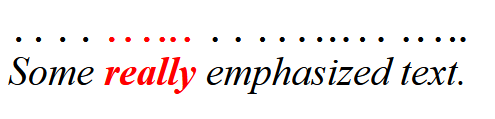
For example, the text-emphasis-color property [CSS3-TEXT-DECOR],
whose initial value is currentcolor,
by default matches the text color
even as the color property changes across elements.
In the above example, the emphasis marks are black over the text "Some" and "emphasized text", but red over the text "really". Note: Multi-word keywords in CSS usually separate their component words with hyphens. currentcolor doesn’t, because (deep breath) it was originally introduced in SVG as a property value, "current-color" with the usual CSS spelling. It (along with all other properties and their values) then became presentation attributes and attribute values, as well as properties, to make generation with XSLT easier. Then all of the presentation attributes were changed from hyphenated to camelCase, because the DOM had an issue with hyphen meaning "minus". But then, they didn’t follow CSS conventions anymore so all the properties and property values that were already part of CSS were changed back to hyphenated! currentcolor was not a part of CSS at that time, so remained camelCased. Only later did CSS pick it up, at which point the capitalization stopped mattering, as CSS keywords are ASCII case-insensitive. 7. HSL Colors: hsl() and hsla() functionsThe RGB system for specifying colors, while convenient for machines and graphic libraries, is often regarded as very difficult for humans to gain an intuitive grasp on. It’s not easy to tell, for example, how to alter an RGB color to produce a lighter variant of the same hue. There are several other color schemes possible. One such is the HSL [HSL] color scheme, which is more intuitive to use, but still maps easily back to RGB colors. HSL colors are specified as a triplet of hue, saturation, and lightness. The syntax of the hsl() and hsla() functions is:
Tests
The first argument specifies the hue angle. In HSL (and HWB) the angle 0deg represents sRGB primary red (as does 360deg, 720deg, etc.), and the rest of the hues are spread around the circle, so 120deg represents sRGB primary green, 240deg represents sRGB primary blue, etc. The next two arguments are the saturation and lightness, respectively. For saturation, 100% or 100 is a fully-saturated, bright color, and 0% or 0 is a fully-unsaturated gray. For lightness, 50% or 50 represents the "normal" color, while 100% or 100 is white and 0% or 0 is black. For historical reasons, if the saturation is less than 0% it is clamped to 0% at parsed-value time, before being converted to an sRGB color. The final argument specifies the alpha component of the color. It’s interpreted identically to the fourth argument of the rgb() function. If omitted, it defaults to 100%. HSL colors resolve to sRGB. If the saturation of an HSL color is 0% or 0, then the hue component is powerless.
For example, an ordinary red,
the same color you would see from the keyword red
or the hex notation #f00,
is represented in HSL as hsl(0deg 100% 50%).
An advantage of HSL over RGB is that it is more intuitive: people can guess at the colors they want, and then tweak.
For example, the following colors can all be generated off of the basic "green" hue,
just by varying the other two arguments:
A disadvantage of HSL over OkLCh is that hue manipulation changes the visual lightness, and that hues are not evenly spaced apart. It is thus easier in HSL to create sets of matching colors (by keeping the hue the same and varying the saturation and lightness), compared to manipulating the sRGB component values; however, because the lightness is simply the mean of the gamma-corrected red, green and blue components it does not correspond to the visual perception of lightness across hues.
For example, blue
is represented in HSL as
hsl(240deg 100% 50%)
while yellow
is hsl(60deg 100% 50%).
Both have an HSL Lightness of 50%,
but clearly the yellow looks much lighter than the blue.
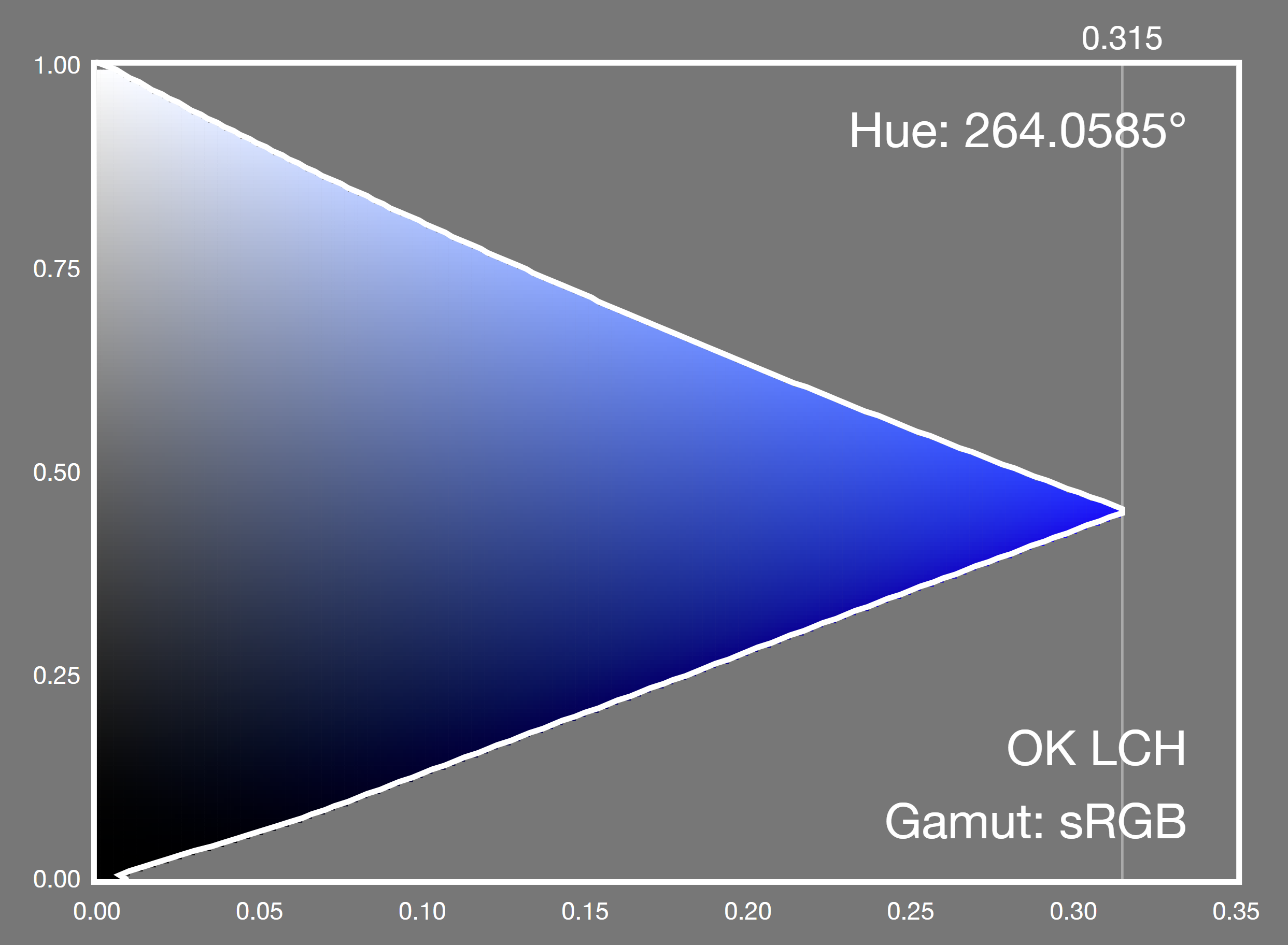
In OkLCh, sRGB blue is oklch(0.452 0.313 264.1) while sRGB yellow is oklch(0.968 0.211 109.8). The OkLCh Lightnesses of 0.452 and 0.968 clearly reflect the visual lightnesses of the two colors. The hue angle in HSL is not perceptually uniform; colors appear bunched up in some areas and widely spaced in others.
For example, the pair of hues
hsl(220deg 100% 50%)
and
hsl(250deg 100% 50%)
have an HSL hue difference of 250-220 = 30deg and look fairly similar,
while another pair of colors
hsl(50deg 100% 50%)
and
hsl(80deg 100% 50%),
which also have a hue difference of 80-50 = 30deg, look very different.
In OkLCh, the same pair of colors oklch(0.533 0.26 262.6) and oklch(0.462 0.306 268.9) have a hue difference of 268.9 - 262.6 = 6.3deg while the second pair oklch(0.882 0.181 94.24) and oklch(0.91 0.245 129.9) have a hue difference of 129.9 - 94.24 = 35.66deg, correctly reflecting the visual separation of hues. For historical reasons, hsl() and hsla() also support a legacy color syntax. Tests
7.1. Converting HSL Colors to sRGBConverting an HSL color to sRGB is straightforward mathematically. Here’s a sample implementation of the conversion algorithm in JavaScript. It returns an array of three numbers representing the red, green, and blue components of the colors, which for colors in the sRGB gamut will be in the range [0, 1]. This code assumes that parse-time clamping of negative saturation has already been applied.
7.2. Converting sRGB Colors to HSLConversion in the reverse direction proceeds similarly. Special care is taken to deal with intermediate negative values of saturation, which can be produced by colors far outside the sRGB gamut.
7.3. Examples of HSL ColorsThis section is not normative. TestsThis section is not normative, it does not need tests. The tables below illustrate a wide range of possible HSL colors. Each table represents one hue, selected at 30° intervals, to illustrate the common "core" hues: red, yellow, green, cyan, blue, magenta, and the six intermediary colors between these. In each table, the X axis represents the saturation while the Y axis represents the lightness.
8. HWB Colors: hwb() functionHWB (short for Hue-Whiteness-Blackness) [HWB] is another method of specifying sRGB colors, similar to HSL', but often even easier for humans to work with. It describes colors with a starting hue, then a degree of whiteness and blackness to mix into that base hue. Many color-pickers are based on the HWB color system, due to its intuitiveness. HWB colors resolve to sRGB. 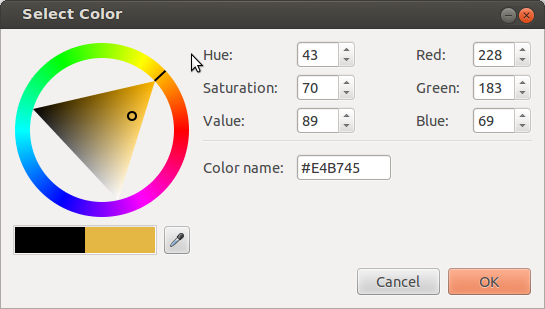
The syntax of the hwb() function is:
The first argument specifies the hue, and is defined identically to hsl(); this means it suffers the same disadvantages such as hue uniformity. The second argument specifies the amount of white to mix in, as a percentage from 0% (no whiteness) to 100% (full whiteness). Similarly, the third argument specifies the amount of black to mix in, also from 0% (no blackness) to 100% (full blackness). Note: hwb() does not account for the Abney effect [Abney] which is the perceived hue shift that occurs when white light is added to a monochromatic light source. Values outside of these ranges are not invalid; hue angles outside the range [0,360) will be normalized to that range and values of white and black which sum to 100% or greater will produce achromatic colors as described below. The resulting color can be thought of conceptually as a mixture of paint in the chosen hue, white paint, and black paint, with the relative amounts of each determined by the percentages. If the sum white+black is greater than or equal to 100%, it defines an achromatic color, i.e. a shade of gray; when converted to sRGB the R, G and B values are identical and have the value white / (white + black).
For example, in the color
hwb(45 40% 80%)
white and black adds to 120, so this is an achromatic color
whose R, G and B components are 40 / 40 + 80 = 0.33
rgb(33.33% 33.33% 33.33%).
Achromatic HWB colors no longer contain any hint of the chosen hue. In this case, the hue component is powerless. The fourth argument specifies the alpha component of the color. It’s interpreted identically to the fourth argument of the rgb() function. If omitted, it defaults to 100%. There is no Web compatibility issue with hwb, which is new in this level of the specification, and so hwb() does not support a legacy color syntax that separates all of its arguments with commas. Using commas inside hwb() is an error. Tests
8.1. Converting HWB Colors to sRGBConverting an HWB color to sRGB is straightforward, and related to how one converts HSL to RGB. The following JavaScript implementation of the algorithm first normalizes the white and black components, so their sum is no larger than 100%.
8.2. Converting sRGB Colors to HWBConversion in the reverse direction proceeds similarly.
8.3. Examples of HWB ColorsThis section is not normative. TestsThis section is not normative, it does not need tests.
9. Device-independent Colors: CIE Lab and LCH, Oklab and OkLCh9.1. CIE Lab and LCHThis section is not normative. TestsThis section is not normative, it does not need tests. Physical measurements of a color are typically expressed in the CIE L*a*b* [CIELAB] color space, created in 1976 by the CIE and commonly referred to simply as Lab. Color conversions from one device to another may also use Lab as an intermediate step. Derived from human vision experiments, Lab represents the entire range of color that humans can see. Lab is a rectangular coordinate system with a central Lightness (L) axis. This value is usually written as a unitless number; for compatibility with the rest of CSS, it may also be written as a percentage. 100% means an L value of 100, not 1.0. L=0% or 0 is deep black (no light at all) while L=100% or 100 is a diffuse white. Usefully, L=50% or 50 is mid gray, by design, and equal increments in L are evenly spaced visually: the Lab color space is intended to be perceptually uniform. 

The a and b axes convey hue; positive values along the a axis are a purplish red while negative values are the complementary color, a green. Similarly, positive values along the b axis are yellow and negative are the complementary blue/violet. Desaturated colors have small values of a and b and are close to the L axis; saturated colors lie far from the L axis. The illuminant is D50 white, a standardized daylight spectrum with a color temperature of 5000K, as reflected by a perfect diffuse reflector; it approximates the color of sunlight on a sunny day. D50 is also the whitepoint used for the profile connection space in ICC color interconversion, the whitepoint used in image editors which offer Lab editing, and the value used by physical measurement devices such as spectrophotometers and spectroradiometers, when they report measured colors in Lab. Conversion from colors specified using other white points is called a chromatic adaptation transform, which models the changes in the human visual system as we adapt to a new lighting condition. The linear Bradford algorithm [ICC] (a simplification of the original Bradford algorithm [Bradford-CAT]) is the industry standard chromatic adaptation transform, and is easy to calculate as it is a simple matrix multiplication. CIE LCH has the same L axis as Lab, but uses polar coordinates C (chroma) and H (hue), making it a polar, cylindrical coordinate system. C is the geometric distance from the L axis and H is the angle from the positive a axis, towards the positive b axis. 
Note: The L axis in Lab and LCH is not to be confused with the L axis in HSL. For example, in HSL, the sRGB colors blue (#00F) and yellow (#FF0) have the same value of L (50%) even though visually, blue is much darker. This is much clearer in Lab: sRGB blue is lab(29.567% 68.298 -112.0294) while sRGB yellow is lab(97.607% -15.753 93.388). In Lab and LCH, if two colors have the same measured L value, they have identical visual lightness. HSL and related polar RGB models were developed in an attempt to give similar usability benefits for RGB that LCH gave to Lab, but are significantly less accurate. Although the use of CIE Lab and LCH is widespread, it is known to have some problems. In particular:
These deficiencies affect, for example, creation of evenly spaced gradients, gamut mapping from one color space to a smaller one, and computation of the visual difference between two colors. To compensate for this, formulae to predict the visual difference between two colors (delta E) have been made more accurate over time (but also, much more complex to compute). The current industry standard formula, delta E 2000, works well to mitigate some of the Lab and LCH problems. A sample implementation is given in § 20.2 ΔE2000. This does not help with hue curvature, however. 9.2. Oklab and OkLChThis section is not normative. TestsThis section is not normative, it does not need tests. Recently, Oklab, an improved Lab-like space has been developed [Oklab]. The corresponding polar form is called OkLCh. It was produced by numerical optimization of a large dataset of visually similar colors, and has improved hue linearity, hue uniformity, and chroma uniformity compared to CIE LCH. Like CIE Lab, there is a central lightness L axis which is usually written as a unitless number in the range [0,1]; for compatibility with the rest of CSS, it may be written as a percentage. 100% means an L value of 1.0. L=0% or 0.0 is deep black (no light at all) while L=100% or 1.0 is a diffuse white. Note: Unlike CIE Lab, which assumes adaptation to the diffuse white, Oklab assumes adaptation to the color being defined, which is intended to make it scale invariant. As with CIE Lab, the a and b axes convey hue; positive values along the a axis are a purplish red while negative values are the complementary color, a green. Similarly, positive values along the b axis are yellow and negative are the complementary blue/violet. The illuminant is D65, the same white point as most RGB color spaces. OkLCh has the same L axis as Oklab, but uses polar coordinates C (chroma) and H (hue). Note: Unlike CIE LCH, where Chroma can reach values of 200 or more, OkLCh Chroma ranges to 0.5 or so. The hue angles between CIE LCH and OkLCh are broadly similar, but not identical. 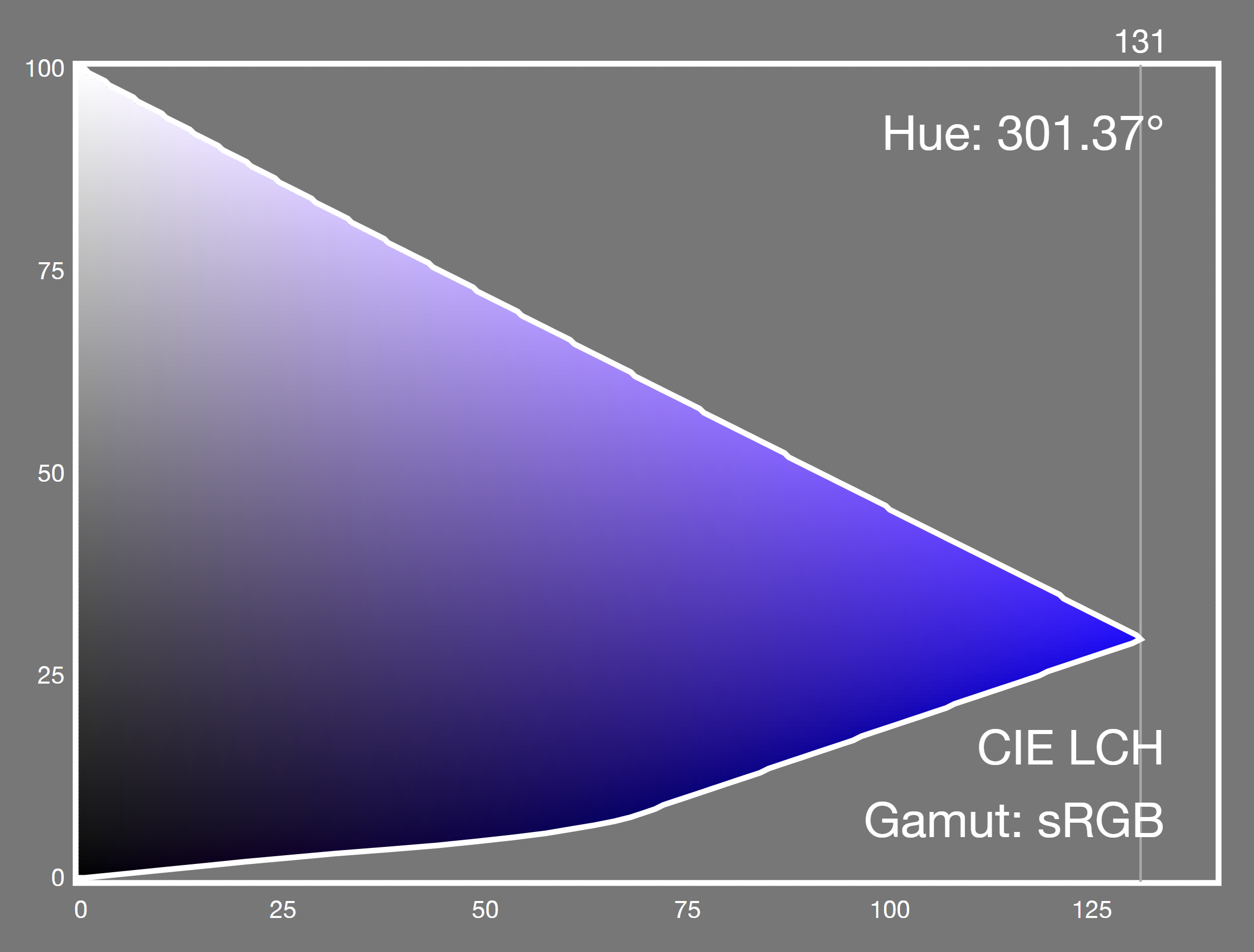
Because Oklab is more perceptually uniform than CIE Lab, the color difference is a straightforward distance in 3D space (root sum of squares). Although trivial, a sample implementation is give in § 20.3 ΔEOK. 9.3. Specifying Lab and LCH: the lab() and lch() functional notationsCSS allows colors to be directly expressed in Lab and LCH.
Tests
In Lab, the first argument specifies the CIE Lightness, L. This is a number between 0% or 0 and 100% or 100. Values less than 0% or 0 must be clamped to 0% at parsed-value time; values greater than 100% or 100 are clamped to 100% at parsed-value time. The second and third arguments are the distances along the "a" and "b" axes in the Lab color space, as described in the previous section. These values are signed (allow both positive and negative values) and theoretically unbounded (but in practice do not exceed ±160 for real-world colors). There is an optional fourth <alpha-value> component, separated by a slash, representing the alpha component. If the lightness of a Lab color (after clamping) is 0%, or 100% the color will be displayed as black, or white, respectively due to gamut mapping to the display.
Tests
In CIE LCH the first argument specifies the CIE Lightness L, interpreted identically to the Lightness argument of lab(). The second argument is the chroma C, (roughly representing the "amount of color"). Its minimum useful value is 0, while its maximum is theoretically unbounded (but in practice does not exceed 230). If the provided value is negative, it is clamped to 0 at parsed-value time. The third argument is the hue angle H. It’s interpreted similarly to the <hue> argument of hsl(), but doesn’t map hues to angles in the same way because they are evenly spaced perceptually. Instead, 0deg points along the positive "a" axis (toward purplish red), (as does 360deg, 720deg, etc.); 90deg points along the positive "b" axis (toward mustard yellow), 180deg points along the negative "a" axis (toward greenish cyan), and 270deg points along the negative "b" axis (toward sky blue). There is an optional fourth <alpha-value> component, separated by a slash, representing the alpha component. If the chroma of an LCH color is 0%, the hue component is powerless. If the lightness of an LCH color (after clamping) is 0%, or 100%, the color will be displayed as black, or white, respectively due to gamut mapping to the display.
There is no Web compatibility issue with lab or lch', which are new in this level of the specification, and so lab() and lch() do not support a legacy color syntax that separates all of their arguments with commas. Using commas inside these functions is an error. 9.4. Specifying Oklab and OkLCh: the oklab() and oklch() functional notationsCSS allows colors to be directly expressed in Oklab and OkLCh.
Tests
In Oklab the first argument specifies the Oklab Lightness. This is a number between 0% or 0 and 100% or 1.0. Values less than 0% or 0.0 must be clamped to 0% at parsed-value time; values greater than 100% or 1.0 are clamped to 100% at parsed-value time. The second and third arguments are the distances along the "a" and "b" axes in the Oklab color space, as described in the previous section. These values are signed (allow both positive and negative values) and theoretically unbounded (but in practice do not exceed ±0.5). There is an optional fourth <alpha-value> component, separated by a slash, representing the alpha component. If the lightness of an Oklab color is 0% or 0, or 100% or 1.0, the color will be displayed as black, or white, respectively due to gamut mapping to the display.
Tests
In OkLCh the first argument specifies the OkLCh Lightness L, interpreted identically to the Lightness argument of oklab(). The second argument is the chroma C. Its minimum useful value is 0, while its maximum is theoretically unbounded (but in practice does not exceed 0.5). If the provided value is negative, it is clamped to 0 at parsed-value time. The third argument is the hue angle H. It’s interpreted similarly to the <hue> arguments of hsl() and lch(), but doesn’t map hues to angles in the same way. 0deg points along the positive "a" axis (toward purplish red), (as does 360deg, 720deg, etc.); 90deg points along the positive "b" axis (toward mustard yellow), 180deg points along the negative "a" axis (toward greenish cyan), and 270deg points along the negative "b" axis (toward sky blue). There is an optional fourth <alpha-value> component, separated by a slash, representing the alpha component. If the chroma of an OkLCh color is 0% or 0, the hue component is powerless. If the lightness of an OkLCh color is 0% or 0, or 100% or 1.0, the color will be displayed as black, or white, respectively due to gamut mapping to the display.
There is no Web compatibility issue with oklab or oklch', which are new in this level of the specification, and so oklab() and oklch() do not support a legacy color syntax that separates all of their arguments with commas. Using commas inside these functions is an error. 9.5. Converting Lab or Oklab colors to LCH or OkLCh colorsConversion to the polar form is trivial:
For extremely small values of a and b (near-zero Chroma), although the visual color does not change from being on the neutral axis, small changes to the values can result in the reported hue angle swinging about wildly and being essentially random. In CSS, this means the hue is powerless, and treated as missing when converted into LCH or OkLCh; in non-CSS contexts this might be reflected as a missing value, such as NaN. 9.6. Converting LCH or OkLCh colors to Lab or Oklab colorsConversion to the rectangular form is trivial:
10. Predefined Color SpacesCSS provides several predefined color spaces including display-p3 [Display-P3], which is a wide gamut space typical of current wide-gamut monitors, prophoto-rgb, widely used by photographers and rec2020 [Rec.2020], which is a broadcast industry standard, ultra-wide gamut space capable of representing almost all visible real-world colors. 10.1. Specifying Predefined Colors: the color() functionThe color() function allows a color to be specified in a particular, specified color space (rather than the implicit sRGB color space that most of the other color functions operate in). Its syntax is:
TestsThe color function takes parameters specifying a color, in an explicitly listed color space. It represents either an invalid color, as described below, or a valid color. The parameters have the following form:
An out of gamut color has component values less than 0 or 0%, or greater than 1 or 100%. These are not invalid, and are retained for intermediate computations; instead, for display, they are css gamut mapped using a relative colorimetric intent which brings the values (in the display color space) within the range 0/0% to 1/100% at actual-value time.
There is no Web compatibility issue with color(), which is new in this level of the specification, and so color() does not support a legacy color syntax that separates all of its arguments with commas. Using commas inside this function is an error. A color which is either an invalid color or an out of gamut color can’t be displayed. If the specified color can be displayed, (that is, it isn’t an invalid color and isn’t out of gamut) then this is the actual value of the color() function. If the specified color is a valid color but can’t be displayed, the actual value is derived from the specified color, css gamut mapped for display. If the color is an invalid color, the used value is opaque black.
This very intense lime color is in-gamut for rec.2020:
in LCH, that color is in display-p3, that color is and is out of gamut for display-p3 (red and blue are negative, green is greater than 1). If you have a display-p3 screen, that color is:
This example has a typo!
An intense green is provided in profoto-rgb space (which doesn’t exist).
This makes it invalid, so the used value is opaque black
10.2. The Predefined sRGB Color Space: the sRGB keywordThe sRGB predefined color space defined below is the same as is used for legacy sRGB colors, such as rgb().
Tests10.3. The Predefined Linear-Light sRGB Color Space: the srgb-linear keywordThe sRGB-linear predefined color space is the same as srgb except that the transfer function is linear-light (there is no gamma-encoding).
Tests10.4. The Predefined Display P3 Color Space: the display-p3 keyword
Tests
10.5. The Predefined Linear-Light Display P3 Color Space: the display-p3-linear keyword
Tests10.6. The Predefined A98 RGB Color Space: the a98-rgb keyword
Tests10.7. The Predefined ProPhoto RGB Color Space: the prophoto-rgb keyword
Tests
10.8. The Predefined ITU-R BT.2020-2 Color Space: the rec2020 keyword
Tests
10.9. The Predefined CIE XYZ Color Spaces: the xyz-d50, xyz-d65, and xyz keywords
Tests
10.10. Converting Predefined Color Spaces to Lab or OklabFor all predefined RGB color spaces, conversion to Lab requires several steps, although in practice all but the first step are linear calculations and can be combined.
Conversion to Oklab is similar, but the chromatic adaptation step is only needed for prophoto-rgb.
There is sample JavaScript code for these conversions in § 19 Sample code for Color Conversions. 10.11. Converting Lab or Oklab to Predefined RGB Color SpacesConversion from Lab to predefined spaces like display-p3 or rec2020 also requires multiple steps, and again in practice all but the last step are linear calculations and can be combined.
Conversion from Oklab is similar, but the chromatic adaptation step is only needed for prophoto-rgb.
There is sample JavaScript code for these conversions in § 19 Sample code for Color Conversions. Implementations may choose to implement these steps in some other way (for example, using an ICC profile with relative colorimetric rendering intent) provided the results are the same for colors inside both the source and destination gamuts. 10.12. Converting Between Predefined RGB Color SpacesConversion from one predefined RGB color space to another requires multiple steps, one of which is only needed when the whitepoints differ. To convert from src to dest:
There is sample JavaScript code for this conversion for the predefined RGB color spaces, in § 19 Sample code for Color Conversions. 10.13. Simple Alpha CompositingWhen drawing, implementations must handle alpha according to the rules in Section 5.1 Simple alpha compositing of [Compositing]. 11. Converting ColorsTestsThis section provides algorithms used later, it does not need tests. 11.1. Introduction to Converting ColorsColors may be converted from one color space to another and, provided that there is no gamut mapping and that each color space can represent out of gamut colors, (for RGB spaces, this means that the transfer function is defined over the extended range) then (subject to numerical precision and round-off error) the two colors will look the same and represent the same color sensation.
For example, these different syntactic forms are all the same color:
For historical reasons, at parse time, some legacy color syntax colors are clamped. In general though such clamping is undesirable because it interferes with round-tripping and results in errors accumulating over multiple color conversions. Thus, the results of color conversion are not clamped, which may result in out of gamut colors or indeed, imaginary colors such as colors outside the spectral locus, or even colors with negative lightness or lightness greater than the maximum allowed value.
For example, these are all the same color, but it is outside the gamut of even rec2020
(the swatches have been gamut mapped to sRGB for display, but the values have not):
For example, due to chromatic adaptation,
the lightness value of this XYZ color is slightly greater than 100
when adapted to D50 Lab:
11.2. Algorithm for Converting Colors
To prepare a color col1 for conversion:
To convert a color col1 in a source color space src
with white point src-white
to a color col2 in destination color space dest
with white point dest-white,
where src and dest are different:
12. Comparing <color> ValuesTwo <color> values are equivalent colors when they compare as equal using the algorithm below. This comparison is used, for example, by style() container queries [CSS-CONDITIONAL-5] and by CSS Transitions [CSS-TRANSITIONS-1] to determine whether a color value has changed. Given two <color> values C1 and C2, they are equivalent colors if and only if the following algorithm returns true:
Note: Two colors that are expressed in different syntactic forms, in the same <color-space>, but are colorimetrically identical—for example, red and color(srgb 1 0 0)—are equivalent colors by step 2 of this algorithm. Note: Two colors that are expressed in different <color-space>s but are colorimetrically identical—for example, red and color(display-p3 0.91748756 0.20028681 0.13856059)—are equivalent colors by step 4 of this algorithm, since they convert to the same oklab value. For the purposes of this comparison, rgb(), rgba(), hsl(), hsla(), hwb(), hex colors, named colors, and system colors are all considered to be in the srgb <color-space>.
red
and rgb(255, 0, 0)
are equivalent colors.
Both are in the srgb <color-space>,
so step 2 compares their red, green, blue
and alpha components, which are all equal.
red
and color(srgb 1 0 0)
are equivalent colors.
A named color is considered to be in the srgb <color-space>,
which is also the <color-space> of this color() value,
so the two are compared component by component at step 2.
#ff000080
and rgb(255 0 0 / 50%)
are not equivalent colors,
although they are hard to tell apart.
The alpha channel is compared like any other component,
and 128 / 255 = 0.50196…, which differs from 0.5
by more than a small ε.
hsl(0 0% 50%)
and hsl(200 0% 50%)
are equivalent colors,
by either of two routes.
Their saturation is 0%, so at step 1
the hue of each becomes a missing component,
and a missing component is equal to another missing component.
Independently, hsl() is considered to be in the srgb <color-space>,
where the hue is not one of the components being compared at all.
white
and hwb(120 100% 0%)
are equivalent colors.
Whiteness and blackness sum to 100,
so the hue is powerless and becomes missing at step 1;
and since hwb() is considered to be in the srgb <color-space>,
both colors are compared as R, G and B of 100%.
oklch(50% 0 40)
and oklch(50% 0 200)
are equivalent colors.
The chroma is zero, so each hue is powerless
and becomes missing at step 1,
leaving two colors whose every component compares as equal.
lch(50% 0.001 30)
and lch(50% 0.001 200)
are equivalent colors,
even though their chroma is not exactly zero
and their hues are 170 degrees apart.
A chroma of 0.001 is within the ε of 0.0015
that lch() defines for a powerless hue,
so at step 1 both hues become missing
and both chromas are set to zero.
lch(50% 30 0)
and lch(50% 30 360)
are equivalent colors,
but not because of anything this algorithm does:
a <hue> is normalized to the range [0, 360) when it is parsed,
so by the time the two are compared
both hue components are 0.
rgb(none 128 0)
and rgb(0 128 0)
are not equivalent colors,
although they render identically,
since a missing component behaves as zero when a color is displayed.
For the purposes of this comparison a missing component
is only ever equal to another missing component,
never to a component whose value happens to be zero.
oklch(50% 0 none)
and oklab(50% 0 0)
are not equivalent colors,
despite being colorimetrically identical.
They are in different <color-space>s,
and the first has a missing component,
so step 3 returns false
without any component values being compared.
red
and color(srgb-linear 1 0 0)
are equivalent colors.
They are in different <color-space>s
and neither has a missing component,
so step 4 converts both to oklab,
where they have the same value.
color(display-p3 1 1 1)
and white
are equivalent colors.
Converting each to oklab at step 4
leaves component differences of the order of 10-16,
which is why that step compares with an ε
rather than for exact equality.
lab(50% 0 0)
and oklab(0.5 0 0)
are not equivalent colors.
Both are achromatic with a lightness of 50%,
but the two lightness scales are not the same:
converted to oklab at step 4
their lightness components are 0.56897 and 0.5,
which differ by far more than the standardized ε.
13. Color InterpolationColor interpolation happens with gradients, compositing, filters, transitions, animations, and color mixing and color modification functions. Interpolation between two <color> values takes place by executing the following steps:
Interpolating to or from currentcolor is possible. The numerical value used for this purpose is the used value. 13.1. Interpolation and color gamutsWhen interpolating colors, particularly in a <polar-color-space>, the results of color interpolation may fall outside the gamut of a display or a canvas, even if both the starting and ending color are inside the gamut.
For example, consider interpolating between two colors
#1A1 and
#23F,
in the oklch color space.
Because the interpolation follows a curved path,
most of the interpolated values
are outside the gamut of srgb and also of display-p3.

13.2. Component-wise Linear InterpolationThere are two ways to conceptualize how much each color component contributes to the final result: color quantities and color progress. Both give the same result; they are just different mental models.
For example, when mixing the lightness components of two colors
La and Lb,
the natural mental model is that of a pair of quantities:
I want 70% of La and 30% of Lb.
For example, when animating the lightness component of a color,
from a starting value of La
to en ending value of Lb,
the natural mental model is of a single progress value
which is 0% at the start of the animation
and 100% at the end of the animation.
At a progress of 0%, the interpolated component is equal to
100% La and 0% of Lb;
at a progress of 100%, the interpolated component is equal to
0% La and 100% of Lb.
Thus, at a progress of 30%,
the interpolated component is equal to
70% of La and 30% of Lb.
Thus, when converting from one model to another, the progress is the amount of the second color. 13.3. Color Space for InterpolationVarious features in CSS depend on interpolating colors. To interpolate, the colors must be in (or be converted to) the same color space. Mixing or otherwise combining colors has different results depending on the interpolation color space used. Thus, different color spaces may be more appropriate for each interpolation use case.
These features are collectively termed the host syntax. To permit a host syntax to indicate the interpolation color space, this specification exports a color-interpolation-method production. It is not used by this specification itself, only exposed so that other specifications can use it; see e.g. use in CSS Images 4 § 3.1 Linear Gradients: the linear-gradient() notation. The host syntax should define what the default interpolation color space should be for each case, and preferably provide syntax for authors to override this default. If such syntax is part of a property value, it should use the color-interpolation-method production, defined below for easy reference from other specifications. This ensures consistency across CSS, and that further customizations on how color interpolation is performed can automatically percolate across all of CSS. <color-space> = <rectangular-color-space> | <polar-color-space> <rectangular-color-space> = srgb | srgb-linear | display-p3 | display-p3-linear | a98-rgb | prophoto-rgb | rec2020 | lab | oklab | <xyz-space> <polar-color-space> = hsl | hwb | lch | oklch <hue-interpolation-method> = The keywords in the definitions of <rectangular-color-space> and <polar-color-space> each refer to their corresponding color space, represented in CSS either by the functional syntax with the same name, or (if no such function is present), by the corresponding <ident> in the color() function. Tests
If the host syntax does not define what color space interpolation should take place in, it defaults to Oklab. For a <polar-color-space> if the <hue-interpolation-method> is not specified, it defaults to shorter. However, user agents must handle interpolation between legacy sRGB color formats (hex colors, named colors, rgb(), hsl() or hwb() and the equivalent alpha-including forms) in gamma-encoded sRGB space. This provides Web compatibility; legacy sRGB content interpolates in the sRGB space by default. This also means that authors can choose to opt-in to better interpolation, even between sRGB colors, by using the non-legacy color(srgb r g b) form for at least one of their colors, or by explicitly specifying an interpolation color space. If the colors to be interpolated are outside the gamut of the interpolation color space , then once converted to that space, they will contain out of range values. These are not clipped; the values must be interpolated as-is. 13.4. Interpolating with Missing ComponentsIn the course of converting the two colors to the interpolation color space, any missing components would be replaced with the value 0. Thus, the first stage in interpolating two colors is to classify any missing components in the input colors, and compare them to the components of the interpolation color space. If any analogous components which are missing components are found, they will be carried forward and re-inserted in the converted color before premultiplication, and before linear interpolation takes place. Similarly, if every component of an analogous set (defined below) in the original color is a missing component, they are all carried forward and re-inserted in the corresponding analogous set of the interpolation color space. Alpha is its own analogous component (alpha is analogous to alpha), so a missing alpha is carried forward in exactly the same way as any other missing component. The analogous components are as follows:
Note: for the purposes of this classification, the XYZ spaces are considered super-saturated RGB spaces. Also, despite Saturation being Lightness-dependent, it falls in the same category as Chroma here. The Whiteness and Blackness components of HWB have no analogs in other color spaces. Additionally, for any two color spaces, the components that remain after removing all analogous components form an analogous set of components. Note: Because the full set of all color components is the analogous set that remains when there are no individual analogous components, a color with all color components missing will have all color components missing in the interpolation color space as well.
When converting
Similarly,
For example, if these two colors
are to be interpolated in OkLCh,
the missing hue in the CIE LCH color
is analogous to the hue component of OkLCh
and will be carried forward
while the missing blue component
in the second color
is not analogous to any OkLCh component
and will not be carried forward:
which convert to
and with carried forward missing component re-inserted, the two colors to be interpolated are:
If a color with a carried forward missing component is interpolated with another color which is not missing that component, the missing component is treated as having the other color’s component value. Therefore, the identification of carried-forward components must be performed before any powerless component handling; to prevent conversion of that value to zero.
For example, if these two colors are interpolated,
the second of which has a missing hue:
Then the actual colors to be interpolated are
and not
If the carried forward missing component is alpha, the color must be premultiplied with this carried forward value, not with the zero value that would have resulted from color conversion.
For example, if these two colors are interpolated,
the second of which has a missing alpha:
Then the actual colors to be interpolated are
giving the premultiplied OkLCh values [0.3915, 0.054, 326] and [0.196, 0.2, 0]. If both colors are missing a given component, the interpolated color will also be missing that component. 13.5. Interpolating with AlphaWhen the colors to be interpolated are not fully opaque, they are first premultiplied as follows:
To obtain a color value from a premultiplied color value,
Why is premultiplied alpha useful?Interpolating colors using the premultiplied representations tends to produce more attractive transitions than the non-premultiplied representations, particularly when transitioning from a fully opaque color to fully transparent. Note that transitions where either the transparency or the color are held constant
(for example, transitioning between
The following example illustrates the difference between
a gradient transitioning via pre-multiplied values
(in this case sRGB, since all colors involved are legacy colors)
and one transitioning (incorrectly) via non-premultiplied values.
In both of these examples,
the gradient is drawn over a white background.
Both gradients could be written with the following value:
With premultiplied colors, transitions to or from "transparent" always look nice: On the other hand, if a gradient were to incorrectly transition in non-premultiplied space, the center of the gradient would be a noticeably grayish color, because "transparent" is actually a shorthand for rgba(0,0,0,0), or transparent black, meaning that the red transitions to a black as it loses opacity, and similarly with the blue’s transition:
For example, to interpolate, in the sRGB color space, the two sRGB colors
rgb(24% 12% 98% / 0.4)
and
rgb(62% 26% 64% / 0.6)
they would first be converted to premultiplied form
[9.6% 4.8% 39.2% ]
and
[37.2% 15.6% 38.4%]
before interpolation.
The midpoint of linearly interpolating these colors would be [23.4% 10.2% 38.8%] which, with an alpha value of 0.5, is rgb(46.8% 20.4% 77.6% / 0.5) when premultiplication is undone.
To interpolate, in the Lab color space, the two colors
rgb(76% 62% 03% / 0.4)
and
color(display-p3 0.84 0.19 0.72 / 0.6)
they are first converted to lab
lab(66.927% 4.873 68.622 / 0.4)
lab(53.503% 82.672 -33.901 / 0.6)
then the L, a and b coordinates are premultiplied before interpolation
[26.771% 1.949 27.449]
and
[32.102% 49.603 -20.341].
The midpoint of linearly interpolating these would be [29.4365% 25.776 3.554] which, with an alpha value of 0.5, is lab(58.873% 51.552 7.108 / 0.5) when premultiplication is undone.
To interpolate, in the chroma-preserving LCH color space, the same two colors
rgb(76% 62% 03% / 0.4)
and
color(display-p3 0.84 0.19 0.72 / 0.6)
they are first converted to LCH
lch(66.93% 68.79 85.94 / 0.4)
lch(53.5% 89.35 337.7 / 0.6)
then the L and C coordinates (but not H) are premultiplied before interpolation
[26.771% 27.516 85.94]
and
[32.102% 53.61 337.7].
The midpoint of linearly interpolating these, along the shorter hue arc (the default) would be [29.4365% 40.563 31.82] which, with an alpha value of 0.5, is lch(58.873% 81.126 31.82 / 0.5) when premultiplication is undone. There is sample JavaScript code for alpha premultiplication and un-premultiplication, for both polar and rectangular color spaces, in § 19 Sample code for Color Conversions. 13.6. Hue InterpolationFor color functions with a hue angle (LCH, HSL, HWB etc), there are multiple ways to interpolate. As arcs greater than 360° are rarely desirable, hue angles are fixed up prior to interpolation so that per-component interpolation is done over less than 360°, often less than 180°. Host syntax can specify any of the following algorithms for hue interpolation (angles in the following are in degrees, but the logic is the same regardless of how they are specified). Specifying a hue interpolation strategy is already part of the <color-interpolation-method> syntax via the <hue-interpolation-method> token. Unless otherwise specified, if no specific hue interpolation algorithm is selected by the host syntax, the default is shorter. TestsNote: As a reminder, if the interpolating colors were not already in the specified interpolation color space, then converting them will turn any powerless components into missing components. 13.6.1. shorterHue angles are interpolated to take the shorter of the two arcs between the starting and ending hues. For example, the midpoint when interpolating in OkLCh from a red oklch(0.6 0.24 30) to a yellow oklch(0.8 0.15 90) would be at a hue angle of 30 + (90 - 30) * 0.5 = 60 degrees, along the shorter arc between the two colors, giving a deep orange oklch(0.7 0.195 60) Angles are adjusted so that θ₂ - θ₁ ∈ [-180, 180]. In pseudo-JavaScript: if 13.6.2. longerHue angles are interpolated to take the longer of the two arcs between the starting and ending hues. For example, the midpoint when interpolating in OkLCh from a red oklch(0.6 0.24 30) to a yellow oklch(0.8 0.15 90) would be at a hue angle of (30 + 360 + 90) * 0.5 = 240 degrees, along the longer arc between the two colors, giving a sky blue oklch(0.7 0.195 240) Angles are adjusted so that θ₂ - θ₁ ∈ {(-360, -180], [180, 360)}. In pseudo-JavaScript: if 13.6.3. increasingHue angles are interpolated so that, as they progress from the first color to the second, the angle is always increasing. If the angle increases to 360 it is reset to zero, and then continues increasing. Depending on the difference between the two angles, this will either look the same as shorter or as longer. However, if one of the hue angles is being animated, and the hue angle difference passes through 180 degrees, the interpolation will not flip to the other arc. For example, the midpoint when interpolating in OkLCh from a deep brown oklch(0.5 0.1 30) to a turquoise oklch(0.7 0.1 190) would be at a hue angle of (30 + 190) * 0.5 = 110 degrees, giving a khaki oklch(0.6 0.1 110). However, if the hue of the second color is animated to oklch(0.7 0.1 230), the midpoint of the interpolation will be (30 + 230) * 0.5 = 130 degrees, continuing in the same increasing direction, giving another green oklch(0.6 0.1 130) rather than flipping to the opponent color part-way through the animation. Angles are adjusted so that θ₂ - θ₁ ∈ [0, 360). In pseudo-JavaScript: if 13.6.4. decreasingHue angles are interpolated so that, as they progress from the first color to the second, the angle is always decreasing. If the angle decreases to 0 it is reset to 360, and then continues decreasing. Depending on the difference between the two angles, this will either look the same as shorter or as longer. However, if one of the hue angles is being animated, and the hue angle difference passes through 180 degrees, the interpolation will not flip to the other arc. For example, the midpoint when interpolating in OkLCh from a deep brown oklch(0.5 0.1 30) to a turquoise oklch(0.7 0.1 190) would be at a hue angle of (30 + 360 + 190) * 0.5 = 290 degrees, giving a purple oklch(0.6 0.1 290). However, if the hue of the second color is animated to oklch(0.7 0.1 230), the midpoint of the interpolation will be (30 + 360 + 230) * 0.5 = 310 degrees, continuing in the same decreasing direction, giving another purple oklch(0.6 0.1 310) rather than flipping to the opponent color part-way through the animation. Angles are adjusted so that θ₂ - θ₁ ∈ (-360, 0]. In pseudo-JavaScript: if 14. Gamut Mapping14.1. An Introduction to Gamut MappingNote: This section provides important context for the specific requirements described elsewhere in the document. This section is non-normative TestsThis section is not normative, it does not need tests. When a color in an origin color space is converted to another, destination color space which has a smaller gamut, some colors will be outside the destination gamut. For intermediate color calculations, these out of gamut values are preserved. However, if the destination is the display device (a screen, or a printer) then out of gamut values must be converted to an in-gamut color. Gamut mapping is the process of finding an in-gamut color with the least objectionable change in visual appearance. Some out of gamut colors correspond to real-world colors (they could be physically reproduced) while others are imaginary colors (they lie outside the spectral locus and thus would need more than 100% of a single wavelength) and could never be physically realized. Those colors tend to come from calculations such as "make this color 100x as saturated".
For example, while theoretically unbounded,
the CIE Lab (a,b) plane is often implemented
such that a and b are constrained
to the range ±127.
Three of those four corners are outside the spectral locus and thus correspond to imaginary colors. 14.1.1. ClippingThe simplest and least acceptable method is simply to clip the component values to the displayable range. Since the motivation for this method is speed, clipping is commonly done on gamma-encoded values rather than converting them to linear-light. This changes the proportions of the three primary colors (for an RGB display), resulting in a hue shift.
For example,
consider the color
If we now clip this color
to bring it into gamut for sRGB,
we get When colors are not too far out of gamut, clipping can give acceptable results. This is particularly true for darker (or negative) component values.
For example,
consider the color
Converting to p3 colorspace, the negative blue value shows
the color is out of gamut:
Clipping the gamma-encoded p3 color to the p3 gamut gives
This is a good result; the hue angle and lightness have barely changed but the chroma is somewhat reduced, as expected. In terms of percentages of linear-light red green and blue, the red and green are identical while the blue is -1.46% higher.
For example,
consider the color
Converting to p3 colorspace, the color is significantly
out of gamut:
Clipping the gamma-encoded p3 color to the p3 gamut gives
A less good but still visually acceptable result. Here the hue is more affected, a 5.8° change. In terms of percentages of linear-light red green and blue, red is 57% higher, green is 6.7% lower and blue is 23% higher. 14.1.2. Closest Color (MINDE)A better method is to map colors, in a perceptually uniform color space, by finding the closest in-gamut color (so-called minimum ΔE or MINDE). Clearly, the success of this technique depends on the degree of uniformity of the gamut mapping color space and the predictive accuracy of the deltaE function used. However, when doing gamut mapping changes in Hue are particularly objectionable; changes in Chroma are more tolerable, and small changes in Lightness can also be acceptable especially if the alternative is a larger Chroma reduction. MINDE weights changes in each dimension equally, and thus gives suboptimal results. 14.1.3. Chroma ReductionTo implement MINDE, colors are mapped in a perceptually uniform, polar color space by holding the hue constant, and reducing the chroma until the color falls in gamut. This could be done algorithmically by finding the geometric intersection of a constant-lightness, constant-hue ray with the gamut boundary; or iteratively, reducing the chroma until it falls in gamut. Note: For performance reasons, iteration is typically performed by binary search.
In this example, Display P3 primary yellow
(
is which is
By progressively reducing the chroma component until the resulting color falls inside the sRGB gamut (has no components negative, or greater than one) a gamut mapped color is obtained. which is

14.1.4. Excessive Chroma ReductionAlso, this simple MINDE approach will give sub-optimal results for certain colors, principally very light colors like yellow and cyan, if the upper edge of the gamut boundary is shallow, or even slightly concave. The line of constant lightness can skim just above the gamut boundary, resulting in an excessively low chroma in those cases. The choice of color space will affect the acceptability of the gamut mapped colors.
In this example, Display P3 primary yellow (

In this example, Display P3 primary yellow (

14.1.5. Chroma Reduction with Local ClippingThe simple chroma-reduction algorithm can be improved: at each step, the color difference is computed between the current mapped color and a clipped version of that color. If the current color is outside the gamut boundary, but the color difference between it and the clipped version is below the threshold for a just noticeable difference (JND), the clipped version of the color is returned as the mapped result. Effectively, this is doing a MINDE mapping at each stage, but constrained so the hue and lightness changes are very small, and thus are not noticeable.
In this example, Display P3 primary yellow (

In this example, Display P3 primary yellow (

14.1.6. Deviations from Perceptual Uniformity: Hue CurvaturePerforming gamut mapping in the CIE LCH color space even with the deltaE2000 distance metric, is known to give suboptimal results with significant hue shifts, for colors in the hue range 270° to 330°.
Using OkLCh color space and the deltaEOK distance metric avoids this issue at all hue angles.
14.2. CSS Gamut Mapping to an RGB DestinationTestsActual values of color are not exposed to script, making this hard to test in an automated manner. A choice of three algorithms also makes this harder to test The three CSS gamut mapping algorithms apply to Standard Dynamic Range (SDR) CSS colors which are out of gamut of:
They thus require to be css gamut mapped.
For example, given a Display P3 screen,
attempting to display the color color(display-p3 1.1 0.4 0.2)
will trigger gamut mapping,
because the red coordinate is outside the range 0 to 1;
gamut mapping will produce a similar, but lower chroma,
color, such as color(display-p3 1 0.473 0.314).
For example, given a 2d context
with colorSpace set to "display-p3"
and colorType set to "unorm8";
attempting to paint the color oklch(76% 0.27 60)
will trigger gamut mapping,
because once converted to Display P3,
the value color(display-p3 1.062 0.4954 -0.3115)
has a red coordinate greater than 1 and a negative blue coordinate.
Gamut mapping will produce a similar, but lower chroma,
color, such as color(display-p3 1 0.546 0).
Implementations may choose any of the three algorithms based on their quality and runtime efficiency tradeoffs, and must use their chosen algorithm wherever CSS mandates that gamut mapping be performed. They all implement a relative colorimetric intent, thus colors inside the destination gamut are unchanged. Note: other situations, in particular mapping to printer gamuts where the maximum black level is significantly above zero, will require different algorithms which align the respective black and white points, which will result in lightness changes for very light and very dark colors as chroma is reduced. Note: these algorithms are for individually specified colors, used either singly (on page elements) or in combination (as with gradients); for photographic images, where relationships between neighboring pixels are important and the aim is to preserve detail and texture, a perceptual rendering intent is more appropriate and in that case, colors inside the destination gamut could be changed. All three CSS gamut mapping algorithms aim at constant-lightness, constant-hue chroma reduction in the OkLCh color space. For colors which are out of range on the Lightness axis, white is returned in the destination color space if the Lightness is greater than or equal to 1.0, while black is returned in the destination color space if the Lightness is less than or equal to 0.0. Tests
14.2.1. Binary Search Gamut Mapping with Local MINDEFor this binary search algorithm, the color difference formula used is deltaEOK. The local-MINDE improvement is used. At each step in the search, the deltaEOK is computed between the current mapped color and a clipped version of that color. If the current color is outside the gamut boundary, but the deltaEOK between it and the clipped version is below a threshold for a just noticeable difference (JND), the clipped version of the color is returned as the mapped result. This gives good results with non-noticeable hue shifts, and avoids excessive chroma reduction near concave gamut surfaces, but can be computationally intensive. For the OkLCh color space, one JND is an OkLCh difference of 0.02. Note: In CIE Lab color space, where the range of the Lightness component is 0 to 100, using deltaE2000, one JND is 2. Because the range of Lightness in Oklab and OkLCh is 0 to 1, using deltaEOK, one JND is 100 times smaller. Note: for the purposes of experimentation, and comparing implementations, implementations of the Binary Search with Local MINDE algorithm are available in the Coloraide library (in Python) [Coloraide-MINDE] and the color.js library (in JavaScript) [colorjs-MINDE]. 14.2.2. Sample Pseudocode for the Binary Search Gamut Mapping with Local MINDE
To Binary Search Gamut Map with Local MINDE a color origin
in color space origin color space
to be in gamut of a destination color space destination:
14.2.3. The EdgeSeeker Gamut MappingThe EdgeSeeker algorithm is a geometric and lookup-table-based approach, originally developed by Alexey Ardov for the color.js library [colorjs-EdgeSeeker]. For any given hue, the gamut boundary slice is represented as a curved top section and a linear bottom section, joining at the highest chroma point for that hue. To initialize this algorithm, for a given target RGB space, a lookup table (LUT) is constructed containing the highest-chroma Oklch color on each hue slice. Linear interpolation between closest LUT values is used to then estimate the highest-chroma color for the exact hue of each color to be gamut mapped. Intersection of the constant-lightness ray with the gamut boundary is then calculated, which is fast for the lower (linear) part of the boundary and still fairly fast for the upper (curved) portion. This gives good results, at the expense of memory for the LUT. 14.2.4. Sample Pseudocode for the EdgeSeeker Gamut MappingThe EdgeSeeker algorithm relies on a lookup table (LUT) which is constructed once for a given RGB destination color space with non-imaginary primaries (not, for example, ProPhoto RGB) and then reused to gamut map every color mapped into that space. The following describes how the LUT is constructed, and how it is then used to gamut map an individual color.
To construct an EdgeSeeker lookup table
for an RGB destination color space destination
with non-imaginary primaries (not, for example, ProPhoto RGB),
given a number of hue samples per region N< [Page truncated to keep GeezerVison snappy.] | |||||||||||||||||||||||||||||||||||||||||||||||||||||||||||||||||||||||||||||||||||||||||||||||||||||||||||||||||||||||||||||||||||||||||||||||||||||||||||||||||||||||||||||||||||||||||||||||||||||||||||||||||||||||||||||||||||||||||||||||||||||||||||||||||||||||||||||||||||||||||||||||||||||||||||||||||||||||||||||||||||||||||||||||||||||||||||||||||||||||||||||||||||||||||||||||||||||||||||||||||||||||||||||||||||||||||||||||||||||||||||||||||||||||||||||||||||||||||||||||||||||||||||||||||||||||||||||||||||||||||||||||||||||||||||||||||||||||||||||||||||||||||||||||||||||||||||||||||||||||||||||||||||||||||||||||||||||||||||||||||||||||||||||||||||||||||||||||||||||||||||||||||||||||||||||||||||||||||||||||||||||||||||||||||||||||||||||||||||||||||||||||||||||||||||||||||||||||||||||||||||||||||||||||||||||||||||||||||||||||||||||||||||||||||||||||||||||||||||||||||||||||||||||||||||||||||||||||||||||||||||||||||||||||||||||||||||||||||||||||||||||||||||||||||||||||||||||||||||||||
| You are visitor 01402503 — GeezerVison does not store the pages you look up. Best viewed with Netscape Navigator 4.7 or Internet Explorer 6 at 800×600. No cookies required. | |||||||||||||||||||||||||||||||||||||||||||||||||||||||||||||||||||||||||||||||||||||||||||||||||||||||||||||||||||||||||||||||||||||||||||||||||||||||||||||||||||||||||||||||||||||||||||||||||||||||||||||||||||||||||||||||||||||||||||||||||||||||||||||||||||||||||||||||||||||||||||||||||||||||||||||||||||||||||||||||||||||||||||||||||||||||||||||||||||||||||||||||||||||||||||||||||||||||||||||||||||||||||||||||||||||||||||||||||||||||||||||||||||||||||||||||||||||||||||||||||||||||||||||||||||||||||||||||||||||||||||||||||||||||||||||||||||||||||||||||||||||||||||||||||||||||||||||||||||||||||||||||||||||||||||||||||||||||||||||||||||||||||||||||||||||||||||||||||||||||||||||||||||||||||||||||||||||||||||||||||||||||||||||||||||||||||||||||||||||||||||||||||||||||||||||||||||||||||||||||||||||||||||||||||||||||||||||||||||||||||||||||||||||||||||||||||||||||||||||||||||||||||||||||||||||||||||||||||||||||||||||||||||||||||||||||||||||||||||||||||||||||||||||||||||||||||||||||||||||||