GeezerVisonThe World Wide Web, restored to 800 pixels of glory. | ||||||||||||||||||||||||||||||||||||||||||||||||||||||||||||||||||||||||||||||||||||||||||||||||||||||||||||
| Home|About|Gaming cabinet|Archives|How it works|Starter sites | ||||||||||||||||||||||||||||||||||||||||||||||||||||||||||||||||||||||||||||||||||||||||||||||||||||||||||||
GeezerVison is showing drafts.csswg.org — CSS Generated Content Module Level 3 IntroductionAuthors sometimes want user agents to render content that does not come from the document tree. One familiar example of this is numbered headings; the author does not want to mark the numbers up explicitly, they want the user agent to generate them automatically. Counters and markers are used to achieve these effects. Similarly, authors may want the user agent to insert the word "Figure" before the caption of a figure, or "Chapter 7" on a line before the seventh chapter title. chapter Another common effect is replacing elements with images or other multimedia content. Since not all user agents support all multimedia formats, fallbacks may have to be provided.
Value DefinitionsThis specification follows the CSS property definition conventions from [CSS2] using the value definition syntax from [CSS-VALUES-3]. Value types not defined in this specification are defined in CSS Values & Units [CSS-VALUES-3]. Combination with other CSS modules may expand the definitions of these value types. In addition to the property-specific values listed in their definitions, all properties defined in this specification also accept the CSS-wide keywords as their property value. For readability they have not been repeated explicitly. 1. Inserting and Replacing Content: the content property
Tests
User agents are expected to support this property on all media, including non-visual ones. The content property specifies the box’s contents for stylistic purposes. It can replace the box with an image (turning it into a replaced element), or provide it with arbitrary inline-level content (text and images). It can also, for some types of boxes, control whether the box renders at all. <content-replacement> = <image> <content-list> = Values have the following meanings:
To correctly use <counter> in "alt text" in unsupported browsers
one should specify content property twice.
First, a fallback without counter in "alt text".
Second, use counter in "alt text".
::before Should the contents keyword be replaced with content()? 1.1. Accessibility of Generated ContentGenerated content should be searchable, selectable, and available to assistive technologies. The content property applies to speech and generated content must be rendered for speech output. [CSS3-SPEECH] 1.2. Alternative Text for AccessibilityContent intended for visual media sometimes needs alternative text for speech output or other non-visual mediums. The content property thus accepts alternative text to be specified after a slash (/) after the last <content-list>. If such alternative text is provided, it must be used for speech output instead. This allows, for example, purely decorative text to be elided in speech output (by providing the empty string as alternative text), and allows authors to provide more readable alternatives to images, icons, or text-encoded symbols.
Here the content property is an image, so the alt value is required to provide alternative text.
.new::before
If the pseudo-element is purely decorative and its function is covered elsewhere, setting alt to the empty string can avoid reading out the decorative element. Here the ARIA attribute will be spoken as "collapsed". Without the empty string alt value, the content would also be spoken as "Black right-pointing pointer".
.expandable::before 2. Basic Strings and Images: <string>, <attr()>, <counter>, <symbolic-glyph>, and <image> values
3. Elemental Content: the contents keyword
In the following case:
foo ...the element’s content property would compute to contents and the ::after pseudo-element would have no contents (equivalent to none) and thus would not appear. foo But in this example, the ::after pseudo-element will contain the contents of the foo element. Use cases for suppressing the content on the element and using it in a pseudo-element would be welcome. Note: While it is useless to include contents twice in a single content property, that is not a parse error. The second occurrence simply has no effect, as it has already been used. It is also not a parse error to use it on a ::marker pseudo-element, it is only during the rendering stage that it gets treated like none. Do we need the statement about marker pseudo-elements here? Or is this legacy from the old version of the spec? 4. Quotation MarksThe quotes property, which defines the quotation mark system of an
element,
in conjunction with the various *-quote values of the content property,
which insert corresponding quotation marks as generated content,
can be used to automatically insert opening and closing quotation marks,
such as for the HTML 4.1. Quotation Mark System: the quotes property
Tests
User agents are expected to support this property on all media, including non-visual ones. This property specifies the quotation mark system for the element, defining how the content property’s open-quote and close-quote values behave. See § 4.2 Inserting Quotation Marks: the *-quote keywords. Values have the following meanings:
4.2. Inserting Quotation Marks: the *-quote keywords<quote> = open-quote | close-quote | no-open-quote | no-close-quote
Quotation marks can be inserted in appropriate places in a document with the open-quote and close-quote values of the content property. Each occurrence of open-quote or close-quote is replaced by a quotation mark string as defined by the quotation mark system specified by the quotes property, based on the depth of nesting. Which pair of quotes is used depends on the nesting level of quotes (the quote depth): the number of occurrences of open-quote in all generated text before the current occurrence, minus the number of occurrences of close-quote in all generated text before and including the current occurence. If the depth is 0, the first pair is used, if the depth is 1, the second pair is used, etc. If the depth is greater than the number of pairs, the last pair is repeated. Note: Quote depth is independent of the nesting of the source document or the formatting structure. Also, like counter inheritance, it operates on the “flattened element tree” in the context of the [DOM]. A close-quote or no-close-quote that would make the quote depth negative is in error and is ignored (at rendering time): the depth stays at 0 and no quote mark is inserted (although the rest of the content property’s value is still inserted).
Some typographic styles require open quotation marks to be repeated
before every paragraph of a quote spanning several paragraphs,
but only the last paragraph ends with a closing quotation mark.
In CSS, this can be achieved by inserting "phantom" closing quotes.
The keyword no-close-quote decrements the quoting level,
but does not insert a quotation mark.
The following style sheet puts opening quotation marks on every paragraph in a blockquote p::before For symmetry, there is also a no-open-quote keyword, which inserts nothing, but increments the quotation depth by one. Note: If a quotation is in a different language than the surrounding text, it is customary to quote the text with the quote marks of the language of the surrounding text, not the language of the quotation itself.
For example, French inside English:
The device of the order of the garter is “Honi soit qui mal y pense.” English inside French: Il disait: « Il faut mettre l’action en ‹ fast forward ›. » A style sheet like the following will set the quotes property so that open-quote and close-quote will work correctly on all elements. These rules are for documents that contain only English, French, or both. One rule is needed for every additional language. Note the use of the child combinator (">") to set quotes on elements based on the language of the surrounding text: :lang The quotation marks are shown here in a form that most people will be able to type. If you can type them directly, they will look like this: :lang
For example, applying the following style sheet:
to the following HTML fragment: <html lang= would allow a user agent to produce:
while this HTML fragment: <html lang= would produce: «Trøndere gråter når ’Vinsjan på kaia’ blir deklamert.» 5. LeadersA leader, sometimes known as a tab leader or a dot leader, is a repeating pattern used to visually connect content across horizontal spaces. They are most commonly used in tables of contents, between titles and page numbers. The leader() function, as a value for the content property, is used to create leaders in CSS. This function takes a string (the leader string), which describes the repeating pattern for the leader. 5.1. The leader() function
Three keywords are shorthand values for common strings:
ol.toc a::after This might result in: Table of Contents Do leaders depend on the assumption that the content after the leader is right-aligned (end-aligned)? 5.2. Rendering leadersConsider a line which contains the content before the leader (the “before content”), the leader, and the content after the leader (the “after content”). Leaders obey the following rules:
5.3. Procedure for rendering leaders
what to do if after content is wider than the line box? Leaders don’t quite work in table layouts. How can we fix this? 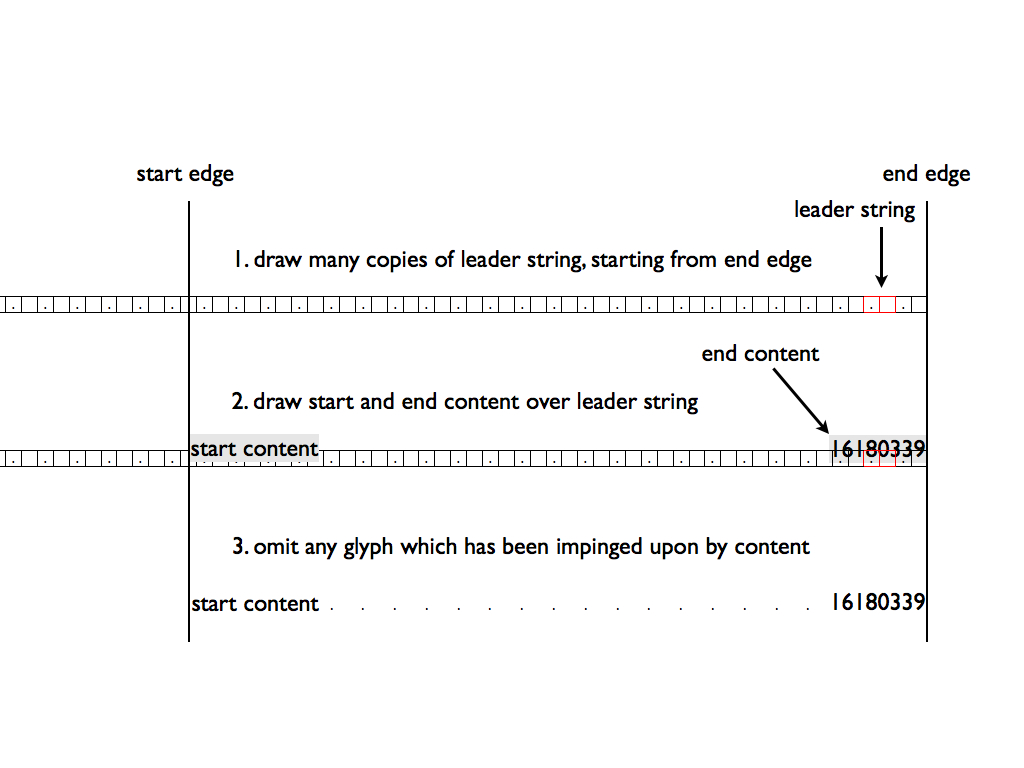
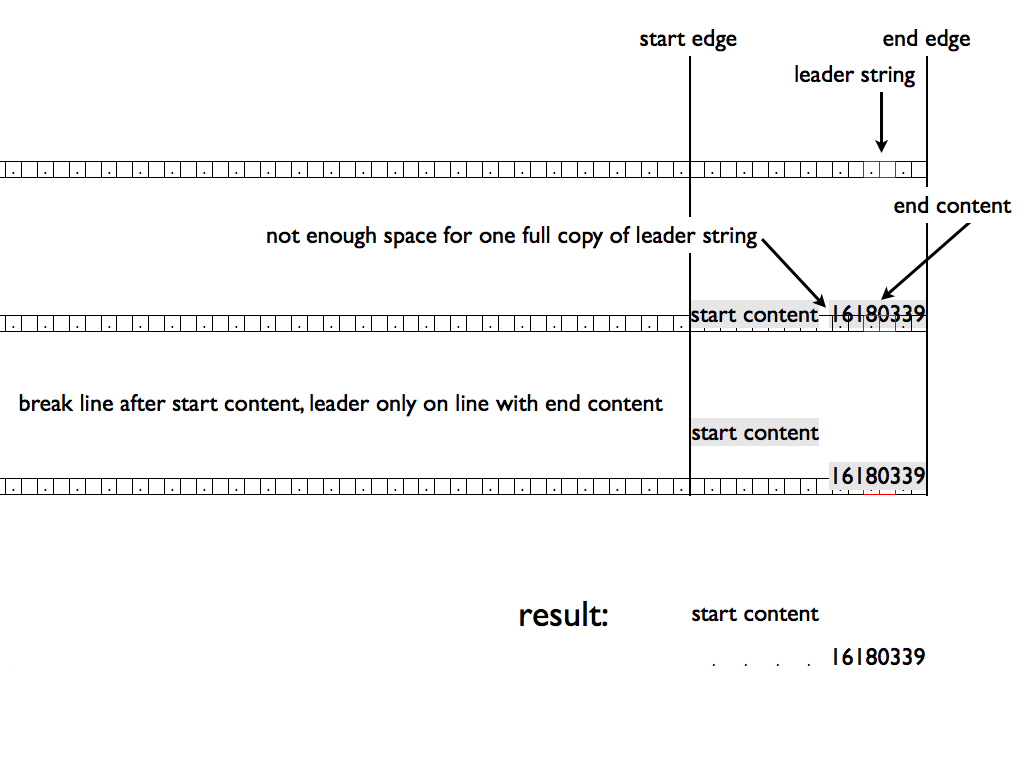
6. Cross ReferencesMany documents contain internal references: Three new values for the content property are used to automatically create these types of cross-references: target-counter(), target-counters(), and target-text(). Each of these displays information obtained from the target end of a link. <target> = < See sections below for details on each of these. 6.1. The target-counter() function
The target-counter() function retrieves the value of the innermost counter with a given name. The required arguments are the url of the target and the name of the counter. An optional counter-style argument can be used to format the result. These functions only take a fragment URL which points to a location in the current document. If there’s no fragment, if the ID referenced isn’t there, or if the URL points to an outside document, the user agent must treat that as an error. what should error handling be? restrict syntactically to local references for now.
HTML:
…which will be discussed on page <a href= CSS:
Result: …which will be discussed on page
Page numbers in tables of contents can be generated automatically:
HTML: <nav> <ol> <li class= CSS: .frontmatter a::after Result: Preface.............vii Introduction.........xi Chapter One.......... 6.2. The target-counters() functionThis functions fetches the value of all counters of a given name from the end of a link, and formats them by inserting a given string between the value of each nested counter.
6.3. The target-text() functionThe target-text() function retrieves the text value of the element referred to by the URL. An optional second argument specifies what content is retrieved, using the same values as the string-set property above.
A simpler syntax has been proposed by fantasai: http://lists.w3.org/Archives/Public/www-style/2012Feb/0745.html …which will be discussed <a href= Result: …which will be discussed later, in the chapter entitled Loomings. 7. Named StringsThis section introduces named strings, which are the textual equivalent of counters and which have a distinct namespace from counters. Named strings follow the same nesting rules as counters. The string-set property accepts values similar to the content property, including the extraction of the current value of counters. Named strings are a convenient way to pull metadata out of the document for insertion into headers and footers. In HTML, for example, META elements contained in the document HEAD can set the value of named strings. In conjunction with attribute selectors, this can be a powerful mechanism: meta 7.1. Naming Strings: the string-set property
User agents are expected to support this property on all media, including non-visual ones. The string-set property copies the text content of an element into a named string, which functions as a variable. The text content of this named string can be retrieved using the string() function. Since these variables may change on a given page, an optional second value for the string() function allows authors to choose which value on a page is used.
If an element has style containment, the string-set property must have no effects on descendants of that element.
The following example captures the contents of H1 elements,
which represent chapter names in this hypothetical document.
H1 When an H1 element is encountered, the chapter string is set to the element’s textual contents, and the previous value of chapter, if any, is overwritten. 7.2. Inserting Named Strings: the string() function
The string() function is used to copy the value of a named string to the document, via the content property. This function requires one argument, the name of the named string. Since the value of a named string may change several times on a page (as multiple elements defining the string can appear) an optional second argument indicates which value of the named string should be used. The second argument of the string() function is one of the following keywords:
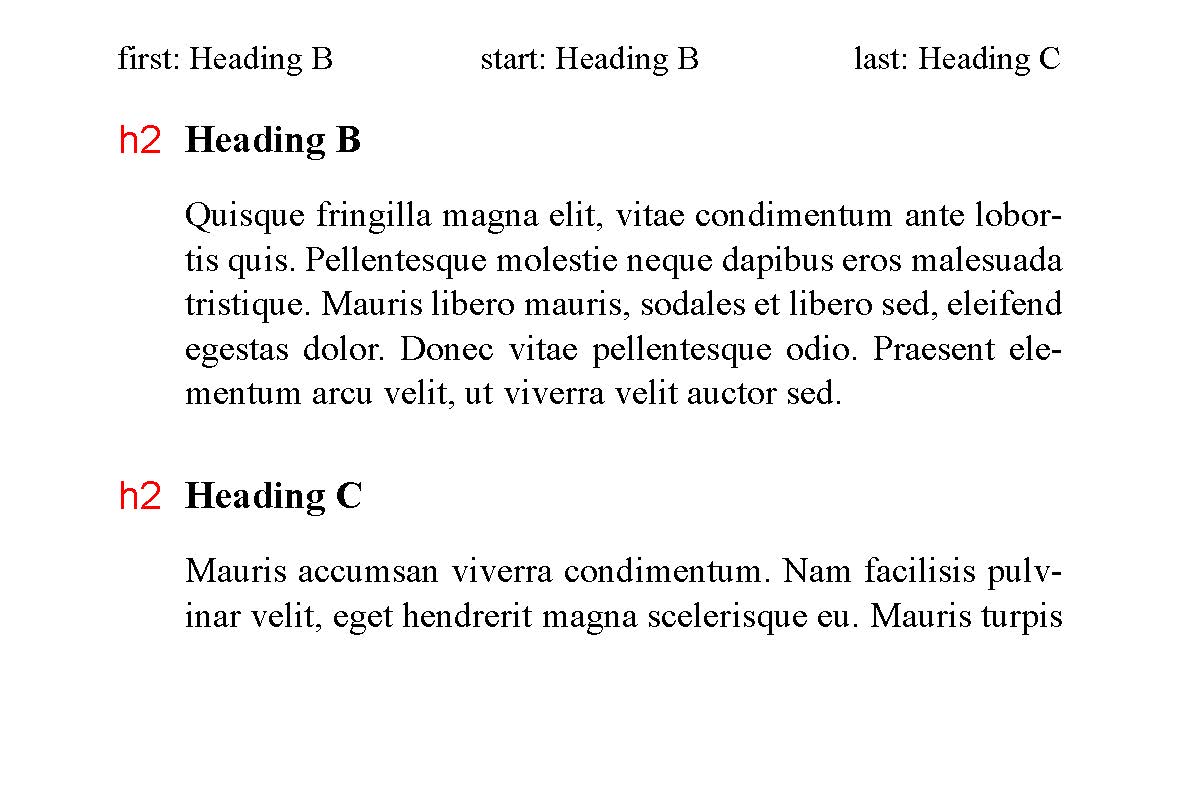
The content values of named strings are assigned at the point when the content box of the element is first created (or would have been created if the element’s display value is none). The entry value for a page is the assignment in effect at the end of the previous page. The exit value for a page is the assignment in effect at the end of the current page.
CSS:
The following figures show the first, start, and last assignments of the “heading” string on various pages. 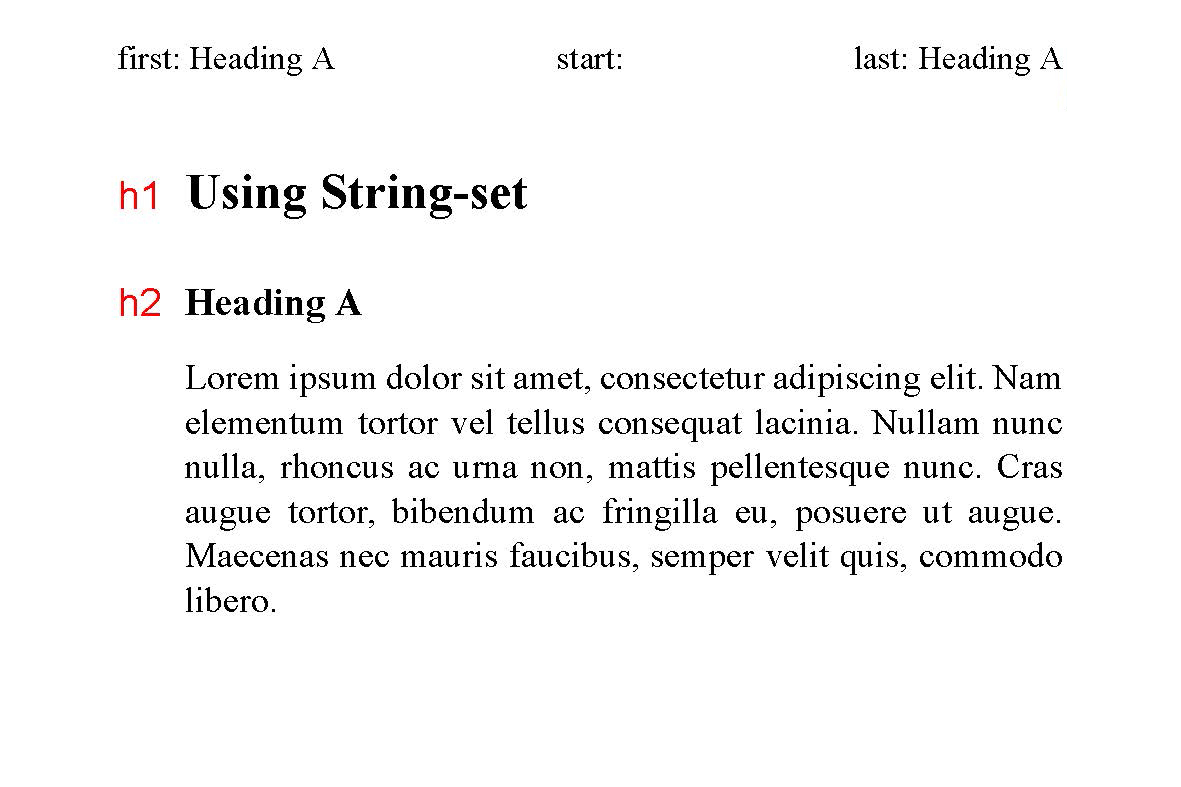
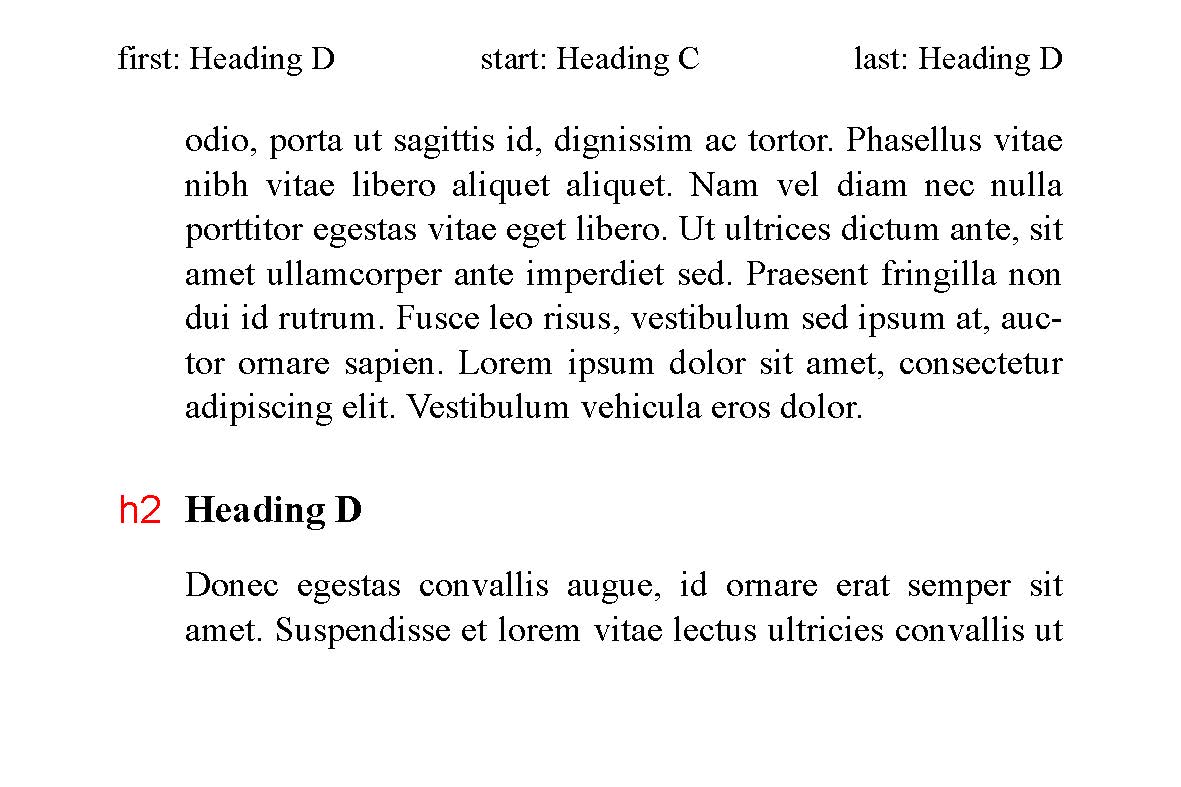
7.3. The content() function
HTML:
<h1>Loomings</h1> CSS:
The value of the named string “header” will be “Chapter 1: Loomings”.
HTML:
<section title= CSS: section The value of the “header” string will be “Loomings”. 8. BookmarksSome document formats, most notably PDF, allow the use of bookmarks as an aid to navigation. Bookmarks provide a list of links to document elements, as well as text to label the links and a level value. A bookmark has three properties: bookmark-level, bookmark-label, and bookmark-state. When a user activates a bookmark, the user agent must bring that reference point to the user’s attention, exactly as if navigating to that element by fragment URL. This will also trigger matching the :target pseudo-class. If an element has style containment, the bookmark-level, bookmark-label, and bookmark-state properties must have no effect on descendants of the element. 8.1. Setting a Bookmark: the bookmark-level propertyThe bookmark-level property determines if a bookmark is created, and at what level. If this property is absent, or has value none, no bookmark should be generated, regardless of the values of bookmark-label or bookmark-state.
section h1 Note: Bookmarks do not need to create a strict hierarchy of levels. Should a bookmark be created for elements with 8.2. Labelling a Bookmark: the bookmark-label property
HTML:
<h1>Loomings</h1> CSS: h1 The bookmark label will be “Loomings”. 8.3. Initial Bookmark Toggle State: the bookmark-state propertyThe bookmark-state may be open or closed. The user must be able to toggle the bookmark state.
Is the initial bookmark state, or the bookmark state updated by the UA as appropriate? 9. ChangesSignificant changes since the 4 December 2025 Working Draft include:
Significant changes since the 2 August 2019 Working Draft consist primarily of:
See also previous changes. AcknowledgementsStuart Ballard, David Baron, Bert Bos, Tantek Çelik, and James Craig provided invaluable suggestions used in this specification. Privacy ConsiderationsNo new privacy considerations have been reported on this specification. Security ConsiderationsNo new security considerations have been reported on this specification. | ||||||||||||||||||||||||||||||||||||||||||||||||||||||||||||||||||||||||||||||||||||||||||||||||||||||||||||
| You are visitor 01402503 — GeezerVison does not store the pages you look up. Best viewed with Netscape Navigator 4.7 or Internet Explorer 6 at 800×600. No cookies required. |