GeezerVisonThe World Wide Web, restored to 800 pixels of glory. | ||||||||||||||||||||||||||||||||
| Home|About|Gaming cabinet|Archives|How it works|Starter sites | ||||||||||||||||||||||||||||||||
GeezerVison is showing drafts.csswg.org — CSS Viewport Module Level 1 1. Introduction
This section is not normative.
CSS 2.1 [CSS21] specifies an initial containing block for continuous media that has the dimensions of the viewport. Since the viewport is generally no larger than the display, devices with smaller displays such as phones or tablets typically present a smaller viewport than larger devices like desktop or laptops. Unfortunately, many documents have historically been designed against larger viewports and exhibit a variety of bugs when viewed in smaller viewports. These include unintended layout wrapping, clipped content, awkward scrollable bounds, and script errors. To avoid these issues, mobile browsers generally use a fixed initial containing block width that mimics common desktop browser window size (typically 980-1024px). The resulting layout is then scaled down to fit in the available screen space. Although this approach mitigates the issues mentioned above, the downscaling means the CSS pixel size will be smaller than recommended by CSS 2.1. Users will likely need to zoom on the content to view it comfortably. This mitigation is unnecessary for sites that have been designed to work well on small viewports. This specification is written from an implementation-centric point of view, making it arguably difficult to read. Significant editorial work may be needed to make it more understandable to different audiences. It also should clarify which viewport is referred to by various js APIs. See this blog post by ppk for a good discussion of these issues. Various issues about this specification and related specifications are listed in this report. 2. TerminologyIn CSS 2.1 a viewport is a feature of a user agent for continuous media and used to establish the initial containing block for continuous media. For paged media, the initial containing block is based on the page area. The page area can be set through @page rules. This specification introduces a way of overriding the size of the viewport provided by the user agent (UA). Because of this, we need to define initial viewport, layout viewport and visual viewport.
Note: The scale transform of the visual viewport is often referred to as "pinch-zoom". Conceptually, this transform changes the size of the CSS reference pixel and changes the size of the layout viewport (inversally) proportionally so that it does not cause reflow of the page’s contents. When the layout viewport cannot fit inside the window or viewing area, either because the layout viewport is larger than the initial viewport or the zoom factor causes only parts of the layout viewport to be visible, the UA should offer a scrolling or panning mechanism. Note: The visual viewport’s scrolling area is the layout viewport. This animation shows an example of a zoomed in visual viewport being "panned" around (for example, by a user performing a touch drag). The page is scaled so that the layout viewport is larger than the visual viewport. A scroll delta is applied to the visual viewport first. When the visual viewport is at its extent, scroll delta will be applied to the layout viewport. This behavior is implemented by the perform a scroll steps. It is recommended that initially the upper-left corners of the
layout viewport and the window or viewing area are aligned if the
base direction of the document is ltr. Similarly, that the upper-right
corners are aligned when the base direction is rtl. The base direction
for a document is defined as the computed value of the direction
property for the first 2.1. Display feature definitionA Display feature is a hardware feature that acts as a divider and creates logically separate region of the viewport calledsegments.
It can be a fold area of a device with a foldable screen or a physical
split occupying a logical space within the viewport for example some dual
screen models.
Below is an illustration describing the concept of display features and how
they divide the viewport in
3.
Viewport
|

| Name: | zoom |
|---|---|
| Value: | <number [0,∞]> | <percentage [0,∞]> |
| Initial: | 1 |
| Applies to: | all <length> property values of all elements |
| Inherited: | no |
| Percentages: | Converted to <number> |
| Computed value: | as specified, but with <percentage> converted to the equivalent <number> |
| Canonical order: | per grammar |
| Animation type: | by computed value type |
| Media: | visual |
The values of this property have the following meanings:
- <number>
-
Positive floating point number indicating a zoom factor.
Numbers smaller than 1.0 indicate a "zoom out" or minification effect,
while numbers greater than 1.0 indicate a "zoom in" or magnification effect.
A 0 value is treated as if it was 1.
Note: The treatment of 0 is a web compatibility quirk.
- <percentage>
-
Positive floating point number,
followed by a percentage character ("%") which indicates a zoom factor multiplied by 100.
A 0 percentage is treated as if it was 100%.
Note: The treatment of 0 is a web compatibility quirk.
Negative values for zoom are illegal.
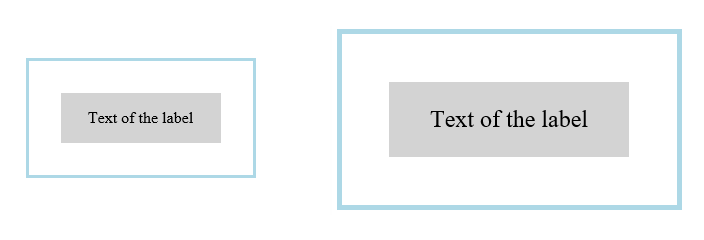
<div class="messageBox">
  <div class="label">Text of the label</div>
</div>

<style>
.messageBox {
    width: 10em;
    padding: 2em;
    border: medium solid lightblue;
}

.messageBox:hover {
    zoom: 150%;
}

.label {
    background: lightgrey;
    padding: 1em;
    text-align: center;
}
</style>
Here is an llustration of the before and after hover state of the message box element:
<div style="zoom: 2">
  Middle text
  <div style="zoom: 2">
     Inner text
  <div>
<div>
Outer text
<div style="zoom: 2">
  <img src="...">
  <iframe src="..."></iframe>
<div>
The effective zoom of an element is the product of its computed value of zoom and all flat tree ancestors' computed values of zoom.
The scaled value of a CSS length is the used value of that length; in particular it includes zoom.
The unscaled value of a CSS length relative to an element is the scaled value divided by the element’s effective zoom.
devicePixelRatio and getBoundingClientRect.
4.1. DOM and CSSOM interaction
Computed style APIs (i.e., all values returned by getComputedStyle()) that are non-auto and non-percentage lengths must be unscaled.
The getBoundingClientRect,
getClientRects,
and IntersectionObserver APIs must return rects with scaled
lengths.
All other APIs related to element geometries must return unscaled lengths (except as detailed below). This is explained in detail in CSSOM View § 7 Extensions to the HTMLElement Interface.
In cases where properties (such as scrollTop) are propagated to the viewport,
APIs for these lengths must be in viewport units,
and not be divided by the zoom of the element.
The devicePixelRatio of a frame is multiplied by the effective zoom inherited by its parent frame.
5. Extensions to the Window Interface
partial interface Window { [SameObject ,Replaceable ]readonly attribute Viewport ; };viewport
6. The Viewport Interface
[Exposed =Window ]interface {Viewport readonly attribute FrozenArray <DOMRect >?segments ; };
7.
The segments property
The segments property is an array of DOMRect that represent the dimensions of each existing viewport segment.
Each DOMRect contains the geometry of the segment (x, y, width, height) in CSS px.
Additional details about the definition of a viewport segment can be found here: CSS Environment Variables 1 § 2.3 Viewport segment variables.
The segments attribute getter steps are:
-
If the
Viewport’s associatedDocumentis not fully active, return null. -
Let topLevelTraversable be document’s relevant global object’s navigable’s top-level traversable.
-
If topLevelTraversable.[[DisplayFeaturesOverride]] is non-null, return
Viewport’s segments array calculated from topLevelTraversable.[[DisplayFeaturesOverride]]. -
If there is only a single viewport segment (typically the size of the
Viewport) return an array with that single segment. -
Otherwise, return the
Viewport’s segments array calculated from the hardware features.
The segments property represents an immutable snapshot of the device segments when the value was queried.
If the device state changes (rotation, window resize, posture change), the value previously retrieved will be invalid. Developers can listen to Screen Orientation, Window Resize, or Posture changes events to detect device state changes.
segments array will have the following content:
[ DOMRect( 0 , 0 , 400 , 200 ), DOMRect( 0 , 200 , 400 , 200 )] Privacy Considerations
No new privacy considerations have been reported on this specification.
Security Considerations
No new security considerations have been reported on this specification.
Appendix A. Changes
This appendix is informative.
Since the 29 March 2016 Working Draft
- Added interactive-widgets property to viewport meta
- Removed @viewport rule
- Renamed spec from device-adapt to css-viewport
- CSSViewportRule exposed to Window
Since the 15 September 2011 First Public Working Draft.
- Made various editorial improvements and clarifications.
- Added OM Interfaces.
- Added semi-colon as separator in meta viewport.
- Created UA stylesheets section.
- Added recommendation for when to respect orientation property.
- Dropped support for the resolution descriptor.
- Decouple width/height and zoom, introducing extend-to-zoom value for meta viewport translation.
- Made normative rules about interaction of @viewport and @media.
- Allow 0 for <viewport-length> and zoom values
- Removed support for device-width/height.
- Apply @viewport to top level document only.
- Extend [CSS3-CONDITIONAL] rather than CSS21 for nesting in @media.
Appendix B. Automation
Automation of the segments property
The segments property poses a challenge to test authors, as exercising this property
requires access to specific hardware devices. To address this challenge this document defines
[WEBDRIVER2] extension commands that allow users to control how the viewport is split by
one or more display features (such as a fold or a hinge between two separate displays).
A display feature override is a struct encapsulating the result of a single display feature. It has a orientation (a string that is either "vertical" or "horizontal"), a mask length (a positive number describing the length of the feature in CSS px), and an offset (which describe the distance from the origin of the viewport in CSS px).
Internal slots
To support the extension commands below and their integration with thesegments attribute getter steps, top-level traversables must have the following
internal slots:
| Internal slot | Description |
|---|---|
| [[DisplayFeaturesOverride]] |
List of display feature override that overrides those provided by the hardware, or null.
|
Extensions Commands
Set display features
| HTTP Method | URI Template |
|---|---|
| POST | /session/{session id}/displayfeatures |
This extension command creates a setup that emulates a set of display feature override by taking a list of display features as parameter.
This section exists because the input format is not trivial. Here is a pseudo IDL example on how a display feature override is defined:
enum OrientationType {"vertical" ,"horizontal" };interface DisplayFeature {readonly attribute OrientationType orientation ;readonly attribute double offset ;readonly attribute double maskLength ; };
Below is an illustration showing the various properties of a display feature:

Considering a viewport of 400px by 400px the command will result of a{ "features" : [ { "orientation" : "horizontal" , "offset" : 190 , "maskLength" : 20 } ] }
segments property with the following content:
[ DOMRect( 0 , 0 , 400 , 190 ), DOMRect( 0 , 210 , 400 , 190 )] - Let features be the result of invoking getting a property "features" from parameters.
- If features is not a
Array, return error with WebDriver error code invalid argument. - Let parsedFeatures be a new list of display feature override.
-
For each feature item in features:
- If feature item is not an
Object, return error with WebDriver error code invalid argument. - Let mask length be the result of invoking getting a property "maskLength" from feature item.
- If mask length is not a
Numberor its value isNaN, +∞, −∞, or negative return error with WebDriver error code invalid argument. - Let offset be the result of invoking getting a property "offset" from feature item.
- If offset is not a
Numberor its value isNaN, +∞, −∞, or negative return error with WebDriver error code invalid argument. - Let orientation be the result of invoking getting a property "orientation" from feature item.
- If orientation is not a
string, return error with WebDriver error code invalid argument. - If orientation is neither "vertical" or "vertical", return error with WebDriver error code invalid argument.
- If orientation is "vertical" and mask length + offset is greater than viewport width including the size of the rendered scrollbar, return error with WebDriver error code invalid argument.
- If orientation is "vertical" and mask length + offset is greater than viewport height including the size of the rendered scrollbar, return error with WebDriver error code invalid argument.
- Let override be a new display feature override.
- Set override’s mask length to mask length.
- Set override’s orientation to orientation.
- Set override’s offset to offset.
- Append override to parsedFeatures.
- If feature item is not an
- Let topLevelTraversable be the current browsing context’s top-level traversable.
- Set topLevelTraversable.[[DisplayFeaturesOverride]] to parsedFeatures.
- Return success with data
null.
Clear display features
| HTTP Method | URI Template |
|---|---|
| DELETE | /session/{session id}/displayfeatures |
- Let topLevelTraversable be the current browsing context’s top-level traversable.
- Set topLevelTraversable. [[DisplayFeaturesOverride]] to
null. - Return success with data
null.
Best viewed with Netscape Navigator 4.7 or Internet Explorer 6 at 800×600. No cookies required.