GeezerVisonThe World Wide Web, restored to 800 pixels of glory. | ||||||||||||||||||||||||||||||||||||||||||||||||||||||||||||||||||||||||||||||||||||||||||||||||||||||||||||||||||||||||||||||||||||||||||||||||||||||||||||||||||||||||||||||||||||||||||||||||||||||||||||||||||||||||||||||||||||||||||||||||||||||||||||||||||||||||||||||||||||||||||||||||||||||||||||||||||||||||||||||||||||||||||||||||||||||||||||||||||||||||||||||||||||||||||||||||||||||||||||||||||||||||||||||||||||||||||||||||
| Home|About|Gaming cabinet|Archives|How it works|Starter sites | ||||||||||||||||||||||||||||||||||||||||||||||||||||||||||||||||||||||||||||||||||||||||||||||||||||||||||||||||||||||||||||||||||||||||||||||||||||||||||||||||||||||||||||||||||||||||||||||||||||||||||||||||||||||||||||||||||||||||||||||||||||||||||||||||||||||||||||||||||||||||||||||||||||||||||||||||||||||||||||||||||||||||||||||||||||||||||||||||||||||||||||||||||||||||||||||||||||||||||||||||||||||||||||||||||||||||||||||||
GeezerVison is showing drafts.csswg.org — CSS Gaps Module Level 1 1. IntroductionThis section is not normative. CSS Multicol 1 § 4 Column Gaps and Rules defined properties that allow authors to control the spacing between columns in a multicol container, and to paint visible separators such as lines in those spaces. We refer to these visible separators as gap decorations. This specification expands upon the previously defined properties. It adds equivalent properties for the row direction, applies the full set of properties to other container types, and gives additional control over where and how gap decorations are painted. 1.1. Value DefinitionsThis specification follows the CSS property definition conventions from [CSS2] using the value definition syntax from [CSS-VALUES-3]. Value types not defined in this specification are defined in CSS Values & Units [CSS-VALUES-3]. Combination with other CSS modules may expand the definitions of these value types. In addition to the property-specific values listed in their definitions, all properties defined in this specification also accept the CSS-wide keywords as their property value. For readability they have not been repeated explicitly. 2. Gaps Between BoxesWhile margin and padding can be used to specify visual spacing around individual boxes, it’s sometimes more convenient to globally specify spacing between adjacent boxes within a given layout context, particularly when the spacing is different between sibling boxes as opposed to between the first/last box and the container’s edge. The gap property, and its row-gap and column-gap sub-properties, provide this functionality for multi-column, flex, grid, and grid lanes layout. A gap is either a column gap or row gap, whose definitions vary by type of container:
Gutters effect a minimum spacing between items: additional spacing may be added by justify-content/align-content. Such additional space increases the size of the corresponding gaps. In all cases, the gap disappears when it coincides with a fragmentation break. [CSS-BREAK-3] Note: Table boxes do not use the gap properties to specify separation between their cells. Instead, they use the border-spacing property, which has slightly different functionality: it inherits, and it also specifies the additional spacing between the outermost cells and the border of the table (similar to space-evenly rather than space-between). 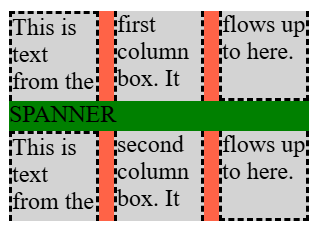
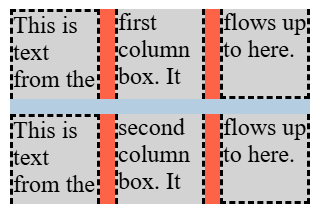
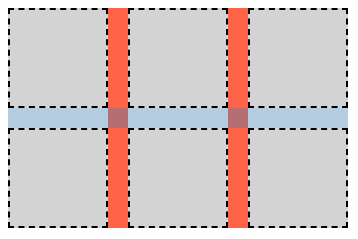
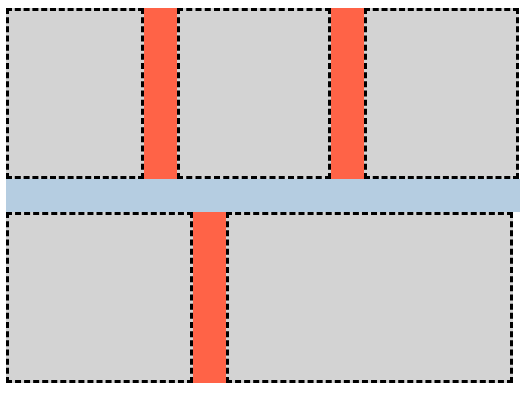
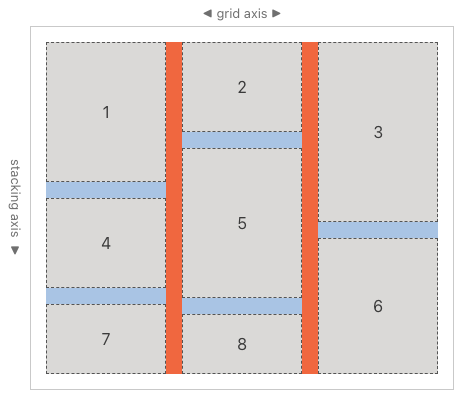
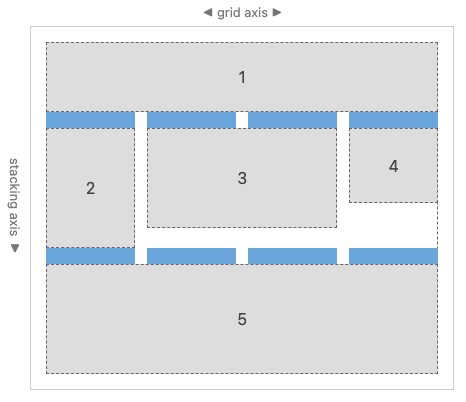
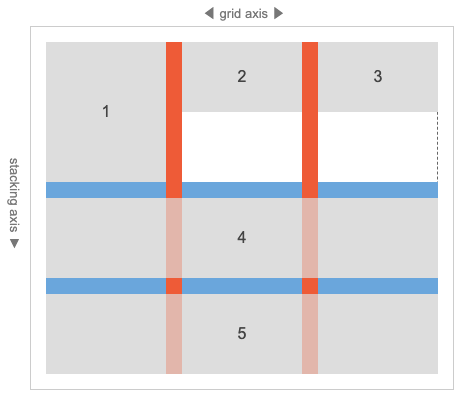
2.1. Row and Column Gutters: the row-gap and column-gap properties
These properties specify fixed-length gutters between items in the container, adding space between them—in a manner similar to the space-between keyword of the content-distribution properties, but of a fixed size instead of as a fraction of remaining space. The column-gap property specifies spacing between “columns”, separating boxes in the container’s inline axis similar to inline-axis margin; while row-gap indicates spacing between “rows”, separating boxes in the container’s block axis. Values have the following meanings:
2.2. Gap Shorthand: the gap property
This property is a shorthand that sets row-gap and column-gap in one declaration. If <'column-gap'> is omitted, it’s set to the same value as <'row-gap'>. 
Note: The gap property is only one component of the visible “gutter” or “alley” created between boxes. Margins, padding, or the use of distributed alignment may increase the visible separation between boxes beyond what is specified in gap. 2.3. Percentages In gap PropertiesIn general, gaps introduced by the gap properties are intended to act like an empty item/track/etc with the gap’s size; in other words, an author should be able to reproduce the effects of gap by just inserting additional empty items/tracks/etc into the container. gap always resolves percentages against the corresponding size of the content box of the element. When this size is definite, the behavior is well-defined and consistent across layout modes. But since different layout modes treat cyclic percentage sizes for items/tracks/etc differently, gap does as well:
2.4. Legacy Gap Properties: the grid-row-gap, grid-column-gap, and grid-gap propertiesThe Grid Layout module was originally written with its own set of gutter properties, before all such properties were unified into the existing row-gap/column-gap naming. For compatibility with legacy content, these grid-prefixed names must be supported as follows:
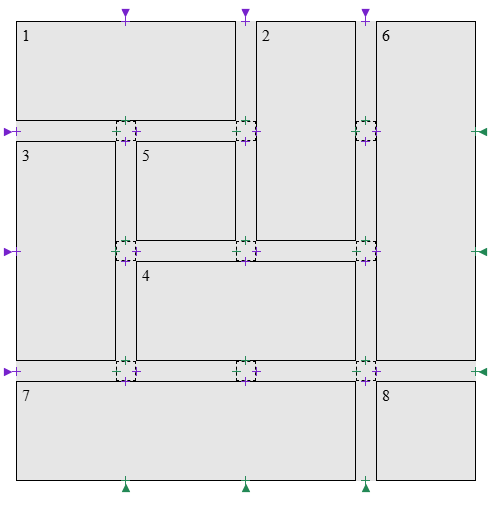
3. Gap decorationsGaps may contain a gap decoration, which is a visible separator (such as a line) painted between adjacent boxes. Gap decorations do not take up space. That is, the presence or width of a gap decoration will not alter the placement of anything else. If a gap decoration is wider than its gap, any adjacent boxes will overlap the decoration, and in some cases the decoration may extend outside the box of the container. Gap decorations are painted just above the border of the container. For scrollable containers, note that while the border and background of the container aren’t scrolled, the decorations need to scroll along with items in the container. Gap decorations follow the definitions of "column" and "row" laid out by the container to which the properties are applied. They depend on the container type taking writing mode into account when determining the meanings of these terms. For examples, see: CSS Multicol 2 § 3 The multi-column model, CSS Flexbox 1 § 5.1 Flex Flow Direction: the flex-direction property, and CSS Grid Layout 1 § 3 Grid Layout Concepts and Terminology. Properties in this specification whose names begin with "column" apply to column gaps, and properties in this specification whose names begin with "row" apply to row gaps. 3.1. GeometryGap decorations are painted within a gap as one or more gap decoration segments. 3.1.1. Segment endpointsA segment endpoint is a point on a gap’s centerline where a gap decoration segment may start or end. There are two endpoint types:
To create segment endpoints for a gap G:
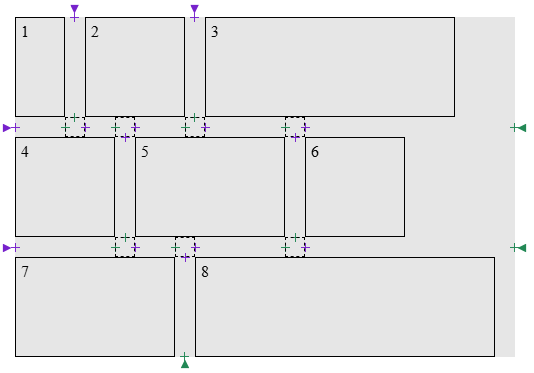
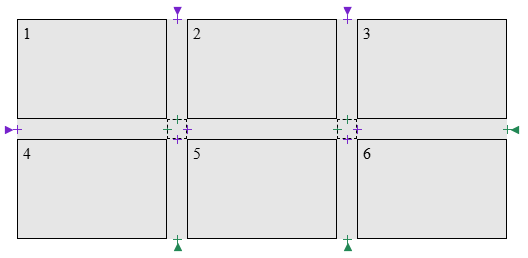
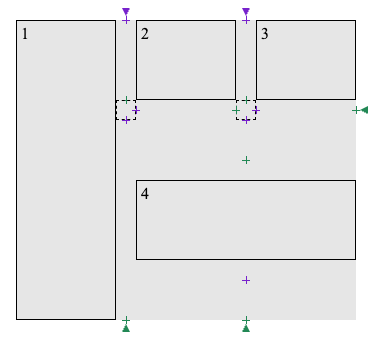
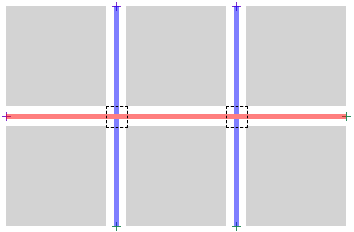
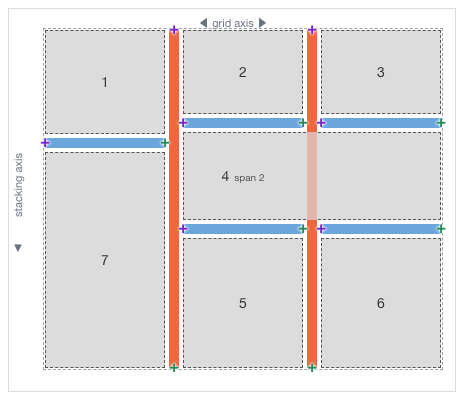
The following examples illustrate the locations of segment endpoints, with a purple + for start segment endpoints and a green + for end segment endpoints in each case. Gap junctions are shown with a dashed box. .grid-with-spans {
display: grid;
grid-template: repeat(4, 100px) / repeat(4, 100px);
gap: 20px;
background: rgb(255 255 128);
}
.grid > * {
border: 1px dashed black;
}
.flex {
  display: flex;
  flex-wrap: wrap;
  gap: 20px;
  width: 500px;
  background: rgb(255 255 128);
}
.flex > * {
  border: 1px dashed black;
}
.multi-column {
  column-count: 3;
  column-width: 100px;
  column-height: 50px;
  column-wrap: wrap;
  gap: 20px;
  background: rgb(255 255 128);
}

.multi-column > * {
  height: 100px;
  border: 1px dashed black;
}
.lanes {
  display: grid-lanes;
  grid-template-columns: repeat(3, 100px);
  gap: 20px;
  width: 340px;
  background: #e6e6e6;
}
.lanes > div {
  box-sizing: border-box;
  height: 80px;
  border: 1px solid black;
}
.lanes > .tall {
  height: 300px;
}
.lanes > .spanner {
  grid-column: 2 / span 2;
  align-self: center;
}
3.1.2. Gap segmentsA gap segment is the portion of a gap between a start segment endpoint and the end segment endpoint that directly follows the gap along its centerline. Each gap forms a collection of gap segments.
To determine gap segments for a given gap G:
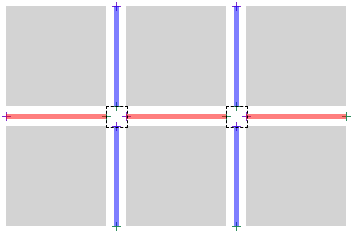
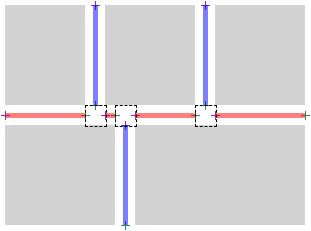
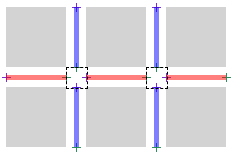
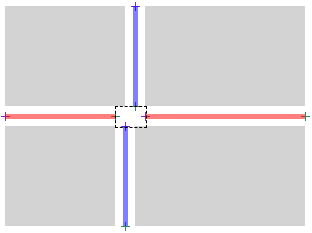
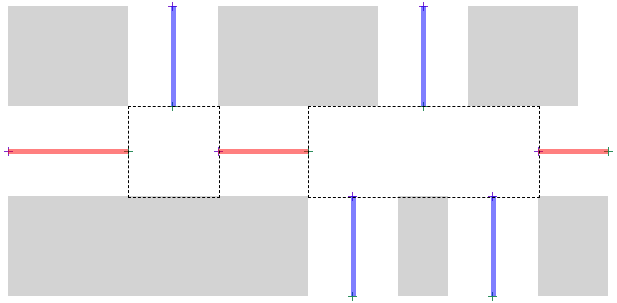
3.1.3. Gap decoration segmentsDefinitionsA gap decoration segment is formed by joining one or more consecutive gap segments of a gap. The rule-break properties control how gap segments are joined, as described in the steps to determine gap decoration segments. See § 3.2 Break behaviors at intersections: The column-rule-break, row-rule-break, and rule-break properties for examples of gap decoration segments with each rule-break value in different types of containers. In this section, we represent a gap decoration segment s as
Let UNION(s1, s2) be the gap decoration segment [s1.start, s2.end]. A gap decoration segment is flanked by spanning items if, for every gap junction between its endpoints, there exist items on opposing sides of the gap that span across all perpendicular gaps contributing to that junction. In the context of a given gap, a pair of segment endpoints a and b is considered discontiguous if a line segment from a to b, with the same width as the gap, intersects a child item in the container. Algorithms
To determine gap decoration segments for a given gap G:
To apply offsets to a segment s = [start, end]:
Tests
3.2. Break behaviors at intersections: The column-rule-break, row-rule-break, and rule-break properties
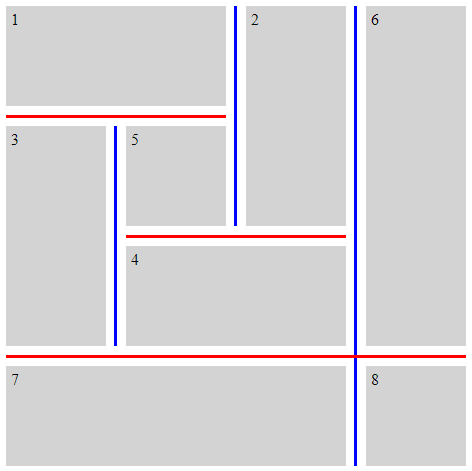
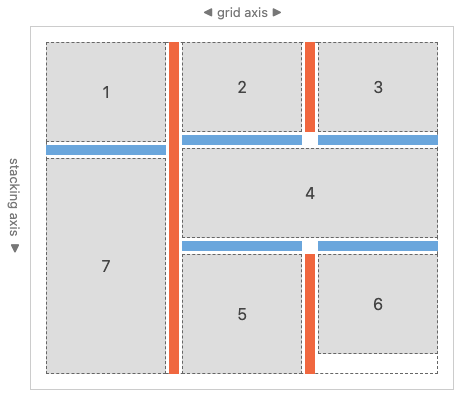
These properties control how gap segments are joined into gap decoration segments. Visually, this sets where decorations within a given gap break at visible "T" or "cross" intersections formed by items in the container. Precise details for how to apply these values are given in the steps to determine gap decoration segments.
Tests
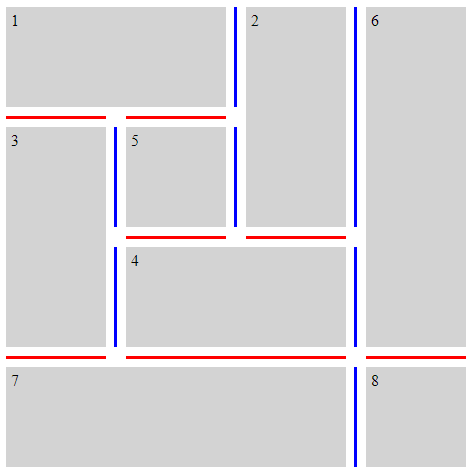
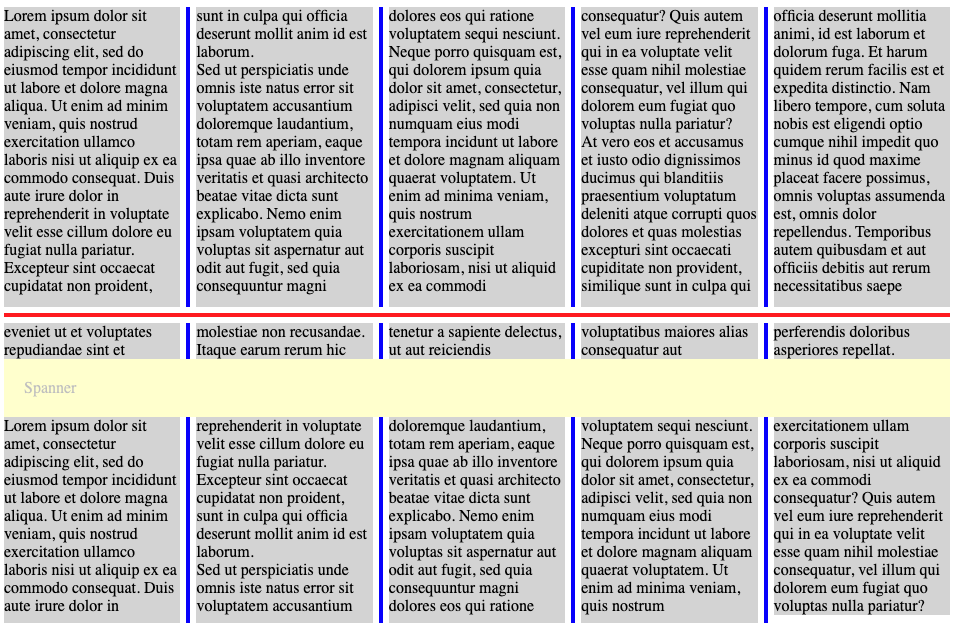
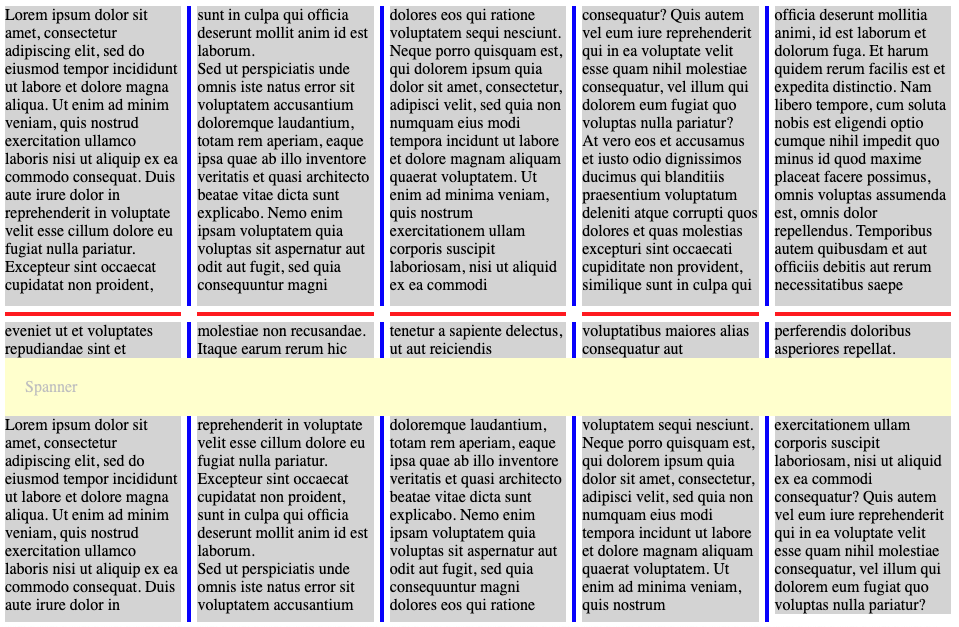
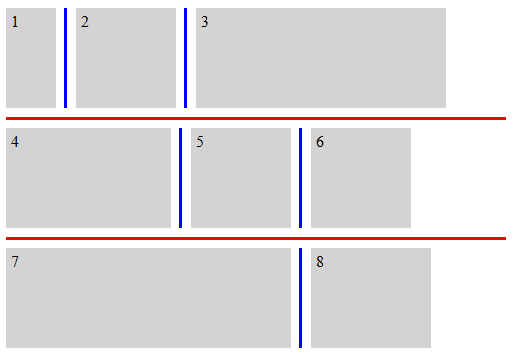
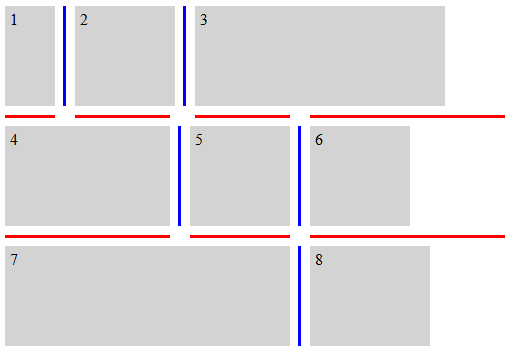
This shorthand property sets column-rule-break and row-rule-break to the same value. TestsThe following examples illustrate various settings for the *-rule-break properties. .break-normal-grid {
display: grid;
grid-template: repeat(4, 100px) / repeat(4, 100px);
gap: 20px;
row-rule: 6px solid red;
column-rule: 6px solid blue;
rule-break: normal;
}
.break-normal-grid-lanes {
  display: grid-lanes;
  grid-template-columns: repeat(3, 120px);
  gap: 16px;
  row-rule: 10px solid #6aa6dc;
  column-rule: 10px solid #f0673f;
  rule-break: normal;
}
.break-none-grid {
  display: grid;
  grid-template: repeat(4, 100px) / repeat(4, 100px);
  gap: 20px;
  row-rule: 6px solid red;
  column-rule: 6px solid blue;
  rule-break: none;
}
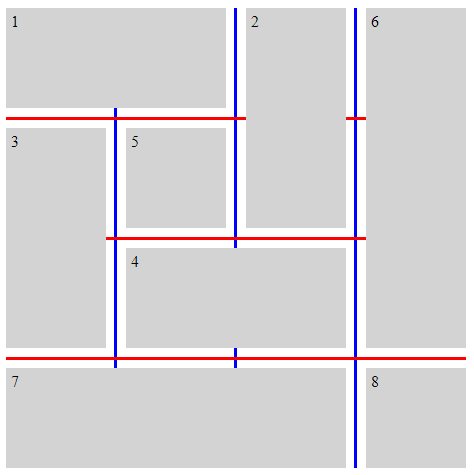
.break-intersection-grid {
  display: grid;
  grid-template: repeat(4, 100px) / repeat(4, 100px);
  gap: 20px;
  row-rule: 6px solid red;
  column-rule: 6px solid blue;
  rule-break: intersection;
}
.break-normal-multicol {
  column-width: 150px;
  column-height: 300px;
  gap: 1em;
  row-rule: 4px solid red;
  column-rule: 4px solid blue;
  rule-break: normal;
}
.break-intersection-multicol {
  column-width: 150px;
  column-height: 300px;
  gap: 1em;
  row-rule: 4px solid red;
  column-rule: 4px solid blue;
  rule-break: intersection;
}
.break-normal-flex {
  display: flex;
  flex-wrap: wrap;
  gap: 20px;
  row-rule: 6px solid red;
  column-rule: 6px solid blue;
  rule-break: normal;
}
.break-intersection-flex {
  display: flex;
  flex-wrap: wrap;
  width: 500px;
  gap: 20px;
  row-rule: 6px solid red;
  column-rule: 6px solid blue;
  rule-break: intersection;
}
3.3. Adjusting gap decoration endpoints: The rule-inset properties
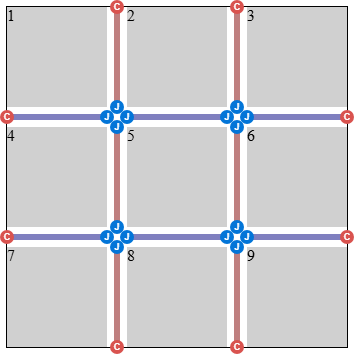
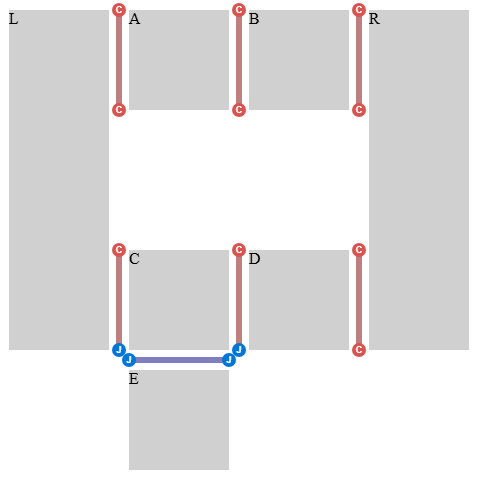
<inset-value> = <length-percentage> | overlap-join These properties can be used to offset the start and end points of gap decorations relative to the segment endpoints which would normally determine where decorations start and end. A junction segment endpoint is a segment endpoint at a gap junction where one or more other painted gap segments also touch the gap junction. See § 3.4 Gap decoration visibility: The rule-visibility-items properties for which gap segments are painted. A cap segment endpoint is any segment endpoint that is not a junction segment endpoint. This includes endpoints at the container’s content edges, as well as endpoints at a gap junction that no other painted gap segment touches. .simple-grid {
rule-break: intersection;
rule-visibility-items: between;
}
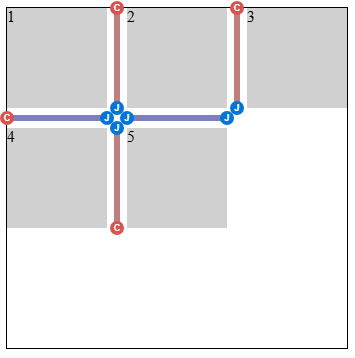
.simple-grid-with-empty-cells {
  rule-break: intersection;
  rule-visibility-items: between;
}
.donut-grid-layout {
  rule-break: intersection;
  rule-visibility-items: between;
}
Percentages are resolved against the crossing gap width, defined as follows:
Note: This classification by position is distinct from the cap segment endpoint / junction segment endpoint classification. A cap segment endpoint may sit at a container edge or at a gap junction (see this example). Hence, column-rule-inset-cap-start: 50% resolves to half the gap junction size at an interior cap and 0 at other caps such as container edges. The column-rule-inset-cap-start and row-rule-inset-cap-start properties apply to start segment endpoints that are cap segment endpoints. The column-rule-inset-junction-start and row-rule-inset-junction-start properties apply to start segment endpoints that are junction segment endpoints. For these properties, positive values offset in the end direction, and negative values offset in the start direction, along the axis of the gap. The column-rule-inset-cap-end and row-rule-inset-cap-end properties apply to end segment endpoints that are cap segment endpoints. The column-rule-inset-junction-end and row-rule-inset-junction-end properties apply to end segment endpoints that are junction segment endpoints. For these properties, positive values offset in the start direction, and negative values offset in the end direction, along the axis of the gap. The overlap-join keyword produces neat joins between gap decorations that meet at the same gap junction:
.inset-overlap-join {
  rule-inset: overlap-join;
  rule-break: intersection;
  rule-visibility-items: between;
}
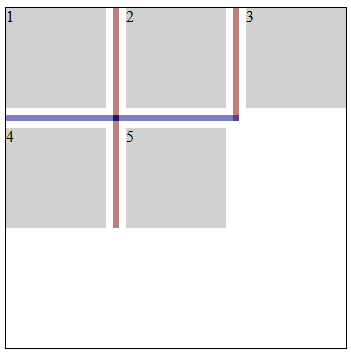
.inset-overlap-join {
  rule-inset: overlap-join;
  rule-break: intersection;
  rule-visibility-items: between;
}
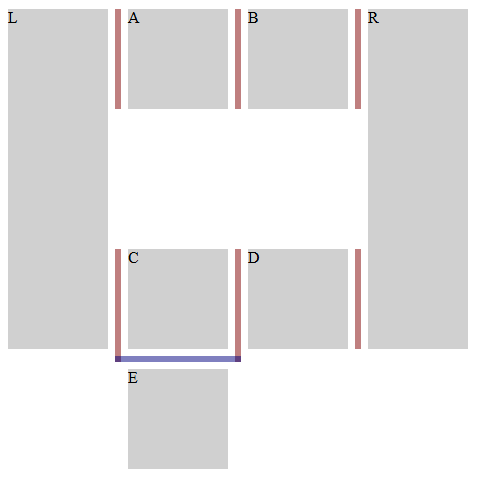
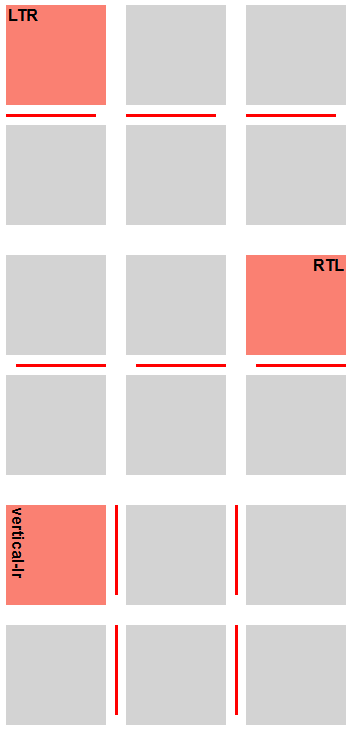
.inset-end {
  row-rule: 3px solid red;
  row-rule-break: intersection;
  row-rule-inset-end: 10px;
}
Tests
3.3.1. -start and -end shorthandsThese shorthands allow authors to achieve uniform asymmetric decorations. .inset-start-8px-end-0px {
column-rule-inset-start: 8px;
column-rule-inset-end: 0px;
}
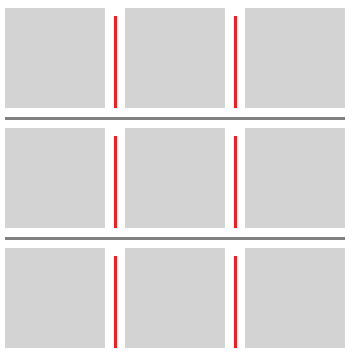
These shorthand properties set the corresponding -cap- and -junction- properties to the same value. For example, column-rule-inset-start sets both column-rule-inset-cap-start and column-rule-inset-junction-start to the same value.
This shorthand property sets column-rule-inset-start and row-rule-inset-start to the same value.
This shorthand property sets column-rule-inset-end and row-rule-inset-end to the same value. Tests3.3.2. -cap- and -junction- shorthandsThese shorthands allow authors to achieve different treatments at cap segment endpoints versus junction segment endpoints. .inset-cap-0px-inset-junction-negative-5px {
column-rule-inset-cap: 0px;
column-rule-inset-junction: -5px;
column-rule-break: intersection;
}
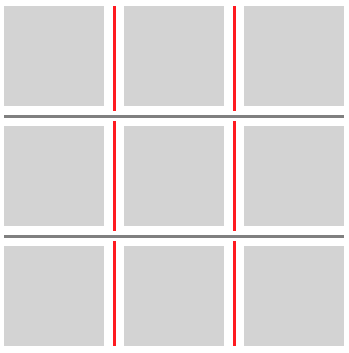
These shorthands set the corresponding -start and -end properties. For example, column-rule-inset-cap sets both column-rule-inset-cap-start and column-rule-inset-cap-end. If one value is specified, both properties are set to that value. If two values are specified, -start is set to the first and -end is set to the second.
This shorthand property sets column-rule-inset-cap and row-rule-inset-cap to the same value.
This shorthand property sets column-rule-inset-junction and row-rule-inset-junction to the same value. Tests
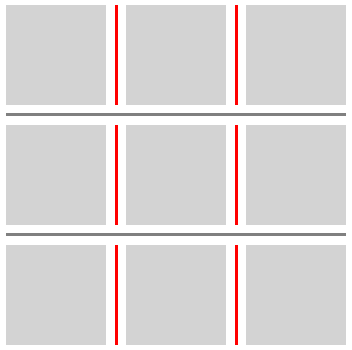
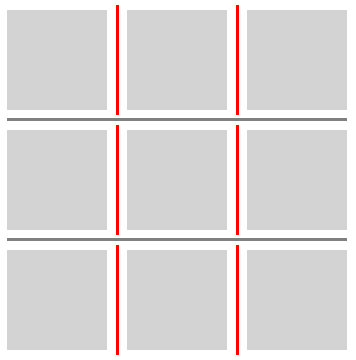
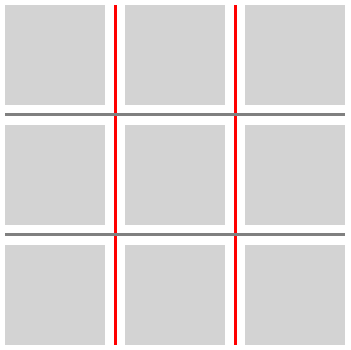
3.3.3. Universal shorthandsThese shorthands allow authors to achieve uniform treatments throughout a container. .inset-0px {
column-rule-inset: 0px;
column-rule-break: intersection;
}
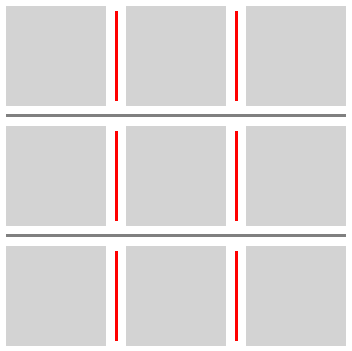
.inset-positive-5px {
  column-rule-inset: 5px;
  column-rule-break: intersection;
}
.inset-negative-5px {
  column-rule-inset: -5px;
  column-rule-break: intersection;
}
.inset-negative-50percent {
  column-rule-inset: -50%;
  column-rule-break: intersection;
}
These shorthands set the corresponding cap and junction start and end values. The order of values is: cap-start cap-end? [/ junction-start junction-end?]? Omitted values are filled in as follows:
This shorthand property sets column-rule-inset and row-rule-inset to the same value. Tests3.4. Gap decoration visibility: The rule-visibility-items properties
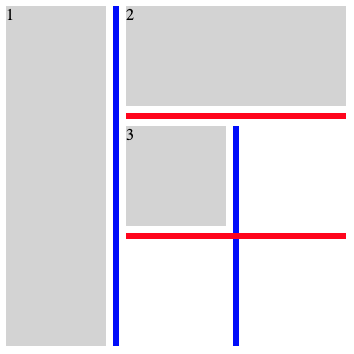
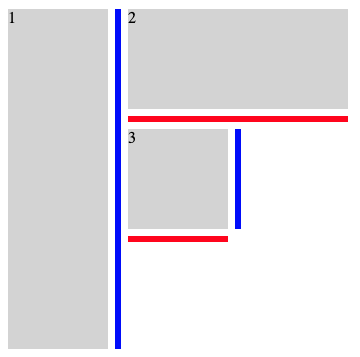
These properties control whether gap decorations are painted in gap segments adjacent to empty areas. A gap segment can stay unpainted even when it is part of a larger gap decoration segment.
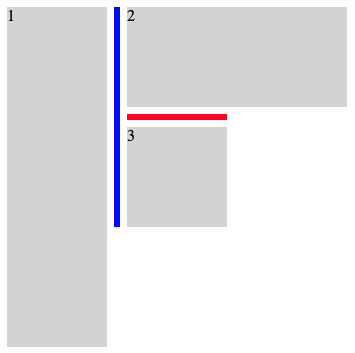
This shorthand property sets column-rule-visibility-items and row-rule-visibility-items to the same value. .break-normal-with-all-grid {
display: grid;
grid-template: repeat(3, 100px) / repeat(3, 100px);
gap: 20px;
row-rule: 6px solid red;
column-rule: 6px solid blue;
rule-visibility-items: all;
}
.break-normal-with-around-grid {
  display: grid;
  grid-template: repeat(3, 100px) / repeat(3, 100px);
  gap: 20px;
  row-rule: 6px solid red;
  column-rule: 6px solid blue;
  rule-visibility-items: around;
}
.break-normal-with-between-grid {
  display: grid;
  grid-template: repeat(3, 100px) / repeat(3, 100px);
  gap: 20px;
  row-rule: 6px solid red;
  column-rule: 6px solid blue;
  rule-visibility-items: between;
}
Tests
3.5. Gap decoration overlap: The rule-overlap property
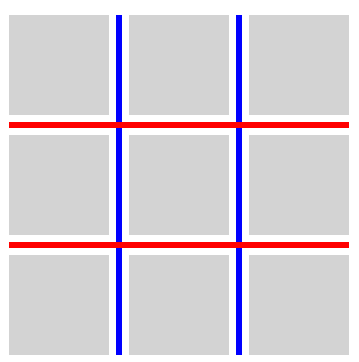
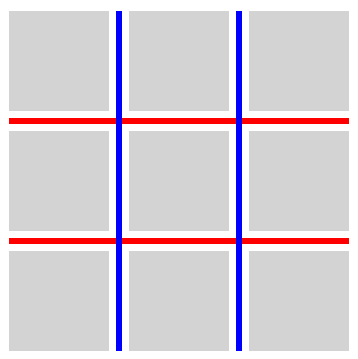
This property sets the paint order for overlapping gap decorations.
.row-over-column {
  rule-overlap: row-over-column;
  row-rule: 6px solid red;
  column-rule: 6px solid blue;
}
.column-over-row {
  rule-overlap: column-over-row;
  row-rule: 6px solid red;
  column-rule: 6px solid blue;
}
Tests3.6. Fragmentation§ 2 Gaps Between Boxes specifies that gaps disappear where they coincide with a fragmentation break. Because there is no gap in such locations, no gap decoration is drawn in them either. Tests
4. Color, style, and widthProperty definitions in this section supersede the definitions of properties with the same names in [CSS-MULTICOL-1]. 4.1. Gap decoration color: The column-rule-color, row-rule-color, and rule-color properties
<line-color-list>          = <line-color-or-repeat>#

<auto-line-color-list>     = <line-color-or-repeat>#? ,
                             <auto-repeat-line-color> ,
                             <line-color-or-repeat>#?

<line-color-or-repeat>     = [ <color> | <repeat-line-color> ]

<repeat-line-color>        = repeat( [ <integer [1,∞]> ] , [ <color> ]# )

<auto-repeat-line-color>   = repeat( auto , [ <color> ]# )
These properties set the color of gap decorations.
This shorthand property sets column-rule-color and row-rule-color to the same value. Tests
4.2. Gap decoration style: The column-rule-style, row-rule-style, and rule-style properties
<line-style-list>          = <line-style-or-repeat>#

<auto-line-style-list>     = <line-style-or-repeat>#? ,
                             <auto-repeat-line-style> ,
                             <line-style-or-repeat>#?

<line-style-or-repeat>     = [ <line-style> | <repeat-line-style> ]

<repeat-line-style>        = repeat( [ <integer [1,∞]> ] , [ <line-style> ]# )

<auto-repeat-line-style>   = repeat( auto , [ <line-style> ]# )
These properties set the styles of gap decorations. The <line-style> values apply the same as for border-style.
This shorthand property sets column-rule-style and row-rule-style to the same value. Tests
4.3. Gap decoration width: The column-rule-width, row-rule-width, and rule-width properties
<line-width-list>          = <line-width-or-repeat>#

<auto-line-width-list>     = <line-width-or-repeat>#? ,
                             <auto-repeat-line-width> ,
                             <line-width-or-repeat>#?

<line-width-or-repeat>     = [ <line-width> | <repeat-line-width> ]

<repeat-line-width>        = repeat( [ <integer [1,∞]> ] , [ <line-width> ]# )

<auto-repeat-line-width>   = repeat( auto , [ <line-width> ]# )
These properties set the widths of gap decorations. Negative values are not allowed.
This shorthand property sets column-rule-width and row-rule-width to the same value. Tests
4.4. Gap decoration shorthands: The column-rule, row-rule, and rule properties
<gap-rule-list>        = <gap-rule-or-repeat>#

<gap-auto-rule-list>   = <gap-rule-or-repeat>#? ,
                         <gap-auto-repeat-rule> ,
                         <gap-rule-or-repeat>#?

<gap-rule-or-repeat>   = <gap-rule> | <gap-repeat-rule>

<gap-repeat-rule>      = repeat( <integer [1,∞]> , <gap-rule># )

<gap-auto-repeat-rule> = repeat( auto , <gap-rule># )

<gap-rule>             = <line-width> || <line-style> || <color>
These shorthand properties set values for the column-rule-width, column-rule-style, and column-rule-color properties, or the row-rule-width, row-rule-style, and row-rule-color properties, respectively.
This shorthand property sets column-rule and row-rule to the same values. Tests
4.5. Lists of values and the repeat() notationEach of the properties in this section accepts a comma-separated list of values. Setting multiple values in this way allows for varying gap decorations within a given container.
An author might specify alternating red and blue column rules as follows:
column-rule-width: 1px;
column-rule-style: solid;
column-rule-color: red, blue;
Such a list may contain repeat() notations. Similar to CSS Grid Layout 1 § 7.2.3 Repeating Rows and Columns: the repeat() notation, these notations allow a series of gap decorations that exhibit a recurring pattern to be written in a more compact form. The generic form of the repeat() syntax is, approximately, repeat( [ <integer [1,∞]> | auto ] , <value># ) The first argument to repeat() specifies the number of repetitions.
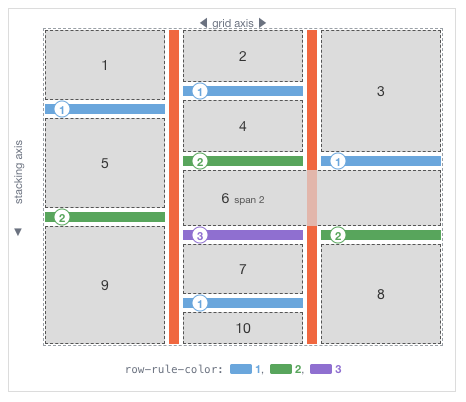
The second argument to repeat() is a comma-separated list of values that would be accepted by the property in which the repeat() appears. 4.6. Assigning gap decoration values to gapsGap decorations are assigned after gutter collapsing has been applied. A given set of collapsed gutters consume exactly one gap decoration; the next gap decoration is applied to the next gutter (or set of collapsed gutters). Therefore, collapsed gutters are treated as a single gap for decoration purposes. A gap that is suppressed due to fragmentation still consumes a gap decoration value from the pattern, even though no decoration is drawn there. This preserves a consistent association between gaps and decorations across fragmented and unfragmented contexts. Similarly, when a flex container wraps into multiple flex lines, the decoration pattern is assigned to gaps sequentially across the flexbox and does not restart at the beginning of each flex line. In flex containers, grid containers, and grid lanes containers, values are assigned starting at the side where placement begins and proceeding in the placement direction. Placement reversals, such as row-reverse, column-reverse, or wrap-reverse, can make this differ from the writing mode direction. In the stacking axis of a grid lanes container, values are assigned independently in each grid track, restarting the value list and expanding repeat() for that track. Gaps before a spanning item take values from their respective track sequences and can therefore differ.
To assign gap decoration values to a list of gaps using a list of values:
Tests
4.7. Interpolation of list valuesWhen interpolating repeat() values, or lists of values for rule-color or rule-width, the interpolation proceeds in two steps:
Interpolation of the above values would result in expansion of the "from" and "to" values to create lists of equal lengths: From: 10px, 10px At 50%: 15px, 25px To: 20px, 40px Interpolation of the above values would result in expansion of the "from" and "to" values to create lists of equal lengths: From: 5px, 10px, 5px, 10px At 50%: 10px, 15px, 10px, 15px To: 15px, 20px, 15px, 20px Interpolation of the above values would result in expansion of the "from" and "to" values to create lists of equal lengths: From: 10px, 20px, 10px, 20px At 50%: 15px, 20px, 15px, 20px To: 20px, 20px, 20px, 20px Interpolation of the above values would result in expansion of the "from" and "to" values to create lists of equal lengths: From: 10px, 20px, 10px, 20px At 50%: 15px, 25px, 15px, 25px To: 20px, 30px, 20px, 30px When either of the lists we are interpolating between (from and to) include an auto repeater:
Length of the leading values and trailing values across from and to match, so we can apply the repeatable list algorithm to each segment. From: 10px, repeat(auto, 20px), 30px At 50%: 15px, repeat(auto, 30px), 35px To: 20px, repeat(auto, 40px), 40px Length of the leading values and trailing values across from and to match, so we can apply the repeatable list algorithm to each segment. From: 10px, 20px, repeat(auto, 20px, 20px), 30px At 50%: 15px, 25px, repeat(auto, 30px, 35px), 35px To: 20px, 30px, repeat(auto, 40px, 50px), 40px Length of the from leading values and to leading values don’t match, so we fall back to discrete interpolation. Length of the from trailing values and to trailing values don’t match, so we fall back to discrete interpolation. Only from contains an auto repeater, so we fall back to discrete interpolation. Tests
4.8. SerializationThe column-rule, row-rule, and rule shorthands are serialized from component longhand properties only if the longhand properties are repeater aligned. If the longhand properties are not repeater aligned, the shorthand serializes as an empty string.
Let W, S and C be the values for the width, style, and color
longhand properties respectively. Recall that each is a list of
items, where an item is either a single value or a repeat() notation.
The longhand properties are repeater aligned
if and only if all of the following are true:
This shorthand declaration:
column-rule: 1px solid red, 2px dashed green, 3px dotted blue; Breaks down to the following longhand values: column-rule-width: 1px, 2px, 3px; column-rule-style: solid, dashed, dotted; column-rule-color: red, green, blue; Which serialize back to the same original shorthand value, because the longhands are repeater aligned: all three properties have the same number of items (3), and each item is a single value (not a repeater). The same behavior would occur if the three longhands were specified directly rather than coming from a shorthand.
This shorthand declaration:
column-rule: 1px solid red, repeat(2, 2px dashed green); Breaks down to the following longhand values: column-rule-width: 1px, repeat(2, 2px); column-rule-style: solid, repeat(2, dashed); column-rule-color: red, repeat(2, green); Which serialize back to the same original shorthand value, because the longhands are repeater aligned: all three properties have the same number of items (2), and at each index the items have matching types (single values at index 0, integer repeaters at index 1), the integer repeaters have the same repeat count (2), and the integer repeaters contain the same number of values (1). The same behavior would occur if the three longhands were specified directly rather than coming from a shorthand.
This shorthand declaration:
column-rule: repeat(auto, 1px solid red, 2px dashed green); Breaks down to the following longhand values: column-rule-width: repeat(auto, 1px, 2px); column-rule-style: repeat(auto, solid, dashed); column-rule-color: repeat(auto, red, green); Which serialize back to the same original shorthand value, because the longhands are repeater aligned: all three properties have the same number of items (1), each item is an auto repeater, and the auto repeaters contain the same number of values (2). The same behavior would occur if the three longhands were specified directly rather than coming from a shorthand.
These declarations:
column-rule: repeat(auto, 1px solid red, 2px dashed green);
column-rule-width: repeat(auto, 3px, 4px, 5px);
Break down to the following longhand values: column-rule-width: repeat(auto, 3px, 4px, 5px); column-rule-style: repeat(auto, solid, dashed); column-rule-color: repeat(auto, red, green); The column-rule shorthand will serialize as an empty string because the longhands are not repeater aligned: the auto repeaters contain different numbers of values. The same behavior would occur if the three longhands were specified directly rather than coming from a shorthand.
These declarations:
column-rule: repeat(2, 1px solid red, 2px dashed green);
column-rule-style: dashed, dotted, solid;
Break down to the following longhand values: column-rule-width: repeat(2, 1px, 2px); column-rule-style: dashed, dotted, solid; column-rule-color: repeat(2, red, green); The column-rule shorthand will serialize as an empty string because the longhands are not repeater aligned: the items at index 0 have mismatched types (integer repeater for width and color, single value for style). The same behavior would occur if the three longhands were specified directly rather than coming from a shorthand.
These declarations:
column-rule: repeat(2, 1px solid red, 2px dashed green);
column-rule-color: repeat(4, red, cyan);
Break down to the following longhand values: column-rule-width: repeat(2, 1px, 2px); column-rule-style: repeat(2, solid, dashed); column-rule-color: repeat(4, red, cyan); The column-rule shorthand will serialize as an empty string because the longhands are not repeater aligned: the integer repeaters have different repeat counts. The same behavior would occur if the three longhands were specified directly rather than coming from a shorthand. Tests5. AcknowledgementsMany thanks to Sam Davis Omekara Jr. and Javier Contreras Tenorio who contributed a significant amount of normative text, examples, and WPT coverage to this specification. Mats Palmgren’s earlier proposal for Gap Decorations helped inform the direction of this specification. Additional feedback that helped shape this specification was contributed by many people, including: Ahmad Shadeed, Alison Maher, Benoît Rouleau, Elika Etemad, Ian Kilpatrick, Josh Tumath, Kurt Catti-Schmidt, Lea Verou, Oliver Williams, Rachel Andrew, Sebastian Zartner, Tab Atkins-Bittner, and the CSS Working Group members. 6. Privacy ConsiderationsSupport for the gap decoration properties is observable through @supports and can contribute, in aggregate, to browser fingerprinting. Gap decoration painting affected by :visited is subject to considerations for user agents to preserve user privacy in Selectors 4 § 8.2 The Link History Pseudo-classes: :link and :visited. 7. Security ConsiderationsNo new security considerations have been reported on this specification. 8. Changes8.1. Changes since the 24 June 2026 Working Draft
8.2. Changes since the 27 February 2026 Working Draft
8.3. Changes since the 17 April 2025 Working Draft
| ||||||||||||||||||||||||||||||||||||||||||||||||||||||||||||||||||||||||||||||||||||||||||||||||||||||||||||||||||||||||||||||||||||||||||||||||||||||||||||||||||||||||||||||||||||||||||||||||||||||||||||||||||||||||||||||||||||||||||||||||||||||||||||||||||||||||||||||||||||||||||||||||||||||||||||||||||||||||||||||||||||||||||||||||||||||||||||||||||||||||||||||||||||||||||||||||||||||||||||||||||||||||||||||||||||||||||||||||
| You are visitor 01402503 — GeezerVison does not store the pages you look up. Best viewed with Netscape Navigator 4.7 or Internet Explorer 6 at 800×600. No cookies required. |