GeezerVisonThe World Wide Web, restored to 800 pixels of glory. | ||||||||||||||||||||||||||||||||||||||||||||||||||||||||||||||||||||||||||||||||||||||||||||||||||||||||||||||||||||||||||||||||||||||||||||||||||||||||||||||||||||||
| Home|About|Gaming cabinet|Archives|How it works|Starter sites | ||||||||||||||||||||||||||||||||||||||||||||||||||||||||||||||||||||||||||||||||||||||||||||||||||||||||||||||||||||||||||||||||||||||||||||||||||||||||||||||||||||||
GeezerVison is showing drafts.csswg.org — CSS Overflow Module Level 3 1. IntroductionIn CSS Level 1 [CSS1], placing more content than would fit inside an element with a specified size was generally an authoring error. Doing so caused the content to extend outside the bounds of the element, which would likely cause that content to overlap with other elements. CSS Level 2 [CSS2] introduced the overflow property, which allows authors to have overflow be handled by scrolling, which means it is no longer an authoring error. It also allows authors to specify that overflow is handled by clipping, which makes sense when the author’s intent is that the content not be shown. This specification defines the long-standing de-facto overflow-x and overflow-y properties, adds a clip value, introduces an overflow-clip-margin property, and defines overflow handling more fully. It also introduces control over smooth scrolling via scroll-behavior and for reserving space for the scrollbar via scrollbar-gutter. Note: This specification also reproduces the definition of the text-overflow property previously defined in [CSS-UI-3], with no addition or modification, in order to present text-overflow and block-ellipsis together. 1.1. Value DefinitionsThis specification follows the CSS property definition conventions from [CSS2] using the value definition syntax from [CSS-VALUES-3]. Value types not defined in this specification are defined in CSS Values & Units [CSS-VALUES-3]. Combination with other CSS modules may expand the definitions of these value types. In addition to the property-specific values listed in their definitions, all properties defined in this specification also accept the CSS-wide keywords as their property value. For readability they have not been repeated explicitly. 1.2. Module InteractionsThis module replaces (supersedes) and extends features defined in [CSS2] section 11.1 Overflow and clipping and [CSS-UI-3] section 5.2. Overflow Ellipsis: the text-overflow property. When applied to 'display: table' elements, the properties defined in this module apply to the table grid box (not the table wrapper box). [CSS2] [CSS-TABLES-3] 2. Overflow Concepts and TerminologyCSS uses the term overflow to describe the contents of a box that extend outside one of that box’s edges (i.e., its content edge, padding edge, border edge, or margin edge). The term might be interpreted as elements or features that cause this overflow, the non-rectangular region occupied by these features, or, more commonly, as the minimal rectangle that bounds that region. A box’s overflow is computed based on the layout and styling of the box itself and of all descendants whose containing block chain includes the box. In most cases, overflow can be computed for any box from the bounds and properties of that box itself, plus the overflow of each of its children. However, this is not always the case; for example, when transform-style: preserve-3d [CSS3-TRANSFORMS] is used on some of the children, any of their descendants with transform-style: preserve-3d must also be examined. There are two different types of overflow, which are used for different purposes by the UA: 2.1. Ink OverflowThe ink overflow of a box is the part of that box and its contents that creates a visual effect outside of the box’s border box. Ink overflow is the overflow of painting effects defined to not affect layout or otherwise extend the scrollable overflow area, such as box shadows, border images, text decoration, overhanging glyphs (with negative side bearings, or with ascenders/descenders extending outside the em box), outlines, etc. Since some effects in CSS (for example, the blurs in text-shadow [CSS-TEXT-3] and box-shadow [CSS-BACKGROUNDS-3], which are theoretically infinite; or text rendering, where shaping and rasterization can vary by platform) do not precisely define what visual extent they cover, the extent of the ink overflow is undefined, and may vary across UAs. The ink overflow area is the non-rectangular area occupied by the ink overflow of a box and its contents, and the ink overflow rectangle is the minimal rectangle whose axes are aligned to the box’s axes and that contains the ink overflow area. Note that the ink overflow rectangle is a rectangle in the box’s coordinate system, but might be non-rectangular in other coordinate systems due to transforms. [CSS3-TRANSFORMS] Any overflow of replaced content is always ink overflow (as opposed to scrollable overflow). 2.2. Scrollable OverflowThe scrollable overflow of a box is the set of things extending outside of that box’s padding edge for which a scrolling mechanism needs to be provided. The scrollable overflow area is the non-rectangular region occupied by the scrollable overflow, and the scrollable overflow rectangle is the minimal rectangle whose axes are aligned to the box’s axes and that contains the scrollable overflow area. See § 3.3 Calculating the Scrollable Overflow Area for details. 2.3. Scrolling OverflowA box’s overflow can be visible or clipped. CSS also allows a box to be a scroll container that allows clipped parts of its scrollable overflow area to be scrolled into view. The visual “viewport” of a scroll container (through which the scrollable overflow area can be viewed) coincides with its padding box, and is called the scrollport. A box’s nearest scroll container is the nearest scroll container ancestor in the containing block chain. (See § 3 Clipping and Scrolling Overflow for control over whether a box clips or scrolls its overflow.) Scrolling operations can be initiated by the user
(for example, by manipulating a scrollbar, swiping a touchscreen, or using keyboard controls)
or by script
(for example, by the A scroll position is a particular alignment of the scrollable overflow rectangle within its scrollport. It is associated with a scroll offset which is its distance from the scroll origin. The scroll origin is the anchor coordinate of the scrollable overflow rectangle, from which the scrollable overflow rectangle expands. Unless otherwise specified, it is the block-start inline-start corner of the scrollable overflow rectangle. (For example, in a flex container it is the main-start cross-start corner.) A scroll container is said to be scrolled to its scroll origin when its scroll origin coincides with the corresponding corner of its scrollport. This scroll position, the scroll origin position, usually, but not always, coincides with the initial scroll position.
For example,
scroll snapping [CSS-SCROLL-SNAP-1]
can change the initial scroll position
away from the scroll origin position.
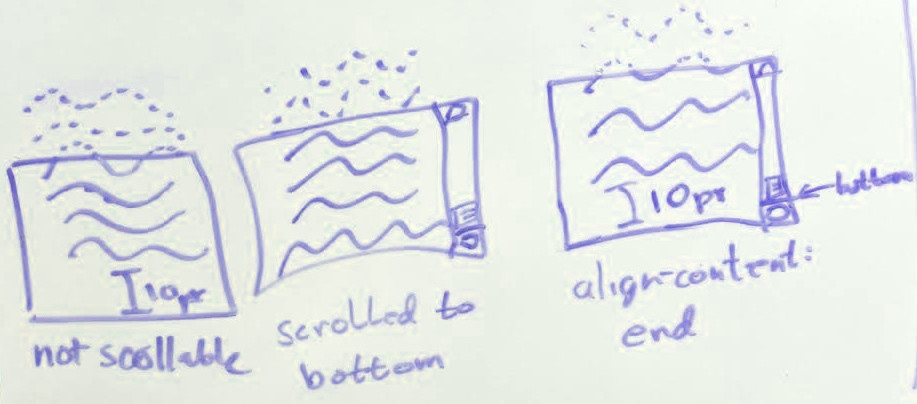
Check whether things like baseline alignment depend on the initial scroll position or the scroll origin position. This doesn’t define a coordinate system for scroll offsets. Whether they increase downward/rightward, block/inline-axis endward, or away from the scroll origin is not defined. Should each API define its coordinate model? Unless otherwise adjusted (e.g. by content alignment [css-align-3]), the area beyond the scroll origin in either axis is considered the unreachable scrollable overflow region: content rendered here is not accessible to the reader, see § 2.2 Scrollable Overflow. The root viewport, which scrolls the page canvas, uses the principal writing mode for determining its scroll origin and initial scroll position. Note: In the case where a scroll container (or one of its ancestors) is the target of a graphical transform, the UA might need to take this transform into account when mapping user inputs to scrolling operations. For instance, on a touch screen where the user scrolls by directly dragging the content, the transform would be expected to be taken into account to match the direction of scrolling to the gesture. On the other hand, other user inputs (such as the Page Down key, or a 1D scroll wheel) might be more naturally interpreted ignoring the transform. Choosing the appropriate behavior for each scrolling mechanism is the responsibility of the UA. 3. Clipping and Scrolling OverflowThe properties in this chapter specify whether and where a box’s overflow is clipped; if so, whether it is a scroll container; and if so, in which axis(es) it is allowed to scroll (its scrollable axis(es)), thus which of the following types of scroll container it is:
3.1. Managing Overflow: the overflow-x, overflow-y, and overflow properties
The overflow-x property specifies the handling of overflow in the horizontal axis (i.e., overflow from the left and right sides of the box), and the overflow-y property specifies the handling of overflow in the vertical axis (i.e., overflow from the top and bottom sides of the box). The overflow-block and overflow-inline properties likewise specify the handling of overflow in the block and inline axis, respectively These four properties form a logical property group together with the overflow shorthand, and interact as defined in CSS Logical Properties 1 § 4 Flow-Relative Box Model Properties.
The overflow property is a shorthand property that sets the specified values of overflow-x and overflow-y in that order. If the second value is omitted, it is copied from the first. Values have the following meanings:
The scroll, auto, and hidden values are known as the scrollable values of overflow. They cause the box to be a scroll container and the affected axis to be a scrollable axis. A block box that becomes a scroll container also establishes an independent formatting context. The visible and clip values are known as the non-scrollable values. However, if the other axis specifies a scrollable value, a specified value of visible computes to auto, enabling scrolling in its axis. If neither axis computes to a scrollable value, the box is not a scroll container. If only one axis computes to a scrollable value (i.e. the other axis is clip), the box is a single-axis scroll container. User agents must also support the overlay keyword as a legacy value alias of auto. Note: The overflow properties are expanded to apply to replaced elements in Level 4. 3.1.1. Interaction of visibility and overflowIf the computed value of the visibility property is hidden (or collapse when it has the same effect as hidden), and overflow is either scroll or auto, then:
3.1.2. Interaction of border-radius and overflowAs mentioned in CSS Backgrounds 3 § 4.3 Corner Clipping, the clipping region established by overflow can be rounded:
3.1.3. Overflow in Print and Other Static MediaSince scrolling is not possible in static media (such as print) authors should be careful to make content accessible in such media, for example by using @media print, (update: none) { … } to adjust layout such that all relevant content is simultaneously visible. On scroll containers in non-interactive media with an overflow value of auto or scroll (but not hidden) UAs may display an indication of any scrollable overflow, such as by displaying scrollbars or an ellipsis. Note: Not all paged media is non-interactive: for example, e-book readers paginate content, but are interactive. 3.1.4. Overflow Viewport PropagationUAs must apply the overflow values
set on the root element to the viewport
when the root element’s display value is not none.
However,
when the root element is an [HTML] Note: Using containment on the HTML Note: overflow: hidden on the root element might not clip everything outside the Initial Containing Block if the ICB is smaller than the viewport, which can happen on mobile. If visible is applied to the viewport, it must be interpreted as auto. If clip is applied to the viewport, it must be interpreted as hidden. 3.2. Expanding Clipping Bounds: the overflow-clip-margin property
This property defines the overflow clip edge of the box, i.e. precisely where the box’s content is allowed to paint before being clipped by effects (such as overflow: clip, above) that are defined to clip to the box’s overflow clip edge. Values are defined as follows:
The overflow clip edge is shaped in the corners exactly the same way as an outer box-shadow with a spread radius of the same cumulative offset from the box’s border edge. See CSS Backgrounds 3 § 4.2 Corner Shaping and CSS Backgrounds 3 § 6.1.1 Shadow Shape, Spread, and Knockout, noting in particular the formula for outsets beyond the border edge. If the box is a scroll container:
Note: This property was previously defined to only affect overflow: clip. It now also affects scroll containers, but only to shrink the clipping edge. 3.3. Calculating the Scrollable Overflow AreaThe scrollable overflow area of a box is the union of:
Additionally, due to Web-compatibility constraints (caused by authors exploiting legacy bugs to surreptitiously hide content from visual readers but not search engines and/or speech output), UAs must clip any content in the unreachable scrollable overflow region. Note: The content-distribution properties can alter the unreachable scrollable overflow region to ensure that a scroll container’s alignment subject is reachable after alignment. [css-align-3] 4. Scrolling Behaviors and AnimationsCSS provides several controls over how scrolling behaves when triggered.
Note: For animating other things in conjunction with scrolling, see [SCROLL-ANIMATIONS-1]. 4.1. Smooth Scrolling: the scroll-behavior Property
The scroll-behavior property specifies the scrolling behavior for a scroll container, when scrolling happens due to navigation, scrolling APIs [CSSOM-VIEW], or scroll snapping operations not initiated by the user [CSS-SCROLL-SNAP-1]. Any other scrolls, e.g. those that are performed by the user, are not affected by this property. When this property is specified on the root element, it applies to the viewport instead. Note: The scroll-behavior property of the HTML
User agents may ignore this property. 5. Scrollbars and Layout5.1. Scrollbar Contributions to SizingThe space reserved for the scrollbar is located between the padding area and the border area of the scroll container box. However, for the purpose of the background positioning area and background painting area, this reserved space is treated as part of the padding area.
In the following document fragment,
both an absolutely-positioned element
and a background image
are positioned to the top right of the box.
If no scrollbars are present on When the box is intrinsically sized, this reserved space is added to the size of its contents. It is otherwise subtracted from space allotted to the content area. To the extent that the presence of scrollbars can affect sizing, UAs must start with the assumption that no scrollbars are needed, and recalculate sizes if it turns out they are.
In the following document fragment,
the outer
<article> has height: auto, but max-height: 5em.
The inner <section> has large margins and would normally just fit:
...
article { overflow: auto; max-height: 5em; width: max-content; }
section { margin: 2em; line-height: 1 }
...
If we assumed that However, we should have started by assuming that no scrollbars are needed.
In that case the content height of 5.2. Reserving space for the scrollbar: the scrollbar-gutter propertyThe space between the inner border edge and the outer padding edge which user agents may reserve to display the scrollbar is called the scrollbar gutter. The scrollbar-gutter property gives control to the author over the presence of scrollbar gutters separately from the ability to control the presence of scrollbars provided by the overflow property.
This property affects the presence of scrollbar gutters placed at the inline start edge or inline end edge of the box. The presence of a scrollbar gutter at the block start edge and block end edge of the box cannot be controlled in this level, and is determined the same way as the presence of scrollbar gutters placed at the inline start edge or inline end edge of the box when scrollbar-gutter is auto. Scrollbars which by default are placed over the content box and do not cause scrollbar gutters to be created are called overlay scrollbars. Such scrollbars are usually partially transparent, revealing the content behind them if any. Their appearance and size may vary based on whether and how the user is interacting with them. Scrollbars which are always placed in a scrollbar gutter, consuming space when present, are called classic scrollbars. Such scrollbars are usually opaque. Whether classic scrollbars or overlay scrollbars are used, the appearance and size of the scrollbar, and whether scrollbars appear on the start or end edge of the box, is UA defined. Note: Which side a scrollbar appears on may depend on operating system conventions, bidirectionality, or other ergonomic considerations. In the case of classic scrollbars, the width of the scrollbar gutter, if present (see below), is the same as the width of the scrollbar. In the case of overlay scrollbars, no scrollbar gutter is present. Note: There are known use cases that could be addressed by enabling scrollbar gutters for overlay scrollbars, but no satisfactory design has been agreed to so far. This could be addressed by future extensions of this property. See CSS Overflow 4 § A Possible extensions for scrollbar-gutter. The values of this property have the following meaning:
When the scrollbar gutter is present but the scrollbar is not, or the scrollbar is transparent or otherwise does not fully obscure the scrollbar gutter, the background of the scrollbar gutter must be painted as an extension of the padding. As for the overflow property,
when scrollbar-gutter is set on the root element,
the user agent must apply it to the viewport instead,
and the used value on the root element itself is scrollbar-gutter: auto.
However, unlike the overflow property,
the user agent must not propagate scrollbar-gutter from the HTML
Note: The following table summarizes the interaction of overflow and scrollbar-gutter
showing in which case space is reserved for a classic scrollbar’s scrollbar gutter.
6. Automatic Ellipses6.1. Overflow Ellipsis: the text-overflow property
This property specifies rendering when inline content overflows its end line box edge in the inline progression direction of its block container element ("the block") that has overflow other than visible. Text can overflow for example when it is prevented from wrapping
(e.g. due to
The term "character" is used in this property definition for better readability and means "grapheme cluster" [UAX29] for implementation purposes. For the ellipsis value implementations must hide characters and atomic inline-level elements at the end edge of the line as necessary to fit the ellipsis, and place the ellipsis immediately adjacent to the end edge of the remaining inline content. The first character or atomic inline-level element on a line must be clipped rather than ellipsed. Bidi ellipsis examplesThese examples demonstrate which characters get hidden to make room for the ellipsis in a bidi situation: those visually at the end edge of the line. Sample CSS: div Sample HTML fragments, renderings, and your browser:
ellipsing details
user interaction with ellipsis
Example(s): text-overflow examplesThese examples demonstrate setting the text-overflow of a block container element that has text which overflows its dimensions: sample CSS for a div: div sample HTML fragments, renderings, and your browser:
Note: the side of the line that the ellipsis is placed depends on the direction of the block.
E.g. an overflow hidden right-to-left
( ellipsis interaction with scrolling interfacesThis section applies to elements with text-overflow other than text-overflow:clip (non-clip text-overflow) and overflow:scroll. When an element with non-clip text-overflow has overflow of scroll in the inline progression dimension of the text, and the browser provides a mechanism for scrolling (e.g. a scrollbar on the element, or a touch interface to swipe-scroll, etc.), there are additional implementation details that provide a better user experience: When an element is scrolled (e.g. by the user, DOM manipulation), more of the element’s content is shown. The value of text-overflow should not affect whether more of the element’s content is shown or not. If a non-clip text-overflow is set, then as more content is scrolled into view, implementations should show whatever additional content fits, only truncating content which would otherwise be clipped (or is necessary to make room for the ellipsis/string), until the element is scrolled far enough to display the edge of the content at which point that content should be displayed rather than an ellipsis/string. This example uses text-overflow on an element with overflow scroll to demonstrate the above described behavior. sample CSS: div.crawlbar sample HTML fragment:
demonstration of sample CSS and HTML:
CSS is awesome, especially when you can scroll
to see extra text instead of just
having it overlap other text by default.
While the content is being scrolled, implementations may adjust their rendering of ellipses (e.g. align to the box edge rather than line edge). Appendix A. Privacy ConsiderationsThis specification introduces no new privacy concerns. Appendix B. Security ConsiderationsThis specification introduces no new security concerns. Appendix C. ChangesThis appendix is informative. Significant changes since the 7 October 2025 Working Draft:
Significant changes since the 29 March 2023 Working Draft:
See also Previous Changes. AcknowledgmentsThanks especially to the feedback from Rossen Atanassov, Tab Atkins, Bert Bos, Tantek Çelik, John Daggett, Daniel Glazman, Vincent Hardy, Ian Kilpatrick, Håkon Wium Lie, Peter Linss, Robert O’Callahan, Florian Rivoal, Alan Stearns, Steve Zilles, and all the rest of the www-style community. | ||||||||||||||||||||||||||||||||||||||||||||||||||||||||||||||||||||||||||||||||||||||||||||||||||||||||||||||||||||||||||||||||||||||||||||||||||||||||||||||||||||||
| You are visitor 01402503 — GeezerVison does not store the pages you look up. Best viewed with Netscape Navigator 4.7 or Internet Explorer 6 at 800×600. No cookies required. |