GeezerVisonThe World Wide Web, restored to 800 pixels of glory. | ||||||||||||||||||||||||||||||||||||||||||||||||||||||||||||||||||||||||||||||||||||||||||||||||||||||
| Home|About|Gaming cabinet|Archives|How it works|Starter sites | ||||||||||||||||||||||||||||||||||||||||||||||||||||||||||||||||||||||||||||||||||||||||||||||||||||||
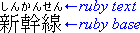
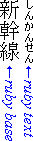
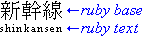
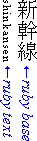
GeezerVison is showing drafts.csswg.org — CSS Ruby Annotation Layout Module Level 1 1. Introduction1.1. What is ruby?This subsection is not normative. Ruby is the commonly-used name for a run of text that appears alongside another run of text (referred to as the “base”) and serves as an annotation or a pronunciation guide associated with that run of text. 
The following figures show two examples of Ruby, a simple case and one with more complicated structure.
In this example, a single annotation is used to annotate a base text
consisting of multiple characters.
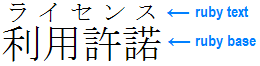
Example of ruby used in Japanese (simple case) In Japanese typography, this case is sometimes called taigo ruby (Japanese: 対語ルビ, i.e. per-word ruby) or group-ruby, because the annotation as a whole is associated with multi-character word (as a whole).
In this second example,
two levels of annotations are attached to the base text:
the hiragana characters on top refer to the pronunciation of each of the base kanji characters,
while the words “Keio” and “University” on the bottom are give the English translation.
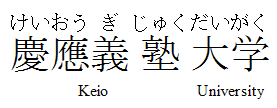
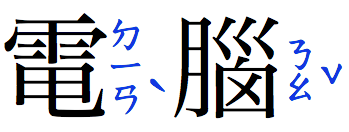
Complex ruby with annotation text over and under the base characters Notice that to reflect the correct association of hiragana characters and their corresponding Kanji base characters, the spacing within the base-level text is adjusted. (This happens around the fourth Kanji character in the figure above, which has a three-character phonetic gloss.) To avoid variable spacing of the base text in the example above, the hiragana annotations can be styled as a merged annotation, which will look more like the group-ruby example earlier. However because the base-annotation pairings are recorded in the ruby structure, if the text breaks across lines, the annotation characters will stay correctly paired with their respective base characters. In HTML, ruby structure and markup to represent it is described in the Ruby Markup Extension specification. This module describes the CSS rendering model and formatting controls relevant to ruby layout of such markup. A more in-depth introduction to Ruby and its formatting can be found in the “What is Ruby“ article [QA-RUBY]. Extensive information about the main ways ruby has traditionally been formatted in Japanese can be found in JIS X-4051 [JIS4051] (in Japanese) and in “Ruby and Emphasis Dots” in Requirements for Japanese Text Layout [JLREQ] (in English and Japanese); Rules for Simple Placement of Japanese Ruby [SIMPLE-RUBY] also describes (in English) one possible approach for Japanese ruby formatting. “Interlinear annotations” in Requirements for Chinese Text Layout [CLREQ] describes the related practices for Chinese typography (in Chinese and English). 1.2. Module interactionsThis module extends the inline box model of CSS Level 2 [CSS2] to support ruby. None of the properties in this module apply to the ::first-line or ::first-letter pseudo-elements; however ruby-position can inherit through ::first-line to affect ruby annotations on the first line. 1.3. Value DefinitionsThis specification follows the CSS property definition conventions from [CSS2] using the value definition syntax from [CSS-VALUES-3]. Value types not defined in this specification are defined in CSS Values & Units [CSS-VALUES-3]. Combination with other CSS modules may expand the definitions of these value types. In addition to the property-specific values listed in their definitions, all properties defined in this specification also accept the CSS-wide keywords keywords as their property value. For readability they have not been repeated explicitly. 1.4. Diagram conventionsThis subsection is not normative. Many typographical conventions in East Asian typography depend on whether the character rendered is wide (CJK) or narrow (non-CJK). There are a number of illustrations in this document for which the following legend is used:
The orientation which the above symbols assume in the diagrams corresponds to the orientation that the glyphs they represent are intended to assume when rendered by the user agent. Spacing between these characters in the diagrams is incidental, unless intentionally changed to make a point. 2. Ruby Box ModelThe CSS ruby model is based on the W3C HTML5 Ruby Markup model and the XHTML Ruby Annotation Recommendation [RUBY]. In this model, a ruby structure consists of one or more ruby base elements representing the base (annotated) text, associated with one or more levels of ruby annotation elements representing the annotations. The structure of ruby is similar to that of a table: there are “rows” (the base text level, each annotation level) and “columns” (each ruby base and its corresponding ruby annotations). 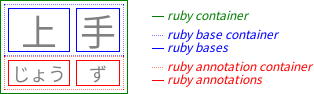
Sets of consecutive bases and their consecutive annotations are grouped together into ruby segments. Within a ruby segment, a ruby annotation may span multiple ruby bases. 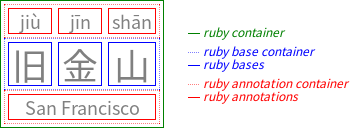
Note: In HTML, a single 2.1. Ruby-specific display ValuesFor document languages (such as XML applications) that do not have pre-defined ruby elements, authors must map document language elements to ruby elements; this is done with the display property.
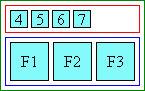
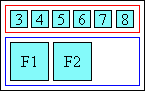
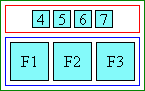
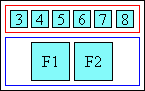
The following new display values assign ruby layout roles to an arbitrary element:
Authors using a language (such as HTML)
that supports dedicated ruby markup
should use that markup rather than
styling arbitrary elements (like Note: Replaced elements with a display value of ruby-base, ruby-text, ruby-base-container, and ruby-text-container are treated as inline-level boxes, as per CSS Display 3 § 2.4 Layout-Internal Display Types: the table-* and ruby-* keywords; replaced elements with a display value of ruby or inline ruby behave according to their outer display type, as per CSS Display 3 § 2.1 Outer Display Roles for Flow Layout: the block, inline, and run-in keywords. (See also § 2.1.2 Non-Inline Ruby.) 2.1.1. The Ruby Formatting ContextRuby containers are non-atomic inline-level boxes. Like regular inline boxes (see CSS Inline Layout 3 § 2 Inline Layout Model), they break across lines, and their containing block is the nearest block container ancestor. And just as the contents of an inline box participate in the same inline formatting context that contains the inline box itself, a ruby container and its base-level contents participate in the same inline formatting context that contains the ruby container itself. However ruby containers also establish a ruby formatting context that builds further structure around their segment of the inline formatting context in order to host their annotations. Note: this formatting context is not an independent formatting context. Ruby bases, ruby annotations, ruby base containers, and ruby annotation containers are internal ruby boxes: like internal table elements, they have specific roles in ruby layout, and participate in their ruby container’s ruby formatting context. In addition to their role in the ruby formatting context, ruby bases simultaneously participate in the same base-level inline formatting context as the ruby container, while ruby annotations participate in separate annotation-level inline formatting contexts established by the ruby container. As with the contents of inline boxes, the containing block for the contents of a ruby container (and all its internal ruby boxes) is the containing block of the ruby container. So floats, for example, are trapped by the ruby container’s containing block, not any of the ruby box types. 2.1.2. Non-Inline RubyIf an element has an inner display type of ruby and an outer display type other than inline, then it generates two boxes: a principal box of the required outer display type type, and an inline-level ruby container. All properties specified on the element apply to the principal box (and if inheritable, inherit to the ruby container box). This allows styling the element as a block, while correctly maintaining the internal ruby structure. Note: Absolute positioning or floating an element causes its display value to compute to a block-level equivalent. (See [CSS-DISPLAY-3] or [CSS2] section 9.7.) For the internal ruby display types, this causes their display value to compute to block. 2.2. Anonymous Ruby Box GenerationThe CSS model does not require that the document language include elements that correspond to each of these components. Missing parts of the structure are implied through the anonymous box generation rules similar to those used to normalize tables. [CSS2]
Once all ruby layout structures are properly parented, the UA can start to associate bases with their annotations. Note: The UA is not required to create any of these anonymous boxes (or the anonymous empty intra-level white space boxes in § 2.3 Annotation Pairing) in its internal structures, as long as pairing and layout behaves as if they existed.
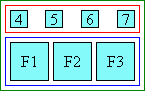
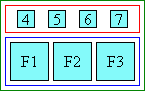
The following markup diagram representing the various boxes
shows where intra-ruby white space is preserved or discarded:
where
2.3. Annotation PairingAnnotation pairing is the process of associating ruby annotations with ruby bases. Each ruby annotation is associated with one or more ruby bases, and is said to span those bases. (A ruby annotation that spans multiple bases is called a spanning annotation.) A ruby base can be associated with only one ruby annotation per annotation level. However, if there are multiple annotation levels, it can be associated with multiple ruby annotations. Once pairing is complete, ruby columns are defined, each represented by a single ruby base and one ruby annotation (possibly an empty, anonymous one) from each interlinear annotation level in its ruby segment. 2.3.1. Segment Pairing and Annotation LevelsA ruby structure is divided into ruby segments, each consisting of a single ruby base container followed by one or more ruby annotation containers. Each ruby annotation container in a ruby segment represents one level of annotation for the base text: the first one represents the first level of annotation, the second one represents the second level of annotation, and so on. The ruby base container represents the base level. The ruby base container in each segment is thus paired with each of the ruby annotation containers in that segment. In order to handle degenerate cases, some empty anonymous containers are assumed:
Inter-segment white space is effectively a ruby segment of its own. 2.3.2. Unit Pairing and Spanning AnnotationsWithin a ruby segment, each ruby base in the ruby base container is paired with one ruby annotation from each ruby annotation container in its ruby segment. If a ruby annotation container contains only a single, anonymous ruby annotation, then that ruby annotation is paired with (i.e. spans across) all of the ruby bases in its ruby segment. Otherwise, each ruby annotation is paired, in document order, with the corresponding ruby base in that segment. If there are not enough ruby annotations in a ruby annotation container, the remaining ruby bases are paired with anonymous empty annotations inserted at the end of the ruby annotation container. If there are not enough ruby bases, any remaining ruby annotations pair with empty, anonymous bases inserted at the end of the ruby base container. If an implementation supports ruby markup with explicit spanning (e.g. XHTML Complex Ruby Annotations), it must adjust the pairing rules to pair spanning annotations to their bases appropriately. Intra-level white space does not participate in standard annotation pairing. However, if the immediately-adjacent ruby bases or ruby annotations are paired
The following diagram shows the pairing of
regular base and annotation boxes
as well as the pairing of intra-ruby white space (represented as ws):
|[  s p a n n i n g   a n n o t a t i o n ]|
|[ a1 ]|[ws]|[ a2 ]|[  ]|[ a3 ]|[ws]|[ a4 ]|
|[ b1 ]|[ws]|[ b2 ]|[ws]|[ b3 ]|[  ]|[ b4 ]|
Blue brackets ([ ]) represent base boxes, red brackets ([ ]) represent annotation boxes, gray bars (|) represent the limits of ruby columns, [ws] represents intra-ruby white space, and [] represents an empty anonymous base or annotation automatically generated to pair with intra-ruby white space in another level. Ruby containers, base containers, and annotation containers are omitted. 2.4. Hiding Annotations: visibility: collapse and auto-hidden rubyA ruby annotation whose visibility is collapse is a hidden annotation. Additionally, if a ruby annotation has the exact same text content as its base, it is automatically hidden (auto-hidden) by the UA. Hiding a ruby annotation does not affect annotation pairing. However the hidden annotation is not visible, and it has no impact on layout other than to separate adjacent sequences of ruby annotation boxes within its level, as if they belonged to separate segments and the hidden annotation’s base were not a ruby base but an intervening inline.
Auto-hiding allows correct inlined display of annotations
for Japanese words that are a mix of kanji and hiragana.
For example, the word 振り仮名 should be inlined as
振り仮名(ふりがな) and therefore marked up as
However, when displayed as ruby, the “り” should be hidden 
Hiragana ruby for 振り仮名. Notice there is no hiragana annotation above り, since it is already in hiragana.
The Japanese word in this example is composed of three kanji characters,
one of which is taught in first grade,
while the other two are more advanced.
(Characters colored to show base-pair correspondences.)

Although some readers might need pronunciation guidance on all three characters, for other audiences it is more appropriate to hide the annotation on the easier character. Applying visibility: collapse enables this hiding: 
The hiding behavior of visibility: collapse differs from visibility: hidden—which makes the annotation invisible, but does not remove its impact on layout: 
It also differs from display: none because visibility: collapse preserves pairing relationships, whereas display: none removes the box from the tree entirely, disturbing the pairing of any annotations after it: 
When the computed value of ruby-merge on the annotation container is merge, hiding is disabled. When that value is auto, the user agent may decide whether to disable hiding of its annotations, but it is recommended to enable hiding if the user agent’s layout algorithm produces the results similar to separate. The content comparison for auto-hiding
takes place prior to white space collapsing (white-space) and text transformation (text-transform)
and ignores elements (considers only the Note: Future levels of CSS Ruby may add controls for auto-hiding, but in this level it is always forced. 2.5. White Space CollapsingAs discussed in § 2.2 Anonymous Ruby Box Generation, white space within a ruby structure is discarded:
For example, the following markup will display without any spaces:
Between ruby segments, between ruby bases, and between ruby annotations, however, white space is not discarded, and is maintained for rendering as inter-base, inter-annotation, or inter-segment white space. (See Interpret intra-level white space, above.)
The rules preserving white space allow ruby to be used with space-separated scripts such as Latin.
For example,
They also ensure that annotated white space is preserved. For example,
Where undiscarded white space is collapsible, it will collapse across adjacent boxes in each line box following the standard white space processing rules [CSS-TEXT-3]. Annotations in separate ruby segments or separated by hidden annotations are not considered adjacent; however all base-level content (including inter-character annotations, which are treated as atomic inlines) is. For collapsible white space between ruby segments (inter-segment white space), the contextual text for determining segment break transformations is thus given by the ruby bases on either side, not necessarily the text on either side of the white space in source document order (which could include interlinear annotations).
Note: The white space processing rules
cause a white space sequence containing a segment break (such as a line feed)
to collapse to nothing between Han and Kana characters.
This means that Chinese and Japanese ruby can safely use white space for indentation of ruby markup.
For example, the following markup will display without any spaces:
However, white space that does not contain a segment break does not collapse completely away, so this markup will display with a space between the first and second ruby pairs:
3. Ruby LayoutWhen a ruby structure is laid out, its base level is initially laid out on the line exactly as if its ruby bases were a regular sequence of inline boxes and the ruby container a regular inline box wrapped around it. If a ruby container has any inter-character annotations, they are laid out into the base level as detailed in § 3.2 Inter-character Ruby Layout. Subsequently, the base container is sized and interlinear annotations are laid out as detailed in § 3.1 Interlinear Ruby Layout. As in other CSS layout models, relative positioning, transforms, and other graphical effects apply after this layout of the boxes. 3.1. Interlinear Ruby LayoutInterlinear ruby annotations within a level are initially laid out as if they were inline boxes participating in the same inline formatting context, effectively establishing a line box for that level of annotation in the ruby container. Annotations and bases are aligned to each other by adjusting their spacing as described below. 3.1.1. Inline-axis Interlinear LayoutIn the inline axis, interlinear ruby annotations are aligned with respect to their ruby base boxes in accordance with their annotation container’s ruby-merge value. When ruby-merge is separate, each ruby column is sized to the widest content (ruby base or ruby annotation) in that column. In the case of spanning annotations (whether actually spanning or pretending to span per ruby-merge: merge), if the content of a spanning annotation would be wider than the columns that it spans, then the difference is distributed equally among the spanned columns. If a ruby segment contains multiple spanning annotations, this distribution of additional space is performed starting with the spanning annotations that span the least number of bases, and then in increasing number of bases spanned. Each ruby base and ruby annotation is then sized to exactly span its column(s). Note: If there are multiple annotations in different levels spanning the same number of bases that overlap but do not coincide, the distribution of space is undefined. Note this is not possible with HTML markup, but can happen in markup languages with explicit spanning such as in [RUBY]. If any ruby annotation in an annotation container with ruby-merge: auto is wider than its base, then ruby annotations in that annotation container may extend outside of their column(s). When they do, their influence on the measure of the columns they intersect is up to the user agent, provided that the ruby segment is made wide enough to fit all its content. Inter-character annotations are interleaved between columns: they factor into measurement of annotations that span both adjacent columns, but are not included in either column and are never affected by the sizing or positioning of interlinear annotations. Within each base and annotation box, how the extra space is distributed when its content is narrower than the measure of the box is specified by its ruby-align property.
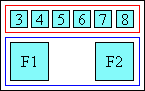
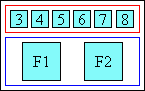
The following diagrams illustrate these rules,
covering typical situations
as well as a few more complex ones.
In each case,
base boxes and annotation boxes are assumed to have ruby-align: center,
while annotation containers are assumed to have ruby-align: space-between.
Blue brackets ([ ]) represent base boxes, red brackets ([ ]) represent annotation boxes, and gray bars (|) represent the limits of ruby columns. Ruby containers, base containers, and annotation containers are omitted.
3.1.2. Block-axis Interlinear LayoutDefine the extent to which vertical-align affects these ruby boxes. See Issue 4987. Each base container is then sized and positioned to contain exactly all of its ruby bases’ margin boxes—and all their associated inter-character ruby annotation margin boxes, if any—as well as the base and annotation containers of any descendant ruby containers also participating in this inline formatting context. (If a base container has no in-flow content, it is sized and positioned as if it contained a single empty ruby base.) Each interlinear annotation container is sized and positioned to contain exactly all of its ruby annotations’ margin boxes as well as the base and annotation containers of any descendant ruby containers also participating in this annotation level’s inline formatting context. (If an annotation container has no in-flow content, it is sized and positioned as if it contained a single empty ruby annotation.) These annotation containers are then stacked outward over or under (depending on ruby-position) their corresponding base container, without any intervening space, thus determining the block-axis positioning of the ruby annotations with respect to their ruby bases. Should block-axis margins collapse? This makes layout more robust, but is inconsistent with how inlines behave along the inline-axis. 3.2. Inter-character Ruby LayoutInter-character annotations have special layout. Inter-character ruby annotation boxes are spliced into and measured as part of the layout of the base level. Each ruby annotation is inserted to the right of the ruby base it is paired with; a spanning inter-character annotation is placed after the rightmost of all the bases that it spans. Inter-character ruby annotations are laid out exactly like inline blocks, except as described below. Note: As per the definition of inter-character, inter-character annotations always have a vertical-rl writing-mode, and only exist in horizontal ruby containers. Each ruby annotation is placed immediately to the right of the relevant ruby base, before any inter-base white space (or inter-segment white space). If multiple inter-character ruby annotation boxes are placed against the same ruby base, their margin boxes are stacked rightwards without intervening space, in increasing level order. If the automatic height of the ruby annotation box’s content area would be shorter than the height of the content box of the ruby base after which it is placed, its content box height is increased to match that height exactly. The alignment of the ruby annotation box depends on the ruby-align property on the ruby annotation:
The ruby annotation container box of an inter-character annotation is sized and placed so that its content box coincides exactly with that of the ruby base container box. Note: The size and position of inter-character ruby annotation container boxes has no effect on layout. The above definition is merely so that programmatically inquiring about them produces deterministic results. For the purpose of alignment and column sizing (as discussed in § 3 Ruby Layout), inter-character ruby annotations are not considered to be part of the same column as the base to with they are attached; rather, they effectively form a column of their own. 3.3. Styling Ruby BoxesRuby bases and ruby containers are treated as inline boxes, and all properties that apply to inline boxes, unless otherwise specified, also apply to them in the same way. However, the line-relative shift values of vertical-align (top, bottom) must be ignored (treated as zero). All properties that apply to inline boxes, unless otherwise specified, also apply to ruby annotations in the same way, except line-height, which does not apply. Also, the line-relative shift values of vertical-align (top, bottom) must be ignored (treated as zero). Neither the margin, padding, and border properties nor any of the properties that do not apply to inline boxes apply to base containers or annotation containers. Additionally, line-height does not apply to annotation containers. The UA is not required to support any of the background properties or outline properties, or any other property that illustrates the bounds of the box on ruby base container boxes or ruby annotation container boxes. The UA may implement these boxes simply as abstractions for inheritance and control over the layout of their contents. 3.4. Breaking Across LinesWhen there is not enough space for an entire ruby container to fit on the line, the ruby may be broken wherever all levels simultaneously allow a break. (See CSS Text 3 § 5 Line Breaking and Word Boundaries for details on line breaking.) Ruby most often breaks between base-annotation sets, but if the line-breaking rules allow it, can also break within a ruby base (and, in parallel, its associated ruby annotation boxes). Whenever ruby breaks across lines, ruby annotations must stay with their respective ruby bases. The line must not break between a ruby base and its annotations, even in the case of inter-character annotations. 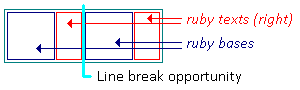
inter-character ruby line breaking opportunity After line-breaking, each fragment is laid out independently, and ruby alignment takes place within each fragment. 3.4.1. Breaking Between BasesIn typical cases, ruby base boxes and ruby annotation boxes are styled to forbid internal line wrapping and do not contain forced breaks. (See Appendix A.) In such cases the ruby container can only break between adjacent ruby bases, and only if no ruby annotations span those ruby bases. 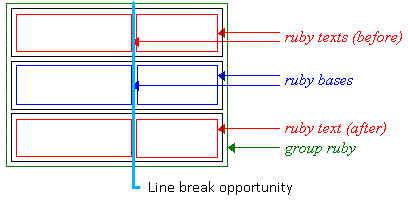
Ruby line breaking opportunity Whether ruby can break between two adjacent ruby bases is controlled by normal line-breaking rules for the base text, exactly as if the ruby bases were adjacent inline boxes. (The annotations are ignored when determining soft wrap opportunities for the base level.)
For example, if two adjacent ruby bases are “蝴” and “蝶”,
the line may break between them,
because lines are normally allowed to break between two Han characters.
However, if word-break is keep-all, that line break is forbidden.
Inter-base white space is significant for evaluating line break opportunities between ruby bases. As with white space between inlines, it collapses when the line breaks there, following the rules detailed in CSS Text 3 § 4.1 The White Space Processing Rules. Similarly, annotation white space is also trimmed at a line break.
For example, given the following markup:
Due to the space, the line may break between “one” and “two“. If the line breaks there, that space—and the space between “1” and “2”—disappears, in accordance with standard CSS white space processing rules. 3.4.2. Breaking Within BasesFor longer base texts, it is sometimes appropriate to allow breaking within a base-annotation pair. For example, if an English sentence is annotated with its Japanese translation, allowing the text to wrap allows for reasonable line breaking behavior in the paragraph. Insert scanned example so people don’t think this is just the ramblings of an insane spec-writer. Line-breaking within a ruby base is only allowed if the white-space property of the ruby base and all its parallel annotations allow it, and there exists a soft wrap opportunity within (i.e. not at the start or end) the content of each base/annotation box. Since there is no structural correspondence between fragments of content within ruby bases and annotations, the UA may break at any set of opportunities; but it is recommended that the UA attempt to proportionally balance the amount of content inside each fragment. There are no line breaking opportunities within inter-character annotations. 3.5. Bidi ReorderingThe Unicode bidirectional algorithm reorders logically-stored text for visual presentation when characters from scripts of opposing directionalities are mixed within a single paragraph. To preserve the correspondence of ruby annotations to their respective ruby bases, a few restrictions must be imposed:
To this end,
As with other inline-level content, the bidi reordering of internal ruby boxes happens after line-breaking so that content is divided across lines according to its logical order. Note: It could be useful to adjust these rules slightly so that when ruby-merge is merge on a particular annotation container, bidi isolation is not forced onto the individual annotations, enabling them to be processed together. However, this would add complexity to implementations, which does not seem justified in the absence of demand to handle this situation. Anyone with a need for this to be handled is encouraged to contact the CSS Working Group. See [CSS3-WRITING-MODES] for a more in-depth discussion of bidirectional text in CSS. 3.6. Line SpacingThe line-height property controls spacing between lines in CSS. When inline content on line is shorter than the line-height, half-leading is added on either side of the content, as specified in CSS Inline Layout 3 § 5 Logical Heights and Inter-line Spacing. In order to ensure consistent spacing of lines, documents with ruby typically ensure that the line-height is large enough to accommodate ruby between lines of text. Therefore, ordinarily, ruby annotation containers and ruby annotation boxes do not contribute to the measured height of a line’s inline contents; any alignment (see vertical-align) and line-height calculations are performed using only the ruby base container, exactly as if it were a normal inline. However, if the line-height specified on the ruby container is less than the distance between the top of the top ruby annotation container and the bottom of the bottom ruby annotation container, then additional leading is added on the appropriate side(s) of the ruby base container such that if a block consisted of three lines each containing ruby identical to this, none of the ruby containers would overlap. Note: This does not ensure that the ruby annotations remain within the line box. It merely ensures that if all lines had equal spacing and equivalent amounts and positioning of ruby annotations, there would be enough room to avoid overlap. Authors should ensure appropriate line-height and padding to accommodate ruby, and be particularly careful at the beginning or end of a block and when a line contains inline-level content (such as images, inline blocks, or elements shifted with vertical-align) taller than the paragraph’s default font size. 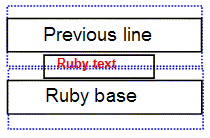
Ruby annotations will often overflow the line; authors should ensure content over/under a ruby-annotated line is adequately spaced to leave room for the ruby. Note: More control over how ruby affects alignment and line layout will be part of the CSS Line Layout Module Level 3. Note, it is currently in the exploratory stages of development; descriptions of new features should not yet be relied upon. 4. Ruby Formatting PropertiesThe following properties are introduced to control ruby positioning, text distribution, and alignment. 4.1. Ruby Positioning: the ruby-position property
This property controls position of the ruby annotation with respect to its base. Values have the following meanings:
Annotation containers that are not inter-character annotations are called interlinear annotations. If multiple ruby annotation containers have the same ruby-position, they stack outwards from the base text. 4.2. Sharing Annotation Space: the ruby-merge property
This property controls how ruby annotation boxes should be rendered when there are more than one in a ruby container box: whether each pair should be kept separate, the annotations should be merged and rendered as a group, or the separation should be determined based on the space available. Note: Inter-character annotations are always separate, and this property does not apply. Possible values:
Note: Text does not shape or form ligatures across ruby annotations or bases, even merged ones, due to bidi isolation. See § 3.5 Bidi Reordering and CSS Text 3 § 7.3 Shaping Across Element Boundaries. 4.3. Ruby Text Distribution: the ruby-align property
This property specifies how text is distributed within the various ruby boxes when their contents do not exactly fill their respective boxes. Note that space distributed by ruby-align is unrelated to, and independent of, any space distributed due to justification. For inter-character annotations, this property can also affect the alignment of the box itself (see § 3.2 Inter-character Ruby Layout). It otherwise only affects the alignment of content within the box, not the size or position of the box itself. Values have the following meanings:
The default UA style sheet applies
text-justify: ruby to ruby annotations,
defining justification opportunities
between every adjacent pair of CJK characters
but not between adjacent pairs of Latin or Bopomofo characters.
Thus, the space-around and space-between values
will nevertheless result in Latin or Bopomofo characters centered:
The distribution of space can be controlled via text-justify. [CSS-TEXT-3] Content in ruby bases and ruby annotations, except those that span due to ruby-merge: merge, is aligned within its box based on the value of ruby-align on that box. Content in merged annotations is aligned within the ruby annotation container based on the value of ruby-align on the annotations container, ignoring the value of ruby-align on the individual ruby annotations. What if a merged annotation causes the ruby segment to be wider? Does it cause each base to grow as if it were spanning them, as currently specified? This does not allow e.g. centering the text in a multi-base base container when its merged annotation is longer. Instead, maybe we should allow ruby-merge to apply to base containers as well, but this would require us either to allow a single base to span multiple annotations (if the base is merged but some annotation levels are not), or to require that if the base is merged, then all annotation levels must be merged as well. The way content is aligned when ruby-merge is auto is up to the user agent, but must be identical to that of ruby-merge: separate when all annotations fit over their respective bases. 4.4. Ruby Text DecorationText decoration does not propagate from the base text to the annotations. When text decoration is specified on an ancestor of the ruby, it is drawn across the entire content area of the ruby base container, including any extra space added on either side of the ruby base contents to accommodate long annotations. When text decoration is specified on a ruby base itself, this extra space is not decorated, similar to how a box’s own padding is not decorated when text decoration is specified directly on that box. [CSS3-TEXT-DECOR] Text decoration may be specified directly on ruby base containers and ruby annotation containers: in such cases it is propagated to all of the container’s bases or annotations (respectively), and is also drawn between them for continuity. The positions of ruby annotations may be adjusted to avoid potential conflicts with overline and underline decorations applied to the base text. In the basic case of consistent font size and baseline alignment, an underline or overline is positioned between the base level and any annotations on that side. This section needs some clarification about drawing decorations between the content of adjacent bases/annotations. Depends on if those boxes are as wide as their column or not. 5. Edge Effects5.1. Overhanging Ruby: the ruby-overhang property
The ruby-overhang property controls whether ruby annotations may overlap adjacent text outside the ruby container. Values have the following meanings:
When ruby annotations are not allowed to overhang, the ruby container behaves like a traditional inline box, i.e. only its own contents are rendered within its boundaries and adjacent elements do not cross the box boundary: 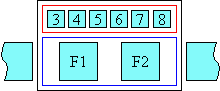
Simple ruby whose text is not allowed to overhang adjacent text However, if a ruby annotation container is allowed to overhang, neighbouring content may overlap the ruby container box, allowing its ruby annotation(s) to partially render over/under surrounding inline-level content. Overhang is only allowed to the extent that it does not cause collisions between the neighboring content and the ruby container’s annotation boxes or its overlapped base’s contents. 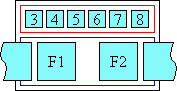
Simple ruby whose text is allowed to overhang adjacent text Note: Whether ruby annotations related to a ruby base can overhang another ruby base is controlled by ruby-merge. Typically, the alignment of the contents of the base or the annotation is not affected by overhanging behavior: alignment and space distribution (see ruby-align) is achieved the same way regardless of the overhang allowance, and is computed before the space available for overlap is determined. However, UAs may consider allowed overhang when determining space distribution and/or alignment of annotations and bases. I suspect overhanging interacts with alignment in some cases; might need to look into this later.
The user agent may use [JIS4051] recommendation of
using 0.5ic (half of a full-width character) in the annotation’s font
as the maximum overhang length.
Detailed rules for how ruby text can overhang adjacent characters
for Japanese are described by [JLREQ].
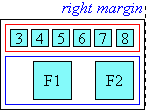
Additionally, for compatibility reasons, user agents must support an additional value of none for the ruby-overhang property, as a legacy value alias of spaces. 5.2. Line-edge AlignmentWhen a ruby annotation box that is longer than its ruby base is at the start or end edge of a line, the user agent may force the side of the ruby annotation that touches the edge of the line to align to the corresponding edge of the base. This type of alignment is described by [JLREQ]. This level of the specification does not provide a mechanism to control this behavior. 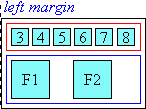
Line-edge alignment Appendix A: Sample Style SheetsThis section is informative. A.1 Default UA Style SheetThe following represents a default UA style sheet for rendering HTML and XHTML ruby markup as ruby layout: ruby Note: Authors should not use the above rules: a UA that supports ruby layout should provide these by default. UAs implementing a user-controlled “minimum font size” feature should consider scaling that minimum down for ruby annotations. A.2 Inlining Ruby AnnotationsThe following represents a sample style sheet for rendering HTML and XHTML ruby markup as inline annotations: ruby A.3 Generating ParenthesesUnfortunately, because Selectors cannot match against text nodes, it’s not possible with CSS to express rules that will automatically and correctly add parentheses to unparenthesized ruby annotations for all possible ruby markup patterns in HTML. (This is because HTML ruby allows implying the ruby base from raw text without a corresponding element.) However, these rules will add parentheses around each annotation sequence
in cases where either
Alternatively, if it is known that a purely alternating style of markup is used
(
6. Glossary
AcknowledgmentsThis specification would not have been possible without the help from: David Baron, Robin Berjon, Susanna Bowen, Stephen Deach, Martin Dürst, Hideki Hiura (樋浦 秀樹), Masayasu Ishikawa (石川雅康), Taichi Kawabata, Chris Pratley, Xidorn Quan, Takao Suzuki (鈴木 孝雄), Frank Yung-Fong Tang, Chris Thrasher, Masafumi Yabe (家辺勝文), Boris Zbarsky, Steve Zilles. Special thanks goes to the previous editors: Michel Suignard and Marcin Sawicki of Microsoft, and Richard Ishida of W3C. ChangesThis section documents the changes since previous publications. Changes since the 2 December 2021 WD
Changes since the 29 April 2020 WD
Note: There remain many open issues, see Disposition of Comments and the newer issues tracked in GitHub. Changes since the 5 August 2014 WD
Changes since the 19 September 2013 WD
Changes since the 30 June 2011 WD
Privacy ConsiderationsNo new privacy considerations have been reported on this specification. Security ConsiderationsNo new security considerations have been reported on this specification. | ||||||||||||||||||||||||||||||||||||||||||||||||||||||||||||||||||||||||||||||||||||||||||||||||||||||
| You are visitor 01402503 — GeezerVison does not store the pages you look up. Best viewed with Netscape Navigator 4.7 or Internet Explorer 6 at 800×600. No cookies required. |