GeezerVisonThe World Wide Web, restored to 800 pixels of glory. |
| Home|About|Gaming cabinet|Archives|How it works|Starter sites |
GeezerVison is showing eloquentjavascript.net — Program Structure :: Eloquent JavaScript Program Structure
 In this chapter, we will start to do things that can actually be called programming. We will expand our command of the JavaScript language beyond the nouns and sentence fragments we’ve seen so far to the point where we can express meaningful prose. Expressions and statementsIn Chapter 1, we made values and applied operators to them to get new values. Creating values like this is the main substance of any JavaScript program. But that substance has to be framed in a larger structure to be useful. That’s what we’ll cover in this chapter. A fragment of code that produces a value is called an expression. Every value that is written literally (such as This shows part of the beauty of a language-based interface. Expressions can contain other expressions in a way similar to how subsentences in human languages are nested—a subsentence can contain its own subsentences, and so on. This allows us to build expressions that describe arbitrarily complex computations. If an expression corresponds to a sentence fragment, a JavaScript statement corresponds to a full sentence. A program is a list of statements. The simplest kind of statement is an expression with a semicolon after it. This is a program: 1; !false; It is a useless program, though. An expression can be content to just produce a value, which can then be used by the enclosing code. However, a statement stands on its own, so if it doesn’t affect the world, it’s useless. It may display something on the screen, as with In some cases, JavaScript allows you to omit the semicolon at the end of a statement. In other cases, it has to be there, or the next line will be treated as part of the same statement. The rules for when it can be safely omitted are somewhat complex and error prone. So in this book, every statement that needs a semicolon will always get one. I recommend you do the same, at least until you’ve learned more about the subtleties of missing semicolons. BindingsHow does a program keep an internal state? How does it remember things? We have seen how to produce new values from old values, but this does not change the old values, and the new value must be used immediately or it will dissipate again. To catch and hold values, JavaScript provides a thing called a binding, or variable. let caught = 5 * 5; That gives us a second kind of statement. The special word (keyword) The example creates a binding called After a binding has been defined, its name can be used as an expression. The value of such an expression is the value the binding currently holds. Here’s an example: let ten = 10; console.log(ten * ten); // → 100 When a binding points at a value, that does not mean it is tied to that value forever. The let mood = "light"; console.log(mood); // → light mood = "dark"; console.log(mood); // → dark You should imagine bindings as tentacles rather than boxes. They do not contain values; they grasp them—two bindings can refer to the same value. A program can access only the values to which it still has a reference. When you need to remember something, you either grow a tentacle to hold on to it or reattach one of your existing tentacles to it. Let’s look at another example. To remember the number of dollars that Luigi still owes you, you create a binding. When he pays back $35, you give this binding a new value. let luigisDebt = 140; luigisDebt = luigisDebt - 35; console.log(luigisDebt); // → 105 When you define a binding without giving it a value, the tentacle has nothing to grasp, so it ends in thin air. If you ask for the value of an empty binding, you’ll get the value A single let one = 1, two = 2; console.log(one + two); // → 3 The words var name = "Ayda"; const greeting = "Hello "; console.log(greeting + name); // → Hello Ayda The first of these, The word Binding namesBinding names can be any sequence of one or more letters. Digits can be part of binding names— Words with a special meaning, such as break case catch class const continue debugger default delete do else enum export extends false finally for function if implements import interface in instanceof let new package private protected public return static super switch this throw true try typeof var void while with yield Don’t worry about memorizing this list. When creating a binding produces an unexpected syntax error, check whether you’re trying to define a reserved word. The environmentThe collection of bindings and their values that exist at a given time is called the environment. When a program starts up, this environment is not empty. It always contains bindings that are part of the language standard, and most of the time, it also has bindings that provide ways to interact with the surrounding system. For example, in a browser, there are functions to interact with the currently loaded website and to read mouse and keyboard input. FunctionsA lot of the values provided in the default environment have the type function. A function is a piece of program wrapped in a value. Such values can be applied in order to run the wrapped program. For example, in a browser environment, the binding prompt("Enter passcode"); 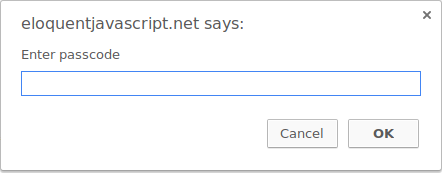 Executing a function is called invoking, calling, or applying it. You can call a function by putting parentheses after an expression that produces a function value. Usually you’ll directly use the name of the binding that holds the function. The values between the parentheses are given to the program inside the function. In the example, the The The console.log functionIn the examples, I used When running the examples (or your own code) on the pages of this book, let x = 30; console.log("the value of x is", x); // → the value of x is 30 Though binding names cannot contain period characters, Return valuesShowing a dialog box or writing text to the screen is a side effect. Many functions are useful because of the side effects they produce. Functions may also produce values, in which case they don’t need to have a side effect to be useful. For example, the function console.log(Math.max(2, 4)); // → 4 When a function produces a value, it is said to return that value. Anything that produces a value is an expression in JavaScript, which means that function calls can be used within larger expressions. In the following code, a call to console.log(Math.min(2, 4) + 100); // → 102 Chapter 3 will explain how to write your own functions. Control flowWhen your program contains more than one statement, the statements are executed as though they were a story, from top to bottom. For example, the following program has two statements. The first asks the user for a number, and the second, which is executed after the first, shows the square of that number: let theNumber = Number(prompt("Pick a number")); console.log("Your number is the square root of " + theNumber * theNumber); The function Here is the rather trivial schematic representation of straight-line control flow:  Conditional executionNot all programs are straight roads. We may, for example, want to create a branching road where the program takes the proper branch based on the situation at hand. This is called conditional execution.  Conditional execution is created with the let theNumber = Number(prompt("Pick a number")); if (!Number.isNaN(theNumber)) { console.log("Your number is the square root of " + theNumber * theNumber); } With this modification, if you enter “parrot”, no output is shown. The The The statement after the if (1 + 1 == 2) console.log("It's true"); // → It's true You often won’t just have code that executes when a condition holds true, but also code that handles the other case. This alternate path is represented by the second arrow in the diagram. You can use the let theNumber = Number(prompt("Pick a number")); if (!Number.isNaN(theNumber)) { console.log("Your number is the square root of " + theNumber * theNumber); } else { console.log("Hey. Why didn't you give me a number?"); } If you have more than two paths to choose from, you can “chain” multiple let num = Number(prompt("Pick a number")); if (num < 10) { console.log("Small"); } else if (num < 100) { console.log("Medium"); } else { console.log("Large"); } The program will first check whether The schema for this program looks something like this:  while and do loopsConsider a program that outputs all even numbers from 0 to 12. One way to write this is as follows: console.log(0); console.log(2); console.log(4); console.log(6); console.log(8); console.log(10); console.log(12); That works, but the idea of writing a program is to make something less work, not more. If we needed all even numbers less than 1,000, this approach would be unworkable. What we need is a way to run a piece of code multiple times. This form of control flow is called a loop.  Looping control flow allows us to go back to some point in the program where we were before and repeat it with our current program state. If we combine this with a binding that counts, we can do something like this: let number = 0; while (number <= 12) { console.log(number); number = number + 2; } // → 0 // → 2 // … etcetera A statement starting with the keyword The As an example that actually does something useful, we can now write a program that calculates and shows the value of 210 (2 to the 10th power). We use two bindings: one to keep track of our result and one to count how often we have multiplied this result by 2. The loop tests whether the second binding has reached 10 yet and, if not, updates both bindings. let result = 1; let counter = 0; while (counter < 10) { result = result * 2; counter = counter + 1; } console.log(result); // → 1024 The counter could also have started at Note that JavaScript also has an operator for exponentiation ( A let yourName; do { yourName = prompt("Who are you?"); } while (!yourName); console.log("Hello " + yourName); This program will force you to enter a name. It will ask again and again until it gets something that is not an empty string. Applying the Indenting CodeIn the examples, I’ve been adding spaces in front of statements that are part of some larger statement. These spaces are not required—the computer will accept the program just fine without them. In fact, even the line breaks in programs are optional. You could write a program as a single long line if you felt like it. The role of this indentation inside blocks is to make the structure of the code stand out to human readers. In code where new blocks are opened inside other blocks, it can become hard to see where one block ends and another begins. With proper indentation, the visual shape of a program corresponds to the shape of the blocks inside it. I like to use two spaces for every open block, but tastes differ—some people use four spaces, and some people use tab characters. The important thing is that each new block adds the same amount of space. if (false != true) { console.log("That makes sense."); if (1 < 2) { console.log("No surprise there."); } } Most code editor programs (including the one in this book) will help by automatically indenting new lines the proper amount. for loopsMany loops follow the pattern shown in the Because this pattern is so common, JavaScript and similar languages provide a slightly shorter and more comprehensive form, the for (let number = 0; number <= 12; number = number + 2) { console.log(number); } // → 0 // → 2 // … etcetera This program is exactly equivalent to the earlier even-number-printing example. The only change is that all the statements that are related to the “state” of the loop are grouped together after The parentheses after a This is the code that computes 210 using let result = 1; for (let counter = 0; counter < 10; counter = counter + 1) { result = result * 2; } console.log(result); // → 1024 Breaking Out of a LoopHaving the looping condition produce for (let current = 20; ; current = current + 1) { if (current % 7 == 0) { console.log(current); break; } } // → 21 Using the remainder ( The If you were to remove that If you create an infinite loop in one of the examples on these pages, you’ll usually be asked whether you want to stop the script after a few seconds. If that fails, you will have to close the tab that you’re working in to recover. The Updating bindings succinctlyEspecially when looping, a program often needs to “update” a binding to hold a value based on that binding’s previous value. counter = counter + 1; JavaScript provides a shortcut for this: counter += 1; Similar shortcuts work for many other operators, such as This allows us to further shorten our counting example: for (let number = 0; number <= 12; number += 2) { console.log(number); } For Dispatching on a value with switchIt is not uncommon for code to look like this: if (x == "value1") action1(); else if (x == "value2") action2(); else if (x == "value3") action3(); else defaultAction(); There is a construct called switch (prompt("What is the weather like?")) { case "rainy": console.log("Remember to bring an umbrella."); break; case "sunny": console.log("Dress lightly."); case "cloudy": console.log("Go outside."); break; default: console.log("Unknown weather type!"); break; } You may put any number of CapitalizationBinding names may not contain spaces, yet it is often helpful to use multiple words to clearly describe what the binding represents. These are pretty much your choices for writing a binding name with several words in it: fuzzylittleturtle fuzzy_little_turtle FuzzyLittleTurtle fuzzyLittleTurtle The first style can be hard to read. I rather like the look of the underscores, though that style is a little painful to type. The standard JavaScript functions, and most JavaScript programmers, follow the final style—they capitalize every word except the first. It is not hard to get used to little things like that, and code with mixed naming styles can be jarring to read, so we follow this convention. In a few cases, such as the CommentsOften, raw code does not convey all the information you want a program to convey to human readers, or it conveys it in such a cryptic way that people might not understand it. At other times, you might just want to include some related thoughts as part of your program. This is what comments are for. A comment is a piece of text that is part of a program but is completely ignored by the computer. JavaScript has two ways of writing comments. To write a single-line comment, you can use two slash characters ( let accountBalance = calculateBalance(account); // It's a green hollow where a river sings accountBalance.adjust(); // Madly catching white tatters in the grass. let report = new Report(); // Where the sun on the proud mountain rings: addToReport(accountBalance, report); // It's a little valley, foaming like light in a glass. A /* I first found this number scrawled on the back of an old notebook. Since then, it has often dropped by, showing up in phone numbers and the serial numbers of products that I've bought. It obviously likes me, so I've decided to keep it. */ const myNumber = 11213; SummaryYou now know that a program is built out of statements, which themselves sometimes contain more statements. Statements tend to contain expressions, which themselves can be built out of smaller expressions. Putting statements after one another gives you a program that is executed from top to bottom. You can introduce disturbances in the flow of control by using conditional ( Bindings can be used to file pieces of data under a name, and they are useful for tracking state in your program. The environment is the set of bindings that are defined. JavaScript systems always put a number of useful standard bindings into your environment. Functions are special values that encapsulate a piece of program. You can invoke them by writing ExercisesIf you are unsure how to test your solutions to the exercises, refer to the introduction. Each exercise starts with a problem description. Read this description and try to solve the exercise. If you run into problems, consider reading the hints after the exercise. You can find full solutions to the exercises online at https://eloquentjavascript.net/code. If you want to learn something from the exercises, I recommend looking at the solutions only after you’ve solved the exercise, or at least after you’ve attacked it long and hard enough to have a slight headache. Looping a triangleWrite a loop that makes seven calls to # ## ### #### ##### ###### ####### It may be useful to know that you can find the length of a string by writing let abc = "abc"; console.log(abc.length); // → 3 Most exercises contain a piece of code that you can modify to solve the exercise. Remember that you can click code blocks to edit them. // Your code here. Display hints...You can start with a program that prints out the numbers 1 to 7, which you can derive by making a few modifications to the even number printing example given earlier in the chapter, where the Now consider the equivalence between numbers and strings of hash characters. You can go from 1 to 2 by adding 1 ( FizzBuzzWrite a program that uses When you have that working, modify your program to print (This is actually an interview question that has been claimed to weed out a significant percentage of programmer candidates. So if you solved it, your labor market value just went up.) // Your code here. Display hints...Going over the numbers is clearly a looping job, and selecting what to print is a matter of conditional execution. Remember the trick of using the remainder ( In the first version, there are three possible outcomes for every number, so you’ll have to create an The second version of the program has a straightforward solution and a clever one. The simple solution is to add another conditional “branch” to precisely test the given condition. For the clever solution, build up a string containing the word or words to output and print either this word or the number if there is no word, potentially by making good use of the ChessboardWrite a program that creates a string that represents an 8×8 grid, using newline characters to separate lines. At each position of the grid there is either a space or a "#" character. The characters should form a chessboard. Passing this string to # # # # # # # # # # # # # # # # # # # # # # # # # # # # # # # # When you have a program that generates this pattern, define a binding // Your code here. Display hints...You can build the string by starting with an empty one ( To work with two dimensions, you will need a loop inside of a loop. Put braces around the bodies of both loops to make it easy to see where they start and end. Try to properly indent these bodies. The order of the loops must follow the order in which we build up the string (line by line, left to right, top to bottom). So the outer loop handles the lines, and the inner loop handles the characters on a line. You’ll need two bindings to track your progress. To know whether to put a space or a hash sign at a given position, you could test whether the sum of the two counters is even ( Terminating a line by adding a newline character must happen after the line has been built up, so do this after the inner loop but inside the outer loop. |
| You are visitor 01402503 — GeezerVison does not store the pages you look up. Best viewed with Netscape Navigator 4.7 or Internet Explorer 6 at 800×600. No cookies required. |