extract_surface_mesh.py source
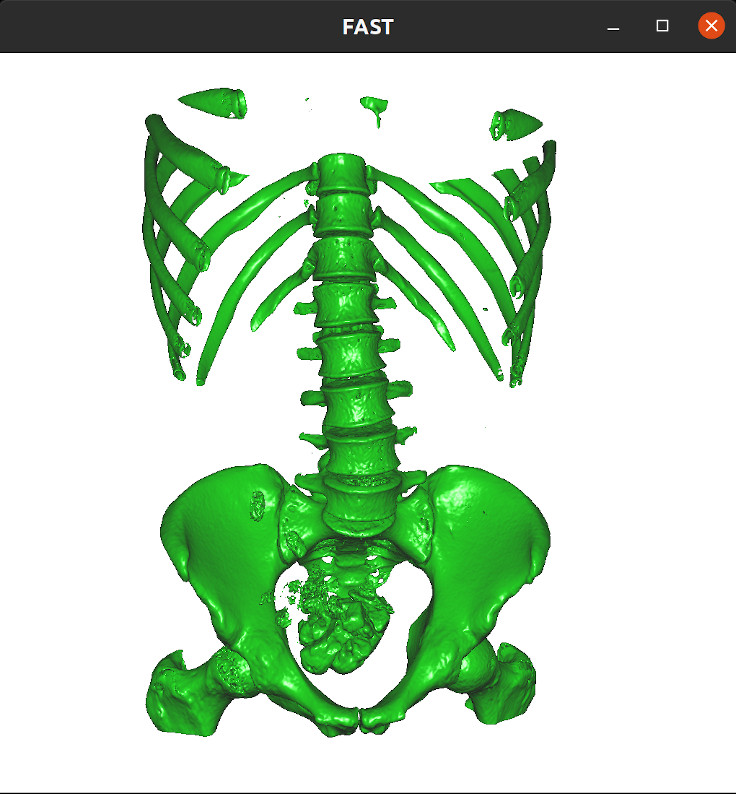
This examples extract a surface mesh with over 3 million triangles from a CT volume using the Marching Cubes algorithm.
This examples extract a surface mesh with over 3 million triangles from a CT volume using the Marching Cubes algorithm. It also shows how you can access the vertex and triangle data directly.
import fast

importer = fast.ImageFileImporter.create(fast.Config.getTestDataPath() + "/CT/CT-Abdomen.mhd")

extraction = fast.SurfaceExtraction.create(threshold=300).connect(importer)

mesh = extraction.runAndGetOutputData()
access = mesh.getMeshAccess(fast.ACCESS_READ)

# Get size of mesh:
print('Mesh size (vertices, triangles)', mesh.getNrOfVertices(), mesh.getNrOfTriangles())
# Get the position of first vertex
print(access.getVertex(0).getPosition())
# Get endpoints (vertex indices) of triangle 0
print(access.getTriangle(0).getEndpoint1(), access.getTriangle(0).getEndpoint2(), access.getTriangle(0).getEndpoint3())

# Get all vertices and triangles as lists, this is slow if it is a big surface:
#vertices = access.getVertices()
#triangles = access.getTriangles()

# Visualize the mesh
renderer = fast.TriangleRenderer.create().connect(mesh)

window = fast.SimpleWindow3D.create().connect(renderer).run()