Planet Pluto Guide
Free Planet Feed Reader and (Static) Website Generator - Auto-Build Web Pages From Published Web Feeds
GitHub //
Planets //
Quick Starter Kit //
Quick Starter Kit (Jekyll & Friends Ed.) //
Template Samples
Table of Contents
Getting Started
Step 1 - Add all web feeds to your planet configuration
Add all web feeds to add to your planet news site
to your planet configuration file.
Example - planet.ini:
title = Planet Ruby

[rubylang]
  title = Ruby Lang News
  link  = http://www.ruby-lang.org/en/news
  feed  = http://www.ruby-lang.org/en/feeds/news.rss

[rubyonrails]
  title = Ruby on Rails News
  link  = http://weblog.rubyonrails.org
  feed  = http://weblog.rubyonrails.org/feed/atom.xml

[viennarb]
  title = Vienna.rb News
  link  = http://vienna-rb.at
  feed  = http://vienna-rb.at/atom.xml
Step 2 - Auto-build your planet news site
Use the pluto command line tool and pass in the
planet configuration file. Example:
This will
1) fetch all feeds listed in planet.ini and
2) store all entries in a local database, that is, planet.db in your working folder and
3) generate a planet web page, that is, planet.html using the blank template pack in your working folder using all feed entries from the local database.
Open up planet.html to see your planet web page. Voila!
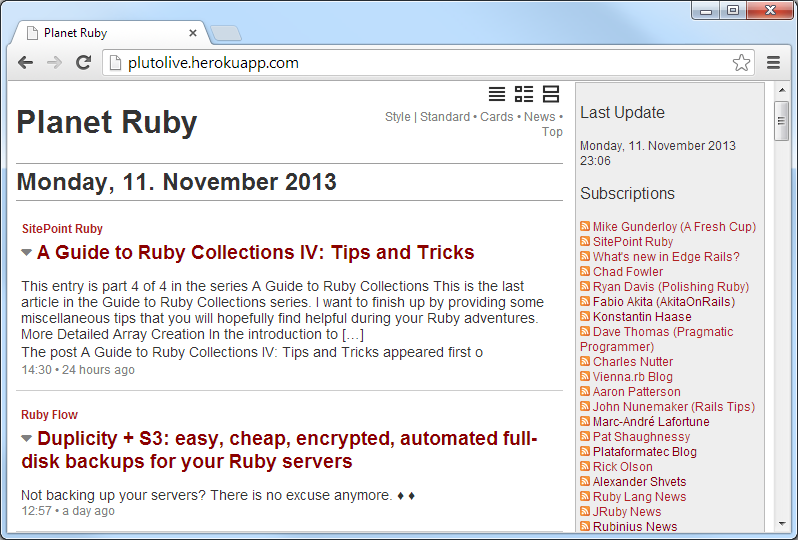
Bonus: Try different templates/theme packs
Don’t like the look and feel of the built-in standard blank theme / template?
Use a different planet theme or design your own.
See the “Planet Templates” site for more free themes / templates including:
- Blank - default templates; more »
- News - ‘river of news’ style templates; more »
- Top - Popurl-style templates; more »
- Classic - Planet Planet-Style templates; more »
top - Pluto Planet Template Pack
Screenshot - Preview
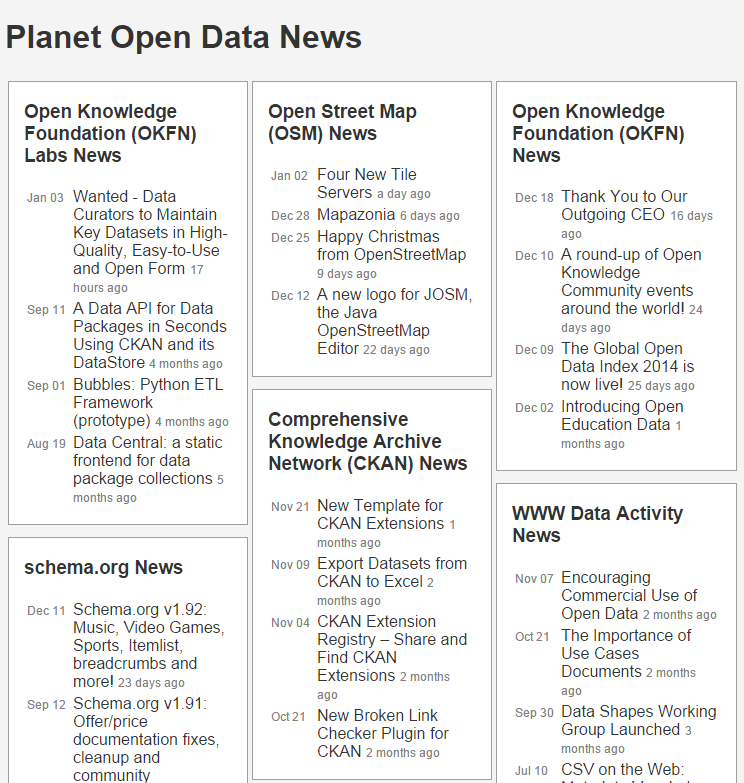
Usage
Try It Yourself - How To Use the Top Template Pack
If you want to try it yourself, install (fetch) the new template pack. Issue the command:
Or as an alternative clone the template pack using git. Issue the commands:
$ cd ~/.pluto
$ git clone git://github.com/planet-templates/pluto.top.git
To check if the new template got installed, use the list command:
Listing something like:
Installed templates include:
   top (~/.pluto/top/top.txt)
Showtime! Let’s use the -t/--template switch to build a sample Planet Ruby. Example:
 $ pluto build ruby.yml --template top     or
 $ pluto b ruby -t top
Open up the generated planet page ruby.html in your browser. Voila. That’s it.
digest - Pluto Planet Template Pack
Design and layout inspired by Alterslash - the unofficial Slashdot digest. Easy to read single page digest.
Screenshot - Preview
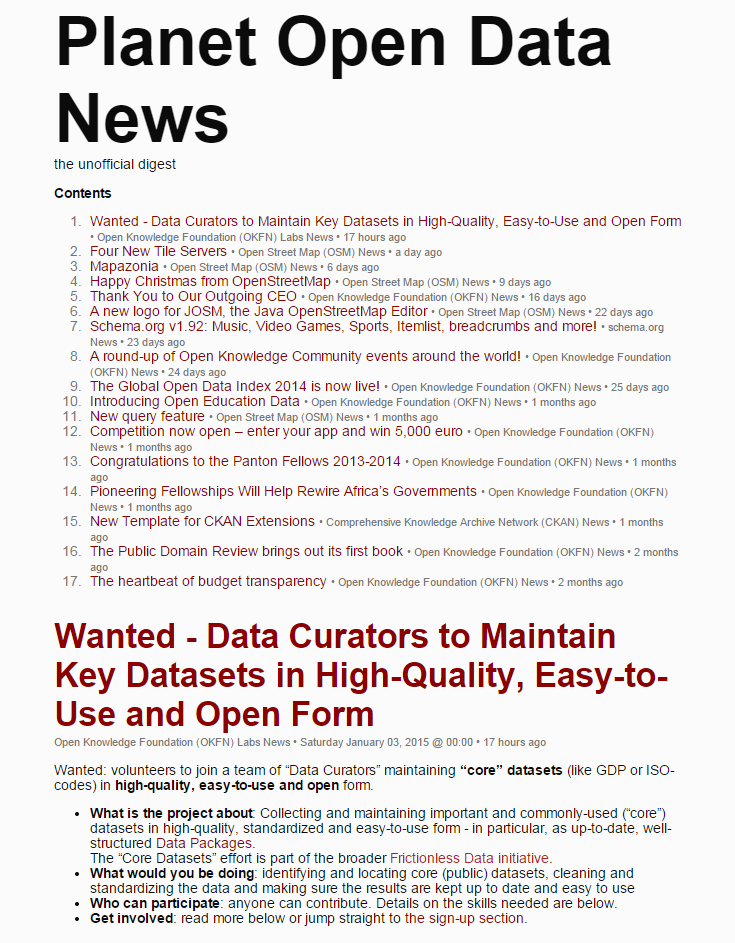
Usage
Try It Yourself - How To Use the Digest Template Pack
If you want to try it yourself, install (fetch) the new template pack. Issue the command:
Or as an alternative clone the template pack using git. Issue the commands:
$ cd ~/.pluto
$ git clone git://github.com/planet-templates/planet-digest.git
To check if the new template got installed, use the list command:
Listing something like:
Installed templates include:
   top (~/.pluto/digest/digest.txt)
Showtime! Let’s use the -t/--template switch to build a sample Planet Ruby. Example:
 $ pluto build ruby.ini --template digest     or
 $ pluto b ruby -t digest
Open up the generated planet page ruby.digest.html in your browser. Voila. That’s it.
Planet Configuration
Samples
For more planet configuration samples
or real world setups (with live planet news sites) see the
Planets repo.
Samples include:
nytimes.ini,
js-node.ini,
dart.ini,
haskell.ini.
Real world setups include:
Create Your Own Templates - Template Reference
Embedded Ruby (ERB) Templates
Pluto uses “standard / plain vanilla” embedded ruby (ERB) templates.
To create your own templates use the built-in variables site, feed, item, etc.
Site
Example: Planet Title
Example: List all subscriptions
<% site.feeds.each do |feed| %>
  <%= feed.url %>  or  <%= feed.link %>
  <%= feed.title %>  or  <%= feed.name %>
  <%= feed.title2 %>
  <%= feed.feed_url %>  or  <%= feed.feed %>
<% end %>
Feed
Example: Lastest feed items
<% items = site.items.latest.limit(24)
     ItemCursor.new( items ).each do |item,new_date,new_feed| %>

  <% if new_date %>
    <%= item.published %>
  <% end %>

  <% if new_feed %>
    <%= item.feed.url %>  or  <%= item.feed.link %>
    <%= item.feed.title %>  or  <%= item.feed.name %>
    <%= item.feed.title2 %>
  <% end %>

  <% if item.title %>
    <%= item.title %>
  <% end %>

  <% item.content %>
  <% item.url %>  or  <% item.link %>
  <% item.published %>

<% end %>
Planet Planet <=> Pluto - Template Cheatsheet
What’s Planet Planet?
Planet Planet is the very first planet feed reader coded in Python
by Scott James Remnant and Jeff Waugh (Site) - uses
Mark Pilgrim’s universal feed parser (RDF, RSS and Atom)
and Tomas Styblo’s templating engine; last release version 2.0 in 2006.
To help with converting your “classic” templates
to the new pluto machinery
using embedded ruby templates here’s a cheatsheet.
Planet Planet <=> Pluto - Template Cheatsheet
<TMPL_VAR name>                |  <%= site.title %>  or  <%= site.name %>
<TMPL_VAR generator>           |  <%= Pluto.generator %>

<TMPL_LOOP Channels>           |  <% site.feeds.each do |feed| %>
   <TMPL_VAR link>             |    <%= feed.url %>  or  <%= feed.link %>
   <TMPL_VAR name>             |    <%= feed.title %>  or  <%= feed.name %>
   <TMPL_VAR title>            |    <%= feed.title2 %>
   <TMPL_VAR url>              |    <%= feed.feed_url %>  or  <%= feed.feed %>
</TMPL_LOOP>                   |  <% end %>

<TMPL_LOOP Items>              |  <% items = site.items.latest.limit(24)
                               |     ItemCursor.new( items ).each do |item,new_date,new_feed| %>
                               |
  <TMPL_IF new_date>           |    <% if new_date %>
    <TMPL_VAR new_date>        |      <%= item.published %>
  </TMPL_IF>                   |    <% end %>
                               |
  <TMPL_IF new_channel>        |    <% if new_feed %>
    <TMPL_VAR channel_link>    |      <%= item.feed.url %>  or  <%= item.feed.link %>
    <TMPL_VAR channel_name>    |      <%= item.feed.title %>  or  <%= item.feed.name %>
    <TMPL_VAR channel_title>   |      <%= item.feed.title2 %>
  </TMPL_IF>                   |    <% end %>
                               |
  <TMPL_IF title>              |    <% if item.title %>
    <TMPL_VAR title>           |      <%= item.title %>
  </TMPL_IF>                   |    <% end %>
                               |
  <TMPL_VAR content>           |    <% item.content %>
  <TMPL_VAR link>              |    <% item.url %>  or  <% item.link %>
  <TMPL_VAR date>              |    <% item.published %>
                               |
  <TMPL_IF author>             |
    <TMPL_VAR author>          |    to be done
  </TMPL_IF>                   |
</TMPL_LOOP>                   |  <% end %>

<TMPL_VAR date>                |  <%= site.fetched %>     # site (planet) last updated
Commands, Commands, Commands
Welcome to the pluto command line tool.
To see all commands type:
resulting in:
NAME
    pluto - another planet generator - lets you build web pages from published web feeds

SYNOPSIS
    pluto [global options] command [command options] [arguments...]

GLOBAL OPTIONS
    -c, --config=PATH - Configuration Path (default: ~/.pluto)
    -q, --quiet       - Only show warnings, errors and fatal messages
    --verbose         - (Debug) Show debug messages
    --version         - Display the program version
    --help            - Show this message

COMMANDS
    build, b      - Build planet
    install, i    - Install template pack
    list, ls, l   - List installed template packs
    update, up, u - Update planet feeds
    merge, m      - Merge planet template pack
    about, a      - (Debug) Show more version info
    help          - Shows a list of commands or help for one command
build Command
NAME
    build - Build planet

SYNOPSIS
    pluto [global options] build [command options] FILE

COMMAND OPTIONS
    -o, --output=PATH       - Output Path (default: .)
    -t, --template=MANIFEST - Template Manifest (default: blank)
    -d, --dbpath=PATH       - Database path (default: .)
    -n, --dbname=NAME       - Database name (default: <PLANET>.db e.g. ruby.db)

EXAMPLE
    pluto build ruby.yml
    pluto build ruby.yml --template news
    pluto b ruby
    pluto b ruby -t news
    pluto b            # will use pluto.ini|pluto.yml|planet.ini|planet.yml if present
list Command
NAME
    list - List installed template packs

SYNOPSIS
    pluto [global options] list

EXAMPLE
   pluto list
   pluto ls
install Command
NAME
    install - Install template pack

SYNOPSIS
    pluto [global options] install MANIFEST

EXAMPLE
   pluto install news      # install "river of news" template pack
update Command
NAME
    update - Update planet feeds

COMMAND OPTIONS
    -d, --dbpath=PATH       - Database path (default: .)
    -n, --dbname=NAME       - Database name (default: <PLANET>.db e.g. ruby.db)

SYNOPSIS
    pluto [global options] update FILE

EXAMPLE
    pluto update ruby.yml
    pluto u ruby
merge Command
NAME
    merge - Merge planet template pack

SYNOPSIS
    pluto [global options] merge [command options] FILE

COMMAND OPTIONS
    -o, --output=PATH       - Output Path (default: .)
    -t, --template=MANIFEST - Template Manifest (default: blank)
    -d, --dbpath=PATH       - Database path (default: .)
    -n, --dbname=NAME       - Database name (default: <PLANET>.db e.g. ruby.db)

EXAMPLE
    pluto merge ruby.yml
    pluto merge ruby.yml --template news
    pluto m ruby
    pluto m ruby -t news
About
Gerald Bauer and contributors designed and developed the pluto gem.
See the change log for contributions and credits.
License
The pluto scripts and templates are dedicated to the public domain.
Use it as you please with no restrictions whatsoever.
Questions? Comments?
Send them along to the
wwwmake mailing list/forum.
Thanks!