Deploy to live & preview channels via GitHub pull requests
You can integrate deploys to Firebase Hosting via a GitHub Action. Here's what this GitHub Action can do for you:
Creates a new preview channel (and its associated preview URL) for every PR on your GitHub repository.
Adds a comment to the PR with the preview URL so that you and each reviewer can view and test the PR's changes in a "preview" version of your app.
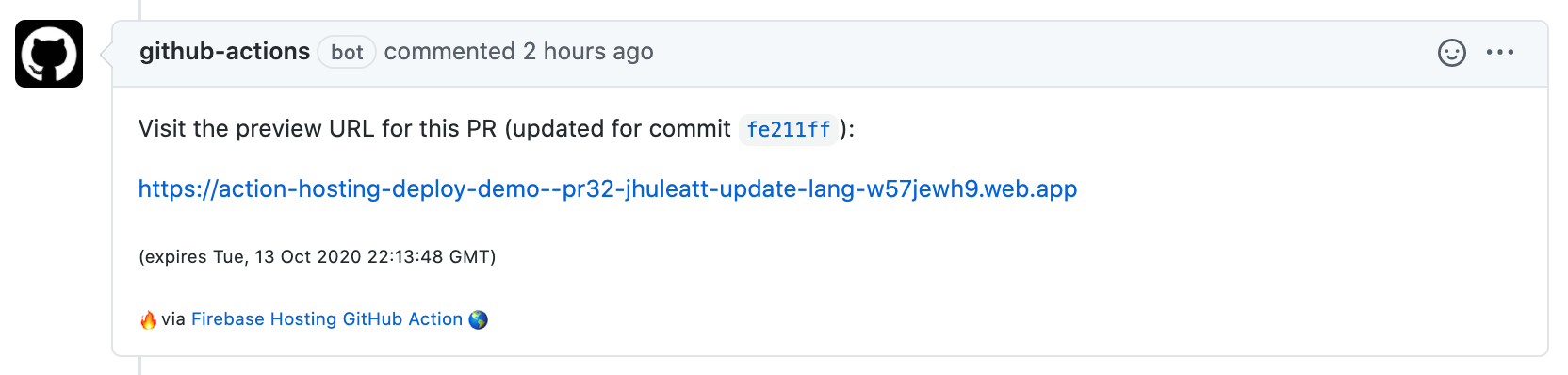
Updates the preview URL with changes from each commit by automatically deploying to the associated preview channel. The URL doesn't change with each new commit.
(Optional) Deploys the current state of your GitHub repo to your live channel when the PR is merged.
Reminder: When using preview URLs, your app interacts with the real backend resources of your Firebase project.
Set up the GitHub Action to deploy to Firebase Hosting
Create a GitHub repository (public or private) or use an existing one. You must have admin permissions for the repository.
In a local version of your repo, set up Firebase Hosting using the
firebase initcommand.If you've NOT set up Hosting, run this version of the command from the root of your local directory:
firebase init hosting
If you've ALREADY set up Hosting, then you just need to set up the GitHub Action part of Hosting. Run this version of the command from the root of your local directory:
firebase init hosting:github
Follow the CLI prompts, and the command will automatically take care of setting up the GitHub Action:
Creates a service account in your Firebase project with permission to deploy to Firebase Hosting.
Encrypts that service account's JSON key and uploads it to the specified GitHub repository as a GitHub secret.
Writes GitHub workflow
yamlconfiguration files that reference the newly created secret. These files configure the GitHub Action to deploy to Firebase Hosting.
In GitHub, create a new branch and commit the workflow
yamlfiles created by the CLI.Publish the branch to your GitHub repository.
Merge the branch.
That's it! Any subsequent PR in this GitHub repo will automatically get its own "preview URL"!
Learn more about the GitHub Action
Firebase maintains the "Deploy to Firebase Hosting" GitHub Action as an open-source project. View the source code.
The "Deploy to Firebase Hosting" GitHub Action allows for further configuration, like customizing the expiry date for a preview channel or setting a non-live channel to deploy to when a PR is merged. Learn about the available configuration options.
Learn more about GitHub Actions, in general.