GeezerVisonThe World Wide Web, restored to 800 pixels of glory. |
| Home|About|Gaming cabinet|Archives|How it works|Starter sites |
GeezerVison is showing gameprogrammingpatterns.com — Game Loop · Sequencing Patterns · Game Programming Patterns Game LoopGame Programming PatternsSequencing PatternsIntentDecouple the progression of game time from user input and processor speed. MotivationIf there is one pattern this book couldn’t live without, this is it. Game loops are the quintessential example of a “game programming pattern”. Almost every game has one, no two are exactly alike, and relatively few programs outside of games use them. To see how they’re useful, let’s take a quick trip down memory lane. In the olden days of computer programming when everyone had beards, programs worked like your dishwasher. You dumped a load of code in, pushed a button, waited, and got results out. Done. These were batch mode programs — once the work was done, the program stopped. You still see these today, though thankfully we don’t have to write them on punch cards anymore. Shell scripts, command line programs, and even the little Python script that turns a pile of Markdown into this book are all batch mode programs. Interview with a CPUEventually, programmers realized having to drop off a batch of code at the computing office and come back a few hours later for the results was a terribly slow way to get the bugs out of a program. They wanted immediate feedback. Interactive programs were born. Some of the first interactive programs were games:
You could have a live conversation with the program. It waited for your input, then it would respond to you. You would reply back, taking turns just like you learned to do in kindergarten. When it was your turn, it sat there doing nothing. Something like:
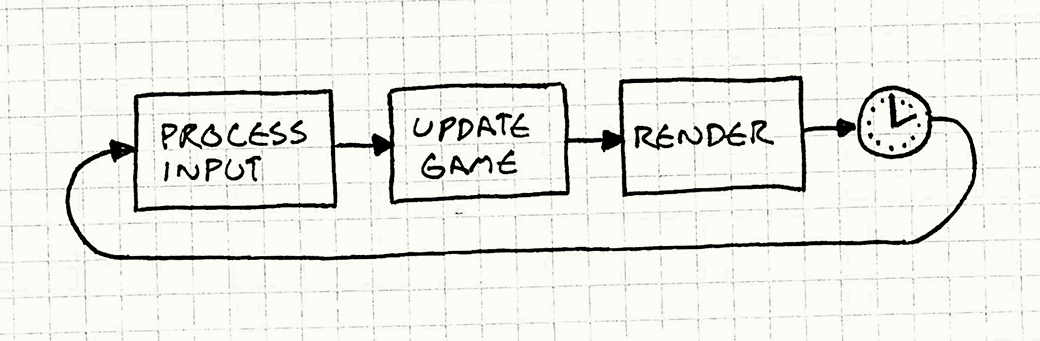
Event loopsModern graphic UI applications are surprisingly similar to old adventure games once you shuck their skin off. Your word processor usually just sits there doing nothing until you press a key or click something: The main difference is that instead of text commands, the program is waiting for user input events — mouse clicks and key presses. It still works basically like the old text adventures where the program blocks waiting for user input, which is a problem. Unlike most other software, games keep moving even when the user isn’t providing input. If you sit staring at the screen, the game doesn’t freeze. Animations keep animating. Visual effects dance and sparkle. If you’re unlucky, that monster keeps chomping on your hero. This is the first key part of a real game loop: it processes user input, but doesn’t wait for it. The loop always keeps spinning: We’ll refine this later, but the basic pieces are here. A world out of timeIf this loop isn’t blocking on input, that leads to the obvious question: how fast does it spin? Each turn through the game loop advances the state of the game by some amount. From the perspective of an inhabitant of the game world, the hand of their clock has ticked forward. Meanwhile, the player’s actual clock is ticking. If we measure how quickly the game loop cycles in terms of real time, we get the game’s “frames per second”. If the game loop cycles quickly, the FPS is high and the game moves smoothly and quickly. If it’s slow, the game jerks along like a stop motion movie. With the crude loop we have now where it just cycles as quickly as it can, two factors determine the frame rate. The first is how much work it has to do each frame. Complex physics, a bunch of game objects, and lots of graphic detail all will keep your CPU and GPU busy, and it will take longer to complete a frame. The second is the speed of the underlying platform. Faster chips churn through more code in the same amount of time. Multiple cores, GPUs, dedicated audio hardware, and the OS’s scheduler all affect how much you get done in one tick. Seconds per secondIn early video games, that second factor was fixed. If you wrote a game for the NES or Apple IIe, you knew exactly what CPU your game was running on and you could (and did) code specifically for that. All you had to worry about was how much work you did each tick. Older games were carefully coded to do just enough work each frame so that the game ran at the speed the developers wanted. But if you tried to play that same game on a faster or slower machine, then the game itself would speed up or slow down. These days, though, few developers have the luxury of knowing exactly what hardware their game will run on. Instead, our games must intelligently adapt to a variety of devices. This is the other key job of a game loop: it runs the game at a consistent speed despite differences in the underlying hardware. The PatternA game loop runs continuously during gameplay. Each turn of the loop, it processes user input without blocking, updates the game state, and renders the game. It tracks the passage of time to control the rate of gameplay. When to Use ItUsing the wrong pattern can be worse than using no pattern at all, so this section is normally here to caution against over-enthusiasm. The goal of design patterns isn’t to cram as many into your codebase as you can. But this pattern is a bit different. I can say with pretty good confidence that you will use this pattern. If you’re using a game engine, you won’t write it yourself, but it’s still there. You might think you won’t need this if you’re making a turn-based game. But even there, though the game state won’t advance until the user takes their turn, the visual and audible states of the game usually do. Animation and music keep running even when the game is “waiting” for you to take your turn. Keep in MindThe loop we’re talking about here is some of the most important code in your game. They say a program spends 90% of its time in 10% of the code. Your game loop will be firmly in that 10%. Take care with this code, and be mindful of its efficiency. You may need to coordinate with the platform’s event loopIf you’re building your game on top of an OS or platform that has a graphic UI and an event loop built in, then you have two application loops in play. They’ll need to play nice together. Sometimes, you can take control and make your loop the only one. For
example, if you’re writing a game against the venerable Windows API, your
Other platforms don’t let you opt out of the event loop so easily. If you’re
targeting a web browser, the event loop is deeply built into browser’s execution
model. There, the event loop will run the show, and you’ll use it as your game
loop too. You’ll call something like Sample CodeFor such a long introduction, the code for a game loop is actually pretty straightforward. We’ll walk through a couple of variations and go over their good and bad points. The game loop drives AI, rendering, and other game systems, but those aren’t the
point of the pattern itself, so we’ll just call into fictitious methods here.
Actually implementing Run, run as fast as you canWe’ve already seen the simplest possible game loop: The problem with it is you have no control over how fast the game runs. On a fast machine, that loop will spin so fast users won’t be able to see what’s going on. On a slow machine, the game will crawl. If you have a part of the game that’s content-heavy or does more AI or physics, the game will actually play slower there. Take a little napThe first variation we’ll look at adds a simple fix. Say you want your game to run at 60 FPS. That gives you about 16 milliseconds per frame. As long as you can reliably do all of your game processing and rendering in less than that time, you can run at a steady frame rate. All you do is process the frame and then wait until it’s time for the next one, like so:
The code looks a bit like this: The Instead, the game slows down. You can work around this by doing less work each frame — cut down on the graphics and razzle dazzle or dumb down the AI. But that impacts the quality of gameplay for all users, even ones on fast machines. One small step, one giant stepLet’s try something a bit more sophisticated. The problem we have basically boils down to:
If step two takes longer than step one, the game slows down. If it takes more than 16 ms of processing to advance game time by 16ms, it can’t possibly keep up. But if we can advance the game by more than 16ms of game time in a single step, then we can update the game less frequently and still keep up. The idea then is to choose a time step to advance based on how much real time passed since the last frame. The longer the frame takes, the bigger steps the game takes. It always keeps up with real time because it will take bigger and bigger steps to get there. They call this a variable or fluid time step. It looks like: Each frame, we determine how much real time passed since the last game update
( Say you’ve got a bullet shooting across the screen. With a fixed time step, in each frame, you’ll move it according to its velocity. With a variable time step, you scale that velocity by the elapsed time. As the time step gets bigger, the bullet moves farther in each frame. That bullet will get across the screen in the same amount of real time whether it’s twenty small fast steps or four big slow ones. This looks like a winner:
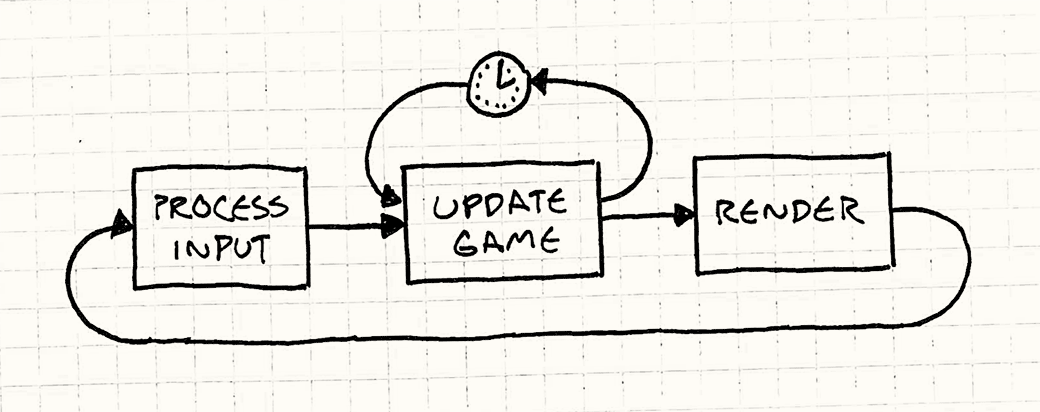
But, alas, there’s a serious problem lurking ahead: we’ve made the game non-deterministic and unstable. Here’s one example of the trap we’ve set for ourselves: Say we’ve got a two-player networked game and Fred has some beast of a gaming machine while George is using his grandmother’s antique PC. That aforementioned bullet is flying across both of their screens. On Fred’s machine, the game is running super fast, so each time step is tiny. We cram, like, 50 frames in the second it takes the bullet to cross the screen. Poor George’s machine can only fit in about five frames. This means that on Fred’s machine, the physics engine updates the bullet’s position 50 times, but George’s only does it five times. Most games use floating point numbers, and those are subject to rounding error. Each time you add two floating point numbers, the answer you get back can be a bit off. Fred’s machine is doing ten times as many operations, so he’ll accumulate a bigger error than George. The same bullet will end up in different places on their machines. This is just one nasty problem a variable time step can cause, but there are more. In order to run in real time, game physics engines are approximations of the real laws of mechanics. To keep those approximations from blowing up, damping is applied. That damping is carefully tuned to a certain time step. Vary that, and the physics gets unstable. This instability is bad enough that this example is only here as a cautionary tale and to lead us to something better… Play catch upOne part of the engine that usually isn’t affected by a variable time step is rendering. Since the rendering engine captures an instant in time, it doesn’t care how much time advanced since the last one. It renders things wherever they happen to be right then. We can use this fact to our advantage. We’ll update the game using a fixed time step because that makes everything simpler and more stable for physics and AI. But we’ll allow flexibility in when we render in order to free up some processor time. It goes like this: A certain amount of real time has elapsed since the last turn of the game loop. This is how much game time we need to simulate for the game’s “now” to catch up with the player’s. We do that using a series of fixed time steps. The code looks a bit like: There’s a few pieces here. At the beginning of each frame, we update
Note that the time step here isn’t the visible frame rate anymore.
But be careful not to make it too short. You need to make sure the time step
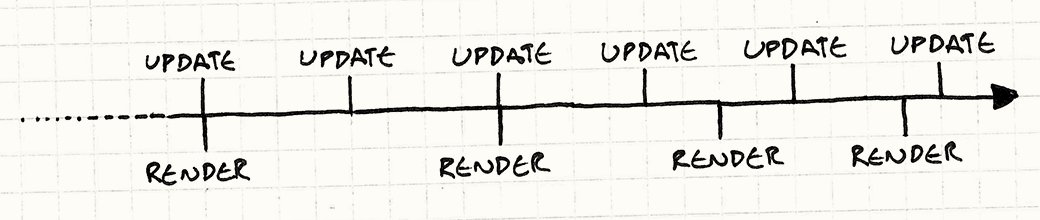
is greater than the time it takes to process an Fortunately, we’ve bought ourselves some breathing room here. The trick is that we’ve yanked rendering out of the update loop. That frees up a bunch of CPU time. The end result is the game simulates at a constant rate using safe fixed time steps across a range of hardware. It’s just that the player’s visible window into the game gets choppier on a slower machine. Stuck in the middleThere’s one issue we’re left with, and that’s residual lag. We update the game at a fixed time step, but we render at arbitrary points in time. This means that from the user’s perspective, the game will often display at a point in time between two updates. Here’s a timeline:
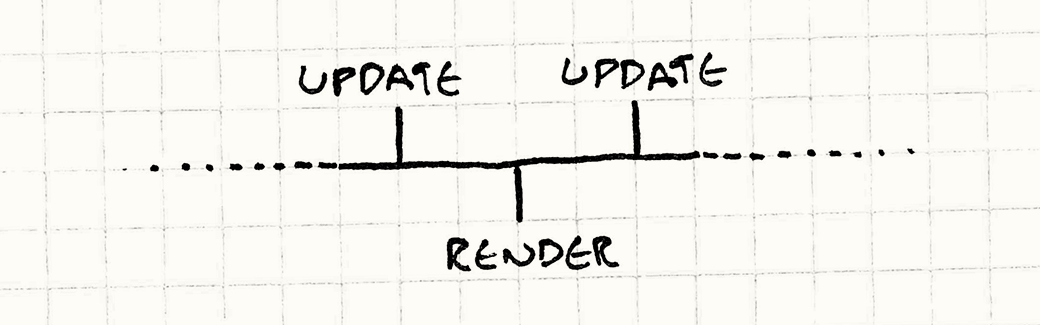
As you can see, we update at a nice tight, fixed interval. Meanwhile, we render whenever we can. It’s less frequent than updating, and it isn’t steady either. Both of those are OK. The lame part is that we don’t always render right at the point of updating. Look at the third render time. It’s right between two updates:
Imagine a bullet is flying across the screen. On the first update, it’s on the left side. The second update moves it to the right side. The game is rendered at a point in time between those two updates, so the user expects to see that bullet in the center of the screen. With our current implementation, it will still be on the left side. This means motion looks jagged or stuttery. Conveniently, we actually know exactly how far between update frames we are
when we render: it’s stored in When we go to render, we’ll pass that in:
The renderer knows each game object and its current velocity. Say that bullet
is 20 pixels from the left side of the screen and is moving right 400 pixels per
frame. If we are halfway between frames, then we’ll end up passing 0.5 to
Of course, it may turn out that that extrapolation is wrong. When we calculate the next frame, we may discover the bullet hit an obstacle or slowed down or something. We rendered its position interpolated between where it was on the last frame and where we think it will be on the next frame. But we don’t know that until we’ve actually done the full update with physics and AI. So the extrapolation is a bit of a guess and sometimes ends up wrong. Fortunately, though, those kinds of corrections usually aren’t noticeable. At least, they’re less noticeable than the stuttering you get if you don’t extrapolate at all. Design DecisionsDespite the length of this chapter, I’ve left out more than I’ve included. Once you throw in things like synchronizing with the display’s refresh rate, multithreading, and GPUs, a real game loop can get pretty hairy. At a high level, though, here are a few questions you’ll likely answer: Do you own the game loop, or does the platform?This is less a choice you make and more one that’s made for you. If you’re making a game that runs in a web browser, you pretty much can’t write your own classic game loop. The browser’s event-based nature precludes it. Likewise, if you’re using an existing game engine, you will probably rely on its game loop instead of rolling your own.
How do you manage power consumption?This wasn’t an issue five years ago. Games ran on things plugged into walls or on dedicated handheld devices. But with the advent of smartphones, laptops, and mobile gaming, the odds are good that you do care about this now. A game that runs beautifully but turns players’ phones into space heaters before running out of juice thirty minutes later is not a game that makes people happy. Now, you may need to think not only about making your game look great, but also use as little CPU as possible. There will likely be an upper bound to performance where you let the CPU sleep if you’ve done all the work you need to do in a frame.
How do you control gameplay speed?A game loop has two key pieces: non-blocking user input and adapting to the passage of time. Input is straightforward. The magic is in how you deal with time. There are a near-infinite number of platforms that games can run on, and any single game may run on quite a few. How it accommodates that variation is key.
See Also
|
| You are visitor 01402503 — GeezerVison does not store the pages you look up. Best viewed with Netscape Navigator 4.7 or Internet Explorer 6 at 800×600. No cookies required. |