GeezerVisonThe World Wide Web, restored to 800 pixels of glory. |
| Home|About|Gaming cabinet|Archives|How it works|Starter sites |
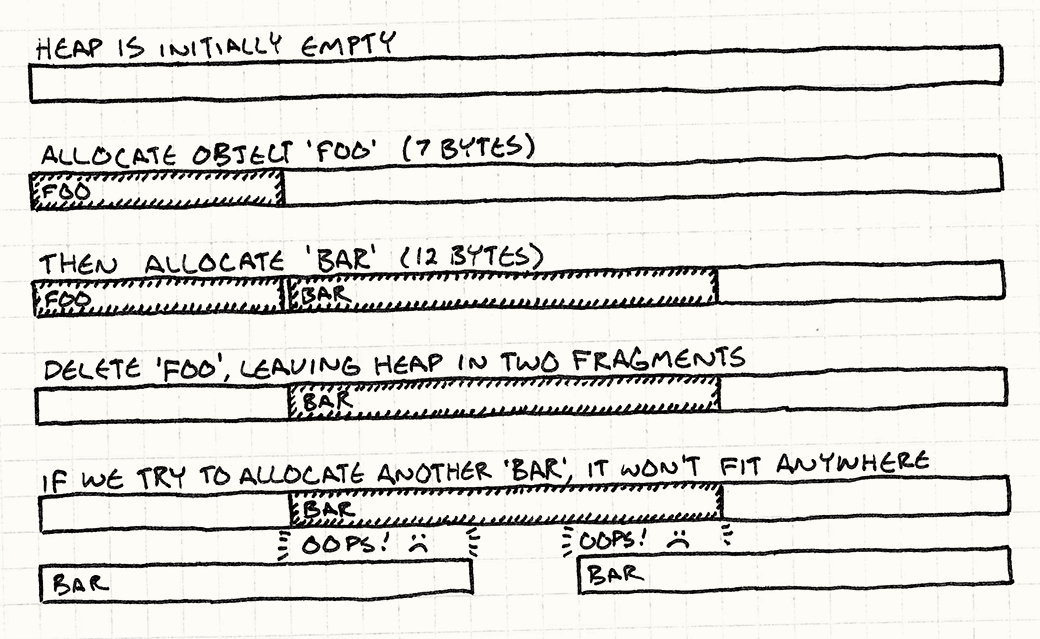
GeezerVison is showing gameprogrammingpatterns.com — Object Pool · Optimization Patterns · Game Programming Patterns Object PoolGame Programming PatternsOptimization PatternsIntentImprove performance and memory use by reusing objects from a fixed pool instead of allocating and freeing them individually. MotivationWe’re working on the visual effects for our game. When the hero casts a spell, we want a shimmer of sparkles to burst across the screen. This calls for a particle system, an engine that spawns little sparkly graphics and animates them until they wink out of existence. Since a single wave of the wand could cause hundreds of particles to be spawned, our system needs to be able to create them very quickly. More importantly, we need to make sure that creating and destroying these particles doesn’t cause memory fragmentation. The curse of fragmentationProgramming for a game console or mobile device is closer to embedded programming than conventional PC programming in many ways. Memory is scarce, users expect games to be rock solid, and efficient compacting memory managers are rarely available. In this environment, memory fragmentation is deadly. Fragmentation means the free space in our heap is broken into smaller pieces of memory instead of one large open block. The total memory available may be large, but the largest contiguous region might be painfully small. Say we’ve got fourteen bytes free, but it’s fragmented into two seven-byte pieces with a chunk of in-use memory between them. If we try to allocate a twelve-byte object, we’ll fail. No more sparklies on screen.
Even if fragmentation is infrequent, it can still gradually reduce the heap to an unusable foam of open holes and filled-in crevices, ultimately hosing the game completely. The best of both worldsBecause of fragmentation and because allocation may be slow, games are very careful about when and how they manage memory. A simple solution is often best — grab a big chunk of memory when the game starts, and don’t free it until the game ends. But this is a pain for systems where we need to create and destroy things while the game is running. An object pool gives us the best of both worlds. To the memory manager, we’re just allocating one big hunk of memory up front and not freeing it while the game is playing. To the users of the pool, we can freely allocate and deallocate objects to our heart’s content. The PatternDefine a pool class that maintains a collection of reusable objects. Each object supports an “in use” query to tell if it is currently “alive”. When the pool is initialized, it creates the entire collection of objects up front (usually in a single contiguous allocation) and initializes them all to the “not in use” state. When you want a new object, ask the pool for one. It finds an available object, initializes it to “in use”, and returns it. When the object is no longer needed, it is set back to the “not in use” state. This way, objects can be freely created and destroyed without needing to allocate memory or other resources. When to Use ItThis pattern is used widely in games for obvious things like game entities and visual effects, but it is also used for less visible data structures such as currently playing sounds. Use Object Pool when:
Keep in MindYou normally rely on a garbage collector or The pool may waste memory on unneeded objectsThe size of an object pool needs to be tuned for the game’s needs. When tuning, it’s usually obvious when the pool is too small (there’s nothing like a crash to get your attention). But also take care that the pool isn’t too big. A smaller pool frees up memory that could be used for other fun stuff. Only a fixed number of objects can be active at any one timeIn some ways, this is a good thing. Partitioning memory into separate pools for different types of objects ensures that, for example, a huge sequence of explosions won’t cause your particle system to eat all of the available memory, preventing something more critical like a new enemy from being created. Nonetheless, this also means being prepared for the possibility that your attempt to reuse an object from the pool will fail because they are all in use. There are a few common strategies to handle this:
Memory size for each object is fixedMost pool implementations store the objects in an array of in-place objects. If all of your objects are of the same type, this is fine. However, if you want to store objects of different types in the pool, or instances of subclasses that may add fields, you need to ensure that each slot in the pool has enough memory for the largest possible object. Otherwise, an unexpectedly large object will stomp over the next one and trash memory. At the same time, when your objects vary in size, you waste memory. Each slot needs to be big enough to accommodate the largest object. If objects are rarely that big, you’re throwing away memory every time you put a smaller one in that slot. It’s like going through airport security and using a huge carry-on-sized luggage tray just for your keys and wallet. When you find yourself burning a lot of memory this way, consider splitting the pool into separate pools for different sizes of object — big trays for luggage, little trays for pocket stuff. Reused objects aren’t automatically clearedMost memory managers have a debug feature that will clear freshly allocated or
freed memory to some obvious magic value like Since our object pool isn’t going through the memory manager any more when it reuses an object, we lose that safety net. Worse, the memory used for a “new” object previously held an object of the exact same type. This makes it nearly impossible to tell if you forgot to initialize something when you created the new object: the memory where the object is stored may already contain almost correct data from its past life. Because of this, pay special care that the code that initializes new objects in the pool fully initializes the object. It may even be worth spending a bit of time adding a debug feature that clears the memory for an object slot when the object is reclaimed. Unused objects will remain in memoryObject pools are less common in systems that support garbage collection because the memory manager will usually deal with fragmentation for you. But pools are still useful there to avoid the cost of allocation and deallocation, especially on mobile devices with slower CPUs and simpler garbage collectors. If you do use an object pool in concert with a garbage collector, beware of a potential conflict. Since the pool doesn’t actually deallocate objects when they’re no longer in use, they remain in memory. If they contain references to other objects, it will prevent the collector from reclaiming those too. To avoid this, when a pooled object is no longer in use, clear any references it has to other objects. Sample CodeReal-world particle systems will often apply gravity, wind, friction, and other physical effects. Our much simpler sample will only move particles in a straight line for a certain number of frames and then kill the particle. Not exactly film caliber, but it should illustrate how to use an object pool. We’ll start with the simplest possible implementation. First up is the little particle class: The default constructor initializes the particle to “not in use”. A later call
to The pool needs to know which particles are available for reuse. It gets this
from the particle’s The pool class is also simple: The The particles themselves are simply stored in a fixed-size array in the class. In this sample implementation, the pool size is hardcoded in the class declaration, but this could be defined externally by using a dynamic array of a given size or by using a value template parameter. Creating a new particle is straightforward: We iterate through the pool looking for the first available particle. When we find it, we initialize it and we’re done. Note that in this implementation, if there aren’t any available particles, we simply don’t create a new one. That’s all there is to a simple particle system, aside from rendering the particles, of course. We can now create a pool and create some particles using it. The particles will automatically deactivate themselves when their lifetime has expired. This is good enough to ship a game, but keen eyes may have noticed that creating a new particle requires iterating through (potentially) the entire collection until we find an open slot. If the pool is very large and mostly full, that can get slow. Let’s see how we can improve that. A free listIf we don’t want to waste time finding free particles, the obvious answer is to not lose track of them. We could store a separate list of pointers to each unused particle. Then, when we need to create a particle, we remove the first pointer from the list and reuse the particle it points to. Unfortunately, this would require us to maintain an entire separate array with as many pointers as there are objects in the pool. After all, when we first create the pool, all particles are unused, so the list would initially have a pointer to every object in the pool. It would be nice to fix our performance problems without sacrificing any memory. Conveniently, there is some memory already lying around that we can borrow — the data for the unused particles themselves. When a particle isn’t in use, most of its state is irrelevant. Its position and
velocity aren’t being used. The only state it needs is the stuff required to
tell if it’s dead. In our example, that’s the We’ve moved all of the member variables except for We can use these pointers to build a linked list that chains together every unused particle in the pool. We have the list of available particles we need, but we didn’t need to use any additional memory. Instead, we cannibalize the memory of the dead particles themselves to store the list. This clever technique is called a free list. For it to work, we need to make sure the pointers are initialized correctly and are maintained when particles are created and destroyed. And, of course, we need to keep track of the list’s head: When a pool is first created, all of the particles are available, so our free list should thread through the entire pool. The pool constructor sets that up: Now to create a new particle, we jump directly to the first available one: We need to know when a particle dies so we can add it back to the free list, so
we’ll change When that happens, we simply thread it back onto the list: There you go, a nice little object pool with constant-time creation and deletion. Design DecisionsAs you’ve seen, the simplest object pool implementation is almost trivial: create an array of objects and reinitialize them as needed. Production code is rarely that minimal. There are several ways to expand on that to make the pool more generic, safer to use, or easier to maintain. As you implement pools in your games, you’ll need to answer these questions: Are objects coupled to the pool?The first question you’ll run into when writing an object pool is whether the objects themselves know they are in a pool. Most of the time they will, but you won’t have that luxury when writing a generic pool class that can hold arbitrary objects.
What is responsible for initializing the reused objects?In order to reuse an existing object, it must be reinitialized with new state. A key question here is whether to reinitialize the object inside the pool class or outside.
See Also
|
| You are visitor 01402503 — GeezerVison does not store the pages you look up. Best viewed with Netscape Navigator 4.7 or Internet Explorer 6 at 800×600. No cookies required. |