The web app is WaveKit's main interface. It runs in any recent browser, on a desktop or a phone,
and talks to the core over its REST API and WebSocket. The code lives in web/.

- Without a radio:
pnpm --filter @wavekit/web mock, thenpnpm --filter @wavekit/web dev, and open http://localhost:5173. The mock plays a station with aircraft, ships, pagers, DMR and more (web/mock/README.md). - With your core:
WAVEKIT_WEB_API=http://<core-host>:9000 pnpm --filter @wavekit/web dev. When the core runs on another machine, set itsliveDemod.publicOrigin(WAVEKIT_LIVE_DEMOD__PUBLIC_ORIGIN) so live audio reaches your browser (core reference). - Protected core: the first visit shows a Pair this browser chip. Pair once, and the browser stays signed in. Signed-in devices are listed in the ⌘K palette. A session lasts 30 days from its last refresh: the app refreshes it when it opens and when its window comes back to the front, once less than 29 days are left (at most once an hour), so a browser used at least once every 30 days never has to pair again. A browser whose session ran out (or was signed out from another device) shows Session expired, pair again instead of the bare pairing prompt.
- One address: a protected core accepts the address named in its access settings and no
other.
localhostand127.0.0.1reach the same server, but to the browser and to the core they are two sites, each with its own sign-in. Opened under the one the core refuses, the app shows This address is not accepted · Open 127.0.0.1:5173 instead; the chip is a link to the same page on the other name. When that one is refused too, or off this machine, it reads Allow it in the core's access settings (access.allowedAuthoritiesandaccess.allowedOrigins, Docker setup). The dev and preview servers do the first step for you: a page opened under a loopback name the core refuses is sent to the loopback name it accepts. Onlylocalhost,127.0.0.1and[::1]are ever tried, and the core still decides which one it accepts. - Opened before the core: a page opened while the core is down or restarting shows Can't reach the receiver · Retrying… and loads by itself once the core answers.
The app has two views, picked from the dock at the bottom: Spectrum and Map. Drawers open on the right on top of the view: Activity, Scanner, Recordings and Settings. Decoded messages as cards live in Activity's Cards layout (the Messages view is gone; see Drawers). On a phone, the ⌘K palette (the search button) is the way around.
Nothing moves when a drawer opens. The Tuner (top left), the Receiver (top right), Listen (bottom
left) and the dock (bottom centre) keep their places at every width; the drawer opens on the right
under the Receiver, down to the bottom of the window when it clears the dock and above the dock
row otherwise. Below 1100 px wide, and on a phone, a drawer spans the window between the top
islands and Listen. While a recording is loaded, the player sits just above Listen at full width
and the tuned card above it; the drawer never reaches that column. The dock hides on windows too
narrow to hold it beside Listen; the search button takes its place. The spectrum keeps its signal
labels clear of the card, the drawer and any notice, and its status notes (No source connected,
Use Auto range and the like) stand clear of them too, on the spectrum left of the drawer; with
no room anywhere a note shows on the top row with the notices.
The few things that do move are deliberate. The tuned card moves up by the player's height when a recording starts (and back when it stops), and a card parked on the right steps left of an open drawer; while it glides there, anything appearing in its way (the player, the drawer) waits until it lands, so nothing is ever drawn over it. A card you drag stops at the edges of the islands instead of sliding over them. An open panel (Audio options, the Receiver's, the Tuner's) is never covered by another island: on a phone, Audio options starts under the Receiver and scrolls, and the Receiver steps out of sight while the Tuner's panel is open over it. The tuned card and the player do the same where an open panel reaches them (Audio options over the card above Listen): they step out of sight in place, the player still playing, and are back where they were when it closes. A notice an open panel covers (on a phone, the Tuner's panel over a receipt with Undo) waits out of sight with its clock stopped and comes back with the time it had left. The dock stands clear of Listen at its open width, so opening Audio options moves nothing. On a short or zoomed window the bottom of the screen gives way in order: the player shrinks to a progress line, the spectrum's trace gets shorter, the discovery row and the band ruler hide, then the player hides (it keeps playing), and last the spectrum's scale rows hide, leaving the waterfall.
Notices appear on the top row, between the Tuner and the Receiver, never over the spectrum's labels: a warning sits next to the Receiver (beside the connection chip and Receiver paused, when they show), what you just did sits next to the Tuner, and neither pushes the other. When the row is tight a warning shortens to one line (the full text in its tooltip), then to its triangle alone (the Receiver island says the same); a lone warning may take two lines first. When the top row still cannot hold them all, the notices stack just under the top row instead. On a phone and other narrow windows, where the top row has no room, notices stack just under the Receiver; with a drawer open there (Activity, Scanner, Recordings or Settings span the window), they sit inside it as a banner directly under its header: the drawer's list moves down to make room and comes back when the notice goes, and the title, Live, ✕ and every other header control stay clear and usable. An open island panel and the ⌘K palette sit above the notices, the connection chip and Receiver paused, and these hide while the palette is open. There are two kinds, and at most one of each shows at once:
- What you just did, such as
Saved,CopiedorRemoved, often with Undo. It stays 6 seconds; the next one replaces it. - Something that is going on, such as lost samples or an update waiting. It shows for
8 seconds, then stays visible in its usual place: lost samples on the Receiver island
(
Samples lostwith a warning triangle, and the full sentence in the Receiver panel). A second one waits until the first has had its time, then shows if it is still going on. Neither kind removes the other, so an Undo is never pushed away by a warning.
WaveKit was updated · Reload stays until you reload or close it. Notices wait while the ⌘K palette is open and while the pointer or keyboard focus is on them, and a notice with no room on screen yet waits too: its time only runs once you can see it, so an Undo is never lost unseen. ✕ closes one.
When WaveKit loses receiver samples, the notice says why:
| Cause | Notice |
|---|---|
| The link from the receiver cannot carry the rate | Receiver link dropping samples — lower the sample rate |
| The same, while the 1090 MHz rate policy holds a raise | Receiver link dropping samples at 2.4 MS/s (raised for ADS-B) |
| WaveKit itself was too busy to read the samples | Samples lost: WaveKit is too busy to keep up |
| WaveKit cannot tell which, or names no cause | Receiver samples lost |
Only the first asks for a lower sample rate. While another program controls the tuner,
WaveKit names no cause. A disconnected or paused receiver is not losing
samples and raises no such notice. The notice comes once the loss has lasted 6 seconds,
and once per episode: an episode starts with the first loss and lasts until the link has been clean
for a minute, so a link that recovers and drops again does not repeat it. A different cause in the
same episode shows once more, except a change to an unknown cause. After ✕ nothing more shows in
that episode; the Receiver island still says Samples lost while samples are being lost. A page
reloaded during an episode shows it on the Receiver island only, and a WaveKit restart in the middle
of a loss does not bring the notice back (nor undo a ✕). If the app stops hearing from
WaveKit for 10 seconds, the notice goes and the Receiver island's marker turns grey until fresh
news arrives. Samples dropped inside WaveKit after they all arrived, or a link that has not yet
shown it can carry the rate, raise nothing. While the Receiver panel is open, it lists these instead
of a notice, and a notice held back that way counts as shown: closing the panel does not bring it
up. A notice waiting behind another one counts only once it shows. A sample-rate raise or restore by the rate policy is a short notice of its own; a raise
it had to skip (another client has the tuner, or the receiver refused the rate) stays listed in the
Receiver panel for 5 minutes.
- Drag the spectrum to tune, or click a peak. Drag past the edge of the capture to retune the receiver.
- The band ruler under the spectrum shows the band plan and your saved frequencies. Zoom with its
−+buttons. - Recalling a saved frequency (its tag, the Tuner's Saved list or the palette) follows Settings › Display › Click to tune. With Free the listening channel moves to it inside the capture and the receiver recentres only when it lies past the capture's usable edge; with Centre the receiver always recentres on it, so a bookmark saved as a band's middle becomes the capture centre. A saved frequency with Tune as centre switched on (in the Tuner's save form, or its pencil Edit) recentres from the Saved list, the spectrum's saved tags and the palette even with Free. In Edit, Enter or leaving the row saves, Escape cancels, Space toggles the switch. Undo after a palette recall puts back the earlier centre and listening channel.
- Labels on the peaks say what WaveKit identified there (
DMR · CC 1,AIS · MMSI …). Settings › Spectrum › Signal labels chooses how many you see. - Labels and tags always sit at their own frequency inside the visible span. After a retune or a sample-rate change, the labels from the previous window disappear at once; only signals heard in the new window are labelled.
- The spectrum stream recovers by itself, a core restart included. If the connection to the core
drops, or the stream goes silent, the plot reads
Spectrum stream lost · reconnecting…and retries with growing pauses (up to 10 s) until frames come back. While the receiver is paused it stays connected and checks every 30 s, so the waterfall comes back after a resume even when this page missed it (another browser resumed, or the page's connection dropped meanwhile); a resume, a retune, a sample-rate change or returning to the tab checks at once. If the page cannot reach the stream from the start, it readsSpectrum stream not reachable · retrying…. When the core says this browser is no longer signed in, it stops and says so: pair the browser again and the spectrum comes back, with no reload. - While the spectrum starts the plot reads
Starting the spectrum…. On a busy machine the renderer can take seconds to come up; the stream is subscribed meanwhile, and the rows received in between are drawn as soon as it is ready. - The spectrum is drawn with WebGL2. A browser that has none (graphics acceleration turned off
or blocked; Chrome turns it off by itself after its GPU process crashed a few times) still draws
the trace and the waterfall, with a plain 2D canvas, and shows the chip Graphics acceleration
is off · basic mode on the frequency axis. In Chrome,
chrome://gpusays why; restarting the browser usually turns it back on. When you return to the tab the plot asks for WebGL2 again and goes back to it by itself (after a try that ended in basic mode again it waits 30 s, then twice as long each time, up to 10 minutes). If the graphics context is lost while drawing, the plot says so and draws again when the browser restores it. - For a plot that stays empty, the browser console answers
window.__wavekit.spectrumHealth(): what draws (rendererKind:webgl2,canvas2dornone, with thereason), where (rendererThread),framesReceived,framesDrawn, the stream'slinkand thelastError. - With Spectrum range: Fixed, a scale the signal has left (another receiver, antenna or gain
moves the noise floor by tens of dB) would draw an empty plot. The plot then reads
The noise floor is below the fixed scale(orabove), with a Use Auto range button. - Right-click a signal for its menu, which includes Decode as… to try a decoder on it.
- Signals close together share one tag with a count (
DMR · CC 1 +2). Click it for a list of the grouped signals; each row has a Tune button. - When found signals lie outside the visible span, a marker at that edge shows how many, with an
arrow (its tooltip reads
3 signals outside view →). Clicking it asks "Tune to … MHz?" for the nearest of them first; it never retunes on its own. - Click a tag to see what it is (see Spectrum tags). A group lists each signal
with its state, the protocol (
DMRonce verified; before thatLikely DMR,Maybe DMRorHeard), a mutedlikely <kind>hint (for examplelikely ISM device) when nothing has been verified yet, the next step from the decoders that cover its frequency (for example "Listen to check", "Widen the capture so … fits" or "No decoder covers this frequency; run identify") and a Tune button. Clicking a tag never tunes by itself. The samelikely …hint and next step appear beside unverified rows in the Scanner lists.
There are two kinds of label on the spectrum. The labels over the peaks follow what is on the air now (a proven one waits between bursts, see below). The tags in the row under the band ruler are the scanner's discoveries: frequencies it has heard and kept, with what it has learnt about each.
A tag is in one of three states:
- Heard: something transmits there and nothing has identified it. The tag stays grey and says
what was measured, for example
Unidentified · 4FSK ~9 kHz. - Likely: the signal's shape suggests a protocol (
Likely DMR,Maybe FM voice), but no decoder has checked it. - Proven: a decoder checked it (
DMR · CC 1), or an analog proof such as a CTCSS tone. The dot is filled and the tag has an outline while it is live.
A tag is bright while its discovery is live. A proven tag stays lit for 5 minutes after it was last heard, and any other tag for 90 seconds, so a signal that only sends short bursts (a DMR control channel, a pager) does not flash with every burst. A continuous carrier is on the air all the time, so its tag never goes away. If nothing identifies it, it stays quiet and grey.
The labels over the peaks use the same evidence:
- A label on a proven discovery has a filled dot and an outline, like its tag. While that tag is
lit, the label stays between bursts, so a DMR control channel shows one steady
DMR · CC 1instead of flashing. Once the tag dims, the label goes the next time the signal is quiet. - A label names a protocol only when its discovery is proven. A discovery marked decoded whose
evidence says weak (or whose proof does not prove it) is not proven, so its label reads
Unidentified · …instead ofDMR. - An unnamed peak near a likely discovery reads as its tag does, for example
Likely DMR. Near a discovery that was only heard it says what was measured, for exampleUnidentified · 4FSK ~9 kHzwith its frequency, and has a grey ring for a dot. Any other unnamed peak shows its frequency. - A held proven label moves to a new burst only when that burst is the same signal: its centre within a quarter of the label's width (or the spectrum's resolution, if wider) and its width at most 1.5 times the label's or the other way round. A narrower neighbour one channel away gets its own label.
- Any other label stays a few seconds after its signal goes quiet, as before.
- Hover over a label that sits on a discovery to see how we know (the tag's first detail line). Clicking a label tunes there. For the full detail, click the tag in the row below.
Click a single tag for its detail:
- How we know: for example
DMR decoded: checked control bursts, colour code 7, orNot proven: heard on the air, not identified. The core's own proof summary shows as aCore:line only when it says something the line above does not. - live after the frequency means it was heard in the last 30 seconds. The tag itself stays lit longer (see above).
- Evidence (
Proven,Weak, orNot reportedby an older core), First heard, Last heard and Airtime. - Calls: the scanner checks a channel by decoding it for a moment. When that check saw calls,
the detail names them, for example
Talkgroup 1, source 12 seen by the scanner's check(at most three of each, then+n more). Calls the scanner's check decoded are not Activity rows: Activity lists what the decoders heard, so it may have nothing on that frequency yet, and the detail says so. A proven digital voice channel with no call in it saysNo calls heard yet — control channel only. History of … (History of Club net,History of 145.6125: the channel's name, else its frequency) opens Activity on the channel: its raster frequency, half a raster step either side, never the signal's measured width. Open last transmission shows only when the core names the discovery's last Activity event, and opens it. - Tune and Listen go to the discovery's measured frequency, as the Scanner drawer does.
Listen is the drawer's Listen: it tunes there, then starts live audio once the tune has
landed. If the tune fails, nothing plays and a
Could not tune: …warning says why. If the receiver is tuned elsewhere meanwhile, nothing plays here. The core's live audio is left running, because other browsers may be listening to it. Turning Listen off stops the core's live audio only when a fresh status shows no other listener on either stream. Evidence opens the discovery in the Scanner drawer.
A channel reads the same on the tags, Activity rows, Recordings and the palette (the tuned
card's body keeps its own title for now; its history link uses the saved name): your saved name
first, then the operator's label, the proven protocol (POCSAG pager, FM voice), the likely
one (Likely DMR), then what was measured (Unidentified · FM ~25 kHz). A saved frequency
names the channel within half a raster step of it (the band plan's step at that frequency, 12.5
kHz outside any band), so a carrier measured a little off the raster still gets its name, and a
neighbouring channel never does. NFM is only the demodulator setting: what was heard on an
analog channel reads FM voice. Every door that opens a channel's history (the tag detail, the
tuned card, the palette, Recordings) opens the same Activity window, and its search chip states
the width, for example Club net · 145.6125 ±6.25 kHz.
The card on the left follows the frequency you are tuned to. From the top it says what the signal is, then the frequency once, the mode and channel width, the decoders on its band, and the actions (Activity, save, Identify, Open message). Where the window has no room for the whole card on its place it shows as one line there; its expand control is then disabled and says why, and the card expands by itself when there is room.
The header names the signal from the most specific thing known: the protocol last heard, what Identify or a proven discovery named, the decoder whose band holds the frequency, then the band plan's band. A decoder that is off names it only where the band plan has no band there, and says so ("Pager (off)"). A decoder whose channel only follows the tuner (the pager decoder listening to the live audio, say) never names a frequency outside its band, and the card never says "Nothing decodes this frequency" while a decoder's band holds it. The protocol last heard and the Latest line leave out decodes from a decoder whose band does not hold the frequency, as the core reports it: an old false pager decode stored at 1090 MHz never makes the ADS-B card read POCSAG. A decode from a decoder with no band to read (none from the core, its status or the band plan) still counts, as do Identify's own probes. A decoder forced on outside the band plan never names the card: its band is not readable there, by the same rule the core applies. "Decoded here by" names only a decoder on the tuned channel itself, one of its fixed frequencies within the channel (ADS-B anywhere readsb covers, its signal fills 1089 to 1091 MHz). A decoder whose band merely spans the frequency, such as the ISM decoder at 434.000 MHz with its channel at 433.920 MHz, reads "ISM decodes this band, not this channel", and Identify on its own still identifies a transmission there. Elsewhere in the ADS-B band, past readsb's 200 kHz reach, the card gives the band plan's reason: "Decoded elsewhere · readsb". On a data band (the band plan's mode is RAW, such as ADS-B at 1090 MHz) or with the receiver set to RAW, the card shows No audio (data band) instead of the demodulator and "Quiet".
On this band is a table of the decoders whose band holds the frequency (within 200 kHz of one
of their frequencies or of the span between neighbouring channels of one cluster, or inside their
band). Frequencies more than 2.4 MHz apart are separate bands, a fixed gap whatever the receiver's
sample rate: LoRa, which listens at 433 and 869 MHz in Europe, is not listed at 446 MHz. A decoder
that follows the receiver centre (followCenter) holds the whole band between its declared edges,
so LoRa following 902–928 MHz is listed at 915 MHz. The core decides which
those are: the card asks GET /api/decoders/summary?hz=<Hz> and lists the items with
coversHz: true, so an agent using the same endpoint sees the same list. Right after the core
starts, before the receiver reports its capabilities, a decoder's configured frequencies stand in
for its band, so ADS-B shows at 1090 MHz from the first moment. If that request fails (the core
answers an error, the request times out or the network drops), the card lists the decoders from
their statuses instead of waiting, and takes the core's answer again once a request succeeds. It
picks them by the core's own rule: the decoder's band, else its configured frequencies (never one that
only follows the tuner, so the pager is not listed at 1090 MHz because its channel sits there), else, for a
decoder with no band of its own such as the pager or digital voice, the receiver's band plan ranges
that list its protocols (POCSAG, DMR). When Settings turns a decoder off or it is stopped, its row
says so at once, before the core's next answer arrives. Each decoder takes two compact lines, set
apart by space rather than divider lines:
| Column | Shows |
|---|---|
| Decoder | Its name and program, for example ADS-B over readsb |
| State | A dot and one word: Decoding, Listening, Starting, Waiting, Paused, Failed or Off (filled dot while it runs) |
| Last decode | How long ago it last decoded; opens Activity on that decoder's events only. "Never" when it has not |
| Detail | The second line: the reason from the core's verdict ("CPU budget full"), or how much it decoded, full width |
| Action | At most one small button, at the right of the detail line, only when the verdict suggests one the card can carry out; the detail never repeats its label |
Decoders that decode come first, then those starting, failed, paused, waiting and off. In a narrow drawer or on a phone each decoder stacks: name, state and last decode, then the detail and its button. One Decoder settings link at the foot opens Settings › Decoders (at a decoder that is off, if there is one); rows never link to Settings.
| Suggestion | Button | What it does |
|---|---|---|
| Start (a stopped decoder) | Start | Starts that decoder |
| Restart (a failed decoder) | Restart | Restarts that decoder |
| Raise the CPU budget | Raise CPU budget | Adds one core to the decoder CPU budget, up to its maximum of 64 (Undo in the toast); Settings › Decoders keeps the value |
| Pause the scanner | Stop the scan | Ends the scan, which gives the tuner and the decoders back (a paused scan keeps them) |
| Resume the receiver | Resume | Resumes the paused receiver feed, as the Receiver's Resume does |
| Tune to its band | Tune to 1090.000 | Tunes the receiver to the decoder's frequency |
| Change the sample rate, check the source | Raise sample rate, Check the receiver… | Opens the Receiver, where you set it |
A decoder that is starting or waiting never offers Restart, and a failed decoder the core is
already restarting on its own reads "Restarting on its own" without a button. Suggestions that
belong in Settings (turn on, turn off others, install, channelizer) are left to the foot's link. When
the budget is already at its maximum, the next suggestion's button shows instead of Raise CPU
budget; the card reads the budget again each time it refreshes the verdicts, so a budget lowered
elsewhere offers the raise again. The raise and its Undo each change the budget only if nobody
changed it since the card read it (the core checks this as it saves); otherwise the toast says so,
names the value now set, and leaves it. Stop the scan shows while a scan holds the decoders: moving,
holding on a hit, or paused. A verdict this app does not know shows as plain text without a button.
With read-only access the buttons that change something are disabled; the links still work. A core
without coversHz is read from the decoders' own bands instead.
The bar under the tuned card plays the demodulated audio in the browser: analog modes with squelch and tone squelch, and decoded digital voice. Record saves a WAV file from the browser.
The bar's title says what you hear, in one line:
- Quiet: nothing passes the squelch (or a tone squelch waits for its tone, or Source is Digital and no decoded call is playing, between calls or with no decoder on the channel).
- Waiting for voice, with Play anyway: a carrier is up and Voice only holds it until someone talks. Play anyway turns Voice only off so every carrier plays; the toast has Undo, which turns Voice only back on unless the squelch was changed again since.
- Listening: audio is playing. A decoded call says so under it, for example
DMR voice · TG …. - Open: the squelch is open, and it stays open across retunes until you change it.
A decoded call the core does not play is named under the title whatever it says (unless Source is
Analog or the squelch is Open): DMR voice · checking… while the core does not know yet whether the
call is encrypted (it is never played or shown as clear until that is known), and
Encrypted DMR call for an encrypted one (Encrypted DMR call · analog only while the squelch passes
the analog channel and the title says Listening). Play anyway is not offered then: it would only
play the call's digital noise. Source says the same: Checking DMR call… on its label line, or a
note under it for an encrypted call.
Audio options puts the everyday controls first: Volume, Squelch, Source, then Sound
folded into one row, and a footer with Record, the delay (for example 180 ms delay) and All
audio settings. Each control reads its name on the left and what is true now on the right. A small
info mark after a name explains it: hover or focus it for one sentence, click or tap it to pin it
(Squelch and Source then show what each option does); Escape closes it and leaves the panel open. A
screen reader hears the same sentence on the control itself.
The squelch is one row, Auto | Manual | Open, over a level bar: the signal fills the bar (grey
while the squelch holds it, coloured while it plays) and the squelch is the amber handle, hollow in
Auto, solid in Manual, absent in Open. The caption under it reads, for example, Opens above −46 dB
and Signal −40 dB.
- Auto opens when a signal rises above the noise and adapts as the noise changes. On NFM, the Voice only switch under it (on by default) waits for evidence that someone is talking, voice or a CTCSS or DCS tone: "Plays only when someone talks; carriers, data and pagers stay silent. Voice arrives about 1 s late, uncut." The squelch state says what let the audio through (Voice heard, Tone heard, or Playing), and reads Quiet whenever the title does (Source Digital between calls, for example).
- Manual is the handle on the level bar: everything above it plays. Dragging the handle selects Manual at once; the spectrum shows the same dashed line, in Manual only. Choosing Manual from Auto starts the line where Auto had it.
- Open plays everything, noise, pagers and data included. Transmissions are still detected and
logged in Activity at the Auto threshold.
Qopens the squelch and goes back to the squelch before it (a tone-only squelch comes back exactly as it was); from the defaults,Qalone, or Audio options then Open, plays the noise. Opening fromQ, the panel's Open, the palette's Squelch › Open or a typedsq open/sq offalso starts Listen in this browser once the core has taken the change. Settings › Audio › Squelch › Open only changes the setting, without starting Listen;Qstill goes back from it to the squelch before.
Source, Auto | Analog | Digital, says what Listen plays, and its label line what plays now
(Playing NFM, Playing DMR voice, Waiting for a call). Auto plays the analog audio or a
clear decoded call, decided per transmission; Analog only the demodulated audio (a digital call
sounds like a buzz); Digital only decoded voice, silence otherwise. With no digital voice decoder
on the channel, Digital plays nothing and a note says so, with Use Auto. Open always plays the
analog audio.
Sound holds the level control, de-emphasis, Cut low rumble and Noise reduction. Folded, its
row says what is behind it, or what is set there when something is not at its default (for example
Level control Fast · Rumble cut); it stays open or closed in this browser. A cut-off or a noise
reduction mode chosen in Settings › Audio shows as the row's value. Record keeps what plays in
this browser and saves it as a WAV file; it needs Listen on ("Listen first").
Notes appear in the panel only while there is something to say: live audio off on the core ("Live
audio is off. Listen starts it."), more than one device listening, an error, or audio breaking up.
The stream's format and health are in
GET /api/live-audio/status.
The squelch, Voice only and Source are settings of the core: every browser and client listening sees
the same ones, and a change applies at once without restarting the audio stream. Volume stays in this
browser. The per-browser "What you hear" choice of earlier versions is dropped (removed from this
browser, never sent to the core), so Source starts at what the core has. A core older than these
settings offers Auto, Manual and Open only (Open is sent as a manual squelch of 0) and picks the source
itself. The autoSquelch and autoRoute fields of
GET /api/live-audio/status report the voice check and what plays.
Connecting… means Listen is starting, no audio has played for about 2 s, or the stream ended and is being reattached. If no data at all arrives for 5 s, Listen reattaches by itself; after about 28 s of failed attempts it shows No audio with the reason, and stays there while it keeps trying, until audio returns.
A short gap on an open stream keeps Listening. When over 10% of the audio you should be hearing
did not play in the last 10 s, the card says so next to it, for example
Listening Breaking up · 71% heard, until the figure is back within 5%. It needs at least 5 s of open
signal to judge, and silence from a closed squelch never counts. Audio options gives the figure and
the total missing since Listen started as a note, for example 71% heard · 17.4 s missing; its info
mark explains the figure. The web app reads the core's figure every 2 s, so it can lag a little;
a reading that fails is made up by the next one. After 10 s of playback with no reading it only knows what
this browser played: it gives a percentage only if that alone is breaking up, and a card already breaking up
stays that way, without a percentage if it has none, until a reading arrives.
Time this browser was not playing the stream (a suspended tab's audio, a reattach, another stream) never
counts as missing.
The delay includes audio waiting in the core.
Breaking up usually means the core is too busy. It catches up a late stream by up to 500 ms at once, which
hides short stalls, but it cannot recover audio it never received: when the receiver's data backs up inside
the core (Branch congested in its log), the holes stay until the load comes down. The <audio> fallback, used where the browser lacks Web Audio, reattaches the same way but shows no figure.

-
Activity: everything WaveKit heard, newest first. Search by talkgroup, capcode, MMSI, ICAO, callsign or frequency, filter by category and time range, show a list or cards, choose columns. Cards shows each event as its decoded message card; Expand beside it widens the drawer across the window between the islands and lays the cards out in as many columns as fit (340 px each, up to three), for reading pages and packets side by side; Collapse brings it back. This replaces the old Messages view:
#/messages, a link withview=messagesand the ⌘K Messages row (GD) open Activity in Cards. A scanner recording's row is a transmission: it readsFM voice(or the channel's saved name, withFM voiceunder it), neverRecording 145.5625 MHz. A row for a kept recording (a scanner recording, a call with audio) shows when its audio starts, the same time as its Recordings row: the Recordings list's time when that list has it loaded, else the start a live transmission's stored event carries once you have opened it, else the time it was stored (a scanner recording's stored event holds only when its transmission started, which a later part or a second over shares, so it never stands in for the file's own start). The list stays in the order the events were stored, so a long recording can show an earlier time than the row below it. Last decode on the tuned card opens it on one decoder: a Decoder ADS-B chip in the search lists only that decoder's events; remove the chip with its×like any other filter. If the core rate-limits a request, Activity retries by itself up to 3 times, unless the core asks for a wait over 10 s. Each wait is the one the core asked for (at least 0.25 s; 0.5, 1, then 2 s when it names none) plus up to 20 % random jitter, so a single wait can reach 12 s. If retrying stops, Activity showsrate limited, retry in N s(orrate limited, retry later). While the core is still opening its Activity store, the drawer saysActivity is starting…; if an open failed and the core is retrying, it saysActivity store unavailable, retrying. It checks again every 3 s and loads the list by itself once the store opens. The counts on the category filters follow new rows every 4 s while the list is live. When the core is slow to count (a large store on a busy host) they refresh less often, at most once a minute: 50 times the last count's duration, and doubling after each failed count. Changing the search, a filter or the range recounts at once. Opening the drawer reads the list first, then the filter counts, then each pinned column in turn after the list is on screen, never more than two reads at once. A list read that takes over 3 s saysStill loading. WaveKit is busy.; one with no answer after 10 s, or a failed one, says what failed with Try again, and the list tries again on its own after 2, 4, 8, 16 then every 30 s. Repeats fold into one row per thing going on (see Activity folding). The count beside the list title (2,350) is the number of events the core counts for the search, the same unit and digit grouping as the category filters (not the folded rows on screen); past the core's counting cap (50,000 events) it reads50,000+, at least that many. A pinned column shown in its place, or a core that cannot count, shows the loaded events instead, with+while older ones are not loaded; so does a new search, time range or With audio until the core has counted it, and a count the core failed to answer. With audio keeps only the events that have a recording to play, in every category. A row or card with a recording has a play disc with its length; see Playing recordings. -
Scanner: watch the band in view or plan a scan, see the signals found, skip the ones you do not care about, save presets. A row the core suspects is a receiver spur says so on its second line:
Receiver spuronce confirmed,Possible spur (unverified)while the suspicion is not yet confirmed (for example just after a restart). -
Recordings: recordings kept by the core, to play, search and keep, including one scanner recording per analog voice transmission the scanner finds. Every recording the core holds is listed, newest first: the list reads a page at a time as you scroll (up to 10 000 in the browser; past that it asks you to search) and keeps only the rows on screen in the page, so it stays quick with thousands. The header count comes from the core (
2,350, or50,000+when the core left the oldest out), and so does Kept. The search runs on the core: one chip per kind (talkgroup, radio, frequency, kind, text; a new chip replaces the one of its kind), and typed text matches the talkgroup, radio, decoder, kind, start time or frequency in MHz, never the file size or the recording's internal id. A scanner recording is named like its channel (the saved name, elseFM voice), with the frequency in the line under it. Where a file sits in its transmission, and why the transmission ended, is said in words, neverCut: the parts of a long transmission split into files readPart 1 of 3 · continuesup to the last one, which says how it ended (Part 3 of 3 · Scanner moved on, may be incomplete, orPart 5 of 5 · continueswhen the next file is not listed yet); a single file readsScanner moved on at 1:30, may be incomplete(the tuner moved under it while the transmission was on the air, or its tuning stopped being trusted; a move that cut off only the silence after it says nothing),Continues…while the core has not yet linked a rolled-over file to its next part,Receiver lostorWaveKit stopped(separate overs of one held carrier get no part number). An open row has the same actions in the same order everywhere: Play, Keep (Kept, click again to unkeep;S), Details (the Transmission view in this drawer), ⋯ (Download, Tune, Open in Scanner, Delete with Undo) and one channel link, History of …, which opens the channel's list in Activity and nothing over it. Open in Scanner says so in a notice when the core can no longer give the channel's discovery. A row's time is when its audio starts, not when it was kept, so Recordings and the Transmission view agree. Copies (the same audio heard again on another frequency, a receiver ghost the scanner marked, see SCANNER.md) stay in the list, each row carrying acopychip that opens its original's Transmission view. The footer's quiet Hide copies (n) leaves them out (Show copies (n) lists them again) until you reload; a copy you kept is never left out, andncounts only the copies it leaves out (copiesTotal, which leaves out Kept copies). So the toggle does not show whencopiesTotalis 0: when the list holds no copy, when every copy in it is kept, or with a core older than copies. Copies stay on disk, play and download like any recording. New recordings appear on their own (the core announces each change on the socket; nothing polls); while you scroll down or play one from this list, they wait under an↑ N newpill. A slow core shows the same states as Activity: nothing for the first second, then the placeholder,Still loading. WaveKit is busy.after 3 s, and after 10 s (or an error) what failed, Try again, and a retry on its own after 2, 4, 8, 16 then every 30 s, the last rows kept and marked with their time. While the core is still indexing its recordings after a start, the list says so and fills in. Closing and opening the drawer again on the same search keeps the scroll position. The list is one Tab stop: the row under the cursor; the arrows move it and focus follows; Space and Enter on a button inside a row press that button. The footer says in words what each recording area holds and what happens at its limit, for exampleScanner folder: 214 MB. Auto-clean keeps scanner recordings under 537 MB. IQ captures: 96.0 MB of 640 MB (new captures are refused at the limit). Kept items are never removed (12). 41.2 GB free on disk. -
Settings: station, receiver, decoders (each one starts auto, always or off), band plans, spectrum and waterfall, map, units and time, theme, density and motion. Audio uses the Listen words: Squelch (Auto, Manual, Open), Voice only under Auto on NFM, Squelch level in Manual, Source (Auto, Analog, Digital), and the Auto squelch margin under More. A paused decoder says why, for example
Paused · the capture is too narrow hereorPaused · no channel selected yet. Each decoder lists where it listens and why, for example162.025 MHz (tuned), or(activity)for a paging or digital-voice channel chosen because it was active. Decoders › Decoder CPU budget shows the total cores used across sources against the budget, with its resolved source (for exampleAuto (8 CPUs → 4 cores)orconfigured). Enter Auto or a number greater than 0 and up to 64, including fractional cores; press Enter or leave the field to save immediately. Invalid values and save errors appear under the row. The control is disabled with read-only access or when the core denies settings writes; signing in again allows another save attempt. On deployments without settings writes, the row shows the current budget and a note to setdecoderPolicy.efficiency.cpuBudgetCoresin YAML config. A saved override adds “Saved setting overrides config”. On cores without the budget service, the row is disabled and says “Not available”. Receiver › Per-band gain lists the gain the core sets in each frequency range: scanner hops and jobs that tune into a listed band use its gain and give yours back after (also when you tune away from a running sweep), so a gain that suits one band does not overload the dongle in another (the defaults set 37.2 dB at 868 and 915 MHz and keep the gain at 2 m, 70 cm and ADS-B). Edit a band's range in MHz and its gain in dB, or press Keep to leave the gain alone there; Add band and the×add and remove rows. Save sends the whole table and Discard drops your edits. Fields the core would refuse are marked before anything is sent (a range outside 24 to 1900 MHz, an end not above the start, ranges that overlap, ends included, a gain outside 0 to 50 dB, more than 32 bands), and the core's own message shows under the row if it refuses the save. Per-band gain for my tuning (off by default) saves at once: on, your own retunes also set the band's gain and give yours back outside the bands. See Per-band gain. -
Receiver › Pause stops pulling IQ from the receiver without removing it: the core closes the receiver connection, the waterfall stops on its last rows with a
Receiver pausedlabel on the top row (beside the Receiver), decoders wait (their status reads paused because the receiver is paused) and the tuner controls are locked until you resume. The island showsReceiver paused · since 14:02 · waterfall frozen · 3 decoders waitingwith Resume; the island's head readsPaused. The pause survives a core restart; if the core could not save it, the island warnsPaused, but not saved — it will not survive a restartwith Retry, which saves it again. Resume reconnects once and writes the tuning back only when WaveKit is the receiver's only client: the core reads rtlmux's client list from the sdr-host, and when a fresh answer lists exactly one client while WaveKit is connected (WaveKit itself, whatever port a NAT gives it) and no relay client is attached, it writes the centre and rate from before the pause again. Otherwise (two or more clients, no answer) it leaves the tuning as found: while WaveKit was paused, SDR++ may have retuned the shared dongle through rtlmux, which WaveKit cannot see, so it adopts what it finds: until you set them, the island shows the centre and rate aslast known … · unverified(header and Centre row), no sample rate is selected (picking any rate, the shown one too, sets it), and gain reads unknown. The tuner state'sresumeOutcomesays which happened and why (port-matched,sole-client,another-client,clients-unknown,relay-attached, see API.md). While the core cannot prove the tuning (the source'stuningUnproven), the island shows the core's sentence about it, and recordings and identification of signals wait; Take the tuning back writes the held centre and rate again in one call (POST /api/tuner/:sourceId/take-back). It is not offered while a relay client, a scanner job, external control or another core holds the receiver, or while the source is not connected; if the core still refuses, its reason shows beside it. When the core measures a common rate from the stream it adopts it and the island labels itmeasured. Resume at 161.500 MHz (shown when the core knows the centre from before the pause) reconnects and writes the centre, rate and gain from before the pause back. SDR++ connected through WaveKit's tuner relay is seen: its retunes during the pause are written on either resume. If the receiver cannot be reached, the island saysResume failedwith the reason and a Retry button, which repeats the same kind of resume, and the receiver stays paused. In the ⌘K palette, Pause receiver (while live), Resume receiver (while paused) and Resume receiver at 161.500 MHz do the same, and thePkey toggles pause and the plain resume from anywhere; a pause from the palette or the key offers Undo. Read-only browsers cannot pause. While paused, the tuned card's decoders read Paused, "Receiver paused", each with a Resume button; when the paused feed holds any decoder on the card's frequency and none of them is decoding (a decoder on its own dongle, or on another receiver that is not paused, keeps the header live), the card's header readsReceiver pausedand its summary says the receiver is paused, and Settings › Decoders readsPaused · the receiver is paused. A scanner identify running when you pause ends with what it found so far and readsStopped · receiver paused. A sweep running when you pause waits; Resume at 161.500 MHz continues it, but a plain Resume leaves it held so it does not retune the receiver away from SDR++: the scan row readsScan paused · receiver resumed without retuningwith Resume scan, which retunes to the scan's current hop (also Resume scan in the ⌘K palette). If resuming would interrupt someone (a listener, a decoder started since, another scan), the scan row first readsResume needs your OKwith a button naming them, such asResume and interrupt 1 listener, APRS. A scan that could not resume by itself because of someone new already names them on its first button, so one click resumes it. If anyone else has arrived by the time you click, nothing is interrupted and the button names them instead. The Resume in the scan plan's footer and the Scanner drawer's footer works the same way. A scan that keeps its place by itself has no Resume:Paused by Marine VHF · carries on when it endsandSource down · waits for it to return. A Resume clicked on a paused scan while the source sends no data does nothing and says to try again once data returns. In the ⌘K palette, a Resume scan that would interrupt someone asks you to choose Resume in the scan row. The resumed scan hops without a band gain, and when it ends nothing is put back: the receiver keeps whatever it was last tuned to. With more than one receiver, the Receiver island, the palette's receiver commands (pause, resume, gain, sample rate, bias tee, RTL AGC) andPact on the receiver the waterfall shows: the first connected one, which stays on screen through its own pause (else the first paused one). See pause and resume.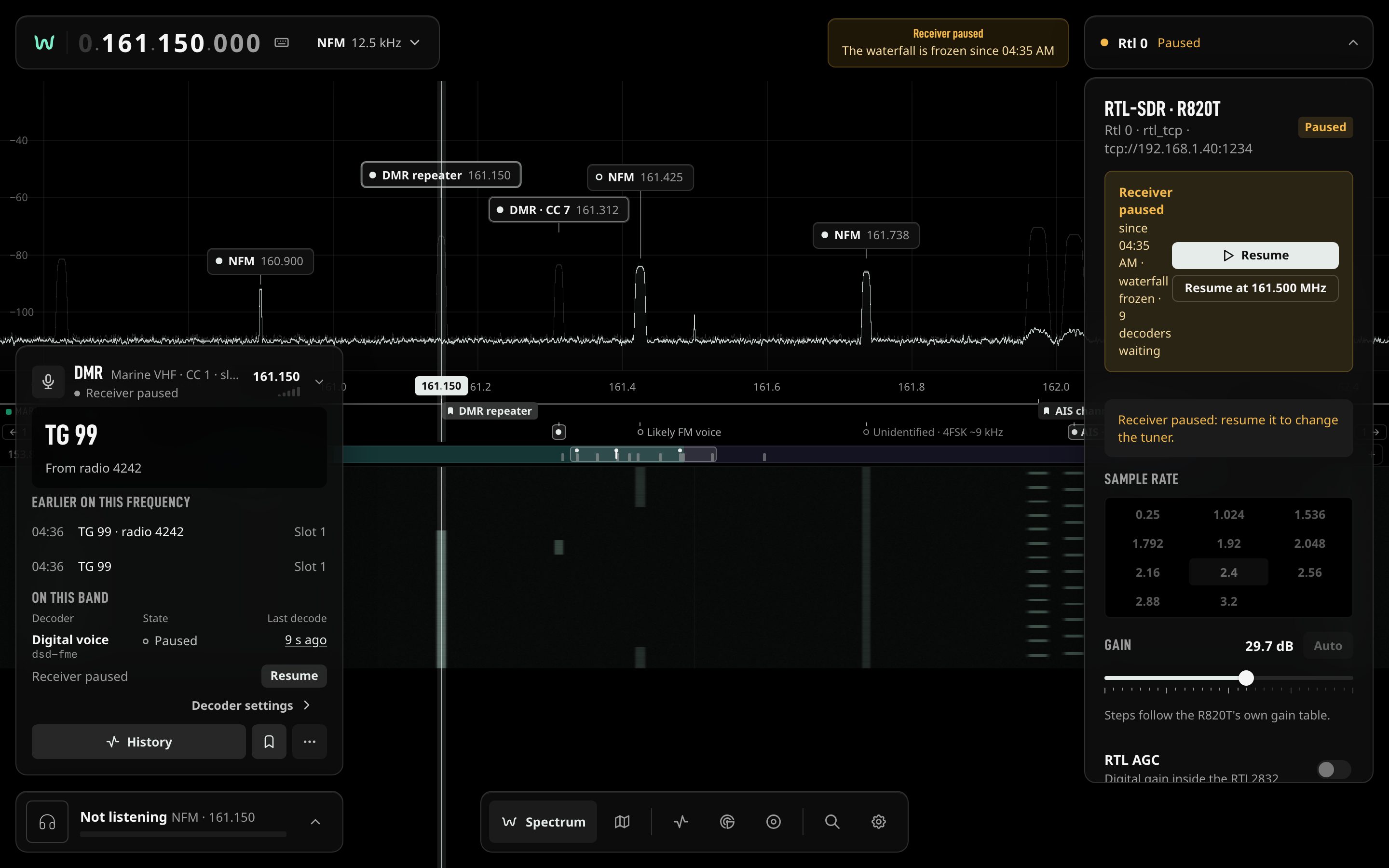
-
Receiver (the island at the top): under Gain, a quiet line says when the core confirms a band gain on the tuner, for example
Band gain 37.2 dB · 868 MHz ISM · while the scanner tunes(or· for your tuningwith the switch on). It shows the gain the tuner really has (snapped to its gain step) and goes away as soon as you change the gain, the mode or the frequency; turning the switch on shows nothing until your next retune. When the scanner sees broadband blanking rise at a manual gain, the lineFront end may be overloaded at this gain (49.6 dB, 7.5 % of frames blanked)suggests a lower gain; it is a hint, not a measurement. -
When samples are lost on the way from the receiver to WaveKit, the Receiver island says
Samples lostand a notice says why (see Notices).

Everything known about one transmission, in the drawer you are in: Details on an open
Recordings row, a transmission's row in Activity or in a pinned column (a scanner recording, a live
analog transmission, a call with audio; other rows keep their event detail), Details on such an
event's detail, one of the tuned card's earlier rows, or the player's title (in Recordings or
Activity when one of them is open, else in Activity; played from an Activity list, it opens on that
row). ‹ Back (or Esc anywhere in the drawer) names where you came from and returns there in
one step: the same list, search, scroll and open row, or the event detail it was opened from
(focus on that detail's Back), with focus on that row or, when the row is no longer on screen, on
the list. When the view opened the drawer, Back closes it again, reopens the drawer that was open
before (when there was one) and puts focus back on what you clicked; closing the drawer another way
(Esc from outside it, such as from the player, or its close button) also reopens that drawer. Opening it never changes another panel's search,
and opening another transmission while it is open (the player's title, a tuned card row) keeps that
same Back. When nothing can be found the view says Not found and why; when the receiver does not
answer within 15 s in all it says so with Retry, so it never stays on Loading for good. Opened from
Recordings, the list's count and its All / Kept switch are hidden until you go Back, so Back
returns to the list exactly as you left it.
From the top: the recording's icon (as on its Recordings row; a live transmission has none), the
time the audio starts (with the date when it is not today; the recording's own start, from its
Recordings entry; a scanner recording whose file is not listed shows no time here, and What we
know says when its Transmission started and when it was Kept at instead), the channel in MHz
on its raster and the length in seconds; the waveform and play disc (or one sentence when there is
no audio, such as The recording was deleted); What we know, a few short rows in words:
- Tone, always for analog FM and never for AM:
CTCSS 88.5 Hz,DCS 023(DCS 023 invertedfor an inverted reading; under the standard code set the core reports every code normal, since each inverted standard code is another standard code sent normal, so this does not appear today),A tone was heard (not stored)(the scanner kept the file for its tone without storing which; such a file never readsNo tone heard),No tone heard(only when the scanner recorder stored that it listened and heard neither a CTCSS tone nor a DCS code, and the open carrier was quiet throughout but for at most 2 half-second blocks (its keying edge and squelch tail), with no audio missing from the source, so a tone would have been heard down to about 120 Hz of deviation at 254.1 Hz and about 80 Hz at 67 Hz (measured; a tone set lower is not ruled out): in practice a carrier with nothing on it; anything more that is not quiet, such as a short burst of speech, readsNot determined for this recording, since a tone can hide under speech; it does not check tones under 67 Hz), orNot measuredwith why (recordings made before WaveKit stored the tone,Not determined for this recordingwhen the stored facts hold no tone, a scanner recording whose file is not listed, a live transmission whose stored event could not be read, a live transmission whose stored reading holds no tone, or a stored tone this web app cannot read). A live transmission never saysNo tone heard: the live demodulator stores the same empty reading when the audio was too short, its detector failed, or the core predates the check. - Signal (
Strong, 24 dB over the noise), Ended (The transmission ended,Cut: the receiver was retuned) and Kept (Speech heard over a tone), each only when known.
For a scanner analog recording the scanner marked as a copy, a link Copy of 156.8 MHz opens its
original; an original lists each copy as Also heard on 156.9137 MHz (copy) (at most 8, then
and 3 more copies), each opening that recording in place. Back still returns to where you came from.
Then the Conversation: the other parts of the same transmission, oldest first, this one marked,
with Play all, which plays every one in that order to the last, whether Auto-next is on
or off; recordings of the same channel close in time are titled
Around this time on this channel, since WaveKit cannot yet tell they were one exchange. Choosing
one shows it in place; Back still returns to where you came from. While it shows the recording that
plays, the player's Next, Previous and Auto-next move the view along with it, without
moving your focus (focus goes to Back only when the view opens). On this
channel says how often the channel was heard and its usual tone, with three doors: History of
… and Open in Scanner close the view and show that place (Back does not come back to it), and
Tune (one row, or whole buttons wrapped onto a second). Details, collapsed (remembered per
browser), says everything in words, the important first: when it Started and Ended (your
clock, with the same time in UTC under it and in its tooltip), the Channel and Measured
frequency in MHz (with its offset from the channel), the Duration (and its part), Speech,
Tone, Why kept, Copy of, then how it ended, the signal in dB to one decimal, the
signal flags (such as Off the channel raster), the file size, and how the recorder decided
(its decision, what the channel's history said and the rule that fired, in words, then its
measured levels, rounded). A code WaveKit has no sentence for shows in plain words (a newer
code such as carrierDrop would read Carrier drop), never as the raw code. Identifiers, collapsed under it, lists
every id (transmission, recording key, observation, discovery, owner discovery, Activity event, operation, receiver), each with a
copy icon; a long id wraps between its parts. Download WAV and Stored JSON (collapsed too;
its header reads like JSON · 6 lines · 83 B, with Wrap and Copy beside it) close it. Copy
says Copied, or that the browser blocked it.
A scanner recording's event detail in Activity speaks the same way: Channel in MHz, Transmission started (when the transmission it belongs to began: a later part or a second over of the same session shares it, so it is not the file's own start), Duration in seconds and Kept at, never its ids or ISO times. Those are under Ids and raw values, collapsed, the important first: what happened (Change, in words), the channel's exact Channel frequency and the Measured frequency in MHz, the times on your clock with the same time in UTC under them, the duration in words, then every id (recording, receiver, discovery, owner discovery, observation) and the stored JSON. A live analog transmission's detail says its length in seconds and how it ended in words.
There is one player for the whole app. A play disc on an Activity row or card (expanded Cards too),
a Recordings row, or the tuned card's last transmission or one of its earlier rows starts the
recording; pressing the same disc again pauses it, and while it loads the disc already says Pause
(pressing it then cancels the start). Rows without a recording (most decodes, and digital calls the
core did not record) have no disc. On an Activity row or card the disc has its own column, the
last thing on the right after the N · time stack count: discs line up row to row, and a
row without a recording keeps that column empty, so every row's time and stack count sit in the
same place (a stacked card without a recording keeps it empty too). A call that has just ended shows a quiet Saving disc for a few seconds while the
receiver finishes writing its file (it lists a file once it has been quiet for 10 seconds), in
the disc's own place and size (the open event and the Transmission view keep the waveform's
height too); it turns into the play disc by itself, and a play started meanwhile (by Next or
Auto-next) waits for the file instead of saying it is gone, even when the receiver's clock and
this browser's disagree. The recording playing is marked the same way in every list that shows
it. On the tuned card a scanner recording's disc sits on the transmission it recorded, which
keeps its tone and transcript. A long transmission recorded as several files sits on that one
transmission and plays its first file (Recordings lists every file). A recording is a row of its own
when its transmission is not in the list, or when WaveKit cannot tell which of two transmissions on
the channel it recorded.
While something is loaded, the player sits just above Listen, at the left, whatever panel is
open (an open drawer never covers it): Previous, Play/Pause, Next, the title and its place in the list
(3 of 12), the time, a position slider, the speed (1×, 1.5×, 2×), Auto-next, Keep and
Close. Closing a drawer does not stop it. Next, Previous and Auto-next follow the
list it was started from, in the order shown, and only the rows with a recording: the Activity
drawer and each pinned column are separate lists. Previous after the first 2 s goes back to the
start; before that it plays the previous recording, and it is greyed out when there is none.
Auto-next plays the next recording when one ends (never after a failure); it is on by default
and remembered per browser. An open Activity event or Recordings row only drives this player: its
disc plays and pauses it and its waveform is where you seek (click or drag on it; a paused one plays
on from there), while the player stays whole, with its title and Close. Only a window too short
for the full player shrinks it to one line: play/pause, the title over a progress line, the time and
Close. A recording that fails keeps the full player, which says why:
This recording is no longer on the receiver,
Too many recordings are being read; try again in a moment,
The receiver is busy; try again, or Session expired, pair again.
Known gap: an Activity row of a scanner recording whose file was deleted since still shows its play
disc, and playing it fails with This recording is no longer on the receiver.
Keep works when WaveKit can name the file, which for a digital-voice call needs it loaded in Recordings; otherwise it says to keep it from there. When WaveKit does not know yet whether a file is kept, Keep never shows it as not kept: pressing it keeps the file and shows the answer.
Live audio in this tab is muted while a recording plays or loads to play, and comes back as soon as the recording pauses, by any means (its disc, the player, a media key or the system), or ends, fails or closes; a media key's play mutes it again, also after the recording ended (it plays again from its start). Live audio in another tab keeps playing. Pressing Listen while a recording plays pauses the recording; Listen stays on. The same holds for every Listen, including a scanner hit's Listen while live audio is already on.
Hit rows show the latest observation duration: milliseconds below one second, or under 1 ms for shorter observations. An operator label takes priority over a matching saved frequency name in both tabs; proof remains visible below it. Merged hits show their survivor. Lookups say Loading discovery… until resolved, then Merged or unavailable on failure. Missing discoveries (404) are not retried; other failures retry twice with backoff. At most 20 lookups run at once, and reconnects or store epoch changes reset lookup outcomes. IQ analyses: N done · M unfinished counts internal analyses, even with zero completed; it does not count saved files. Sweep percentages say hops visited, not listening coverage.
Activity folds repeats into stacks, so one aircraft, one beacon or one call is one row. A stack
shows its newest decode as it was stored, with only who it is filled in from rows heard before it
(an aircraft's callsign when the newest decode is position only; by time, the latest value wins,
never a row heard after it even when stored earlier); a measurement such as a call's
duration, an altitude, a position or a signal level is always the newest decode's own, so a call
that has just started never shows the previous over's duration. The row also shows the count and
the span (24 · 1 min) and expands in place to the earlier rows. An aircraft row titled only by its
ICAO address is named field by field: the callsign the core stored with the row (what it flew as
when heard), else the live fleet's callsign or registration (never a live name that is only the
ICAO address), else the stored registration; "who flies what" is the stored operator and type, else
the live fleet's. So history keeps naming an aircraft after it has left the fleet, and an old row
keeps its own callsign. A row the core stored a minute after its last reception (a fading
aircraft's final row) is dated when that reception was heard. Counts are for the loaded list,
never totals: the list footer says 312 events in 41 rows, loaded so far., and the header counts
rows (its tooltip says 41 rows in the 312 loaded events). Folding runs in the browser over the
rows already loaded (at most 5 000), and each live update folds again only the stacks its decodes
touched; with a short folded list, Activity loads up to 10 older pages of 100 by itself to fill the
view.
The core already merges an aircraft's, vessel's, station's or sensor's repeats into one row per
minute (its coalesced count and first reception; see API.md). Folding counts
those receptions, not rows: a stack's explanation says Likely one aircraft in range for 2 min (239 times) and its span starts at the first merged reception. The detail shows a merged row's
Merged: 120 receptions since 12:00:00, latest state.
Each row gets a fold key from its own data: protocol and event kind, the core's entity
(icao:, mmsi:, capcode:, talkgroup:, sensor:, callsign:, node:; the title when there
is none), the channel to 1 kHz where an entity is only unique per channel, and, when the row
carries a message, its kind (tone only, numeric, alpha) and its exact text, so two different pages
never fold. Ingestion gaps never fold. Rows of one key are taken in the order they were heard, and
a silence longer than the family's gap between two of them ends a stack (a row stored late never
bridges one):
| Family | Gap | Why |
|---|---|---|
| Aircraft (ICAO, registration) | 2 min | readsb sends 1-30 messages/s; the core stores a position update at most once a minute. Twice that tolerates one missed minute |
| Vessel (MMSI) | 10 min | AIS reports every 2 s to 3 min (at anchor); 3 missed anchor reports |
| Pager (capcode) | 3 min | Idle beacons repeat every 30-60 s; 3 × 60 s tolerates two missed beacons |
| Call (talkgroup and radio) | 10 s | Bursts are under 3 s apart; 2 × a 5 s hang time ends the call |
| Sensor | 5 min | 433/868 MHz sensors send every 16-60 s; 5 × 60 s |
| APRS station (callsign) | 15 min | Fixed stations beacon every 10 min; plus 50 % jitter |
| Mesh node | 30 min | Meshtastic sends position every 15 min by default; twice that |
| Aircraft link upkeep | 5 min | Link frames run seconds to minutes apart on a channel while aircraft are in range; five quiet minutes end the stack |
| Anything else | 2 min | One exchange on one channel (analog overs are seconds apart) |
Aircraft datalink rows that only keep the radio link up (VDL2 link frames, ACARS link tests _d
and ground-station squitters SQ: the core's Kind says Link or Ground station) fold per
protocol and channel, whatever aircraft sent them, into one Link traffic row, so the messages
that say something stay in view. The folded rows keep their own titles, and nothing of one aircraft
is filled into another's. An ACARS or VDL2 row reads as the core explains it: the title says who and
what in plain words (N0WK01 ZZ0101 · Message to or from an onboard system), the subtitle how it
travelled (ACARS · Air to ground · 131.550 MHz), and the readings keep the raw label beside its
kind and how sure the explanation is (Label H1 · Onboard systems · Public label list); see
AIRCRAFT-DATALINK.md.
A talkgroup's calls are one stack per radio. A DMR call_start that arrives before its radio is
decoded joins the call that follows it on the same talkgroup and channel (or, with none within the
gap, the call before it) instead of becoming a stack of its own. A capcode is one stack per channel,
except that the same page (same capcode, kind and text) heard within 2 s of one of the stack's
decodes on another channel is a simulcast copy and joins the stack: the row lists the channels it
was heard on (On 160.450 · 431.075 MHz), and the detail shows the decode's own Frequency with the
stack's other channels under Also heard on (simulcast). The copies may arrive in either order: a
repeat whose first copy lands on the other channel joins the stack that already heard both channels,
so a beacon repeated on two channels stays one stack however its copies interleave. A channel stays
with the stack only while its copies keep arriving within 2 s of the others: a repeat heard later on
that channel alone is a stack of that channel again. The 2 s is one POCSAG batch at the slowest
rate (544 bits at 512 baud, 1.06 s), the most two decoders' timestamps of one page differ, plus the
network's launch skew between transmitters (under 1 s).
Stacks are ordered by their latest decode. At the top of the list, a stack that hears again moves
to the top and keeps its place in React and stays expanded (its key is kept while it shares a row
with the stack before, so older rows leaving the list or an older page loading do not reset it); while you are
scrolled down or Paused, new decodes wait behind the N new pill and nothing moves. The pill counts
rows (stacks), not decodes: one beacon heard five times while you were away is 1 new, and its
tooltip says how many decodes are waiting. In the list, ↑ / ↓ move the cursor, → expands the stack
under it and ← collapses it (on an earlier row, ← collapses its stack and returns to it); where there
is nothing to expand or collapse, ← / → move between the columns. Reopening the drawer shows the
last list at once (with Updating…) while it reloads, also for a rolling range such as Last hour
whose start has moved on (rows now before its start are dropped); the fresh rows join the kept ones
when they overlap, else they replace them. Kept rows the store has since pruned, or that the fresh
rows' range no longer holds, are dropped, and loading older rows continues after the oldest kept
row rather than fetching the kept ones again (after a rolling range moved on, with the range it was
loaded for, keeping only rows inside the current one). If the core no longer takes that position
(it expired), loading starts again from the fresh rows and skips the pages of kept rows, at most one
page per 100 kept rows.
Before the first rows arrive, the list shows its shape in placeholder rows (Loading what was heard… after a second). An empty list says which case it is: Nothing heard yet with Find
signals (opens the Scanner) when nothing narrows it, Nothing matches yet with Clear
filters and, for a time range, Any time when a search or range does, and Nothing was heard
in this range for a range that has ended.
An event's detail shows the event exactly as it was stored. Who rows of its stack heard before it
said it is (never a later row; the same rule as the list row), when this decode does not say it (a title, callsign, flight, registration or name), is a
separate Latest known (from earlier rows) block, each value with the time of the row that said
it. The detail says What it is as a guess from its stack, labelled as one: a tone-only
capcode repeating on a schedule reads Likely a paging-network idle beacon (no content, repeats about every 45 s); bursts of one talkgroup and radio read Likely one call: 24 bursts over 55 s.
A schedule needs at least 3 rows with every interval within 35 % of the median. The detail also
shows how often it was seen, the strength when the decoder sends it, Open in Scanner when a
discovery sits within 12.5 kHz, and up to 50 folded rows.

The Map shows aircraft, vessels, APRS stations and mesh nodes around your station, with their trails and the station's coverage.
The map's controls follow the same layout as the rest of the app and never move when a drawer opens. Live, the scale and the map's credits sit at the bottom right, beside the dock (above Listen on a phone); the layers rail, its zoom buttons and the selected item's card sit under the Receiver. An open drawer covers the rail and the card, which come back when it closes.
Between reports, an aircraft keeps moving along its track at its speed. When a new position arrives, the plane glides onto it over about two seconds instead of jumping, and its glyph turns smoothly the short way round (from 359° to 0° it turns 1°, never all the way back). A position the aircraft could not have reached (a speed over 1200 kn since the last one, usually a bad decode) is held back; if a later position agrees with it (at the very same spot, one at least two seconds later), the aircraft really is there and the map moves it at once. A position no newer than the one the plane already follows is ignored, so a late report never pulls it back; a new speed or track for the position it follows always applies. After 60 seconds without a usable position, the next one is taken as it is. A position more than 5 km from where the plane is drawn, or one arriving after the plane has stopped (a hidden tab or layer, a gap in reception), moves it at once instead of sweeping it across the map, and while a position is held back the glyph keeps pointing along the track it follows. Without new reports, the plane slows down after 10 seconds and stops 20 seconds after its last position, then waits there instead of flying on with an old speed and track. The trail, label and selected aircraft's card follow the plane where it is drawn; with the Aircraft layer hidden, the card still follows it.
The ACARS layer shows where aircraft said they were over datalink: an ADS-C report decoded by
libacars, or the rough position a VDL2 link frame carries (to 0.1°, about 10 km). Each aircraft's
latest report of the last hour is a hollow amber ring, never a plane glyph, and it never joins the
aircraft's ADS-B trail: trails ask GET /api/activity/trails for every category but
aviation-data, and the layer asks for aviation-data alone. A selected aircraft shows a
Datalink section: its last five ACARS and VDL2 messages, newest first, how many link frames
were folded, and how its registration was tied to its address (Registration N0WK01 heard with this address on VDL2). The aircraft is found by its ICAO address and the registrations
GET /api/aircraft-identity links to it, never by callsign or flight number. For decoded
messages as cards, use Activity's Cards layout; open one to see its full content or its
position on the map.
Select an aircraft to see its live flight data and what the core knows about it (see
ADS-B, Aircraft Enrichment). From the top: a photo of the airframe,
credited to its photographer with a link to the photo's page; the callsign and who flies it (the
airline, else the operator, else the type with its ICAO type code); a Military tag; an emergency alert; the planned route of its
callsign; then the live data, always shown in full: altitude (or On ground), ground speed,
vertical rate with a climb or descent arrow (Level within 64 ft/min), track, squawk, signal
strength, distance and direction from the station, and when it was last heard. Values follow
Settings › Display › Units, and a value the aircraft has not sent shows a dash. Squawks 7500,
7600 and 7700, and any emergency state the aircraft reports, show as a red alert
(Squawk 7700 · General emergency) and the squawk turns red. Below, the Aircraft section lists
the registration, the type once with its ICAO type code (Airbus A321 251NXSL A21N), the
registered operator unless its name is the airline's give or take words like Air or Ltd at its start or end (Air China and China Airlines are two companies), the country, the ICAO address and
the year built; the footer gives the decoder, the message count and the position. The card
scrolls as a whole when it is taller than the window. The planned route comes from a crowd-sourced database, so
it is hidden when the core marks it implausible (the aircraft is clearly flying away from the
destination). On the map, an
aircraft is named by its callsign, else its registration, else its ICAO address. Photos load
from the photo site (Planespotters) straight into your browser, so they need internet access,
and that site sees your browser's IP address and which aircraft you open; everything else also
works offline. Photos appear only while online lookups are on.
While the receiver tracks an aircraft, its Activity rows say who flies it and what it is
(ADSB · WaveKit Air · A320 214), and a row titled only by the ICAO address takes the callsign or
registration instead. Rows of aircraft no longer tracked stay as they were stored. In ⌘K, type
a callsign, registration, ICAO address or airline to find a tracked aircraft and open the Map
on it. Settings › Map › Online aircraft lookups turns the core's free online sources
(photos, routes, airline names, the local database download) on or off. While they are off
(the default, and what Reset restores) only the local database is used, no photo is shown
and your browser fetches nothing from the photo site, and nothing about the aircraft you receive
leaves the station. Turning them off stops lookups already under way and removes the photos
already shown.
| Key | Action |
|---|---|
| ⌘K / Ctrl K | Command palette |
| ⌘, / Ctrl , | Settings |
T |
Tune to a frequency |
M |
Mode |
Q |
Squelch Open, and back |
[ ] |
Step down / up |
L |
Listen |
P |
Pause / resume the receiver |
B / S |
Saved frequencies / save this one |
/ |
Search Activity |
G then S M D |
Spectrum, Map, Activity as cards |
G then A C R |
Activity, Scanner, Recordings |
? |
All shortcuts |
Esc |
Close the top drawer or sheet |
The address bar names what is on screen, so a link reopens it: #/map, #/activity/<eventId>,
#/activity?layout=cards, #/scanner/<discoveryId>, #/settings/<settingId>. An old
#/messages link (or one with view=messages) opens Activity in Cards.
WaveKit is a PWA: use Install WaveKit in the ⌘K palette, or your browser's install button.
Browsers only install from HTTPS or localhost. Install it from the address the core accepts: an
app installed under another name is sent out of its own window to that address.
A production build keeps its files in a service worker, so the app opens at once and still opens when the server is down. A page load always asks the server first, so a new build is what you get whenever the server answers; the WaveKit was updated toast only replaces the stored copy. The dev server keeps no service worker. If an address that served a production build now serves the dev server, the leftover worker and its stored copy are removed by themselves: the page removes them when it loads, and a window still showing the old build reloads into the dev server at its next update check.
- Design system and decisions:
docs/web/DESIGN.md, tokens indocs/web/THEME-TOKENS.md. - What the web app still needs from the core:
docs/web/CORE-GAPS.md. - Screenshots on this page and in the README come from
pnpm --filter @wavekit/web docs:shots(the built app against the mock, so the data is the same on every run).
Activity pager details show the full stored message when the list presentation was clipped. List previews and titles keep their compact limits. Multimon whitespace markers and their raw control characters become spaces in pager titles and message bodies; other control markers are hidden and whitespace is collapsed. The raw JSON retains the original payload. Empty function-zero pages are labelled tone only and displayed as compact notices.
The band view labels a decode-anchored 1090 MHz discovery ADS-B · N aircraft, where N counts distinct confirmed ICAOs in the last 60 seconds (up to 4096). The label sits at its nominal channel, independently of nearby narrow carriers. Its identification is proven by decodes; API spectrum fields contain unmeasured zero placeholders. The drawer hides RF measurements and transmission history for anchors. Aircraft counts update through live discovery events when confirmations expire, without a new decode. See decode-anchored ADS-B.
Digital voice tags distinguish sync hints from decoded identities. DMR sync-only
activity is labelled DMR?; its detail summary says DMR-like sync, not decoded,
and may show the most frequent color code as CC 3 (unverified). Repeating
Checked TG/SRC voice with unknown CC uses the tag DMR and detail
DMR voice, TG/SRC verified, CC unknown; this remains weak evidence.
VC/IDLE/MBCC sync never earns a proven tag or DMR · CC n identity. A decoded DMR
identity requires repeated checked content, with checked talkgroup/source voice
link control additionally required inside the tuner-centre DC guard. See
Digital voice identity checks.