GV

GeezerVison

The World Wide Web, restored to 800 pixels of glory.

Home|About|Gaming cabinet|Archives|How it works|Starter sites

On this site

  • Sign in
  • ActionsCI/CD and automation
  • CodespacesCloud development environments
  • All Features
  • Documentation
  • Training
  • Certifications
  • Build with Copilot
  • Customize Copilot
  • Integrations
  • Trending repos
  • GitHub Sponsors
  • Developer articles
  • Enterprises

This view

  • Original page
  • New address

GeezerVison is showing github.com — How to use FPM10A Fingerprint Sensor

How to use FPM10A Fingerprint Sensor

Jump to bottom
Ajmal Muhammad P edited this page Jul 27, 2019 · 6 revisions

Buy online now

  • Buy from our store
  • Buy from Amazon

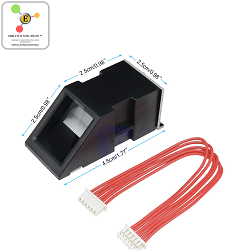
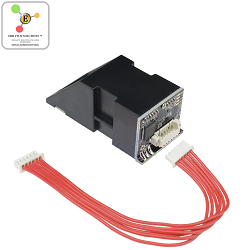
About FPM10A Fingerprint Sensor

  • Supply voltage: DC 3.6 ~ 6.0 V / 3.3 V
  • Supply current: < 120 mA
  • Peak current: < 140mA
  • Fingerprint image time: < 1.0 seconds
  • Storage capacity: max 130
  • Safety level: Five (from low to high: 1, 2, 3, 4, 5)
  • False accept rate (FAR): < 0.001% (security level 3)
  • False reject rate (FRR): < 1.0% (security level 3)
  • Search time: < 1.0 seconds (1:500, mean)
  • PC interface: UART (TTL logic level) or USB2.0 / USB1.1
  • Communication baud rate (UART): (9600 X N) bps where N = 1 ~ 12 (default value N = 6, ie 57600bps)

How to use ?

We provide a sample Arduino code, which can be used to test/learn the working of FPM10A. This code is tested on Arduino Uno

Installing Fingerprint library

To interface FPM10A with Arduino, we need to install fingerprint library

Configure with Arduino

FPM10A has 6 pins, in which we will be using 4 of them

  • Ground
  • Rx [To be connected to pin 3 of Arduino]
  • Tx [To be connected to pin 2 of Arduino]
  • Vcc [3.3v - 6v]

This is how we connect the FPM10A to Arduino for testing


Now we can upload the sample code to Arduino

Sample Code

In the sample code, we are using SoftwareSerial [Rx: 2; Tx: 3] so that the normal Serial pins Rx and Tx is free for debug

You can get sample code from our Github repository

Download sample code

by Erratum Solutions

Erratum Solutions

  • Visit our site
  • Visit our online store
  • Visit our Amazon store

Social Media

  • Facebook Page
  • Instagram Page
  • Twitter Page
  • YouTube Channel

Contact us

  • Quick Support

Clone this wiki locally

You are visitor 01402792 — GeezerVison does not store the pages you look up.
Best viewed with Netscape Navigator 4.7 or Internet Explorer 6 at 800×600. No cookies required.