GeezerVison is showing github.com — Releases · InstaZDLL/WaveFlow
Releases · InstaZDLL/WaveFlow
v2.4.0
66e79b1
This commit was created on GitHub.com and signed with GitHub’s verified signature.
2.4.0 (2026-11-25)
🎬 What's new in v2.4.0
Important Coming from 1.9? Read the WaveFlow 2.0.0 notes first: they present the new interface and everything else 2.0 brings, and explain that your library is upgraded the first time 2.0 opens it, after a verified backup — 1.9 cannot open it afterwards.
Coming from 2.0.x to 2.3.x? 2.4.0 makes one small change to each profile's database the first time it opens that profile. WaveFlow makes and verifies a backup first; if the backup fails, you can try again, cancel, or explicitly continue without one. An older version cannot open an upgraded profile directly: restore its pre-migration backup if you need to go back.
Manually queued tracks now stay in your queue when you start another album or playlist. Custom smart playlists stay in sync with your library and support covers, search results get the full track menu, and your mouse's side buttons move back and forward.
Large libraries also open faster, and a scan gets in the way of what you do far less.
🎵 Queue
- Manually queued tracks stay queued. Starting an album, a playlist or any other list used to wipe the tracks added with Add to queue or Play next. The ones still to play now keep their queue order, right after the track you start and ahead of the rest of the new list, with shuffle on too. If the track you start is one of them, it is not queued twice. Turning shuffle off puts each entry back in its place, a track queued twice included. (#1175, fixes #1168)
✨ Smart playlists
- Custom smart playlists stay in sync with your library. A matching file scanned in joins them, and a track retagged so it no longer matches leaves them, without having to recreate the playlist. They update after a scan, a tag edit, removing a folder or a library, enrichment and analysis, and at launch. Rules that read plays, likes or ratings catch up at the next of these, not on every play. (#1177, #1180, fixes #1169)
- Custom smart playlists now support covers: your own image, or an automatic mosaic of their first tracks' covers that changes with their contents. Daily Mix, On Repeat, Release Radar and the other generated mixes keep their own cover, and the edit window no longer offers to change it. (#1181, fixes #1173)
📋 Playlists
- Creating a playlist from a track's menu or the selection bar now adds those tracks. It used to create an empty playlist, from every view. (#1166)
- Adding an artist to a playlist takes every track crediting them, guest appearances included: the same tracks the artist list counts. (#1166)
- The creation dialog shows how many tracks will be added, instead of always "0 tracks". (#1162, fixes #1156)
- Deleting a library, a folder or duplicates updates the playlists that held those tracks at once: their count, their page and their automatic cover. (#1180, #1181)
- Choosing a playlist cover no longer goes through the system's temporary folder, which made every upload fail when that folder was missing. When a cover still fails, the log now says why. (#1174)
- A long playlist title stays readable in a narrow window. The cover moves above the title when there is no room beside it, and the title takes at most three lines, with the whole name in its tooltip. (#1154)
🔍 Search and navigation
- Search results now have the track menu: right-click, the Menu key or Shift+F10. Queueing, adding to a playlist, liking and rating keep the results open, so you can take several tracks from one search. (#1176, fixes #1170)
- The mouse's back and forward buttons move through the app's history, as do the keyboard's Back and Forward keys, by @shsnalipr. A shortcut you saved on one of those keys keeps it. (#1179, fixes #1172)
🔊 Audio output
- Linux: unplugging your headphones pauses playback. With Pause when the output device disconnects on, WaveFlow now notices when PipeWire or PulseAudio moves the sound to another output by itself, the built-in headphone jack included, and pauses with a notice. Play resumes on the output the system chose. (#1164, fixes #1158)
- A pinned output device is used again when it reconnects. A Bluetooth headset or a USB DAC you picked in the device menu used to stay replaced by the default output after a disconnection; WaveFlow now switches back to it when it returns, and picking it again in the menu works. If it refuses to open, the sound stays on the output that was playing. The menu says Pinned for a pinned device that is present but not in use. (#1167, fixes #1165)
⚡ Large libraries
- The library opens faster. In our benchmark, a generated 20 000-track library, the Albums tab took about 3 s to appear, at launch and on every return to the library; it now takes under 1 s at launch and about 0.2 s on a return. (#1153)
- Library scans are much less disruptive. During a scan of a large library, a like or an add to a playlist could fail, and at the end of the scan picking another track could fail too. They go through now, and the work at the end of a scan is several times shorter. A like or an add that still fails in the main window now says so instead of looking applied. (#1152)
- The log no longer fills with harmless lines written for every MP4 or M4A file opened, which on a large library could use up the day's log budget and hide what came after. (#1154)
🌏 Translations
- More error messages are now in your language, in all 17: offline mode turning down the plugin store or an online lookup, an unsupported image, a file too large, and the like used to show in English. (#1163, fixes #1157)
📦 Recommended installation
Use your platform's package manager when one is available, so updates keep flowing through the tool you already use.
Windows
winget install InstaZDLL.WaveFlow Arch / Manjaro / EndeavourOS / CachyOS
yay -S waveflow-bin
# or: paru -S waveflow-bin
Fedora / RHEL / Rocky / Alma / CentOS Stream
sudo dnf copr enable instazdll/waveflow
sudo dnf install waveflow
Debian / Ubuntu / Mint / Pop!_OS
The Debian package is named wave-flow: Tauri derives that name from the WaveFlow product name.
sudo install -d -m 0755 /etc/apt/keyrings
sudo curl -fsSL https://download.waveflow.app/apt/waveflow.gpg -o /etc/apt/keyrings/waveflow.gpg
echo "deb [signed-by=/etc/apt/keyrings/waveflow.gpg] https://download.waveflow.app/apt stable main" \
  | sudo tee /etc/apt/sources.list.d/waveflow.list
sudo apt update && sudo apt install wave-flow
macOS
curl -fsSL https://waveflow.app/install.sh | bash WaveFlow is not notarized by Apple yet, so macOS refuses to open a copy downloaded by a browser. The script removes the quarantine flag from WaveFlow.app only and changes no system setting; --help lists its options. It is scripts/install-macos.sh, to read before running it. The .dmg below works too: after moving WaveFlow to Applications, either allow it once in System Settings → Privacy & Security → Open Anyway, or run xattr -dr com.apple.quarantine /Applications/WaveFlow.app. Both skip Gatekeeper's check for WaveFlow only.
Standalone downloads
Everything is also available as a raw bundle below — .AppImage, .deb, .rpm, .exe, .msi, .dmg.
🐛 If something goes wrong
Open an issue with your OS, the exact steps, and your logs — Settings → Maintenance → Diagnostics → Copy logs puts them on your clipboard, ready to paste.
Thanks to @shsnalipr for the mouse buttons and five precise reports, to @GoEverLo for three more, to @Sylvvtbr for the smart playlist covers, and to everyone who told us about slowdowns on a large library. Keep the feedback coming. 💚
Full changelog: v2.3.0...v2.4.0
Contributors
shsnalipr, GoEverLo, and Sylvvtbr
Assets
14
-
sha256:236954861a0868345802a1ce6aa0d2a6c9d638ffde5bad46b1c2a9086a8a7015
2.45 KB
2026-11-25T20:28:24Z
-
sha256:25d8005b99dd52079f033215debcd271c82dbfd6eb7cf5ba66e3e4435ce15de2
188 MB
2026-11-25T20:14:59Z
-
sha256:5c7f892972b7e9ffcea91d54f92ac544bd58b5fcb300b719e9d3bf713cb0b3a9
440 Bytes
2026-11-25T20:15:06Z
-
sha256:33f9d445bdeb6e65e7d8682249af2985ab56c911aebfaa0144f3c4128b0608b1
329 KB
2026-11-25T20:15:07Z
-
sha256:cf0893ebbbb0f9dfdd6979a11bad78ae71aeb5b1f7c8f509dd9d85dee5977647
38.8 MB
2026-11-25T20:15:08Z
-
sha256:5d208773b64e269ecf0d1768c0bd14412894a10b8c8b2f2daf1dea990a226e4b
38.8 MB
2026-11-25T20:15:10Z
-
sha256:650d5b0fb73901fefb2266cd7224ea7307f48a49bd3270619eeed78a5e766b51
68.2 MB
2026-11-25T20:26:59Z
-
sha256:edbd4637df834c93ad89cb224b1e650e04d8b84d524ed82edb1eb5708f67436b
424 Bytes
2026-11-25T20:27:03Z
-
sha256:7564687c4a69c26a4da39bb627392153280aaee1b86a3bf531bd52d481a2bc57
66.6 MB
2026-11-25T20:27:04Z
-
sha256:e7855579e92400b187eecea9a77631915cc3b87c9df4b4620db8cba098984c62
23.6 MB
2026-11-25T20:17:27Z
-
2026-11-25T19:54:57Z
-
2026-11-25T19:54:57Z
-
Loading
Uh oh!
There was an error while loading. Please reload this page.
senolfndk, jo-el414, and XOMEZ reacted with heart emoji
3 people reacted
v2.3.0
442107d
This commit was created on GitHub.com and signed with GitHub’s verified signature.
2.3.0 (2026-11-21)
🎬 What's new in v2.3.0
Important Coming from 1.9? Read the WaveFlow 2.0.0 notes first: they present the new interface and everything else 2.0 brings, and explain that your library is upgraded the first time 2.0 opens it, after a verified backup — 1.9 cannot open it afterwards.
Coming from 2.0.x or 2.1.x? Read the 2.2.0 notes too: 2.2.0 makes one small change to each profile's database, after a verified backup. 2.3.0 changes nothing in the database.
The playing track's title now opens its album, the immersive view can switch to the music video, and a music video on a network share plays. A click on a track no longer gets stuck behind a library scan, and the volume no longer jumps when you switch to a music video.
🎵 Player
- The playing track's title opens its album, the way the artist under it opens the artist: in the player bar, the now-playing panel and the immersive view. The album line of the panel and of the immersive view opens it too, and the panel or the view closes on the way. A station, an episode, a server track or a file played without importing it keeps a plain title. (#1147)
- The immersive view can switch to the music video. When the playing track has one, a clapperboard button in the top bar opens it over the view, at the moment of the song you are at; Switch to audio brings the view back. (#1149)
🎬 Music videos
- A track on an SMB or WebDAV share plays its music video. The video beside the track, or in a
Clips folder beside it, is now found on the share and streamed from it, as for a local track. (#1142, fixes #1133)
- A music video plays at its track's level. It now gets the same ReplayGain and normalization as the track, so switching to the video no longer jumps in volume (by about 11 dB on a track ReplayGain turns down that much). A video cannot play louder than its own file, so a boost is matched only as far as the volume slider leaves room for it. (#1141)
- Known limit on Linux: a video on a share stored as a fragmented MP4 stops after about two seconds, as a server video already does.
🔊 Playback
- A click on a track no longer gets stuck behind a scan batch. While a scan was running, playing a track could take several seconds (3.6 s and 9.6 s measured), and a play at the wrong moment could stop the scan. The scan now steps aside for it, then carries on. (#1140)
- A seek right after launch is kept. At launch, or after the last track ended, dragging the progress bar of a library track did nothing, and Play started from the stored point. Play now starts where you dragged it. (#1136, fixes #1129)
📝 Lyrics
- A file played without importing it shows its own lyrics. Those in its tag or the
.lrc beside it are now part of the normal lyrics lookup, so they work offline too. With the default source order they are read before an online lookup. (#1137, fixes #1128)
🖱️ Interface
- A right-click menu stays open while synced lyrics scroll. The lyrics panel moving to the next line closed any menu open elsewhere; now only a scroll that moves what the menu opened on closes it. The same goes for the equalizer's preset menu and the language list. (#1138, fixes #1135)
- Linux: closed dropdowns now use the skin's colours. With a light GTK theme and a dark skin, a closed dropdown showed near-white text on a white button. (#1139, fixes #1131)
- The About page shows the exact version of each library it lists, read automatically instead of typed by hand, so it can no longer fall behind. SQLite reports the version of the library WaveFlow actually linked. (#1148)
🌐 Network shares
- Switching between two profiles that share a network source keeps each one's shares apart. A profile imported from another can carry the same source identifier; during a switch, playback, covers, music-video lookups and scans could cross from one profile's share into the other's. (#1144, #1145, fixes #1143)
🌏 Translations
- Simplified Chinese: consistent wording for the beta update channel and the bug-report hint, by @GoEverLo. (#1127, #1132)
📦 Recommended install
Use your platform's package manager when one is available, so updates keep flowing through the tool you already use.
Windows
winget install InstaZDLL.WaveFlow Arch / Manjaro / EndeavourOS / CachyOS
yay -S waveflow-bin
# or: paru -S waveflow-bin
Fedora / RHEL / Rocky / Alma / CentOS Stream
sudo dnf copr enable instazdll/waveflow
sudo dnf install waveflow
Debian / Ubuntu / Mint / Pop!_OS
The Debian package is wave-flow (kebab-case, required by the Debian naming spec — Tauri bundles it that way from the WaveFlow product name).
sudo install -d -m 0755 /etc/apt/keyrings
sudo curl -fsSL https://download.waveflow.app/apt/waveflow.gpg -o /etc/apt/keyrings/waveflow.gpg
echo "deb [signed-by=/etc/apt/keyrings/waveflow.gpg] https://download.waveflow.app/apt stable main" \
  | sudo tee /etc/apt/sources.list.d/waveflow.list
sudo apt update && sudo apt install wave-flow
macOS
curl -fsSL https://waveflow.app/install.sh | bash WaveFlow is not notarized by Apple yet, so macOS refuses to open a copy downloaded by a browser. The script removes the quarantine flag from WaveFlow.app only and changes no system setting; --help lists its options. It is scripts/install-macos.sh, to read before running it. The .dmg below works too: right-click → Open the first time, or run xattr -cr /Applications/WaveFlow.app.
Standalone download
Everything is also available as a raw bundle below — .AppImage, .deb, .rpm, .exe, .msi, .dmg.
🐛 If something goes wrong
Open an issue with your OS, the exact steps, and your logs — Settings → Maintenance → Diagnostics → Copy logs puts them on your clipboard, ready to paste.
Thanks to @GoEverLo for four precise reports and two translation fixes, to @NielsHoenders for the music video on a share and for asking that the title open its album, and to the listener who wrote in asking for the music video in the immersive view. Keep the feedback coming. 💚
Full changelog: v2.2.0...v2.3.0
Contributors
GoEverLo and NielsHoenders
Assets
14
Loading
Uh oh!
There was an error while loading. Please reload this page.
jo-el414, XOMEZ, and JQuer-lab reacted with heart emoji
3 people reacted
v2.2.0
47924c7
This commit was created on GitHub.com and signed with GitHub’s verified signature.
2.2.0 (2026-11-17)
🎬 What's new in v2.2.0
Important Coming from 1.9? Read the WaveFlow 2.0.0 notes first: they present the new interface and everything else 2.0 brings, and explain that your library is upgraded the first time 2.0 opens it, after a verified backup — 1.9 cannot open it afterwards.
Coming from 2.0.x or 2.1.x? 2.2.0 makes one small change to each profile's database the first time it opens that profile, after making and verifying a backup. An older version cannot open an upgraded profile directly: restore its pre-migration backup if you need to go back.
Music videos can now play from a compatible WaveFlow Server too, playback picks up the right track after an audio hiccup, and old Chinese, Japanese and Korean tags show their real titles.
🎬 Music videos from your server
- A server track's music video plays like a local one. When your WaveFlow Server has a clip for a track, Play the clip is in the track's right-click menu, and Switch to video appears under the cover in the now-playing panel. The video streams from the server and behaves like a local clip: one sound at a time, and the track picks up where the clip was. (#1119, #1125, discussion #1073)
- A server track linked to one of your own files plays the clip beside that file, with no network needed.
- This needs WaveFlow Server 2.3.0 or later. Offline, a server clip is not offered.
- Known limit on Linux: a server video stored as a fragmented MP4 stops after about two seconds.
🔊 Playback
- After the audio output restarts, the right track resumes. When the output was rebuilt (a device lost, a stuck stream, a change of output), playback could resume a track played earlier, at an old position, while the player bar named the right one. This happened after tracks had followed each other gaplessly or through a crossfade. (#1104, refs #1103)
- Linux with PipeWire: short audio interruptions recover in place. The sound could drop out for one or two seconds, more and more often, especially when another app opened an audio stream or a video started in the theatre view. WaveFlow now recovers from these short interruptions on the spot instead of restarting the audio output. (#1106, refs #1103)
- Play after the last track ended starts it over. It sometimes replayed the last few seconds and stopped again. The same goes after closing and reopening the app right after the end. (#1117, fixes #1109)
🏷️ Library
- Old Chinese, Japanese and Korean tags show their real titles. MP3s tagged long ago in a local code page (GBK, Big5, Shift_JIS, EUC-KR) showed garbled text such as
Ò¹Çú instead of 夜曲, and some were listed by their file name. Tracks already in local library folders are corrected on the next regular scan, no deep rescan needed; Western titles such as Café are left as they are. (#1105)
📝 Lyrics
- macOS: the line that has just been sung no longer shows doubled, sliced letters in the lyrics side panel and the immersive view. (#1121, refs #1074)
🛠️ Diagnostics
- Log times are in your local time, with their offset from UTC, such as
2026-11-15T08:00:00.362923+08:00, so a log matches the clock you saw. Each log file still covers one UTC day, and Settings → Maintenance → Diagnostics now says both. (#1126, fixes #1108)
📦 Recommended install
Use your platform's package manager when one is available, so updates keep flowing through the tool you already use.
Windows
winget install InstaZDLL.WaveFlow Arch / Manjaro / EndeavourOS / CachyOS
yay -S waveflow-bin
# or: paru -S waveflow-bin
Fedora / RHEL / Rocky / Alma / CentOS Stream
sudo dnf copr enable instazdll/waveflow
sudo dnf install waveflow
Debian / Ubuntu / Mint / Pop!_OS
The Debian package is wave-flow (kebab-case, required by the Debian naming spec — Tauri bundles it that way from the WaveFlow product name).
sudo install -d -m 0755 /etc/apt/keyrings
sudo curl -fsSL https://download.waveflow.app/apt/waveflow.gpg -o /etc/apt/keyrings/waveflow.gpg
echo "deb [signed-by=/etc/apt/keyrings/waveflow.gpg] https://download.waveflow.app/apt stable main" \
  | sudo tee /etc/apt/sources.list.d/waveflow.list
sudo apt update && sudo apt install wave-flow
macOS
curl -fsSL https://waveflow.app/install.sh | bash WaveFlow is not notarized by Apple yet, so macOS refuses to open a copy downloaded by a browser. The script removes the quarantine flag from WaveFlow.app only and changes no system setting; --help lists its options. It is scripts/install-macos.sh, to read before running it. The .dmg below works too: right-click → Open the first time, or run xattr -cr /Applications/WaveFlow.app.
Standalone download
Everything is also available as a raw bundle below — .AppImage, .deb, .rpm, .exe, .msi, .dmg.
🐛 If something goes wrong
Open an issue with your OS, the exact steps, and your logs — Settings → Maintenance → Diagnostics → Copy logs puts them on your clipboard, ready to paste.
Thanks to @saaim2009, @NielsHoenders and @GoEverLo for their precise reports and logs, and to the listener who wrote in about old Chinese tags. Keep the feedback coming. 💚
Full changelog: v2.1.0...v2.2.0
Contributors
GoEverLo, NielsHoenders, and saaim2009
Assets
14
Loading
Uh oh!
There was an error while loading. Please reload this page.
jo-el414, JQuer-lab, and XOMEZ reacted with heart emoji
3 people reacted
v2.1.0
30f21b8
This commit was created on GitHub.com and signed with GitHub’s verified signature.
2.1.0 (2026-11-14)
🎬 What's new in v2.1.0
Important Coming from 1.9? Read the WaveFlow 2.0.0 notes first: they present the new interface and everything else 2.0 brings, and explain that your library is upgraded the first time 2.0 opens it, after a verified backup — 1.9 cannot open it afterwards.
Coming from 2.0.x? 2.1.0 makes one small change to each profile's database the first time it opens that profile, after making and verifying a backup. 2.0.x cannot open an upgraded profile directly: restore its pre-migration backup if you need to go back.
Warning Debian and Ubuntu: the APT repository has moved. The old one on packages.buildkite.com no longer receives updates. If you installed WaveFlow from it, switch once with the commands in Recommended install below, after removing the old entry:
sudo rm -f /etc/apt/sources.list.d/waveflow.list /etc/apt/keyrings/waveflow.gpg Music videos play beside their song, synced lyrics can be read ahead while the song goes on, and a downloaded track with no album shows the cover inside its file.
🎬 Music videos

-
A music video placed next to a song is now that song's clip. Give the video the song's name, beside it or in a Clips folder next to it (mp4, m4v, mov, webm, or mkv where your system can play it). A Switch to video button appears under the cover in the now-playing panel, and Play clip is in the track's right-click menu. The video plays in place of the cover, with its own sound, and can be enlarged into the immersive view. (#1098, discussion #1073)

-
The player bar drives the clip while it is shown: its time, seeking, play and pause, and Space. Switching between audio and video keeps the same position both ways. Media keys, the tray, the taskbar buttons and MPD play and pause the clip too. With exclusive output turned on, a clip plays without sound and says so.
-
A video .mp4 beside its song no longer appears as a second track. It is left out of the library only when a song of the same name sits beside it and the file really holds a video; an audio .mp4 always stays a track.
-
On Linux, a clip keeps the app's volume, a seek survives a change of audio output, and enlarging a clip from the side panel no longer cuts its sound. (#1099)
📝 Lyrics
- Synced lyrics can be browsed while they play. Scroll the lyrics with the mouse wheel, a touch drag, the scrollbar or the keyboard, and they stop pulling you back to the sung line; the sung line and the word-by-word highlight carry on. A Back to playback button returns to it. Following resumes on its own when the sung line comes back into view, when you click a line, change track or close the panel. In the side panel and in the immersive view. (#1101, refs #1096)
- The immersive view's lyrics reach their last lines. The column ran past the bottom of the window, hiding them. (#1101)
- macOS: blurred lyric lines no longer use the filter that caused thin magenta edges on the reported setup. The soft look of inactive lines now uses a text shadow instead. (#1078, refs #1074)
- Liquid and Editorial side panels: the lines two away from the sung one are no longer left blurred. (#1078)
🖼️ Covers and artists
- A track keeps the cover embedded in its file. A track with no album tag, as downloads often are, had no cover at all, even when its file held one. Its own picture now shows in the track lists, the player bar, the queue and the other track views; an album's cover still comes first when there is one. Tracks already in local library folders get their cover on the next regular scan, no deep rescan needed. (#1102, refs #1100)
- WebP covers are recognised from their image data instead of being treated as
.bin. New covers use the WebP format name, and existing records are corrected on the next scan. (#1102)
- An artist banner you chose shows as it is, with no blur, and the automatic fanart is softened much less. (#1095, refs #1094)
🖥️ Immersive view
- A portrait window stacks the panel below the now-playing view instead of beside it, when the window is taller than it is wide, from 600 px wide and 1000 px tall. (#1097, discussion #1077)
📦 Packaging
- The APT repository is now served from
download.waveflow.app, signed with WaveFlow's own key, in place of the Buildkite registry, which had stopped accepting uploads. (#1092)
📦 Recommended install
Use your platform's package manager when one is available, so updates keep flowing through the tool you already use.
Windows
winget install InstaZDLL.WaveFlow Arch / Manjaro / EndeavourOS / CachyOS
yay -S waveflow-bin
# or: paru -S waveflow-bin
Fedora / RHEL / Rocky / Alma / CentOS Stream
sudo dnf copr enable instazdll/waveflow
sudo dnf install waveflow
Debian / Ubuntu / Mint / Pop!_OS
The Debian package is wave-flow (kebab-case, required by the Debian naming spec — Tauri bundles it that way from the WaveFlow product name).
sudo install -d -m 0755 /etc/apt/keyrings
sudo curl -fsSL https://download.waveflow.app/apt/waveflow.gpg -o /etc/apt/keyrings/waveflow.gpg
echo "deb [signed-by=/etc/apt/keyrings/waveflow.gpg] https://download.waveflow.app/apt stable main" \
  | sudo tee /etc/apt/sources.list.d/waveflow.list
sudo apt update && sudo apt install wave-flow
macOS
curl -fsSL https://waveflow.app/install.sh | bash WaveFlow is not notarized by Apple yet, so macOS refuses to open a copy downloaded by a browser. The script removes the quarantine flag from WaveFlow.app only and changes no system setting; --help lists its options. It is scripts/install-macos.sh, to read before running it. The .dmg below works too: right-click → Open the first time, or run xattr -cr /Applications/WaveFlow.app.
Standalone download
Everything is also available as a raw bundle below — .AppImage, .deb, .rpm, .exe, .msi, .dmg.
🐛 If something goes wrong
Open an issue with your OS, the exact steps, and your logs — Settings → Maintenance → Diagnostics → Copy logs puts them on your clipboard, ready to paste.
Thanks to @saaim2009, @NielsHoenders, @Geebarwan, @GoEverLo and @Arshen0 for their ideas and precise reports, and keep the feedback coming. 💚
Full changelog: v2.0.2...v2.1.0
Contributors
GoEverLo, NielsHoenders, and 3 other contributors
Assets
14
Loading
Uh oh!
There was an error while loading. Please reload this page.
jo-el414, aroslavtorockov64-boop, senolfndk, XOMEZ, and Arshen0 reacted with heart emoji
5 people reacted
v2.0.2
786a256
This commit was created on GitHub.com and signed with GitHub’s verified signature.
2.0.2 (2026-11-13)
🩹 What's new in v2.0.2
Important Coming from 1.9? Read the WaveFlow 2.0.0 notes first: they present the new interface and everything else 2.0 brings, and explain that your library is upgraded the first time 2.0 opens it, after a verified backup — 1.9 cannot open it afterwards.
Coming from 2.0.1? 2.0.2 makes two small changes to each profile's database the first time it opens that profile, after making and verifying a backup. 2.0.1 cannot open an upgraded profile directly: restore its pre-migration backup if you need to go back.
Artists who share a spelling stay apart, Last.fm gets the right artist, the active lyrics line holds still on macOS, and round buttons stay round.
🎤 Artists
- Two artists with the same spelling stay two artists. "LiSA" and "LISA" were merged into one artist, whose name and picture the other one then took over. When WaveFlow can read MusicBrainz artist identifiers from the files, it now keeps such artists apart, in the library, in the tag editor and in the tag workshop, even when both are credited on the same track. Without an identifier, names still merge regardless of case, as before; DSF and DFF files still use the artist name alone. Run Deep rescan on the folders concerned to separate artists already merged. (#1080, #1084, refs #1076, #1081)
- Last.fm gets the main artist. A track credited to several artists was scrobbled under the whole credit ("Giga, TeddyLoid"), which Last.fm treats as an artist of its own. It is now scrobbled under its main artist. (#1079, refs #1075)
- Undo in the tag workshop puts every Album Artist back. Undoing a batch that changed the Album Artist of a file holding two values restored only the first one. (#1085, refs #1082)
📝 Lyrics
- The active line holds still on macOS. Each time the sung word changed, every word of the line shook by a fraction of a pixel, in the side panel and in the immersive view. A word now only changes colour as the song moves on. Linux's WebKitGTK draws the same way, so the same fix applies there. (#1087)
🖥️ Interface and window
- Round buttons stay round when they have focus. Play and the other round buttons turned into rounded squares when focused with the keyboard, and a clicked button could show a focus ring again after the window was restored or a key such as Win / Super was pressed. (#1088, refs #1086)
- The title bar WaveFlow draws on Linux can minimise and maximise. Its two buttons did nothing. (#1088)
- KDE Plasma on Wayland: the window frame options tell the truth. There, KWin draws the window frame and keeps it, so the title bar drawn by WaveFlow had no effect, and neither had the GNOME style. Both are no longer offered on such a session, and a note points to the "Run through XWayland" option, which brings them back. (#1091, refs #1089)
📦 Recommended install
Use your platform's package manager when one is available, so updates keep flowing through the tool you already use.
Windows
winget install InstaZDLL.WaveFlow Arch / Manjaro / EndeavourOS / CachyOS
yay -S waveflow-bin
# or: paru -S waveflow-bin
Fedora / RHEL / Rocky / Alma / CentOS Stream
sudo dnf copr enable instazdll/waveflow
sudo dnf install waveflow
Debian / Ubuntu / Mint / Pop!_OS
The Debian package is wave-flow (kebab-case, required by the Debian naming spec — Tauri bundles it that way from the WaveFlow product name).
sudo install -d -m 0755 /etc/apt/keyrings
curl -fsSL https://packages.buildkite.com/instazdll/waveflow/gpgkey \
  | sudo gpg --dearmor -o /etc/apt/keyrings/waveflow.gpg
echo "deb [signed-by=/etc/apt/keyrings/waveflow.gpg] https://packages.buildkite.com/instazdll/waveflow/any/ any main" \
  | sudo tee /etc/apt/sources.list.d/waveflow.list
sudo apt update && sudo apt install wave-flow
macOS
curl -fsSL https://waveflow.app/install.sh | bash WaveFlow is not notarized by Apple yet, so macOS refuses to open a copy downloaded by a browser. The script removes the quarantine flag from WaveFlow.app only and changes no system setting; --help lists its options. It is scripts/install-macos.sh, to read before running it. The .dmg below works too: right-click → Open the first time, or run xattr -cr /Applications/WaveFlow.app.
Standalone download
Everything is also available as a raw bundle below — .AppImage, .deb, .rpm, .exe, .msi, .dmg.
🐛 If something goes wrong
Open an issue with your OS, the exact steps, and your logs — Settings → Maintenance → Diagnostics → Copy logs puts them on your clipboard, ready to paste.
Thanks to @Geebarwan and @GoEverLo for their precise reports, and keep the feedback coming. 💚
Full changelog: v2.0.1...v2.0.2
Contributors
GoEverLo and Geebarwan
Assets
14
Loading
Uh oh!
There was an error while loading. Please reload this page.
XOMEZ, senolfndk, and GoEverLo reacted with thumbs up emoji
jo-el414, nyouness, and GoEverLo reacted with heart emoji
All reactions
-
👍
3 reactions
-
❤️
3 reactions
5 people reacted
v2.0.1
260304c
This commit was created on GitHub.com and signed with GitHub’s verified signature.
2.0.1 (2026-11-10)
🩹 What's new in v2.0.1
Important Coming from 1.9? Read the WaveFlow 2.0.0 notes first: they present the new interface and everything else 2.0 brings, and explain that your library is upgraded the first time 2.0 opens it, after a verified backup — 1.9 cannot open it afterwards.
The first fixes after 2.0: a track whose file is gone now says so, the Liked tracks count follows your hearts, switching profiles brings up the new profile's music right away, and an empty cover picture no longer hides the real one.
🎧 Playback
- A missing file says so when you start it. Double-clicking a track whose file was deleted outside WaveFlow, or starting an album or a playlist on it, showed that track as playing while the previous one carried on, with no message, and Play then went back to the previous track. It now behaves as it already did when the queue reached such a file: the previous track stops, the player stays on the missing one and the "This track could not be played" alert appears. A track on a network share that does not answer shows its own message. The track is not marked as missing, since an unplugged drive is not a deleted file: the next scan decides. (#1068, refs #1065)
💚 Liked tracks and profiles
- The Liked tracks count follows your hearts. The count in the sidebar and on Home did not move when you liked or unliked a track, so it could stay stale until something else refreshed it, often the next launch. It now changes as soon as you like or unlike a track, in every skin, and after a scan or a duplicate sent to the trash. A like copied from your WaveFlow Server updates it too. (#1069, refs #1066)
- Switching profiles shows the new profile's music. The open page stayed on the previous profile: Liked tracks kept its list until you left and came back, and an open album could even show an album of the other profile. A switch now reloads the page and the search bar and starts a fresh history. An album, artist, genre or playlist that was open takes you to the matching tab of the library, since it belongs to the other profile, and the page starts at the top. (#1069, refs #1067)
🖼️ Covers
- An empty front cover no longer hides the real one. A file whose tags began with an empty front cover picture got no cover at all, even with a valid picture behind it. WaveFlow now takes the first picture that holds an image. A file already in your library is read again only when it changes, so for one that showed no cover, use Deep rescan on its folder. (#1072, refs #1071)
📦 Recommended install
Use your platform's package manager when one is available, so updates keep flowing through the tool you already use.
Windows
winget install InstaZDLL.WaveFlow Arch / Manjaro / EndeavourOS / CachyOS
yay -S waveflow-bin
# or: paru -S waveflow-bin
Fedora / RHEL / Rocky / Alma / CentOS Stream
sudo dnf copr enable instazdll/waveflow
sudo dnf install waveflow
Debian / Ubuntu / Mint / Pop!_OS
The Debian package is wave-flow (kebab-case, required by the Debian naming spec — Tauri bundles it that way from the WaveFlow product name).
sudo install -d -m 0755 /etc/apt/keyrings
curl -fsSL https://packages.buildkite.com/instazdll/waveflow/gpgkey \
  | sudo gpg --dearmor -o /etc/apt/keyrings/waveflow.gpg
echo "deb [signed-by=/etc/apt/keyrings/waveflow.gpg] https://packages.buildkite.com/instazdll/waveflow/any/ any main" \
  | sudo tee /etc/apt/sources.list.d/waveflow.list
sudo apt update && sudo apt install wave-flow
macOS
curl -fsSL https://waveflow.app/install.sh | bash WaveFlow is not notarized by Apple yet, so macOS refuses to open a copy downloaded by a browser. The script removes the quarantine flag from WaveFlow.app only and changes no system setting; --help lists its options. It is scripts/install-macos.sh, to read before running it. The .dmg below works too: right-click → Open the first time, or run xattr -cr /Applications/WaveFlow.app.
Standalone download
Everything is also available as a raw bundle below — .AppImage, .deb, .rpm, .exe, .msi, .dmg.
🐛 If something goes wrong
Open an issue with your OS, the exact steps, and your logs — Settings → Maintenance → Diagnostics → Copy logs puts them on your clipboard, ready to paste.
Thanks to @GoEverLo for three precise reports, and keep the feedback coming. 💚
Full changelog: v2.0.0...v2.0.1
Assets
14
Loading
Uh oh!
There was an error while loading. Please reload this page.
jo-el414, XOMEZ, senolfndk, nyouness, and aroslavtorockov64-boop reacted with heart emoji
5 people reacted
v2.0.0
567fc85
This commit was created on GitHub.com and signed with GitHub’s verified signature.
WaveFlow 2.0.0

WaveFlow 2.0 is here, and it is the biggest release I have made: a new look and a new logo, a new interface, an audio engine that plays 5.1 and 7.1 on the right speakers, WebDAV and SMB shares, podcasts, a tag workshop, and a library that can fill its own gaps from MusicBrainz. Every one of its seventeen languages has now been read by a native speaker, and in Arabic the whole interface reads right to left. The fixes that already reached you in 1.9.2 to 1.9.8 are in here too, but they are not listed again.
On the beta? 2.0.0 is offered to you as an update, and the changes since beta.1 are under Since the beta. Once it is installed you can turn Settings → Maintenance → Updates → Beta channel off to stay on stable releases.
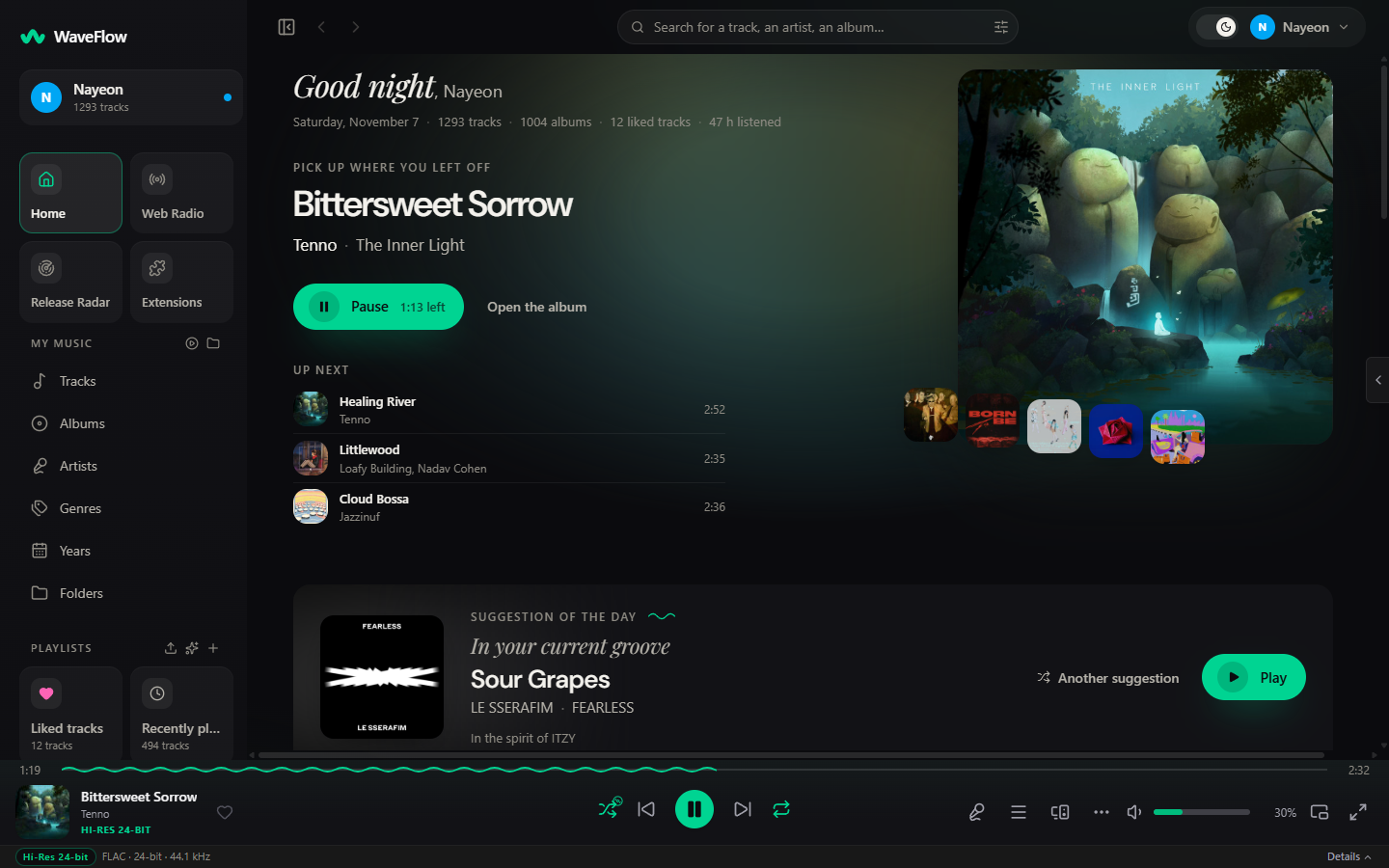
⚠️ Before you update
2.0 upgrades your library's database the first time it opens it. Before it does, WaveFlow writes a copy of the database next to it and reads it back to check it. If that copy cannot be made or does not check out, nothing is migrated until you choose: try again, continue without a backup, or quit. (#946)
1.9 cannot open a library that 2.0 has upgraded — it will say the library was made by a newer version. If you want a way back, export your profile first from Settings → Storage and backups → Profile backups → Export.
🎨 A new interface
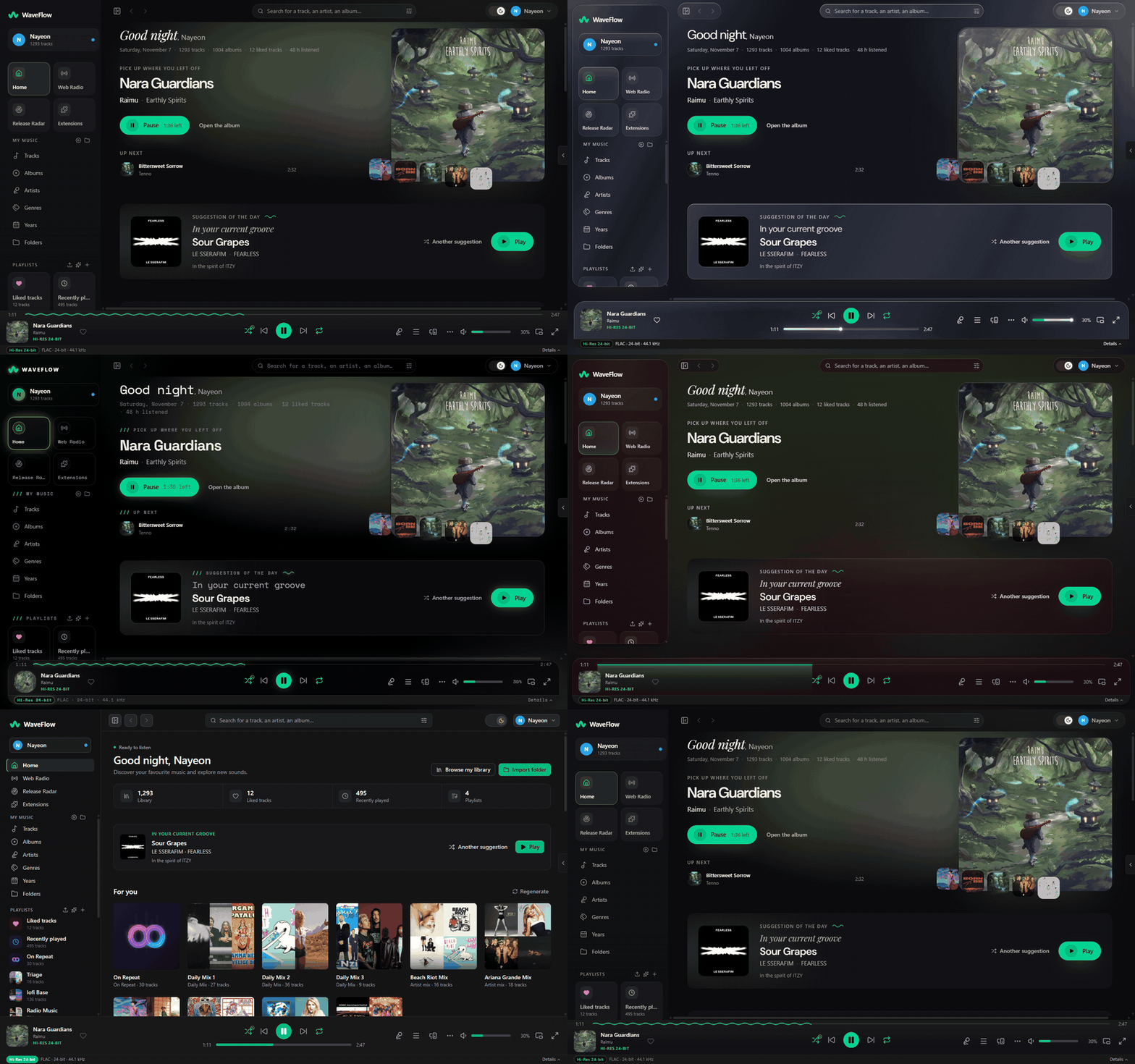
- Fluid is the new default. Navigation on a rail, a Home rebuilt around what you are listening to — where you left off, what plays next, and a suggestion of the day with the reason it was picked — the cover's light behind the music, and one side panel with Details, Lyrics and Queue as tabs. (#924, #904)
- Five materials on that layout: Fluid, Liquid (aurora glass), Pulse (neon), Editorial (a broadsheet on paper) and Lounge (a listening room lit by the record). Studio keeps the classic layout, now flat and precise, and stays the light choice for a machine without graphics acceleration. (#928, #930, #951, #952, #1036)
- Coming from 1.9, you open where you were: 1.9 saved your skin, so if you never changed it you start in Studio. The first page of the What's new panel takes you to Settings → Appearance → Skin.
- Visual effects: Automatic, Full or Reduced. Reduced draws every surface flat so the interface stays smooth without a GPU; Automatic, the default, chooses it on such a machine. (#957)
- Your own accent colour over any of the fourteen themes, or the colour of the playing track's cover. (#895)
- Theater mode for a screen across the room: the immersive view full screen and scaled up, the tracklist beside the cover, controls that fade, and the display kept on while music plays. Off by default; the TV button in the immersive view turns it on. (#970)
- The audio quality strip speaks plainly, and is now on by default under the player bar; its popover shows each stage the sound goes through and what it does to it. A Lossless badge joins Hi-Res and DSD. If you had turned the strip off, it stays off. (#1035, #1048)
- A new mark, the W of the name drawn as a wave, on the app icon; on the rail it breathes while music plays. (#953)
- Settings as groups of cards, with a count of what you changed on each page and a reset. Extensions is now a page of its own in the sidebar. (#959, #947)
- A What's new panel opens once after an update, with a "Try it" for each feature; new installs get a first-run journey instead; and a profile can have a picture. (#1000, #999, #1042)
- Pin albums, artists and playlists to the sidebar. (#962)
- Linux: a GNOME-style window frame as a choice under Wayland, and the desktop's own file pickers. (#960, #971)
🌍 Seventeen languages, read by native speakers
- Every language was read by a native speaker before this release, and the wording they asked for is in: clearer sentences, the right plural forms, and the terms each language really uses. European Portuguese now counts like Portugal does ("0 canais", not "0 canal"). (#1063)
- In Arabic, the whole interface reads right to left: the sidebar and the rail move to the right, menus open toward the left and stay inside the window, arrows and chevrons turn around, and step numbers sit on the right side of their labels. What has a direction of its own keeps it: the progress bar and its times, previous / play / next, the volume and the other audio sliders, the charts and the equaliser curve. (#1064)
🎚️ The audio engine
- 5.1 and 7.1, on the speakers they name. Every channel is now routed by speaker, not by number, so a surround file plays on the right speakers, and one with more channels than you have is folded down by the broadcast standard (ITU-R BS.775) — quieter rather than distorted. On Linux, shared output opens at your sink's full width instead of stopping at stereo. Multichannel AAC files that were listed but would not play now play, and HE-AAC keeps its upper band. (#1009, #1012)
- WavPack and Monkey's Audio play, seek, get analysed and have their tags edited like a FLAC. (#1016)
- Speed without the chipmunk. At any speed, the pitch now stays where it is (the old behaviour is still an option), and you can transpose by up to 12 semitones either way. (#1020)
- AutoMix lands each crossfade on the beats of both tracks, and lets an album play through without fading. Off by default, in Settings → Audio → Track transitions; it needs a crossfade length and analysed tracks, and falls back to the usual fade otherwise. (#993)
- Balance and stereo width, which leave the sound bit-perfect at their neutral values. (#949)
- Test your output: a beep on the left, the right, then both — or on each speaker of a surround setup — with the format the device really runs at, in Settings → Audio → Audio output. (#888)
- An EQ boost no longer clips on a loud master, and 16-bit exclusive output is dithered instead of rounded. (#906)
- The spectrum follows the sound you hear, without trembling, and quiet passages stay quiet. (#1043, #890)
- Play files without importing them: drop them on "Play now", press Ctrl+O, or use your system's Open with (WaveFlow makes itself the default for nothing). QuickPlay can also hand its queue over at the same spot. (#927, #929, #931, #942)
- Pause live radio for up to 30 minutes and catch up, HLS stations play, and Ogg stations show the song's title. (#972, #1021)
- Autoplay keeps the music going with related tracks from your library when the queue ends. Off by default. (#949)
📚 Library
- WebDAV and SMB shares as library folders, read without the system mounting them, from Settings → Storage and backups → Folders and caches. Read-only, streamed through a local cache (5 GB by default), and a share that is away greys its tracks out instead of losing them. SMB 2 and 3 only. (#1007)
- A Quality tab sorts your files by what their audio says, and flags lossless files that appear to come from a lossy source. Track properties can show the spectrogram behind the verdict. (#1038, #886, [#964](https://github.com/InstaZDLL/...
Assets
14
Loading
Uh oh!
There was an error while loading. Please reload this page.
jo-el414, senolfndk, saaim2009, nyouness, and aroslavtorockov64-boop reacted with heart emoji
5 people reacted
v2.0.0-beta.1
6b3e0fc
This commit was created on GitHub.com and signed with GitHub’s verified signature.
WaveFlow 2.0.0-beta.1
Pre-release on the beta channel. To get it from 1.9, turn on Settings → Maintenance → Updates → Beta channel; the beta is then offered like any other update. In 2.0 the switch is in the same place. Stable users are unaffected.
This is the first beta of WaveFlow 2.0, and the biggest release I have made: a new interface, an audio engine that plays 5.1 and 7.1 on the right speakers, WebDAV and SMB shares, podcasts, a tag workshop, and a library that can fill its own gaps from MusicBrainz. The fixes that already reached you in 1.9.2 to 1.9.8 are in here too, but they are not listed again.
The plan is a short beta, about three days, to catch what breaks on machines that are not mine before 2.0.0 goes stable. If you only have ten minutes, read Before you update and the Notes for testers at the bottom.
⚠️ Before you update
2.0 upgrades your library's database the first time it opens it. Before it does, WaveFlow writes a copy of the database next to it and reads it back to check it. If that copy cannot be made or does not check out, nothing is migrated until you choose: try again, continue without a backup, or quit. (#946)
1.9 cannot open a library that 2.0 has upgraded — it will say the library was made by a newer version. If you want a way back, export your profile first from Settings → Storage and backups → Profile backups → Export.
🎨 A new interface
- Fluid is the new default. Navigation on a rail, a Home rebuilt around what you are listening to — where you left off, what plays next, and a suggestion of the day with the reason it was picked — the cover's light behind the music, and one side panel with Details, Lyrics and Queue as tabs. (#924, #904)
- Five materials on that layout: Fluid, Liquid (aurora glass), Pulse (neon), Editorial (a broadsheet on paper) and Lounge (a listening room lit by the record). Studio keeps the classic layout, now flat and precise, and stays the light choice for a machine without graphics acceleration. (#928, #930, #951, #952, #1036)
- Coming from 1.9, you open where you were: 1.9 saved your skin, so if you never changed it you start in Studio. The first page of the What's new panel takes you to Settings → Appearance → Skin.
- Visual effects: Automatic, Full or Reduced. Reduced draws every surface flat so the interface stays smooth without a GPU; Automatic, the default, chooses it on such a machine. (#957)
- Your own accent colour over any of the fourteen themes, or the colour of the playing track's cover. (#895)
- Theater mode for a screen across the room: the immersive view full screen and scaled up, the tracklist beside the cover, controls that fade, and the display kept on while music plays. Off by default; the TV button in the immersive view turns it on. (#970)
- The audio quality strip speaks plainly, and is now on by default under the player bar; its popover shows each stage the sound goes through and what it does to it. A Lossless badge joins Hi-Res and DSD. If you had turned the strip off, it stays off. (#1035, #1048)
- A new mark, the W of the name drawn as a wave, on the app icon; on the rail it breathes while music plays. (#953)
- Settings as groups of cards, with a count of what you changed on each page and a reset. Extensions is now a page of its own in the sidebar. (#959, #947)
- A What's new panel opens once after an update, with a "Try it" for each feature; new installs get a first-run journey instead; and a profile can have a picture. (#1000, #999, #1042)
- Pin albums, artists and playlists to the sidebar. (#962)
- Linux: a GNOME-style window frame as a choice under Wayland, and the desktop's own file pickers. (#960, #971)
🎚️ The audio engine
- 5.1 and 7.1, on the speakers they name. Every channel is now routed by speaker, not by number, so a surround file plays on the right speakers, and one with more channels than you have is folded down by the broadcast standard (ITU-R BS.775) — quieter rather than distorted. On Linux, shared output opens at your sink's full width instead of stopping at stereo. Multichannel AAC files that were listed but would not play now play, and HE-AAC keeps its upper band. (#1009, #1012)
- WavPack and Monkey's Audio play, seek, get analysed and have their tags edited like a FLAC. (#1016)
- Speed without the chipmunk. At any speed, the pitch now stays where it is (the old behaviour is still an option), and you can transpose by up to 12 semitones either way. (#1020)
- AutoMix lands each crossfade on the beats of both tracks, and lets an album play through without fading. Off by default, in Settings → Audio → Track transitions; it needs a crossfade length and analysed tracks, and falls back to the usual fade otherwise. (#993)
- Balance and stereo width, which leave the sound bit-perfect at their neutral values. (#949)
- Test your output: a beep on the left, the right, then both — or on each speaker of a surround setup — with the format the device really runs at, in Settings → Audio → Audio output. (#888)
- An EQ boost no longer clips on a loud master, and 16-bit exclusive output is dithered instead of rounded. (#906)
- The spectrum follows the sound you hear, without trembling, and quiet passages stay quiet. (#1043, #890)
- Play files without importing them: drop them on "Play now", press Ctrl+O, or use your system's Open with (WaveFlow makes itself the default for nothing). QuickPlay can also hand its queue over at the same spot. (#927, #929, #931, #942)
- Pause live radio for up to 30 minutes and catch up, HLS stations play, and Ogg stations show the song's title. (#972, #1021)
- Autoplay keeps the music going with related tracks from your library when the queue ends. Off by default. (#949)
📚 Library
- WebDAV and SMB shares as library folders, read without the system mounting them, from Settings → Storage and backups → Folders and caches. Read-only, streamed through a local cache (5 GB by default), and a share that is away greys its tracks out instead of losing them. SMB 2 and 3 only. (#1007)
- A Quality tab sorts your files by what their audio says, and flags lossless files that appear to come from a lossy source. Track properties can show the spectrogram behind the verdict. (#1038, #886, #964)
- Replace a file with a better copy and keep its plays, likes and playlists. Deleting duplicates moves them to the trash, so a rescan no longer brings them back. (#887, #879, closes #878)
- Analysis reads more of the music: a tempo that knows when it is unsure, an energy measure, the key when no tag gives one, and where the beats fall. Daily Mix now sorts by energy. The next analysis pass measures again the tracks 1.9 had analysed. (#864, #865, #877, #882)
- An album page names its missing tracks, and album artist and composer can now be edited. ([#948](https...
Assets
10
Loading
Uh oh!
There was an error while loading. Please reload this page.
JQuer-lab and nyouness reacted with thumbs up emoji
nyouness reacted with hooray emoji
senolfndk, XOMEZ, and nyouness reacted with heart emoji
All reactions
-
👍
2 reactions
-
🎉
1 reaction
-
❤️
3 reactions
4 people reacted
v1.9.8
100f3df
This commit was created on GitHub.com and signed with GitHub’s verified signature.
1.9.8 (2026-10-30)
🩹 What's new in v1.9.8
WaveFlow stays quiet when nothing is playing, and your ReplayGain and speed settings survive a restart.
⚡ Performance
- WaveFlow no longer keeps your CPU and GPU busy when idle. The logo in the sidebar pulsed in a loop that never stopped, even with playback stopped or the window minimised to the tray. On the reporter's system, that kept the WebView's GPU process at around 5 % CPU and 5 % GPU, and the cost grows with the display's refresh rate (144 Hz, 240 Hz). The logo is static now, and so is the small dot in the Home banner, which had the same endless pulse. (#985)
🔊 Audio
- The ReplayGain pre-amp, the fallback gain and the playback speed are saved again. They applied during the session but reset to 0 dB and 1× on every launch: the database refused the way they were written, and the error was never shown. All three are now kept, and any setting that fails to save is logged. (#984)
If you had set any of them, set them once more after updating; they will stick from now on.
📦 Recommended install
Use your platform's package manager when one is available, so updates keep flowing through the tool you already use.
Windows
winget install InstaZDLL.WaveFlow Arch / Manjaro / EndeavourOS / CachyOS
yay -S waveflow-bin
# or: paru -S waveflow-bin
Fedora / RHEL / Rocky / Alma / CentOS Stream
sudo dnf copr enable instazdll/waveflow
sudo dnf install waveflow
Debian / Ubuntu / Mint / Pop!_OS
The Debian package is wave-flow (kebab-case, required by the Debian naming spec — Tauri bundles it that way from the WaveFlow product name).
sudo install -d -m 0755 /etc/apt/keyrings
curl -fsSL https://packages.buildkite.com/instazdll/waveflow/gpgkey \
  | sudo gpg --dearmor -o /etc/apt/keyrings/waveflow.gpg
echo "deb [signed-by=/etc/apt/keyrings/waveflow.gpg] https://packages.buildkite.com/instazdll/waveflow/any/ any main" \
  | sudo tee /etc/apt/sources.list.d/waveflow.list
sudo apt update && sudo apt install wave-flow
macOS
No Homebrew cask yet — grab the .dmg below. The bundle isn't Apple-signed, so right-click → Open the first time, or run xattr -cr /Applications/WaveFlow.app to clear the quarantine flag.
Standalone download
Everything is also available as a raw bundle below — .AppImage, .deb, .rpm, .exe, .msi, .dmg.
Thanks to @Geebarwan for both reports, the second one with a DevTools trace that pointed straight at the culprit. Keep the feedback coming. 💚
Assets
14
Loading
Uh oh!
There was an error while loading. Please reload this page.
jo-el414, XOMEZ, and JQuer-lab reacted with heart emoji
3 people reacted
v1.9.7
26291d2
This commit was created on GitHub.com and signed with GitHub’s verified signature.
1.9.7 (2026-10-23)
🩹 What's new in v1.9.7
WaveFlow starts again on Ubuntu 24.04 and other Linux distributions with compatible glibc versions.
🐧 Linux
- The Linux downloads start again on Ubuntu 24.04, Linux Mint 22.x, Zorin OS 18, Pop!_OS 24.04 and Debian 13. The 1.9.6 AppImage,
.deb, .rpm and AUR package were built on a newer system and required glibc 2.43, so WaveFlow failed at launch on these distributions with version 'GLIBC_2.43' not found. 1.9.7 is built on Ubuntu 24.04 again and requires no newer than glibc 2.39, like 1.9.5. Every release now checks that compatibility floor before publishing. COPR and Flathub were not affected. (#939)
1.9.7 also carries the 1.9.6 playback fix: tracks play all the way to the end before the next one starts.
On Linux, the in-app updater stopped offering 1.9.6 once the compatibility problem was found. AppImage users still on 1.9.5 will therefore update directly to 1.9.7.
If your AppImage already updated to 1.9.6 and no longer starts, download the 1.9.7 AppImage below and replace the old one. Your library and settings are kept.
📦 Recommended install
Use your platform's package manager when one is available, so updates keep flowing through the tool you already use.
Windows
winget install InstaZDLL.WaveFlow Arch / Manjaro / EndeavourOS / CachyOS
yay -S waveflow-bin
# or: paru -S waveflow-bin
Fedora / RHEL / Rocky / Alma / CentOS Stream
sudo dnf copr enable instazdll/waveflow
sudo dnf install waveflow
Debian / Ubuntu / Mint / Pop!_OS
The Debian package is wave-flow (kebab-case, required by the Debian naming spec — Tauri bundles it that way from the WaveFlow product name).
sudo install -d -m 0755 /etc/apt/keyrings
curl -fsSL https://packages.buildkite.com/instazdll/waveflow/gpgkey \
  | sudo gpg --dearmor -o /etc/apt/keyrings/waveflow.gpg
echo "deb [signed-by=/etc/apt/keyrings/waveflow.gpg] https://packages.buildkite.com/instazdll/waveflow/any/ any main" \
  | sudo tee /etc/apt/sources.list.d/waveflow.list
sudo apt update && sudo apt install wave-flow
macOS
No Homebrew cask yet — grab the .dmg below. The bundle isn't Apple-signed, so right-click → Open the first time, or run xattr -cr /Applications/WaveFlow.app to clear the quarantine flag.
Standalone download
Everything is also available as a raw bundle below — .AppImage, .deb, .rpm, .exe, .msi, .dmg.
Thanks to @saaim2009 for the report, and keep the feedback coming. 💚
Assets
14
Loading
Uh oh!
There was an error while loading. Please reload this page.
senolfndk, jo-el414, saaim2009, XOMEZ, and Portega-ort reacted with heart emoji
5 people reacted
|

