GeezerVisonThe World Wide Web, restored to 800 pixels of glory. |
| Home|About|Gaming cabinet|Archives|How it works|Starter sites |
GeezerVison is showing github.com — Developing JVM bots on Linux and MacOS Developing JVM bots on Linux and MacOS
Jasper Geurtz edited this page
Developping JVM bots on Linux, MacOS and other OS's that This makes it easy to:
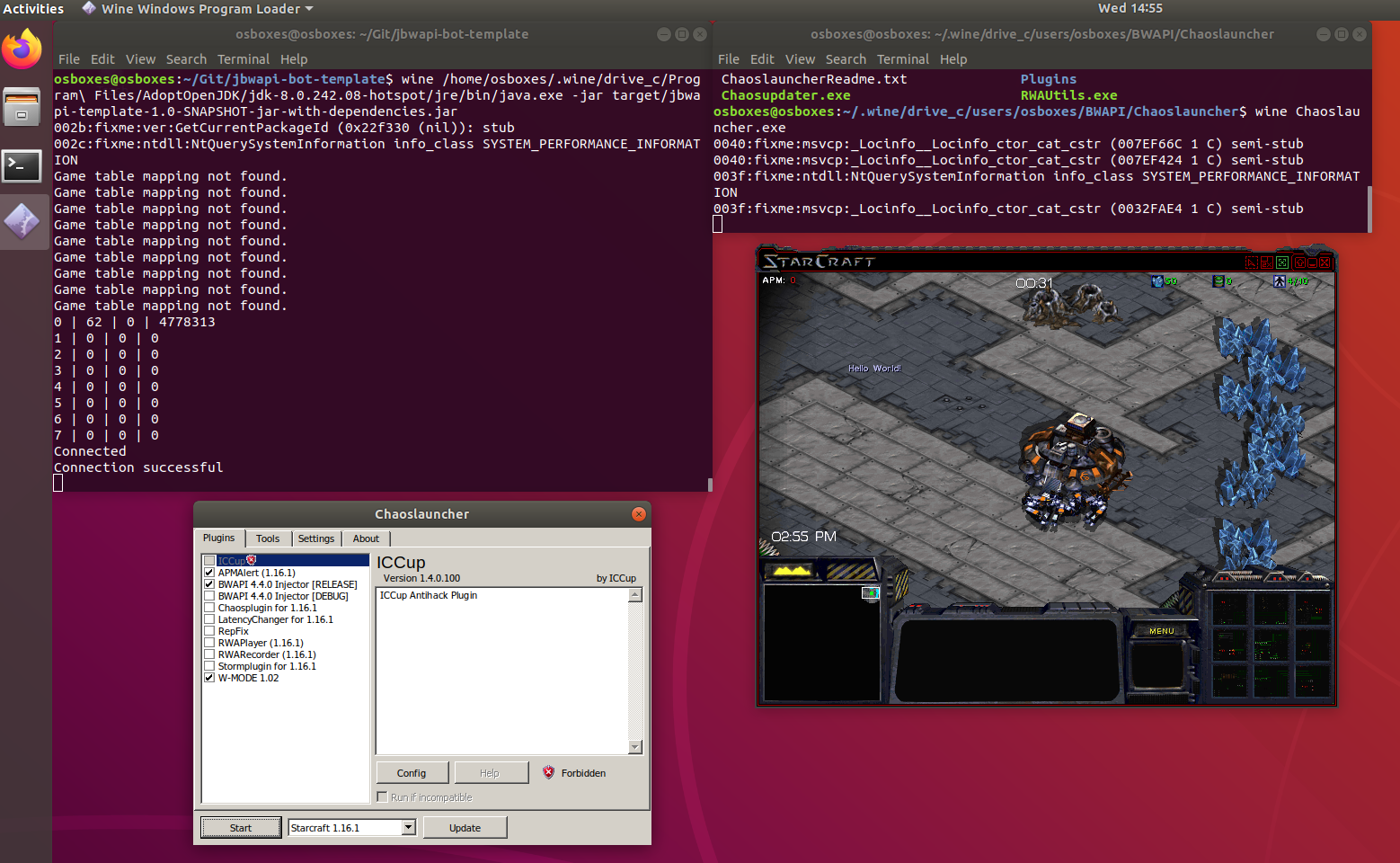
Note Install $ wine --version wine-11.0 If you don't have a $ winecfg Follow the instructions here But move everything to $ pwd /home/user/.wine/drive_c # home/user might look different on MacOS $ cd starcraft/ $ ls APM_check EditLocal.dll maps SEditESP.loc STARDAT.MPQ battle.snp iccscbn.icc nocd1151.bwl SEditFRA.loc StarEdit.cnt bncache.dat iccwc3.icc patch_rt.mp_ SEditITA.loc StarEdit.exe BnetLog.txt install.ex_ patch_rt.mpq SEditPTB.loc StarEdit.hlp BNUpdate.exe InstCC.exe patch.txt SEditPTG.loc storm.dll bnupdate.log JoinAlert.wav ReadMe.txt SETUP.EXE unins000.dat BROODAT.MPQ Launcher.exe RepAnalyser.dll Smackw32.dll unins000.exe BwarInst.log License.html Riched20.dll standard.snp w3lh.dll Chaosplugin.bwl Local.dll SEditDEU.loc StarCraft.exe characters __log.txt SEditENU.loc StarCraft.mpq Download the latest compatible bwapi installer. And run it with $ wine BWAPI_Setup.exe Select StarCraft from your wine Follow the the remaining Chaoslauncher instructions from the main tutorial. Download and install the Java JDK 8 Windows variant (for example from Adoptium ) And install it via $ wine start OpenJDK8U-jdk_x64_windows_hotspot_8u242b08.msi note: the You can check it installed correctly by looking in your $ pwd /home/user/.wine/drive_c/Program Files/AdoptOpenJDK/jdk-8.0.242.08-hotspot $ ls ASSEMBLY_EXCEPTION demo jre LICENSE sample THIRD_PARTY_README bin include lib release src.zip $ cd jre/bin $ wine java.exe -version openjdk version "1.8.0_242" OpenJDK Runtime Environment (AdoptOpenJDK)(build 1.8.0_242-b08) OpenJDK 64-Bit Server VM (AdoptOpenJDK)(build 25.242-b08, mixed mode) This tutorial uses maven to build the Example installation commands MacOS brew install maven Ubuntu sudo apt install maven Now we should be good to go! Let's create a small bot that displays $ git clone https://github.com/JavaBWAPI/jbwapi-bot-template.git Cloning into 'jbwapi-bot-template'... remote: Enumerating objects: 14, done. remote: Counting objects: 100% (14/14), done. remote: Compressing objects: 100% (9/9), done. remote: Total 14 (delta 1), reused 10 (delta 1), pack-reused 0 Unpacking objects: 100% (14/14), done. $ cd jbwapi-bot-template $ mvn package [INFO] Scanning for projects... [INFO] [INFO] ---------------------< org.jbwapi:jbwapi-template >--------------------- [INFO] Building jbwapi-template 1.0-SNAPSHOT [INFO] --------------------------------[ jar ]--------------------------------- ... [INFO] ------------------------------------------------------------------------ [INFO] BUILD SUCCESS [INFO] ------------------------------------------------------------------------ [INFO] Total time: 44.924 s [INFO] Finished at: 2020-03-04T14:48:47-05:00 [INFO] ------------------------------------------------------------------------ Run your bot (change USERNAME to your username, path may differ on different operating systems) Run Chaoslauncher Start a game, and voila, there should be "Hello World" written somewhere on the StarCraft screen!
You can edit/modify build your own bot out of this template. You'll probably also want to create a little script that executes building and running the jar & chaoslauncher via wine to make everything a little easier I hope this tutorial was helpful and have fun creating your own bot on Mac or Linux! Clone this wiki locally |
| You are visitor 01402775 — GeezerVison does not store the pages you look up. Best viewed with Netscape Navigator 4.7 or Internet Explorer 6 at 800×600. No cookies required. |