Firmware 736 · Companion revision 2
FMER combines six-operator FM and Virtual Analog synthesis with hands-on effects, arpeggiation, pattern recording and a four-track song workflow on the M-VAVE FM-1. This release keeps the existing 700-series numbering while development continues toward 1.0. Publication remains a separate maintainer action; use the assets on the published release rather than guessing a filename from the source branch.
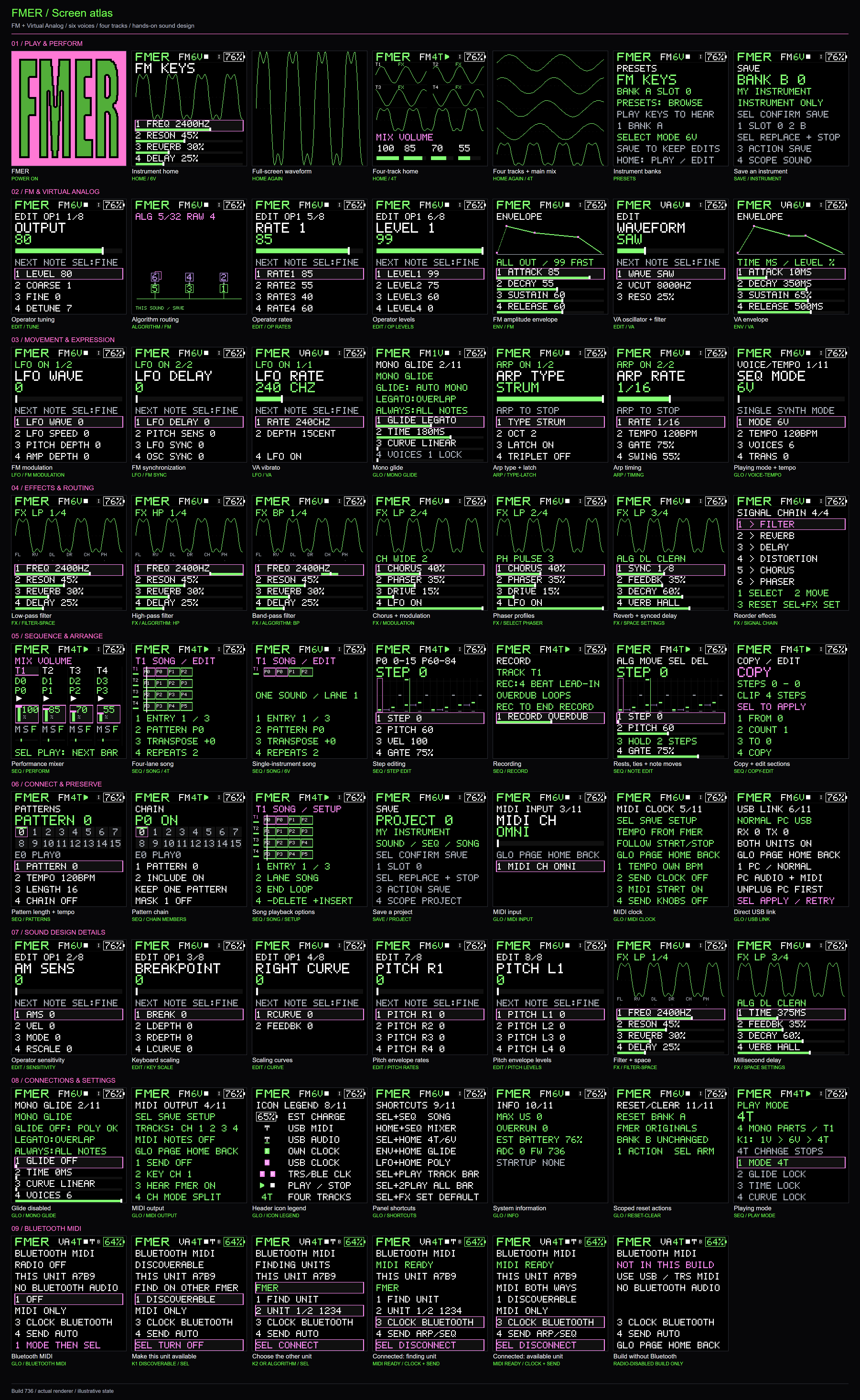
Screen-sheet provenance: 62 actual renderer views with illustrative musical state, including Bluetooth controls and startup recall.
- Six-voice polyphony, mono glide and four independent mono tracks.
- Two editable 64-instrument banks. The 224 original Expressions instruments support five profiles: Balanced, Leads and Bass, Pads and Ambient, Drums and Percussion, and Arps and Textures. Build your own profiles in Companion.
- Reorderable filter, drive, chorus, phaser, delay and reverb; four reverb characters, chorus/phaser flavors and tempo-synced or millisecond delay.
- Eleven arpeggiator types, including Strum, plus latch, octave range, gate and swing. Record generated arp notes into patterns.
- Sixteen projects, sixteen patterns per project and up to 64 steps per pattern; four song lanes with up to 32 entries per lane, repeats and transposition.
- Live mixer controls, queued pattern changes, scopes, a high-contrast display and an estimated battery percentage.
The 736 work also addresses audible discontinuities during control changes, effect-state changes and external-clock behavior. USB audio remains a capture of the main mix. It is not a four-stem interface.
Open GLO → BLUETOOTH MIDI. Make one unit Discoverable, use Find on the other, select the peer and confirm with SEL. The page distinguishes searching, connecting, MIDI READY, disconnected and failed states. Peer suffixes help distinguish nearby units; the Companion's personal names are not radio identities.
Pairing and MIDI routing are separate. Choose the clock source and note route for the musical task; connecting alone does not silently change them. Clock-only operation can synchronize two local arrangements without sending duplicate notes. The illustrated Help includes that setup and a notes-only alternative. K3 changes the clock source and K4 changes note sending directly on the Bluetooth page. Neither knob moves to another page. Send Clock and MIDI Start remain on the MIDI CLOCK page.
The recorded two-unit menu tests exercise both roles, notes, clock-driven sequence/arp playback, Start/Stop, reconnect and USB note ownership. Short USB PCM captures confirm audible output during BLE MIDI operation. The owner also reported a successful two-unit musical session. None of these are Bluetooth audio tests.
Bluetooth audio, three-or-more-unit groups and general PC/other-firmware interoperability are not included. Initial connection can make up to three attempts to the same selected peer within twelve seconds. SEL cancels; a lost link after MIDI READY does not reconnect automatically. Radio connections are not restored at startup. Explicit flash saves close the connection; reconnect when finished.
The instrument can retain its current instrument, mode, effects, patterns and MIDI settings in a separate startup checkpoint without overwriting named projects. It starts stopped, with radio Off and USB in PC/NORMAL. Physical master volume comes from the knob.
An automatic checkpoint requires ten seconds without edits and waits for silence, radio Off and no USB audio streaming; it writes at most once per minute. GLO / INFO shows NONE, SAVED, PENDING, WAIT or FAILED. Pending edits can be lost if power is removed before a checkpoint. Explicit saving checkpoints the working state during its quiet save operation. Automatic checkpoints do not interrupt playback or disconnect a radio link. Keep using named instrument/project saves for work you want to recall deliberately.
The Windows 10/11 x64 portable application includes its runtime dependencies, default libraries and offline Help. Extract the whole ZIP and launch FMER Companion.exe. Manage instruments and projects, rename library items, assign either bank from a loadout profile, back up supported units and follow guided firmware inspection and installation. Named instrument profiles retain separate library choices; they are not substitutes for checking the connected unit.
Feedback and support are available inside the application, including diagnostic export for manual review and sharing. GitHub links open published updates. Downloads and installations are explicit actions, not background updates.
Release assets provide standalone FWSC firmware, the portable Companion, matching source, default sounds, the full instrument library, actual-screen atlas, illustrated guide, shortcut sheet and a press pack. Original code, patches and artwork are GPL-3.0-only; component-specific licenses and provenance remain in LICENSE, LICENSING.md, NOTICE and the source distribution.
Read Installation and recovery. The reviewed V15 route and compatible FMER updates preserve protected regions. Unknown layouts are rejected. Original V16 uses a separate guided recovery workflow: the old updater's staging record overlaps its sequence storage. Companion identifies the unit, makes two matching full-ROM backups, reviews the migration and requires explicit new-FMER storage confirmation. Installation remains gated on the exact package's target qualification, then needs a physical restart and separate startup check. Native V16 projects are archived, not converted; no universal or power-loss recovery is claimed. Qualification combines physical V16 migration to an earlier image, normal updates, exact final-image writer simulation and final hardware checks; a direct physical V16-to-final-image ROM transaction was not exercised. See the qualification record. OEM V15 patch data retains separate notices; V16 patches are not bundled while redistribution rights remain unresolved.
- Effects are shared between the four tracks. TRS MIDI is input-only; direct USB links support one peer. Windows is the packaged Companion target.
- The release target passes normal installation/preservation, 30 actual-menu cases, both short mixed-load roles, received-note USB PCM and physical-cold startup/recall on the two tested boot configurations. The ten-minute combined Bluetooth/mixed4T/USB capture peaks at 2,066/2,163 microseconds, below the unchanged 2,177-microsecond reserve gate. These are defined-workload results, not a guarantee for every patch or session length. Read the qualification record for exact evidence and earlier failed candidates.
- The separate October 30 soak recorded an unexplained master-gain change; its cause remains unconfirmed. The owner confirmed physical MASTER adjustments during the November 3 captures. Those explained changes do not resolve the earlier anomaly or establish a constant-loudness comparison.
- Bluetooth musical clock jitter, startup on other hardware, power cost and low-battery operation need broader measurements. Nonzero radio receive-error counters were recorded even when the tested musical operations completed.
- Bank and project writes are reported operations, not an atomic whole-library transaction. Keep backups and any partial-transfer record if an operation stops.
These limits remain visible until new evidence closes them. Report the build, workflow and reproduction steps through Companion or the repository's issue templates; feedback is useful even when it covers only one feature.