GV

GeezerVison

The World Wide Web, restored to 800 pixels of glory.

Home|About|Gaming cabinet|Archives|How it works|Starter sites

On this site

  • Sign in
  • ActionsCI/CD and automation
  • CodespacesCloud development environments
  • All Features
  • Documentation
  • Training
  • Certifications
  • Build with Copilot
  • Customize Copilot
  • Integrations
  • Trending repos
  • GitHub Sponsors
  • Developer articles
  • Enterprises

This view

  • Original page
  • New address

GeezerVison is showing github.com — How to update

How to update

Jump to bottom Edit New page
7eP6C7 edited this page Oct 6, 2020 · 10 revisions

更新方法

每次更新前备份data文件夹,可以随时恢复到指定版本

手动更新(不推荐新手)

  • 备份 data 文件夹(data 文件夹内保存了 appid,good_ip 等配置信息)

  • 下载XX-Net-Release版本或者根据下载页面提示进行版本选择

  • 解压缩下载的文件

  • 将 data 文件夹放到解压缩目录

  • 更新完成

自动更新

自动升级的类型

为了方便升级,同时适应不同用户的需要,提供几种不同的升级方式:

  • 不检查升级
    完全不检查升级

  • 长期稳定版
    不定期发布,一般是在有重大性能突破时才发送升级

  • 稳定版
    一般github上会维护一份稳定版,供新用户下载。
    测试版经过3天到一周,没有收到反馈大问题,就会作为稳定版

  • 测试版
    一般发新版,需要经过测试版阶段,给遇到具体问题、热心参与测试的网友测试,
    接受反馈

自动检查更新频率:每次启动时,以及启动后每24小时

如何设置

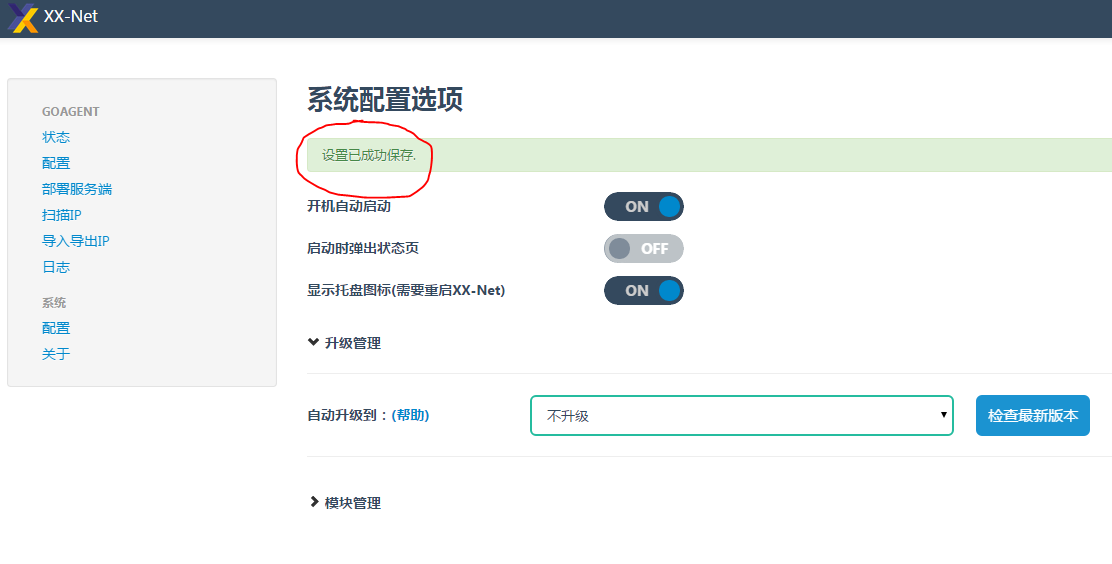
  • 启动XX-Net后,打开http://127.0.0.1:8085/?module=launcher&menu=config 升级管理

  • 单击“升级管理”,“自动升级到”选项会出现 设置升级选项

  • 在下拉菜单中进行选择,窗口上方会出现“设置已成功保存.”字样,设置完成。 设置成功保存

使用 Git 更新(不推荐新手)

  • 等待编写
Add a custom sidebar

Clone this wiki locally

You are visitor 01402792 — GeezerVison does not store the pages you look up.
Best viewed with Netscape Navigator 4.7 or Internet Explorer 6 at 800×600. No cookies required.