To build CircuitPython within a Github codespace, you need to perform the following steps.
- checkout the code to a codespace
- click on the green "<> Code"-button
- select the Codespaces-tab
- choose "+ new with options..." from the "..."-menu
- in the following screen select the branch and then
- select the port instead of "Default project configuration"
(unsupported: ports not using cortex-m or esp-idf)
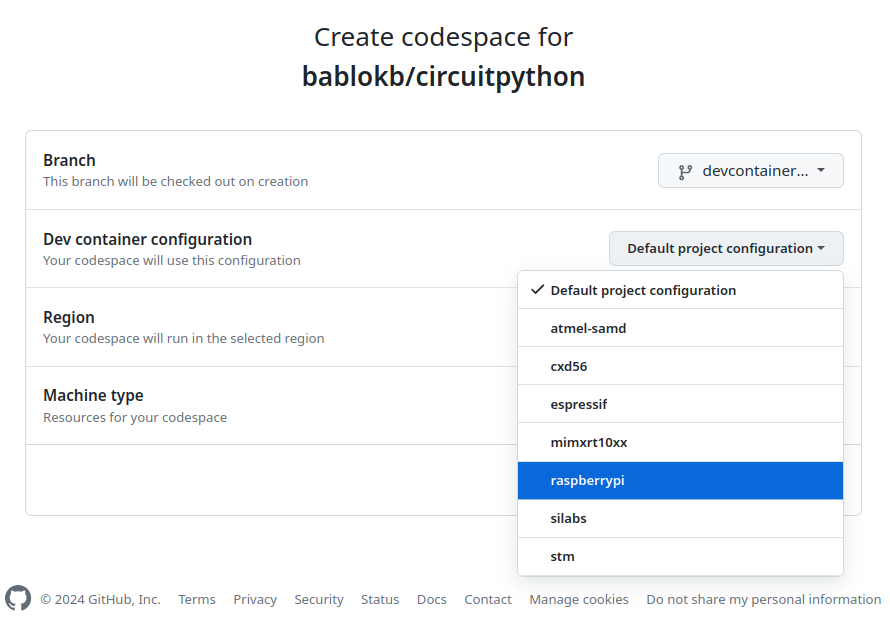
- update region as necessary
- finally, click on the green "Create codespace" button

-
Your codespace is created. Cloning the image and the repo is quite fast, but preparing it for CircuitPython-development takes about 10 minutes. But this is a one-time task: once created, your codespace exists until you explicitly delete it or until it times out (default: 30 days).
(Technical note: due to a bug in codespace creation, the setup is triggered from$HOME/.bashrcand runs in the background). -
During creation, you can run the command
tail -f /workspaces/install_build_env.log.activeto see what is going on. Once finished the log file is available as/workspaces/install_build_env.log. -
To actually build CircuitPython, open a new terminal and run e.g.
cd ports/raspberrypi
make -j $(nproc) BOARD=whatever TRANSLATION=xx_XX
This takes about 2m40s. The new terminal is necessary since the setup of the build environment also changes
$HOME/.bashrcand sets important environment variables in that file.
As a normal user, you have 120 CPU-hours and 15GB per month free. Since the smallest machine has two CPUs, you effectively have 60 hours active time available.
All scripts are in circuitpython/.devcontainer and can also be executed
manually which should usually not be necessary. With small changes, they
should also work on a Linux-PC or laptop.