The main goal of this article is to explore few specific scenarios and alternative DNS configuration options on the client side. If you are implementing Private Link/Endpoint you can leverage options listed here as alternative to make DNS client behavior changes based on your specific needs. The intention here is to illustrate two scenarios, but you can leverage them for others too depending on your situation. Most of the examples are related to specifically Private Endpoint (Consumers side) where private IP is allocated, and name resolution plays a critical role to make it to work properly.
Note: It is important primarily to follow guidelines on Private Endpoint DNS Integration Scenarios. The intention of this document is to illustrate other customized options for specific scenarios and should be not use as primary guidance.
There are few options that can be configured in Operational System side to integrate them with Private Link/Endpoint. Below we will go over how customers can leverage those options as alternative or complement Private Endpoint name resolution.
Operational Systems such as Windows and Linux have options to setup conditional forwarders directly on the client side. On Windows this feature is called NRPT (Network Resolution Table) - More information see: The NRPT. On advantage on Windows is NRPT can also be set using Group Policy which makes easier to deploy for a group of computers that need to receive a specific setting.
On Linux this can be leveraged using dnsmasq by adding rules conditional forward rules in /etc/dnsmasq.conf file. As side note dnsmasq is also refered as an recommended option to add caching capabilities to Linux OS, for more information see: Getting the most from name resolution that Azure provides.
In case you need only few computer in your network On-Prem network to be able to resolve Private Link private IP, you can have a local conditional forwarder on each computer to resolve Private Link records in Azure Private DNZ via Azure Custom DNS Servers (in our example, using IPs 10.0.0.4 and 10.0.0.5). Azure Custom DNS Server has been configured to use 168.63.129.16 (Azure Provided DNS Server) as Forwarder.
 In this scenario, customer does not want to use their On-Prem DNS Server to resolve Private Link. This option is also a good alternative in case customer needs to make short term validation before adding conditional forwarder on their DNS Server or just scope the resolution for few On-premises computers.
In this PowerShell example a rule is added to redirect all traffic towards domain .core.windows.net to Custom DNS Servers 10.0.0.4 (Primary Azure Custom DNS Server) and 10.0.0.5 (Secondary Azure Custom DNS Server).
#Adding NRPT Conditional Forwarder rule
Add-DnsClientNrptRule -Namespace ".core.windows.net" -NameServers 10.0.0.4, 10.0.0.5
#Validation output
Get-DnsClientNrptRule | Format-Table
#DNS name resoltion validation
Resolve-DnsName "Storage-Account-FQDN" -DnsOnly -Type A | Format-Table -AutoSize
Get-DnsClientNrptRule | Format-Table

Resolve-DnsName

Same configuration above can be deployed via Group Policy (GPO), here is an example on how to make changes above over Local GPO (gpedit.msc):

This example shows same exact goal stated on previous scenario, but now for Linux Ubuntu leveraging dnsmasq:
#Install dnsmasq - Reference: https://docs.microsoft.com/en-us/azure/virtual-machines/linux/azure-dns
sudo apt-get install dnsmasq

#(Optional) Rename default dnsmasq.conf file to dnsmasq.conf.bkp
sudo mv -v /etc/dnsmasq.conf /etc/dnsmasq.conf.bkp

# Adding core.windows.net conditional forwarder rules
# Note 1: this can be done with any domain level or full dns name
# Example: (FQDN) such as: blob.core.windows.net or windows.net or full storage account FQDN, i.e. stgspk1.blob.core.windows.net)
# Note 2: multiple lines or use editor commands such as nano or vim using example above: server=/FQDN-or-domain/FW-DNSServer
echo server=/core.windows.net/10.0.0.4 | sudo tee -a /etc/dnsmasq.conf
echo server=/core.windows.net/10.0.0.5 | sudo tee -a /etc/dnsmasq.conf

# Validate dnsmaq.conf content
cat /etc/dnsmasq.conf

# Make file dnsmasq.conf changes effective
sudo systemctl restart dnsmasq

# Update Resolver config file
sudo apt install resolvconf
sudo resolvconf -u

#DNS name resolution validation (replace stgspk1 with your storage account name)
dig +noall +answer stgspk1.blob.core.windows.net

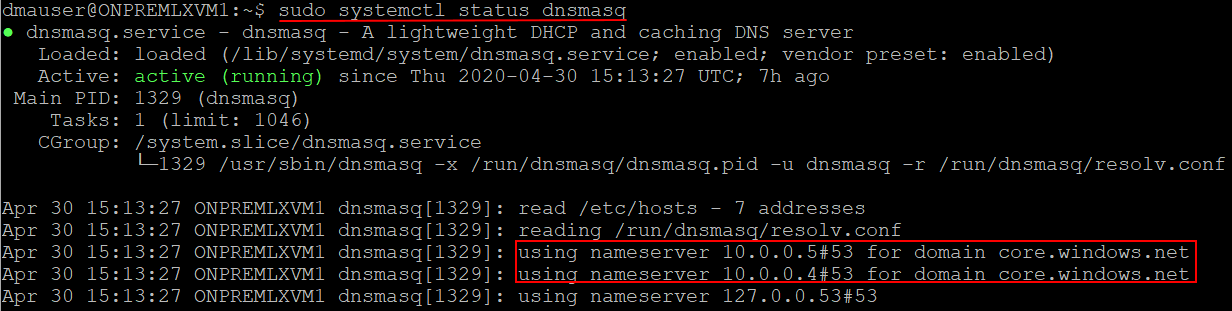
#(Optional - Validation) Make sure added conditional forwarder rules are effective on dnsmasq
sudo systemctl status dnsmasq
#(Optional - Troubleshooting) You may need flush local DNS Cache:
sudo systemd-resolve --flush-caches
- dig +noall +answer stgspk1.blob.core.windows.net
 It shows query from OnPremLXVM1 going directly to Azure Custom DNS Servers.
- sudo systemctl status dnsmasq


There are specific scenarios customer may need to create exceptions when dealing with Private Endpoints name resolution hosted in Azure Private DNS zones. One of them is illustrated on this article: Unable to access each other PaaS Resources when both sides are exposed to PrivateLink/Endpoint. The solution pointed there, when name resolution does not work properly, is to have to create a Conditional Forwarder to make sure Storage Account from Contoso gets resolved by its Public IP instead. More detailed specific steps can be found in: Solution 1 - Create a conditional forwarder for storage account DNS name (FQDN). In case Custom DNS Server is not available in your Azure VNET, you can also use same techniques explained on previous section by leveraging NRPT on Windows or dnsmasq on Linux. However, in this case we will redirect traffic to an external resolver to make an exceptions. Below, there are examples, for both platforms Windows and Linux, using the same example of the article (Conditional Forwarder to OpenDNS Public Resolvers: 208.67.222.222 and 208.67.220.220) to get storage account name contosostg1.blob.core.windows.net resolved and final result Public IP 52.230.240.94 as response.
#Adding NRPT Conditional Forwarder rule
Add-DnsClientNrptRule -Namespace "contosostg1.blob.core.windows.net" -NameServers 208.67.222.222, 208.67.220.220
#Validation output
Get-DnsClientNrptRule | Format-Table
#DNS name resolution validation
Resolve-DnsName "Storage-Account-FQDN" -DnsOnly -Type A  | Format-Table -AutoSize
Get-DnsClientNrptRule | Format-Table
 Resolve-DnsName

Same configuration above can be deployed via Group Policy (GPO), here is an exemple on how to make changes above over Local GPO (gpedit.msc):

Note: Make sure when creating over GPO interface you select the correct DNS name type. In the example above because we use a full name contosostg1.blob.core.windows.net it should be FQDN type. On previous section it is done for domain core.windows.net and Suffix has to be specified as type.
This example shows same previous scenario using NPTR but now for Linux Unbuntu leveraging dnsmasq:
#Install dnsmasq - Reference: https://docs.microsoft.com/en-us/azure/virtual-machines/linux/azure-dns
sudo apt-get install dnsmasq

#(Optional) Rename default dnsmasq.conf file to dnsmasq.conf.bkp
sudo mv -v /etc/dnsmasq.conf /etc/dnsmasq.conf.bkp

# Addinng fqdn contosostg1.blob.core.windows.net as conditional forwarder
echo server=/contosostg1.blob.core.windows.net/208.67.222.222 | sudo tee -a /etc/dnsmasq.conf
echo server=/contosostg1.blob.core.windows.net/208.67.220.220 | sudo tee -a /etc/dnsmasq.conf

# Validate dnsmaq.conf content
cat /etc/dnsmasq.conf

# Make file dnsmasq.conf changes effective
sudo systemctl restart dnsmasq

# Update Resolver config file
sudo apt install resolvconf
sudo resolvconf -u

#Validate DNS Name resolution (replace stgspk1 with your storage account name)
dig +noall +answer contosostg1.blob.core.windows.net

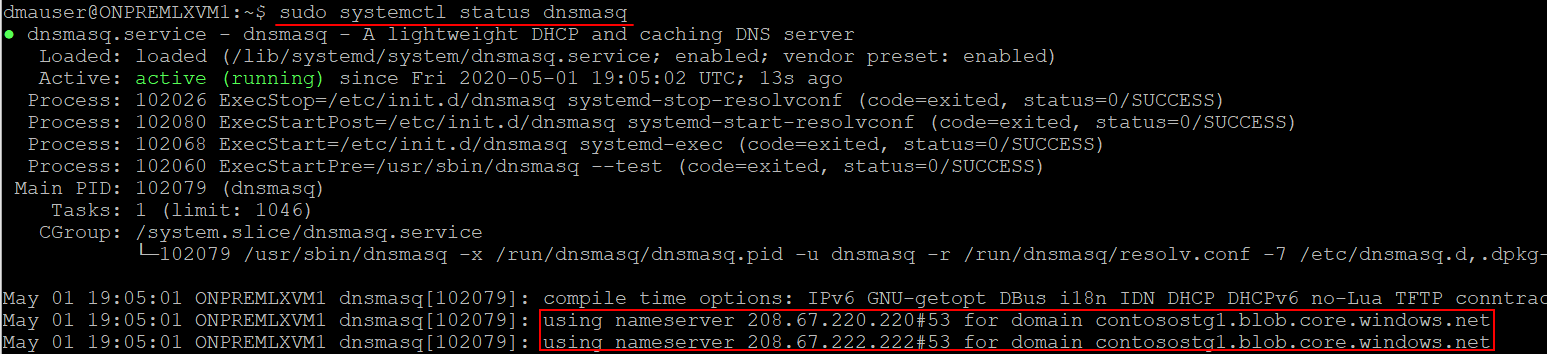
#(Optional - Validation) Make sure added conditional forwarder rules are effective on dnsmasq
sudo systemctl status dnsmasq

#(Optional - Troubleshooting) You may need flush local DNS Cache:
sudo systemd-resolve --flush-caches
- dig +noall +answer stgspk1.blob.core.windows.net
 It shows query from OnPremLXVM1 going directly to Azure Custom DNS Servers.
- sudo systemctl status dnsmasq


The intention of this article was to illustrate DNS client configuration options when dealing dealing with Private Endpoints. There are other potential possibilities not enumerated here yet. Therefore, stay tuned for other potential scenarios.