|
1 | 1 | --- |
2 | | -title: 关于引擎的研发协作流程 |
| 2 | +title: 研发协作流程 |
3 | 3 | sidebar_position: 2 |
4 | 4 | --- |
5 | 5 | ## 代码风格 |
6 | 6 | 引擎项目配置了 eslint 和 stylelint,在每次 git commit 前都会检查代码风格,假如有报错,请修改后再提交。(**严禁 -n 提交,-n 也逃脱不了 github workflow 的 lint 检查,放弃吧,骚年~**) |
7 | 7 |
|
8 | 8 | ## 测试机制 |
9 | 9 | 每次提交代码前,务必本地跑一次单元测试,通过后再提交 MR。 |
10 | | -假如涉及新的功能,需要**补充相应的单元测试,**目前引擎核心模块的单测覆盖率都在 80%+,假如降低了覆盖率,将会不予以通过。 |
| 10 | + |
| 11 | +假如涉及新的功能,需要**补充相应的单元测试**,目前引擎核心模块的单测覆盖率都在 80%+,假如降低了覆盖率,将会不予以通过。 |
11 | 12 |
|
12 | 13 | 跑单测流程: |
13 | 14 |
|
@@ -19,78 +20,134 @@ sidebar_position: 2 |
19 | 20 |
|
20 | 21 | 1. commit message 格式遵循 [ConvensionalCommits](https://www.conventionalcommits.org/en/v1.0.0/#summary) |
21 | 22 | 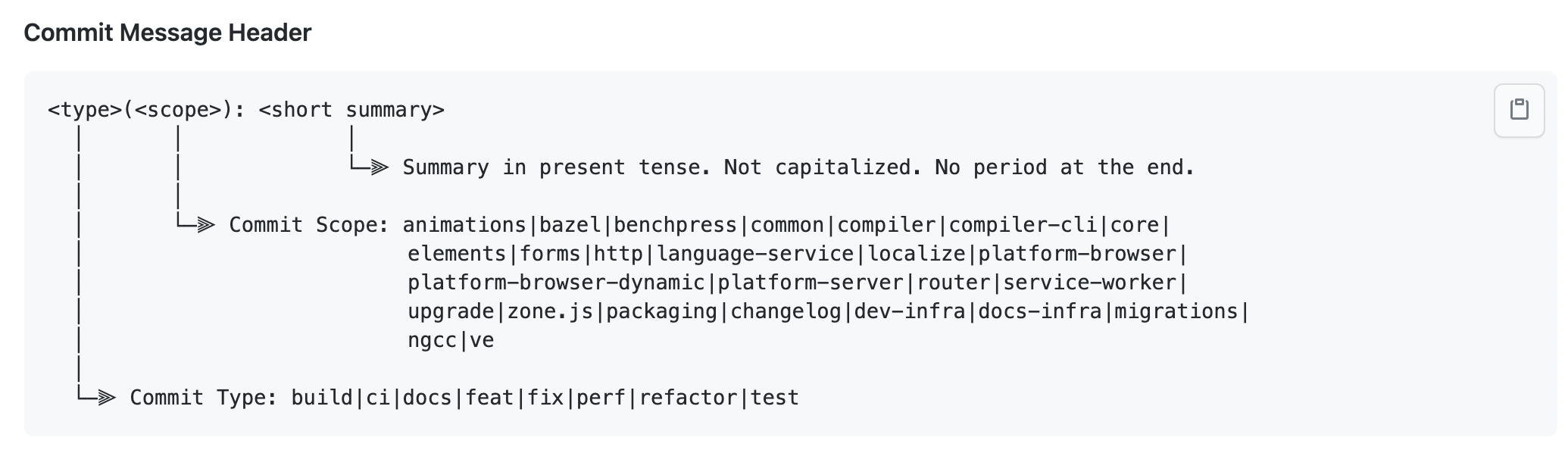 |
22 | | -2. 请按照一个 bugfix / feature 对应一个 commit,假如不是,请 rebase 后再提交 MR,不要一堆无用的、试验性的 commit |
| 23 | +2. 请按照一个 bugfix / feature 对应一个 commit,假如不是,请 rebase 后再提交 MR,不要一堆无用的、试验性的 commit。 |
23 | 24 |
|
24 | | -好处:从引擎的整体 commit 历史来看,会很清晰,**每个 commit 完成一件确定的事,changelog 也能自动生成。**另外,假如因为某个 commit 导致了 bug,也很容易通过 rebase drop 等方式快速修复。 |
25 | | -## 引擎发布机制 |
26 | | -日常迭代先从 develop 拉分支,然后自测、单测通过后,提交 MR 到 develop 分支,由发布负责人基于 develop 拉 release/1.0.z 分支~ |
| 25 | +好处:从引擎的整体 commit 历史来看,会很清晰,**每个 commit 完成一件确定的事,changelog 也能自动生成**。另外,假如因为某个 commit 导致了 bug,也很容易通过 rebase drop 等方式快速修复。 |
27 | 26 |
|
28 | | -### 分支用途 |
| 27 | +## 分支用途 |
29 | 28 |
|
30 | 29 | - main 分支,最稳定的分支,跟 npm latest 包的内容保持一致 |
31 | 30 | - develop 分支,开发分支,拥有最新的、已经验证过的 feature / bugfix,Pull Request 的**目标合入分支** |
32 | 31 | - release 分支 |
33 | 32 | - 正式发布分支,命名规则为 release/x.y.z,一般从 develop 拉出来进行发布,x.y.z 为待发布的版本号 |
34 | 33 | - beta 发布分支,命名规则为 release/x.y.z-beta(\.\d+)?,可以快速验证修改,发布 npm beta 版本。 |
| 34 | + |
35 | 35 | 验证通过后,因为 beta 发布分支上会存在无用的 commit(比如 lerna 修改 package.json 这种),所以不直接 PR 到 develop,而是从 develop 拉分支,从 beta 发布分支 cherry pick 有用的 commit 到新分支,然后 PR 到 develop。 |
36 | 36 |
|
| 37 | +## 引擎发布机制 |
| 38 | + |
| 39 | +日常迭代先从 develop 拉分支,然后自测、单测通过后,提交 PR 到 develop 分支,由发布负责人基于 develop 拉 release/1.0.z 分支~ |
| 40 | + |
| 41 | +### 版本规划 |
| 42 | + |
| 43 | +> 此处是理想节奏,实际情况可能会有调整 |
| 44 | +
|
| 45 | +- 日常迭代 2 周,一般月中或月底 |
| 46 | +- 特殊情况紧急迭代随时发 |
| 47 | +- 大Feature迭代,每年 2 - 4 次 |
| 48 | + |
| 49 | + |
37 | 50 | ### 发布步骤 |
38 | | -> **发布需要权限,如果提 PR 之后着急发布可以**[**加入贡献者交流群**](https://www.yuque.com/lce/doc/pctr1f#d5WKy)**。** |
| 51 | +> **发布需要权限,如果提 PR 之后着急发布可以**[**加入贡献者交流群**](../participate/#核心贡献者交流)**。** |
39 | 52 |
|
40 | | -如果是发布正式版本,步骤如下(以发布 1.0.0 版本为例): |
| 53 | +#### 发正式版 |
| 54 | +步骤如下(以发布 1.0.0 版本为例): |
41 | 55 |
|
42 | 56 | 1. git checkout develop |
43 | | -2. git checkout -b release/1.0.0 |
44 | | -3. npm run build |
45 | | -4. npm run pub |
46 | | -5. tnpm run sync(此步骤将发布在 npm 源的包同步到阿里内网源,因为 alifd cdn 将依赖内网 npm 源) |
| 57 | + ```bash |
| 58 | + git checkout develop |
| 59 | + ``` |
| 60 | +2. 创建release分支 |
| 61 | + ```bash |
| 62 | + git checkout -b release/1.0.0 |
| 63 | + ``` |
| 64 | +3. build |
| 65 | + ```bash |
| 66 | + npm run build |
| 67 | + ``` |
| 68 | +4. 发布到npm |
| 69 | + ```bash |
| 70 | + npm run pub |
| 71 | + ``` |
| 72 | +5. 同步到 tnpm 源 & alifd CDN(此步骤将发布在 npm 源的包同步到阿里内网源,因为 alifd cdn 将依赖内网 npm 源) |
| 73 | + ```bash |
| 74 | + tnpm run sync |
| 75 | + ``` |
47 | 76 | 6. 更新[发布日志](https://github.com/alibaba/lowcode-engine/releases) |
48 | 77 | 7. 合并 release/x.x.x 到 main 分支 |
49 | 78 | 8. 合并 main 分支到 develop 分支 |
50 | 79 |
|
51 | 80 | 如果是发布beta 版本,步骤如下(以发布 1.0.1 版本为例): |
52 | 81 |
|
53 | | -1. git checkout develop |
54 | | -2. git checkout -b release/1.0.1-beta |
55 | | -3. npm run build |
56 | | -4. npm run pub:prepatch(将 lerna 版本号从 1.0.0 改到 1.0.1-beta.0,若是从 1.0.1-beta.0 改到 1.0.1-beta.1,则用 npm run pub:prerelease) |
57 | | -5. tnpm run sync |
58 | | - |
59 | | -注:在 release/1.0.1-beta 上可以直接提交,以便快速测试和验证,不过如何合入 develop,参考 [分支用途](#uem7W) 一节说明。 |
60 | | - |
61 | | -### 发布周期 |
62 | | -**发布周期暂时不固定,按需发布~** |
| 82 | +#### 发某版本首个 beta ,如 1.0.1-beta.0 |
| 83 | +1. 拉 develop 分支 |
| 84 | + ```bash |
| 85 | + git checkout develop |
| 86 | + ``` |
| 87 | + 更新到最新(如需) |
| 88 | + ```bash |
| 89 | + git pull |
| 90 | + ``` |
| 91 | +2. 拉 release 分支,此处以 1.0.1 版本做示例 |
| 92 | + ```bash |
| 93 | + git checkout -b release/1.0.1-beta |
| 94 | + ``` |
| 95 | +3. build |
| 96 | + ```bash |
| 97 | + npm run build |
| 98 | + ``` |
| 99 | +4. 发布,此处需有 @alilc scope 发包权限 |
| 100 | + ```bash |
| 101 | + npm run pub:prepatch |
| 102 | + ``` |
| 103 | +5. 同步到 tnpm 源 & alifd CDN |
| 104 | + ```bash |
| 105 | + tnpm run sync |
| 106 | + ``` |
| 107 | + |
| 108 | +#### 发某版本非首个 beta ,如 1.0.1-beta.0 -> 1.0.1-beta.1 |
| 109 | +1. 切换到 release 分支 |
| 110 | + ```bash |
| 111 | + git checkout release/1.0.1-beta |
| 112 | + ``` |
| 113 | +2. 更新到 develop 分支最新代码 |
| 114 | + ```bash |
| 115 | + git rebase origin/develop |
| 116 | + ``` |
| 117 | +3. build |
| 118 | + ```bash |
| 119 | + npm run build |
| 120 | + ``` |
| 121 | +4. 发布,此处需有 @alilc scope 发包权限 ***此处命令与发首个 beta 时有变化*** |
| 122 | + ```bash |
| 123 | + npm run pub:prerelease |
| 124 | + ``` |
| 125 | +5. 同步到 tnpm 源 & alifd CDN |
| 126 | + ```bash |
| 127 | + tnpm run sync |
| 128 | + ``` |
63 | 129 |
|
64 | | -## 物料发布机制 |
65 | 130 |
|
66 | 131 |
|
67 | 132 | ## DEMO 发布机制 |
68 | | -**修改版本号** |
69 | | -手动修改 package.json 的版本号 |
70 | | - |
71 | | -**build** |
72 | | -```typescript |
73 | | -npm run build |
74 | | -``` |
75 | | - |
76 | | -**publish** |
77 | | -```typescript |
78 | | -npm run pub |
79 | | -``` |
80 | | -需要权限 |
81 | | - |
82 | | -*发布 beta 版本 |
83 | | -```typescript |
84 | | -npm publish --tag beta |
85 | | -``` |
86 | | - |
87 | | -**同步** |
88 | | -```typescript |
89 | | -tnpm run sync |
90 | | -``` |
91 | | -缺少这一步相关的 cdn 地址可能 404 |
92 | | - |
93 | | - |
| 133 | +1. **修改版本号** |
| 134 | + 手动修改 package.json 的版本号 |
| 135 | +2. **build** |
| 136 | + ```bash |
| 137 | + npm run build |
| 138 | + ``` |
| 139 | +3. publish (此步骤需要 npm 发包权限) |
| 140 | + ```bash |
| 141 | + npm run pub |
| 142 | + ``` |
| 143 | + 如发 beta 版 |
| 144 | + ```bash |
| 145 | + npm publish --tag beta |
| 146 | + ``` |
| 147 | +4. 同步到 tnpm 源 & alifd CDN |
| 148 | + ```bash |
| 149 | + tnpm run sync |
| 150 | + ``` |
94 | 151 |
|
95 | 152 | **官网生效** |
96 | 153 | 需要在通过阿里内部系统更新 demo 版本 |