GeezerVison is showing github.com — [Feature]: Expose more actions as bindable keybinding commands · pingdotgg/t3code · Discussion #6817
[Feature]: Expose more actions as bindable keybinding commands
#6817
Jul 27, 2026
·
19 comments
Discussion options
-
Uh oh!
There was an error while loading. Please reload this page.
-
Uh oh!
There was an error while loading. Please reload this page.
Tracking
Before submitting
- I searched existing issues and did not find a duplicate.
- I am describing a concrete problem or use case, not just a vague idea.
Area
packages/contracts or packages/shared
Problem or use case
The keybindings system itself is in good shape — file-backed config, hot reload, when expressions, a settings UI. The limitation is that KeybindingCommand is a closed set (packages/contracts/src/keybindings.ts:50-71), and several everyday actions aren't in it. Each one is already implemented and dispatchable; it just has no command ID, so it stays mouse-only with no way to rebind it.
Six that I hit daily:
1. Interrupt a running turn — no keyboard path at all
interruptThreadTurn (packages/client-runtime/src/operations/commands.ts:245) is reachable only through the stop button's onInterrupt (ChatComposer.tsx:2737).
I grepped every Escape handler in apps/web/src — 13 of them, and all are dialogs, pickers, inline rename, or selection-clear. None interrupt a run. So stopping an agent requires the mouse, and there's no workaround.
This is the one that hurts most, and it's arguably a gap rather than a feature request. Escape-to-interrupt is close to universal in agent UIs, and reaching for the mouse to stop a run that's heading the wrong way is exactly the moment you don't want to.
2. Rename thread
{ id: "rename", label: "Rename thread" } (SidebarV2.tsx:2018). The inline editor already handles Enter and Escape (SidebarV2.tsx:579-594) — only the entry point is missing, and it's the right-click menu.
3. Settle / un-settle thread
SidebarV2.tsx:1996-2001, gated on the threadSettlement capability (state/entities.ts:200). Context menu only.
4. Focus terminal
There's no terminal.focus. Focus is coupled to visibility: opening the drawer bumps terminalFocusRequestId (ChatView.tsx:4218). If the drawer is already open and focus sits in the composer, there's no keyboard route into the terminal.
5. Focus composer
The mirror image. Composer focus fires on drawer close (ChatView.tsx:4222-4227) and on thread switch. Type-to-focus (ChatView.tsx:428) bails whenever focus is inside an input or textarea (ChatView.tsx:383-389) — xterm renders a textarea, so typing in the terminal never brings you back.
6. Environment / checkout picker
The "Current checkout" control (resolveEnvModeLabel, BranchToolbar.logic.ts:58) is a mouse-only menu (BranchToolbar.tsx:184-203). Neither BranchToolbar.tsx nor BranchToolbarBranchSelector.tsx has any keyboard handling. Choosing between current checkout and a new worktree is a decision made on nearly every new thread, and today it needs a pointer.
Proposed solution
Extend STATIC_KEYBINDING_COMMANDS and wire the dispatch, following existing naming:
| Command |
Action |
chat.interrupt |
interrupt the running turn |
thread.rename |
enter inline rename on the active thread |
thread.settle |
toggle settled, as the context menu does |
terminal.focus |
move focus into the terminal, opening it if closed |
chat.focusComposer |
move focus to the composer, leaving the terminal open |
env.togglePicker |
open the environment / checkout picker |
For chat.interrupt a default of escape with something like when: "!terminalFocus" seems right, since mod+K is already hardcoded as terminal-clear and commandPalette.toggle works around it the same way. Happy to ship it with no default binding if Escape feels too overloaded.
Why this matters
The keybinding system is already good enough that the closed command set is what's holding it back — the gap isn't infrastructure, it's coverage. Every action above is one an agent-driven workflow touches many times an hour, and each one currently breaks flow by forcing a reach for the mouse.
chat.interrupt in particular is a correctness-of-experience issue rather than a nicety: there is currently no way to stop a running agent from the keyboard.
Smallest useful scope
Just chat.interrupt. It's the only one with no workaround at all, and it's a small change — the command already exists, it needs a command ID and a dispatch branch.
Items 2, 3 and 6 are similarly mechanical: existing menu handlers, new command IDs.
Items 4 and 5 are the only ones with real design in them, since focus is currently coupled to panel visibility and would need decoupling. Fine to split those into a follow-up.
Alternatives considered
For focus terminal / focus composer there's a partial workaround: mod+J twice. terminal.toggle calls toggleTerminalVisibility() (ChatView.tsx:4267), which is visibility-only rather than lifecycle, so the terminal session survives the round trip. It works, but toggling a panel to move focus isn't a great story.
The other four have no workaround.
I also looked at whether any of this is reachable through the command palette instead — the thread actions are not; they live only in the sidebar context menu.
Risks or tradeoffs
- Escape is heavily overloaded. Binding
chat.interrupt to bare escape by default needs a when clause at minimum, and it may be safer to ship the command with no default and let users opt in.
thread.rename / thread.settle need a target. The context-menu versions act on the right-clicked thread; a keybinding would need to act on the active thread, which is a small semantic difference worth being deliberate about.- Decoupling focus from visibility (items 4 and 5) touches existing effects in
ChatView.tsx that several other behaviors depend on. This is the main reason to treat it as a separate change.
thread.settle is capability-gated, so the command needs to no-op cleanly against pre-settlement servers.
Examples or references
Code references are against 23ea08d on main; the behavior was observed on the nightly build 0.0.29-nightly.20260727.915.
Adjacent open issues, none of which overlap with the actions above:
Contribution
- I would be open to helping implement this.
|
You must be logged in to vote
Comment options
-
Uh oh!
There was an error while loading. Please reload this page.
|
Theres a couple PRs for keyboard shortcuts - specifically for settling/archiving threads. Both are from unvouched people but would be really nice to have.
I'm happy to help/test however I can to get one of them in.
I'd fork and use it for myself but I use t3 connect a lot and I don't think it would work in my own form with the settle shortcut 🙃
#4876
#4277
|
You must be logged in to vote
0 replies
Comment options
-
Uh oh!
There was an error while loading. Please reload this page.
|
Items 4 and 5 are now covered by #5961 — one PR, since they are two halves of the same focus/visibility decoupling. Both ship as a ctrl+`` pair with mutually exclusive when` clauses, so a single key hops focus between composer and terminal in either direction without touching drawer visibility. Demo video is in the PR.
Item 1 is covered by #5959 (and independently by the earlier #5669 and #4308). I've updated the tracking list at the top accordingly.
|
You must be logged in to vote
0 replies
Comment options
-
Uh oh!
There was an error while loading. Please reload this page.
|
Opened #5959 for item 1, the "smallest useful scope" cut described above: chat.interrupt as specced, wired to the same interruptThreadTurn path as the stop button and only claiming its key while a turn is running.
Two things learned while building it, relevant to whichever PR lands:
Verified against a live turn — screenshots and a demo video are in the PR. #5669 and #4308 are alternative takes on the same item; no preference from my side on whose diff lands as long as the gap closes.
|
You must be logged in to vote
0 replies
Comment options
-
Uh oh!
There was an error while loading. Please reload this page.
|
Could preview.annotate go on this list?
Right now the only way to start annotating the preview is clicking the button in the toolbar. There's no command id for it, so there's nothing to bind.
What makes it feel like an oversight: once the annotation overlay is open, the tools already have keys (V, R, D, E). So you can switch tools from the keyboard, but you still have to reach for the mouse to get in there in the first place. Every other thing in the preview — toggle, refresh, focus the URL bar, zoom — already has a command.
I've been running it locally as mod+shift+c, which felt right because it's the same shortcut as inspect element in a browser, and it's more or less the same gesture: pointing at part of the page.
Happy to open a PR if you want it.
|
You must be logged in to vote
0 replies
Comment options
-
Uh oh!
There was an error while loading. Please reload this page.
|
What we do to get these shortcuts/PRs added in? even if we can just get the shortcuts in and have no default shortcut and its upto the user to setup a shortcut would be great
|
You must be logged in to vote
0 replies
Comment options
-
Uh oh!
There was an error while loading. Please reload this page.
|
Two more in the same spirit — both are per-thread settings that are mouse-only today (no command ID), and both get toggled many times an hour in a plan-then-execute loop:
thread.interactionMode.toggle — toggle the active thread between Plan and Build (ProviderInteractionMode / thread.interaction-mode-set); UI-only via the Codex provider toggle todaythread.reasoningEffort.cycle — cycle reasoning effort (the reasoningEffort ModelSelection option); selectable only through the model picker today
Both fit the existing thread.* convention and, like the others here, are already implemented and dispatchable — they just have no command ID. Fine to ship unbound (opt-in via keybindings.json), same as the chat.interrupt approach in #5959.
(If thread.reasoningEffort.cycle overlaps with #2299's "cycle agent trait," happy to consolidate there.)
|
You must be logged in to vote
0 replies
Comment options
-
Uh oh!
There was an error while loading. Please reload this page.
|
FYI thread.settle landed in today's nightly build: #8089
Defaults to: Ctrl+Shift+s
|
You must be logged in to vote
0 replies
Comment options
-
Uh oh!
There was an error while loading. Please reload this page.
-
Uh oh!
There was an error while loading. Please reload this page.
|
This gist is a demonstration of how this feature could be built or customized with the Qt/QML branch. It is an example to try and adapt, not a complete implementation of the discussion request or a feature shipped in upstream T3 Code.
I put the six actions in a Qt-shell shortcut module: interrupt, rename, settle/un-settle, focus terminal, focus composer, and open the checkout picker. The menu shows their chords and disables unavailable actions.
They call the existing controls/actions. Interrupt doesn't take over bare Escape. The shortcuts are configurable in QML, not additions to the web command enum or keybinding settings.
Demonstration gist and setup.
The screenshot uses demo data.

Code and checks assisted by Codex.
|
You must be logged in to vote
0 replies
Comment options
-
Uh oh!
There was an error while loading. Please reload this page.
-
Uh oh!
There was an error while loading. Please reload this page.
|
Sorry for the lack of context this is showing how using this technique in the linked discussion would help with your issue #10708
|
You must be logged in to vote
0 replies
Comment options
-
Uh oh!
There was an error while loading. Please reload this page.
|
Could project.revealInFileManager go on this list? The Finder entry in the "Open in" menu can only be bound through editor.openFavorite, so I can't have separate shortcuts for my editor and for Finder.
{ "key": "mod+shift+e", "command": "project.revealInFileManager" } |
You must be logged in to vote
0 replies
Comment options
-
Uh oh!
There was an error while loading. Please reload this page.
|
+1, and I also want rightPanel.focus.·
rightPanel.focus: move focus into the active right-panel tab, opening the panel if closed
Together with terminal.focus and chat. focusComposer, that would make all three main regions reachable from the keyboard without toggling anything closed. Coming from herdr, where every pane is keyboard-addressable, this is the main thing I miss.·
|
You must be logged in to vote
0 replies
Comment options
-
Uh oh!
There was an error while loading. Please reload this page.
-
Uh oh!
There was an error while loading. Please reload this page.
|
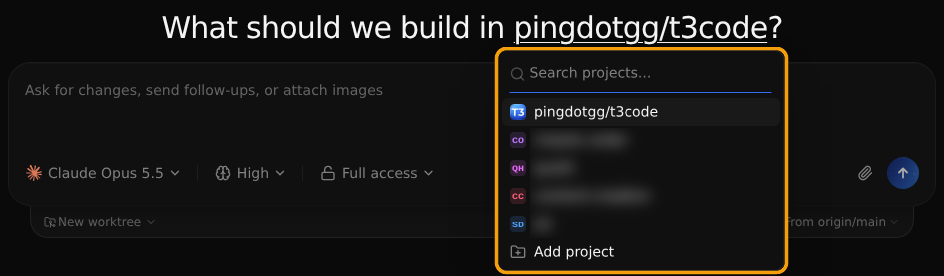
Two more bindable commands for controls that already exist on a new-thread draft:
composer.project opens the draft's project menu.composer.toggleStartFromOrigin flips Start from origin for a new worktree, without opening the branch picker.
Bound here to Ctrl+Shift+R and Ctrl+Shift+U for the screenshots:
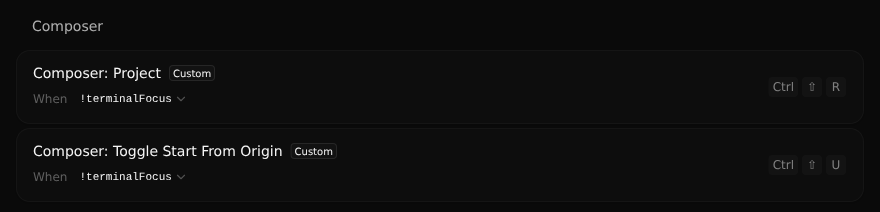
composer.project opens the project menu |
composer.toggleStartFromOrigin flips the base |
 |
 |
Both are unbound by default, so no existing shortcut changes, following #11615 and #19928. I have them working on a branch. Would a maintainer approve this as one small PR?
|
You must be logged in to vote
0 replies
Comment options
-
Uh oh!
There was an error while loading. Please reload this page.
-
Uh oh!
There was an error while loading. Please reload this page.
|
Request: Bindable commands for approving and declining tool-permission requests
Pending tool approvals currently have no configurable keyboard commands for Approve or Decline.
In T3 Code Nightly 0.1.8-nightly.20261107.4327 (e455200), STATIC_KEYBINDING_COMMANDS contains no approval commands. The approval UI invokes the response handler through its button actions. The same command-registration gap was confirmed on main (25bf84ab).
This affects workflows involving frequent permission requests, including Codex MCP elicitations such as Computer Use authorization.
Related work: PR #28840 introduces hardcoded Enter-to-approve and Escape-to-decline behavior in its redesigned approval panel. However, those actions are not registered as configurable commands, and the handler intentionally excludes focus within editors and interactive controls.
Suggested enhancement
Expose approval actions through the existing keybinding system, for example:
approval.accept — approve the active pending request.approval.decline — decline the active pending request.
Ideally, both would be unbound by default, preserving existing keyboard behavior while allowing users to configure their own shortcuts.
Each invocation should authorize or reject only one explicitly targeted request. This should not introduce automatic approval or bypass existing permission checks.
A few implementation details would benefit from maintainer guidance: targeting when multiple approvals are pending (including child-thread requests), handling requests temporarily held by the composer typing guard, and keeping session-wide "Always allow" authorization distinct from ordinary one-time approval.
Verification: Source analysis confirmed the missing commands. Focused Chromium component tests successfully navigated and activated the existing approval buttons, but the original desktop-specific Tab-navigation behavior remains unverified and is not being reported as a confirmed defect.
Environment: T3 Code Nightly 0.1.8-nightly.20261107.4327, macOS 27.2, Codex provider.
|
You must be logged in to vote
0 replies
Comment options
-
Uh oh!
There was an error while loading. Please reload this page.
|
Another action I’d like to put forward / the ability to bind is toggling Boring sidebar (group by project) on and off.
Different times call for different workflows, and being able to swap between the default view and grouping by project really helps.
Right now, switching takes three steps:
Settings > Labs > Boring sidebar (group by project)
Could this toggle be exposed in Settings → Keybindings? No default shortcut needed. Users can choose their own binding; it’s about enabling customisability / different modes of use.
Related: #32991 asks for grouping controls in the sidebar header.
|
You must be logged in to vote
0 replies
Comment options
-
Uh oh!
There was an error while loading. Please reload this page.
|
Could thread.archive and thread.delete go on this list? Both are in the thread menu but have no command id, so there's nothing to bind. #31126 asked for this and got redirected here.
Unbound by default is fine, same confirmation as the menu, and !terminalFocus like settle. I'd bind delete to mod+shift+backspace:
{ "key": "mod+shift+backspace", "command": "thread.delete", "when": "!terminalFocus" }(#27718 is closed as completed for archive, but I don't see it in 0.1.9 yet.)
|
You must be logged in to vote
0 replies
Comment options
-
Uh oh!
There was an error while loading. Please reload this page.
|
Related specific request: Cmd+R to run the existing ⋯ → Refresh on the open pull request detail panel (pullRequest.refresh, when on PR-detail focus so it doesn't steal preview.refresh or desktop View → Reload).
#39323
|
You must be logged in to vote
0 replies
Comment options
-
Uh oh!
There was an error while loading. Please reload this page.
Note 🤖 Claude Opus 5.5 responding on behalf of nibarAhmed
Could rightPanel.nextTab and rightPanel.previousTab go on this list? The right panel has commands to open, close, reopen and maximize tabs (rightPanel.new, rightPanel.close, view.reopenClosed, rightPanel.toggleMaximized), but none to move between them. Switching from a diff to a preview to a terminal means using the mouse or moving focus into the tab strip.
Proposal: two commands that wrap around the open tabs, unbound by default, so people pick their own keys in Settings → Keybindings.
Accessibility: this would help screen reader and keyboard-only users a lot. Today, getting to another tab means leaving what you're working on, finding the tab strip, picking a tab and finding your way back. A command would switch in one step from anywhere. The newly active tab should be announced, so screen reader users know where they landed.
Where they'd apply:
- The panel beside a thread, including new threads before the first message.
- The side chat, which already passes panel commands to the thread it sits in (
SIDE_CHAT_PANE_COMMANDS in useChatShortcuts.ts).
- The shared panels on the Issues and Pull Requests pages.
- Preview pages in the desktop app, which already pass
rightPanel.toggle and rightPanel.close on to the app.
These all handle the same rightPanel.* commands, and only one is listening at a time, so one pair of commands covers all of them. Web and desktop both have the panel; mobile doesn't.
Related: #6966 (Ctrl+Tab for threads), #35604 (right panel shortcuts).
|
You must be logged in to vote
0 replies
Comment options
-
Uh oh!
There was an error while loading. Please reload this page.
|
+1 for item 5, chat.focusComposer. When I open a thread, the composer sometimes doesn't have focus, and I have to click it before I can type. F6 cycles there, but the number of presses depends on which area had focus last.
#5961 was closed because it added a default Ctrl+` binding and backfilled it into existing configs. Would the command alone, unbound by default, be acceptable? Anyone who wants it could bind it in keybindings.json, and nobody's existing shortcuts would change.
|
You must be logged in to vote
0 replies
Comment options
-
Uh oh!
There was an error while loading. Please reload this page.
|
Bumping item 5 (chat.focusComposer) with a narrower scope than #5961, which was closed for adding a default binding and a focus toggle.
What I'm after is just the command: no default key, nothing written into existing keybinding configs, and no terminal toggle. Users who want it bind it themselves in Settings → Keybindings.
The current workarounds don't quite cover it. Type-to-focus only works when nothing editable has focus, so it doesn't help from the terminal, the preview URL bar, or other inputs. F6 cycles through areas, so how many presses it takes depends on the layout.
Would a maintainer be open to a PR scoped to that (contract entry, handler that focuses the active composer, keybindings settings label)? Happy to open it if so.
|
You must be logged in to vote
0 replies
Converted from issue
This discussion was converted from issue #4641 on August 15, 2026 09:46.
|


