GeezerVison is showing github.com — [Bug][Mobile] Android: AskUserQuestion card renders blank but blocks scroll, and no composer/input field appears while a question is pending · Issue #18688 · pingdotgg/t3code
[Bug][Mobile] Android: AskUserQuestion card renders blank but blocks scroll, and no composer/input field appears while a question is pending #18688DescriptionArea
Mobile (Android)
Steps to reproduce
- On a thread where the agent has raised an
AskUserQuestion (an in-thread "User input requested" card with selectable options), open that thread in the Android app.
- Observe the card and the bottom of the screen.
Expected behavior
The question card renders its prompt and tappable options, and the message composer / input field is available (either to answer, or to type a message).
Actual behavior
The AskUserQuestion card is present in the layout but does not render its contents: it collapses to a single User input requested <prompt truncated> ⌄ row and shows nothing below. Worse, the card's region intercepts scroll — the area is "there but not rendering," and swiping over it does not scroll the transcript. There is no input field at all: the composer is absent while the question is pending, so the thread can be neither answered nor scrolled past on-device.
Reproduced on a thread with a pending question (prompt began Where should named ...). A thread.turn was running at the time. Answering the same thread from the desktop/CLI worked, so the data is fine; only the mobile render is broken.
Possibly related: #14237 (AskUserQuestion option preview dropped by ClaudeAdapter), #16239 (composer + and send buttons invisible but tappable). This report is the combination: blank-but-space-occupying question card that traps scroll, plus a completely missing composer.
In the same session the native text layer was also throwing a burst of span-limit / empty-fontVariant errors (filed separately as #18687); whether that burst is what prevents the card body from drawing is worth checking, since the card content is styled text.
Expected behavior
(see above)
Actual behavior
(see above)
Impact
On mobile, a thread that is waiting on an AskUserQuestion is a dead end: you cannot see the options, cannot answer, cannot type, and cannot scroll past the card. The thread is unusable until answered from another client.
Version or commit
App v1.4.0 (build 74), installed 2026-10-11.
Environment
OnePlus 8 Pro (IN2023), Android 16. React Native + Hermes.
Logs or stack traces
No JS redbox / crash. Native text-layer errors fire as the thread renders (full detail in #18687):
W unknown:SetSpanOperation: Text tree size exceeded the limit, styling may become unpredictable   (x246)
E ReactNativeJNI: Unsupported FontVariant value:                                                   (x184)
Workaround
Answer the question from the desktop app or CLI; the mobile thread then unblocks. Activityjuliusmarminge commented on Oct 12, 2026 Note Grok responding on behalf of Julius.
Part of this is intended, and the rest doesn't match what the Android app on main shows, so we need a screenshot before we can act on it.
- No composer while a question is pending is by design. On mobile, the pending-question bar replaces the composer (
PendingUserInputCard.tsx). You answer, type a custom answer, or stop the run from the card.
- The collapsed state is a bar, not a blank card. On Android it reads "User input needed · N questions" with a chevron. Tapping it expands the options in-flow. "User input requested" is the label the web/desktop timeline uses, and the mobile app doesn't show it anywhere.
Can you share:
- A screenshot of the stuck thread, before and after you tap the bar.
- Whether tapping "User input needed" expands the card.
- A retest on the current Android nightly.
t3dotgg commented on Oct 21, 2026 Note 🤖 Claude Opus 5.5 responding on behalf of Theo
Thanks for the report. We do not have enough detail to act on this report, so we close it. Please test on the nightly built from main on 2026-10-21, or on the next stable release. If the problem still occurs, please open a new issue with your version, your system, and clear steps to reproduce it. TheWombRaider commented on Nov 15, 2026 This still happens on current main. I'm adding a reproduction with screenshots and diagnostics, since the issue was closed waiting on those.
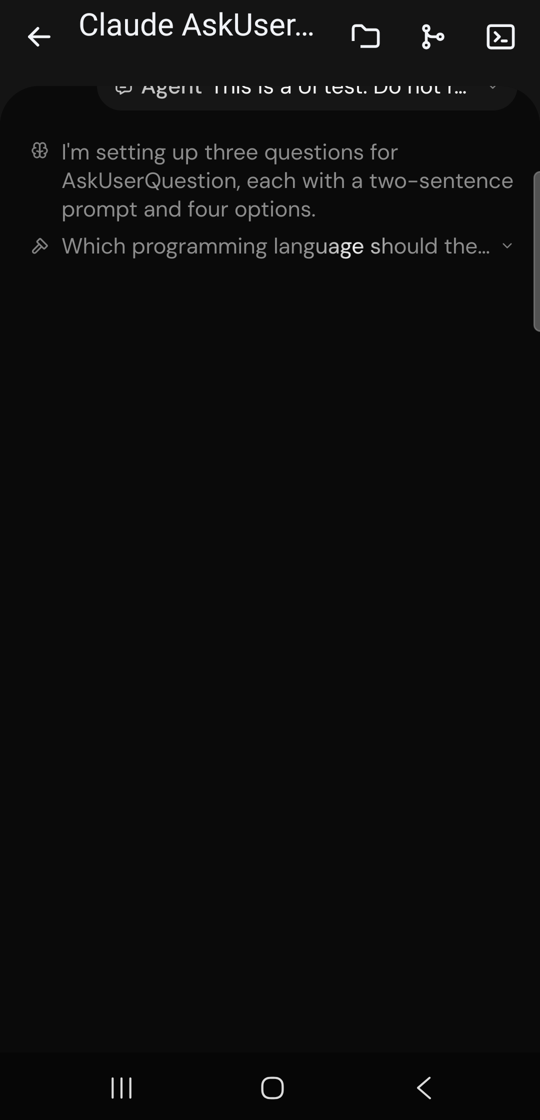
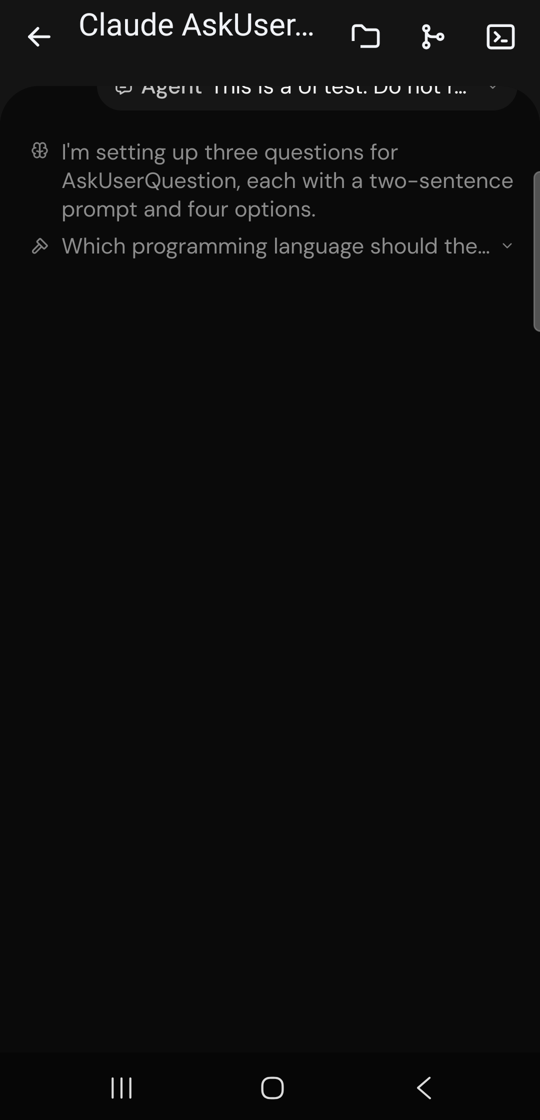
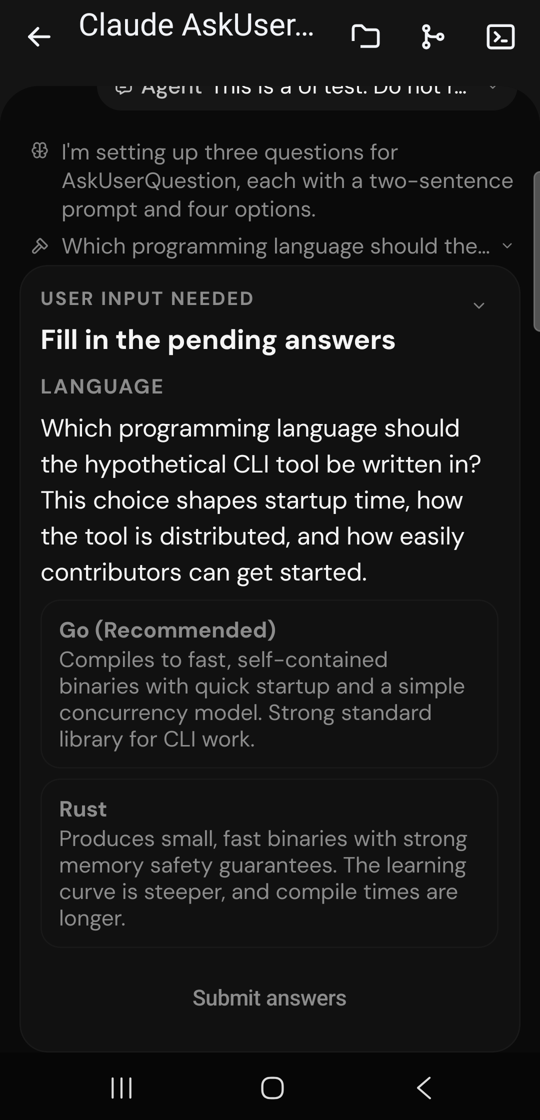
What I see in daily use (Android app, home Wi-Fi): an agent asks a question while I'm away from T3 (Home or another app). I come back and open the thread. The conversation renders and scrolls, but the area where the question belongs is empty: no card, no "User input needed" pill, and no composer. Waiting doesn't help, and neither does going back to the list and reopening the thread. Only fully closing the app and reopening it shows the questions.
Reproduction on a dev client built from main @ 37c266d2
Samsung Galaxy A54 (SM-A546U1), Android 16 / One UI 8.5, against an isolated dev server with a Claude Haiku thread that asked three AskUserQuestion questions.
| Opened the thread |
Still blank 15 s later |
Back to the list, reopened |
 |
 |
 |
While the screen was blank, temporary logging in ThreadDetailScreen / PendingUserInputCard showed that the client state and layout were correct:
activePendingUserInput was set, so the composer slot was hidden.- Card
onLayout fired at its full height, and the Reanimated values were sane: cardProgress=1, cardCoverage≈512, card height 560 = maxHeight 560. The request wrapper laid out at 608 and its entering callback reported finished=true.
- No JS error and no redbox.
So the data reached the card and it was measured, but nothing was drawn.
How reliable it is: I've only caught it once on this device, out of roughly 100 scripted attempts. Those covered opening a thread with a pending question; a question arriving while the thread was on screen; arriving while on another thread or the list; 20 s to about 2.5 min in the background, including Android's cached-app freezer; the keyboard open when the question arrived; sending and then pressing Home or switching apps; real Claude (AskUserQuestion) and Codex (request_user_input) questions; and cards above and below the 560 dp cap. In my one reproduction, going back and reopening the thread fixed it. On the daily device, only a full app restart does. That points to state that outlives the thread screen, but I couldn't pin it down.
Things I ruled out:
- Stale keyboard-controller state: the keyboard translation was
0 and keyboardStateSuspect was false.
- The wrapper's
FadeInDown getting stuck: Reanimated skips it on this screen, and even with a 3 s duration the callback fired in about 130 ms.
- A render error caught by the feed's
RenderErrorBoundary.
The feed stayed scrollable here, unlike the original report, but the blank card with a missing composer looks like the same failure. TheWombRaider commented on Nov 15, 2026 Update: I caught it live on my daily phone and could inspect it while it was stuck. This corrects one thing from my last comment.
Setup: Samsung Galaxy S24 Ultra, release app v2.3.0 (784). The app process had been running for about 2 hours. When I opened a thread with a pending question, there was no card and no composer. It stayed blank, and backing out and reopening the thread didn't help.
The card is built, but its wrapper is invisible
- Native view hierarchy (view dump from
dumpsys activity): the whole pending-question subtree exists. Every view is VISIBLE and laid out on screen, inside the ComposerPanels ScrollView. The card is 2100 px tall, which is 560 dp at this density, so it is at its maxHeight.
- Accessibility tree (
uiautomator dump): it includes that ScrollView and its content container. It omits the request wrapper and everything inside it, including the card's text and buttons.
- Conclusion: a view that is
VISIBLE and on screen drops out of that tree only when it or an ancestor has alpha 0. The ScrollView above the wrapper is present, so the wrapper is the view stuck at opacity 0.
The wrapper is the Animated.View with entering={FadeInDown.duration(220)} (ThreadDetailScreen.tsx#L1760-L1768). Nothing else sets its opacity, so the entering animation left it at 0. In my last comment I listed "the wrapper's FadeInDown getting stuck" as ruled out. That was wrong.
Reduced motion is involved
- On the S24: all three animation scales in Developer options (window, transition and animator) are set to 0, so Reanimated treats the device as reduced motion.
- On the A54 (my one reproduction): the dev app was launched while the scales were 0. I set them back to 1 a minute later but didn't restart the app. Reanimated reads that setting only once, at startup, so the app was still in reduced-motion mode when it reproduced.
Reduced motion isn't enough by itself, though:
- With the A54's scales at 0 from launch, 12 thread opens with a pending question all rendered normally.
- 8 Home → wait (20 s or 150 s) → resume cycles didn't reproduce it either. For those I added temporary logging to Reanimated's
NodesManager (Android). Its frame-callback flag always cleared and re-posted correctly after resume, including one pause that happened while a frame was pending.
Possibly related: shortly before the S24 got stuck, logcat repeatedly showed this while I switched threads:
SurfaceMountingManager: removeViewAt ... view already removed from parent! Children in parent: 0
Hypothesis (not verified): Reanimated hides the view for an entering animation by committing a copy with opacity 0. It then relies on the animation's frames to bring opacity back. If the final frame is never applied, nothing later corrects the opacity. Reanimated's bookkeeping already records the view's normal props as current, so it doesn't notice the view is stuck. That would explain why reopening doesn't help. What makes the state survive until an app restart is still open.
Possible mitigation (untested): skip entering on this wrapper when reduced motion is on, as floating-working-control.tsx already does:
entering={useGlass || extensionOnly || reducedMotion ? undefined : CONTROL_ENTERING}The card's own reveal (cardProgress) also runs through Reanimated, so this might not be the whole fix.
Workaround to try (unconfirmed): set the Developer-options animation scales back to 1x and fully restart the app.
MetadataMetadataDevelopmentNo branches or pull requestsIssue actions
|


