This sample project shows layer/modular approach, that provides great deal of abstraction for developing better android apps
- When there is a large team working on the same app, its really hard to keep track of other team members code, you would have to make multiple branches in git to keep track.
- When the app you are working on covers a very large scope, then there will be alot of code and managing the code can be a very difficult thing.
Using a modular approach will cover both of these problems.
- MVVM Pattern
- The Clean Architecture Pattern
- Android Jetpack (LiveData & ViewModel)
- Data Binding
- Dagger2
- Kotlin Coroutines
- Retrofit2 and Room
-
Choosing a pattern best suited to your needs.\nThe Pattern I'm using for this. You can Call it Extended MVVM or The Clean Architecture.
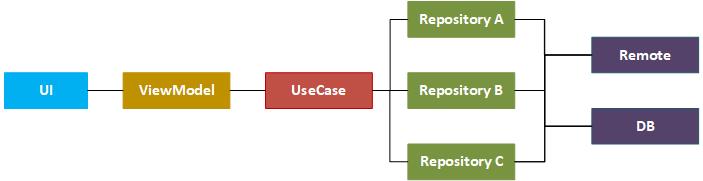
- Each view will have its own (or shared) viewmodel.
- Each ViewModel will have its OWN Usecase (Depending upon the requirements of the usecase)
- Each Usecase can have one or many repositories. (depends on the requirements of viewmodel).
- Each Repository will have its corresponding API (Service calls) and DAO (Database access objects). for example AuthRepository will have AuthAI and AuthDAO, AuthRepository should handle signIn, signUp, logout, validateSession, etc.
-
Dividing app in small features and separating the common functionalities. For example:
- UI Layer: Make Authentication Module that has UI and VM of login, signup, forgotPassword etc screens.
- Common/Base Layer: Create a module for all the colors, styles, themes, and the custom UI Elements classes and name it Base.
- Data Layer: Create a a module for all the APIs, DAOs, Repositorries and Usecase Implementation classes.
- Communication Layer: Create a Module that is a gateway between your
:appand:feature-module, this,module will also containt the (interfaces classes) scope of your repositories and usecases. Defining a scope for a class limits its functionality. meaning we will only use them for a specific purpose and also the big advantage is it provides absctraction so the another class using the class doesn't know what is going on inside this class. meaning ViewModel won't know and care how it receives data.- One more thing The gateway module We can call it
:datainterfacesmodule will also containt the models.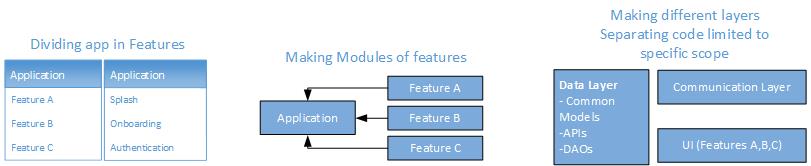
- One more thing The gateway module We can call it
-
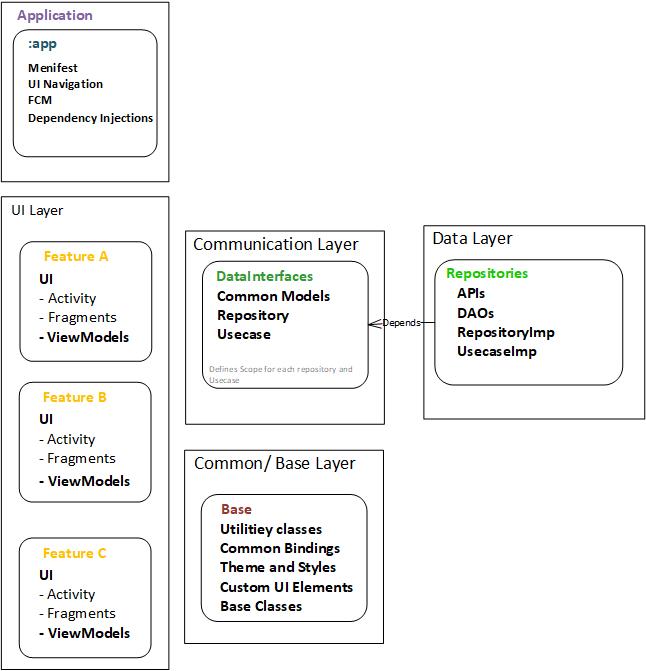
I think this diagram is self expalinatory
-
Dependencies
- feature module depends on:
:dataInterfaceand:base
- Application Module depends on:
:feature-module,:datainterface,:baseand:repositoriesmodules.- Application needs repository module because of the Dependency Injection. because in this case application module is responsible for creating objects and defining their scopes. Those classes which we need throughout the application and those classes which we need only when for a specific module we can manage that.
- Application module should also be responsible for Navigation between modules. although this sample app for now doesn't define any suitable method for this navigation.(I'm still working on it.)
- feature module depends on:


