A tour of tdeemon: what each part does and how to use it. The
screenshots show a demo user (tdeemon user demo) with three months of
made-up data. make screenshots takes them again
(CONTRIBUTING.md).
- The day
- Logging a meal
- Foods and recipes
- Your measured TDEE
- The plan
- Proposals and limits
- Autopilot
- An AI coach
- Apple Health, notifications and alarms
- The check-in and the body
- Several users and a household
- Undo
- On a phone, and with a keyboard
- Your data
- Languages, themes and accessibility
- What tdeemon doesn't do (yet)
The day is the home screen. A ring shows how many calories are left of today's target, with protein, carbs and fat as bars under it. Beside it is the target's arithmetic: your TDEE minus the deficit your phase plans. A small picker sets the day's type (a rest day or a training day), which picks its target.
The week sits beside the day as seven columns, Monday to Sunday, each against its target, with the week's average; tap it to see what the days left can eat. Under them are the morning summary, a proposal waiting for you, and the meals, each a row that opens to its items. Go past your target by more than 5 % and the day says so in a warm colour, not in an error's red.
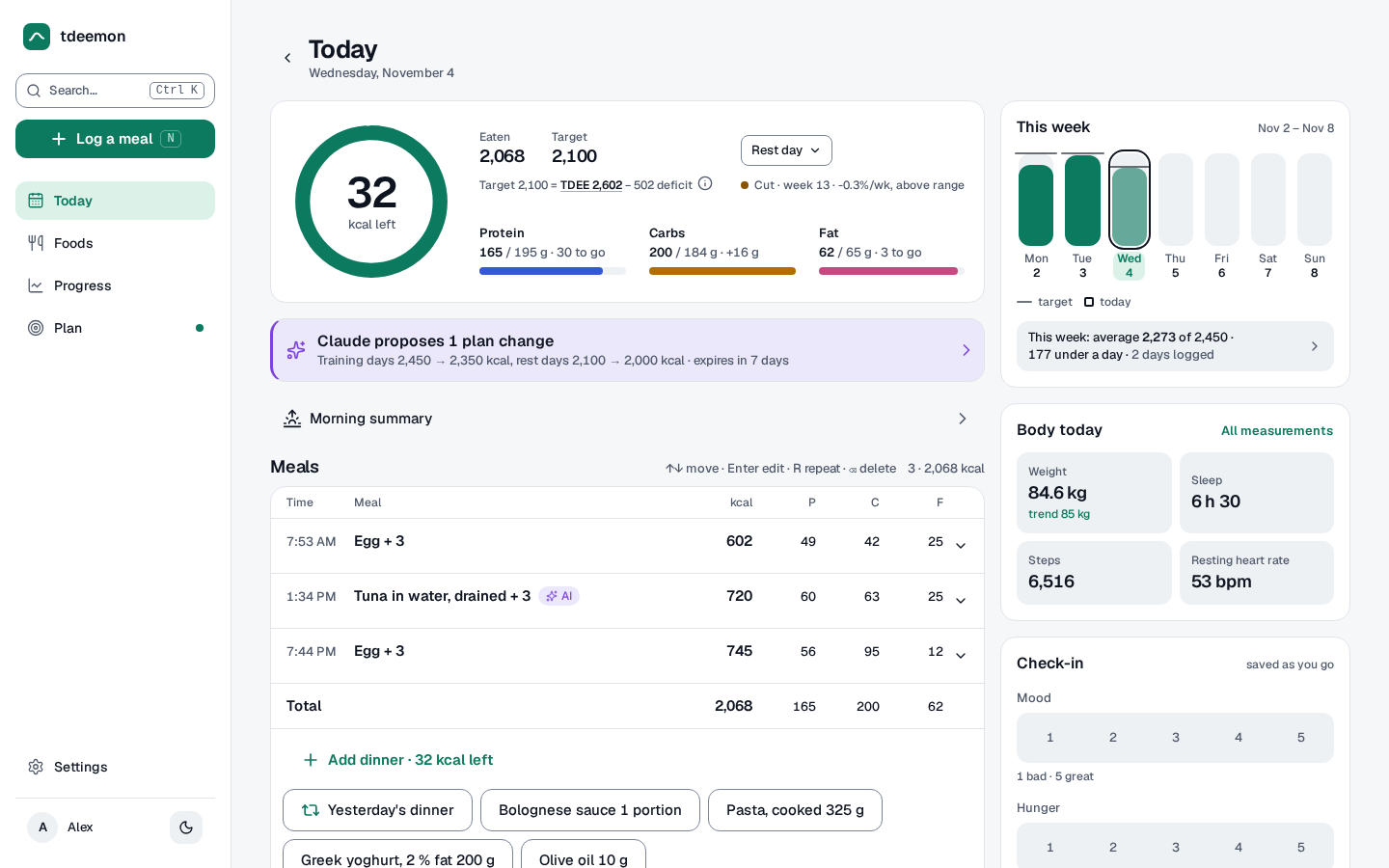
On a phone the same day comes as cards, with the sections in a bar at the bottom and the button that logs a meal in its middle.


Press Log a meal (or N on a keyboard) and start typing. Your own foods come first, then the instance's shared catalog. Before you type, the sheet shows what you eat at this meal lately, what you eat most and your meals of before, each a tap away. Tap + to put a food in the tray in its usual amount; change the amounts there, and log it all at once (⌘↵ on a keyboard). A meal you had before comes back with Repeat.
Other ways in:
- A barcode from the camera, or its digits typed. A product you don't have comes from Open Food Facts.
- A recipe's portion, as a fraction (½, ⅓, 1/10) or in grams.
- An estimate in kcal alone, for a plate nobody weighed.
- Yesterday's meal again, from the chips under the meals.
To correct a meal, open it: change an amount or its unit, move it to another day or time, and see its total change as you type.

Your foods are listed by how often you eat them, this week's first. Each has a page with its energy, the split of its macros, its nutrition per 100 g or a serving, its barcodes and how often you logged it. The food's form warns when its calories and macros don't add up.
A recipe is a dish of your foods that becomes a food of its own. Weigh the pot (tdeemon remembers its empty weight), say how many portions it made, and log a portion or a share of it. Cooked it again? Enter only the new amounts. A recipe can be shared with another user by their address, and an admin can add foods to the instance's catalog, which everyone's search finds.


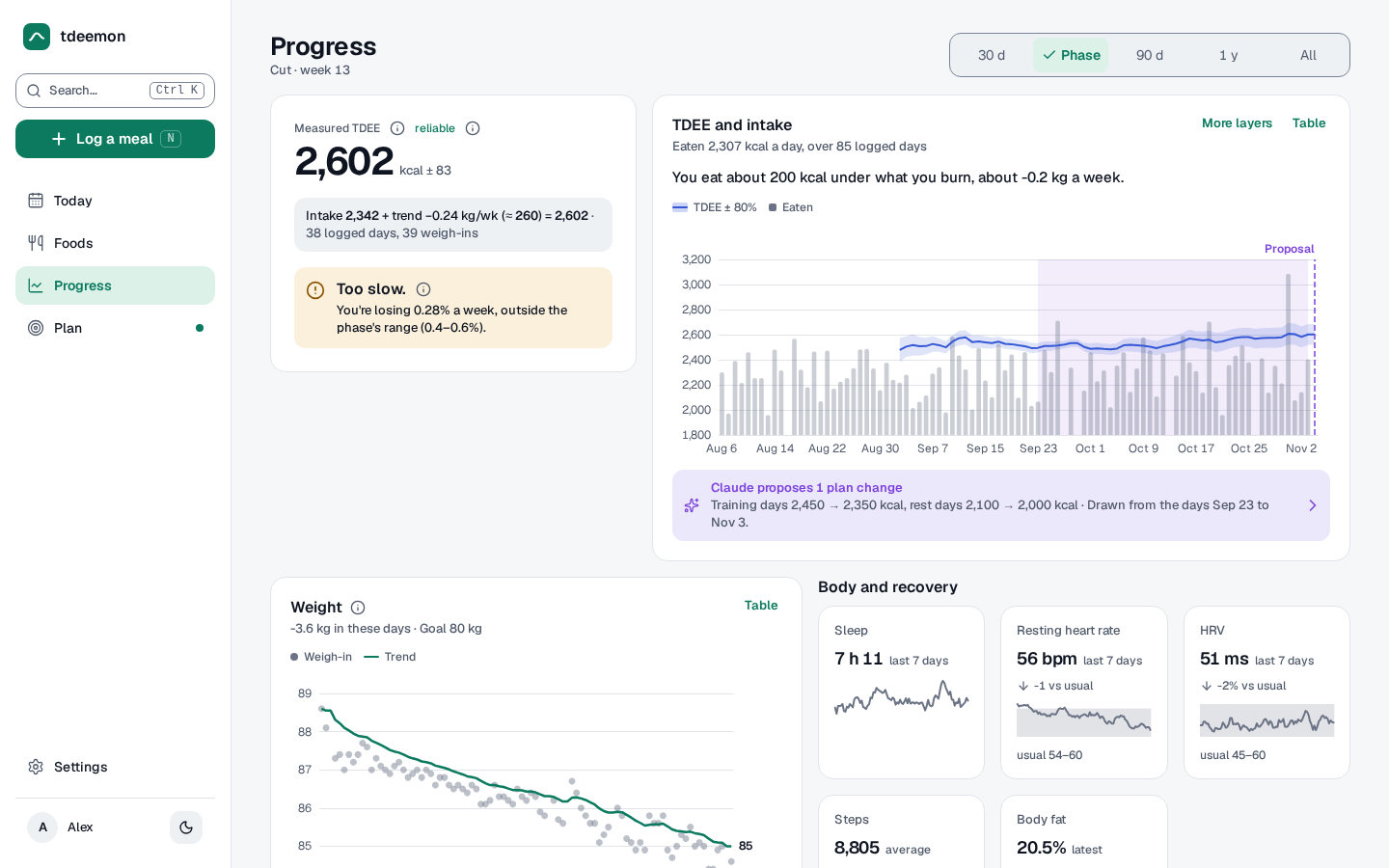
A formula's guess of your energy expenditure is only where tdeemon starts. After a few weeks it measures your TDEE from what you ate and how your trend weight moved, and shows it with its interval and whether it is reliable yet. The sum is spelled out: intake plus the energy of the trend's change. Until there is enough data, a bar shows how far calibration has come and about when the first TDEE arrives.
Under it is a verdict on your phase ("Too slow: you're losing 0.28 % a week, outside the phase's 0.4–0.6 %"). The charts show the weight and its trend, and the TDEE in its band against what you ate, with more layers a switch away and each chart a table a tap away. Sleep, resting heart rate, HRV, steps and body fat come as small tiles against your usual range. Every number has an ⓘ that says what it is, and the methodology explains them all.

A plan is a phase (a cut, maintenance, a bulk or a recomp) with a pace and a goal, and targets by type of day: one for every day, or one for training days and one for the rest. Training days come from the weekdays you train, and a strength workout in Apple Health marks one too. The plan's page shows the phase, the way to your goal, the timeline of phases and the deficit the targets plan. Every change is kept in its history, and a change can be reverted from there.
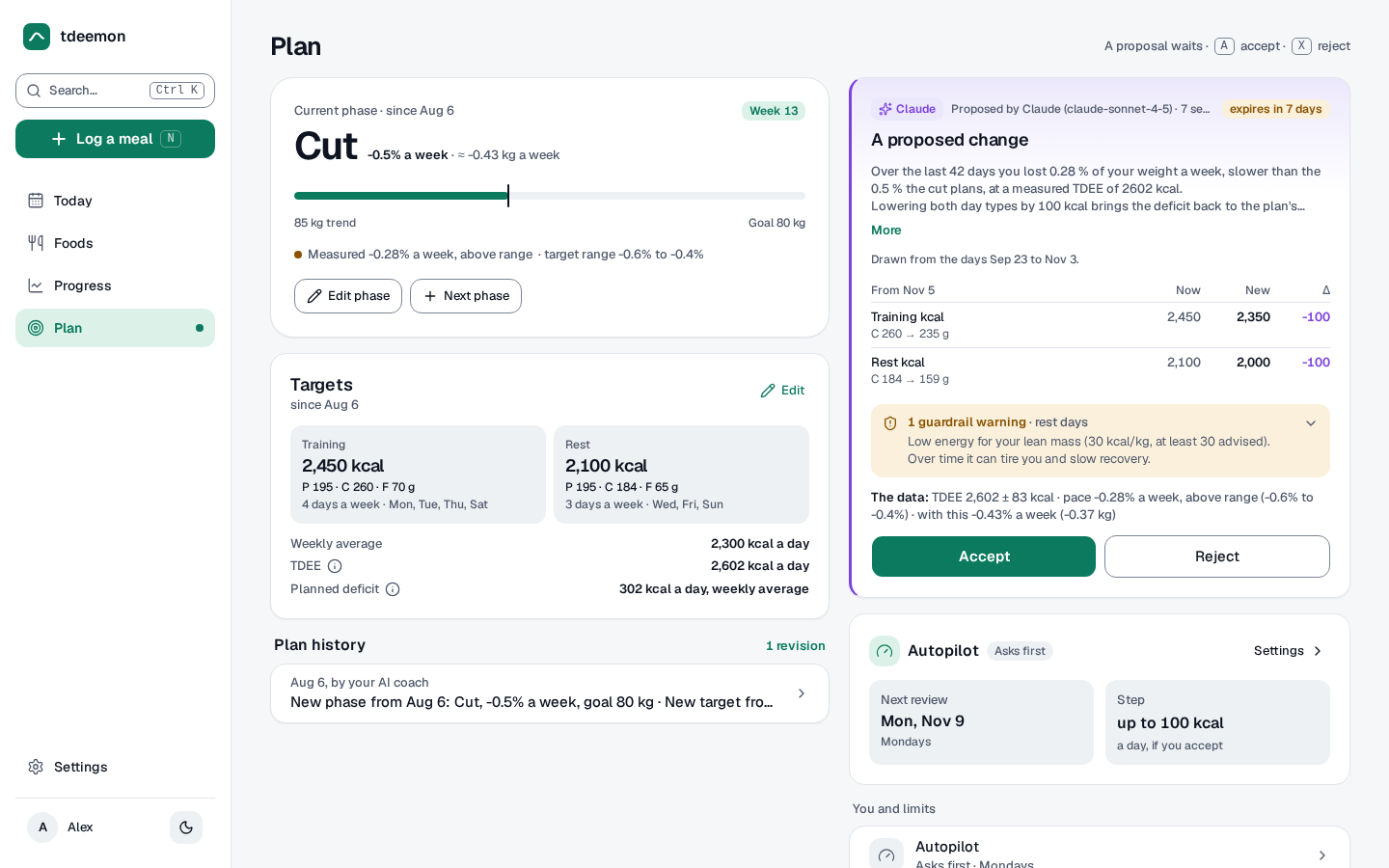
Nobody changes your plan behind your back. An AI coach, or the autopilot, proposes a change; the proposal says what changes (now, new and the difference), who proposed it, why, what the data say and when it expires. You accept or reject it (A or X on a desktop), and an accepted change can be taken back.
Every proposal is checked against your limits: floors on calories, protein and pace that the code enforces, so no prompt can talk them down. A limit a proposal comes close to is a warning on it. limits.md lists every limit and its source.

Once a week, on the weekday you choose, the autopilot reviews your pace against the phase's. It either moves your calorie target a small step (at most 100 kcal a day, and 15 % of your TDEE in all), holds and says why, or, in Ask me first mode, proposes the step and waits for you. It never touches protein, fat or the phase. The review comes as a push notification or a Telegram message, shows on the day, and is kept in the plan's history under Autopilot.

tdeemon is an MCP server. Connect Claude Code, Claude Desktop, Codex, Hermes or a local model with an access key, and talk to it: "I had 200 g of skyr and a banana", "how am I doing this week?", "do a monthly review". The model decides only what you ate and how much: tdeemon finds the foods, logs them and answers with the day's totals, so the model never does the arithmetic. Three coaching sessions (a monthly review, a plateau check, a new phase) come with the methodology, and any change they suggest is a proposal. ai-coach.md has the setup and an example.
Health Auto Export, an app on an iPhone, sends your weight, body fat, sleep, steps, resting heart rate, HRV and more, and your strength workouts, which mark the training days. Each morning tdeemon can send a summary of yesterday and today's target as a push notification to each device you turn them on for, or to Telegram. If your data stop coming (no measurement for 26 hours, or an export's key unused for 3 days), a watchdog tells you. Settings › Devices and AI coaches walks you through each device with a checklist (self-hosting).
A short daily check-in (your mood and hunger, each on five steps, and a note) tells your coach how the days felt. It also says whether the day was a training day, and whether calibration counts it: a day you know is off (a party, an illness) can be left out. The body's tiles on the day show today's weight with its trend, sleep, steps and resting heart rate, each a tap away from its measurements. Weigh in by hand (W on a keyboard), or let Apple Health do it.
One instance serves several people. The admin invites each by a link, from Settings › Users, and each person's meals, weight and plan are theirs alone. People who share a kitchen can make a household: every food and recipe of each member becomes everyone's. Before you join, a preview shows what the merge does, and a member can leave at any time.
Every change ends in a toast with Undo; a delete's stays for 10 seconds, and ⌘Z or Ctrl+Z works too. Settings › Recent changes lists what changed and who changed it (you, an AI coach or the autopilot), with Undo on the latest.
On a phone tdeemon installs as an app (a PWA): it opens full screen under its own icon, and without a network too. It has a bar of sections at the bottom, and sheets you drag down to close.
On a desktop it has a sidebar and keyboard shortcuts: G and a letter to a section, N to log a meal, W to weigh in, the arrows, Enter, R and Delete on the meals, and ⌘K or Ctrl+K for a command palette of actions, sections, foods, days and settings. Shortcuts of one key can be turned off.

Everything lives in one SQLite file in one container. Export all your
data as a ZIP of JSON and CSV at any time, or delete your account and
everything in it, from Settings › Account. The instance snapshots
its database before each migration and, if you set it to, every day.
Sign in with a password or your own OpenID Connect provider. The REST
API, described at /api/v1/openapi.json (OpenAPI 3.1), and access keys
with scopes (read, tools, ingest) let you build your own
integrations.
tdeemon speaks English and Croatian, with each language's plurals and clock. It has a light and a dark theme, or follows the device's. Every screen is checked for accessibility (axe, the size of a finger's targets, the focus, less motion) on a phone and a desktop, in both themes and both languages.

- Metric units only.
- Apple Health only through Health Auto Export, whose REST automations are a paid feature of that app. There is no Android health integration; the generic JSON import works for a script of your own.
- No chat of its own yet: use an MCP client.
- No ChatGPT or claude.ai connector yet: they sign in with OAuth, which tdeemon doesn't offer.
- No hosted version: you run it yourself.
- Not medical advice. Talk to a professional before significant changes to your diet or training.
Questions and ideas go to Discussions.