GeezerVison is showing github.com — visualpython/docs/machine-learning/2.-data-split.md at main · visualpython/visualpython
/
2.-data-split.md
Copy path 21 lines (12 loc) · 1.22 KB
/
2.-data-split.md
Copy pathFile metadata and controls
21 lines (12 loc) · 1.22 KB
Copy raw file
Download raw file
Edit and raw actions
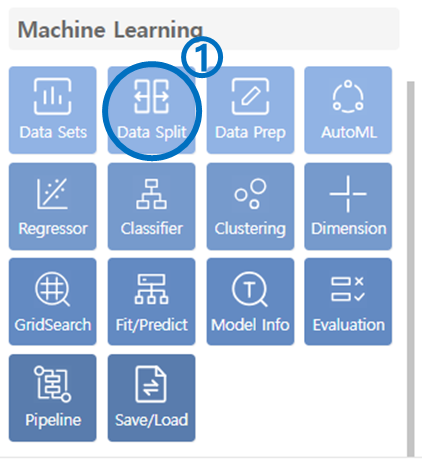
- Click on Data Split in the Machine Learning category.
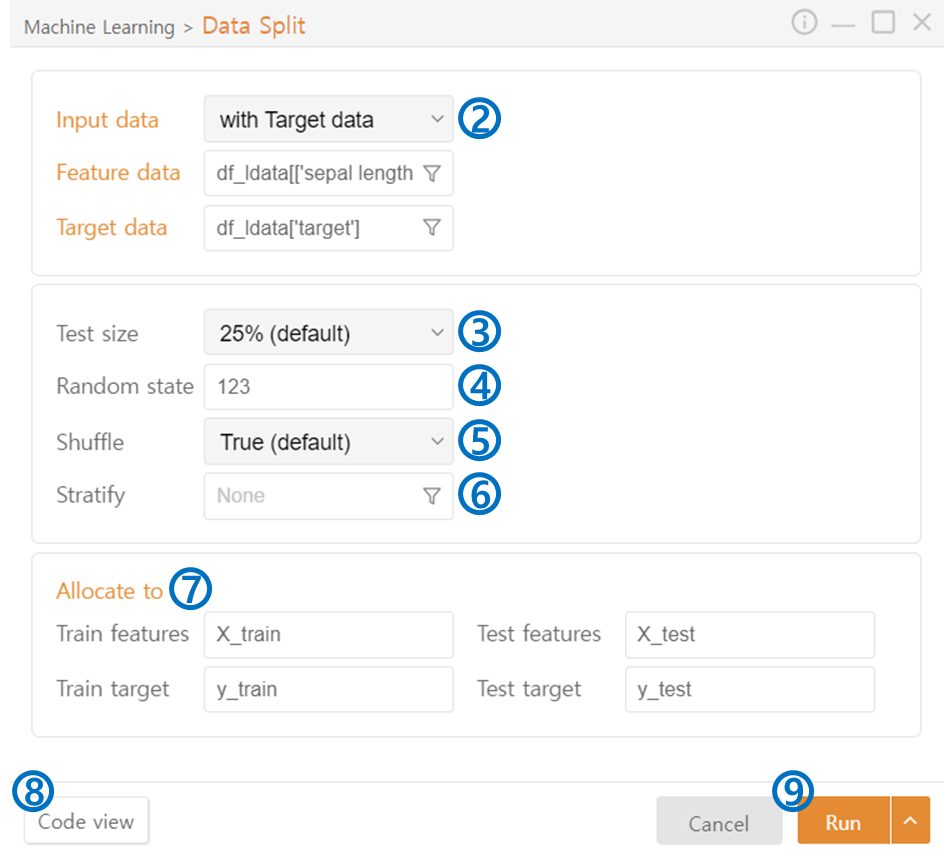
- Input Data: Choose whether the target data is included in the input data. If it is, select Feature Data and Target Data separately. You can also select specific columns from one dataset using the funnel icon.
- Test Size: Select the percentage of input data to use for testing purposes.
- Random State: Generate the same random state, ensuring consistent data splits each time. (If not set, data will be randomly split differently each time.)
- Shuffle: Shuffle the data randomly to prevent the model from relying on the order of the data, thereby reducing bias and improving generalization performance.
- Stratify: Maintain class ratios when splitting the data to prevent over-representation of certain classes (Classification).
- Allocate to: Assign variable names to the split data.
- Code View: Preview the code that will be output.
- Run: Execute the code.

