GeezerVison is showing github.com — Add 3.13, Delete pic, Change pic to github path · whenhowlee/python-basic@4073024
File treeExpand file treeCollapse file tree Open diff view settings Some content is hiddenLarge Commits have some content hidden by default. Use the searchbox below for content that may be hidden. Expand file treeCollapse file tree Open diff view settings Collapse file Copy file name to clipboardExpand all lines: 101.md +4-4Lines changed: 4 additions & 4 deletions - Display the source diff
- Display the rich diff
| Original file line number | Diff line number | Diff line change |
|---|
| 41 | 41 | #下载源码,目前最新版本是2.7.8,如果以后换了,可以在下面的命令中换版本号 | 42 | 42 | #源码也可以在网站上下载,具体见前述下载页面 | 43 | 43 | wget http://www.python.org/ftp/python/2.7.8/Python-2.7.8.tgz | 44 | | - | | 44 | + | 45 | 45 | #解压源码包 | 46 | 46 | tar -zxvf Python-2.7.8.tgz | 47 | | - | | 47 | + | 48 | 48 | #编译 | 49 | 49 | cd Python-2.7.8 | 50 | 50 | ./configure --prefix=/usr/local #指定了目录 | | 53 | 53 | 以上步骤,是我从网上找来的,供参考。因为我的机器早就安装了,不想折腾。安装好之后,进入shell,输入python,会看到如下: | 54 | 54 |
| 55 | 55 | qw@qw-Latitude-E4300:~$ python | 56 | | - Python 2.7.6 (default, Nov 13 2013, 19:24:16) | | 56 | + Python 2.7.6 (default, Nov 13 2013, 19:24:16) | 57 | 57 | [GCC 4.6.3] on linux2 | 58 | 58 | Type "help", "copyright", "credits" or "license" for more information. | 59 | | - >>> | | 59 | + >>> | 60 | 60 |
| 61 | 61 | 恭喜你,安装成功了。我用的是python2.7.6,或许你的版本号更高。 | 62 | 62 |
| |
Collapse file Copy file name to clipboardExpand all lines: 102.md +7-7Lines changed: 7 additions & 7 deletions - Display the source diff
- Display the rich diff
| Original file line number | Diff line number | Diff line change |
|---|
| 10 | 10 |
| 11 | 11 | 都会出现如下内容: | 12 | 12 |
| 13 | | - Python 2.7.6 (default, Nov 13 2013, 19:24:16) | | 13 | + Python 2.7.6 (default, Nov 13 2013, 19:24:16) | 14 | 14 | [GCC 4.6.3] on linux2 | 15 | 15 | Type "help", "copyright", "credits" or "license" for more information. | 16 | 16 | >>> | | 31 | 31 | >>> print | 32 | 32 |
| 33 | 33 | #"Hello,World"是打印的内容,注意,量变的双引号,都是英文状态下的。引号不是打印内容,它相当于一个包裹,把打印的内容包起来,统一交给python。 | 34 | | - >>> print "Hello, World" | 35 | | - | | 34 | + >>> print "Hello, World" | | 35 | + | 36 | 36 | #上面命令执行的结果。python接收到你要求她所做的事情:打印Hello,World,于是她就老老实实地执行这个命令,丝毫不走样。 | 37 | 37 | Hello, World | 38 | | - | | 38 | + | 39 | 39 | 祝贺,伟大的程序员。 | 40 | 40 |
| 41 | 41 | >>笑一笑:有一个程序员,自己感觉书法太烂了,于是立志继承光荣文化传统,购买了笔墨纸砚。在某天,开始练字。将纸铺好,拿起笔蘸足墨水,挥毫在纸上写下了两个打字:Hello World | @@ -56,11 +56,11 @@ IDE的全称是:Integrated Development Environment,简称IDE,也稱為Inte | 56 | 56 |
| 57 | 57 | 看不懂,没关系,看图,认识一下,混个脸熟就好了。所谓有图有真相。 | 58 | 58 |
| 59 | | - | | 59 | +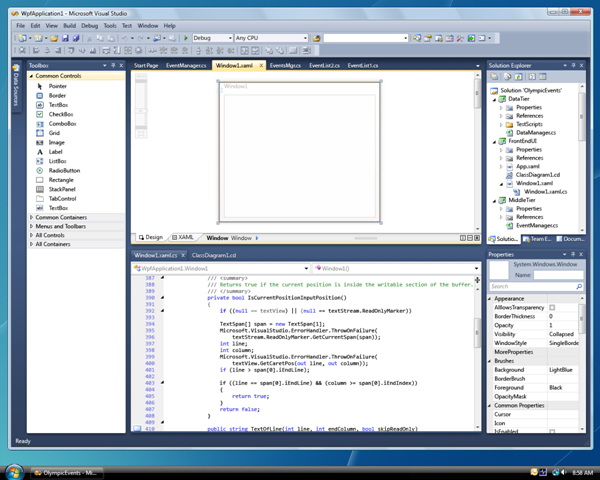 | 60 | 60 |
| 61 | 61 | 上面的图显示的是微软的提供的名字叫做Microsoft Visual Studio的IDE。用C#进行编程的程序员都用它。 | 62 | 62 |
| 63 | | - | | 63 | +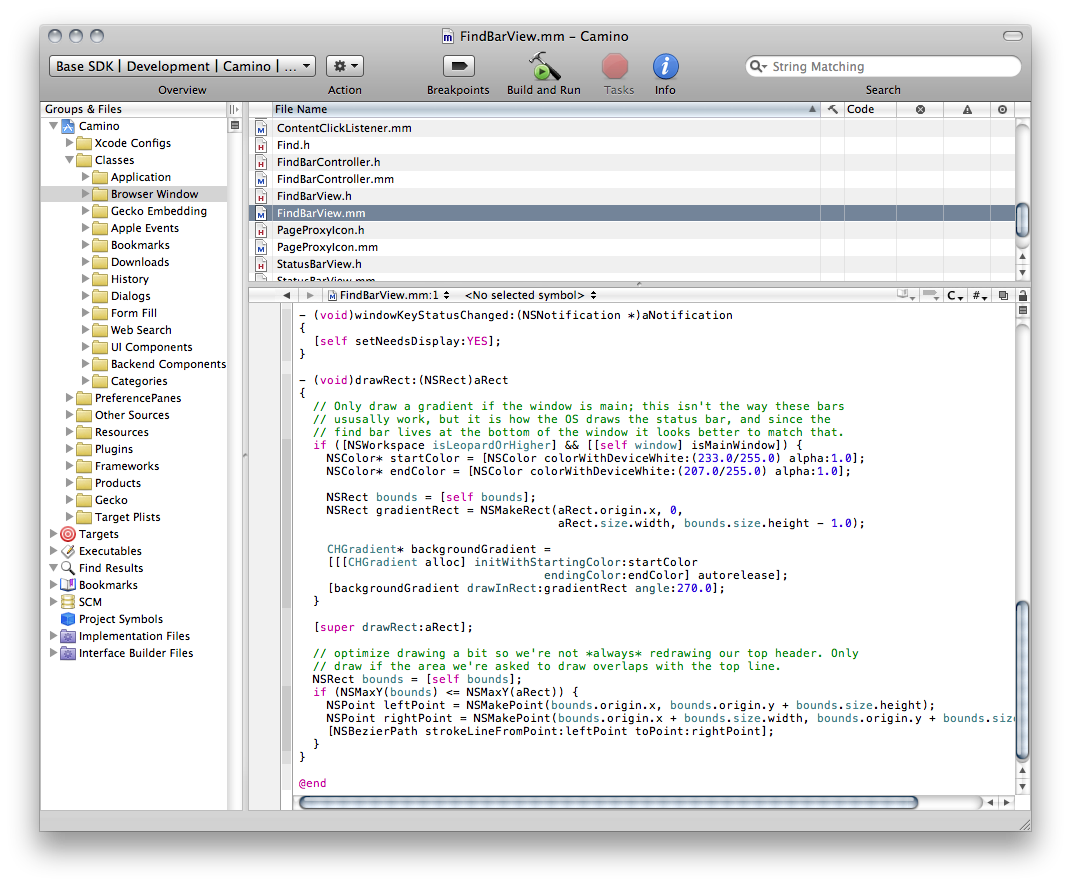 | 64 | 64 |
| 65 | 65 | 上图是在苹果电脑中出现的名叫XCode的IDE。 | 66 | 66 |
| @@ -83,7 +83,7 @@ google一下:python IDE,会发现,能够进行python编程的IDE还真的 | 83 | 83 |
| 84 | 84 | Windows的朋友操作:“开始”菜单->“所有程序”->“Python 2.x”->“IDLE(Python GUI)”来启动IDLE。启动之后,大概看到这样一个图 | 85 | 85 |
| 86 | | - | | 86 | +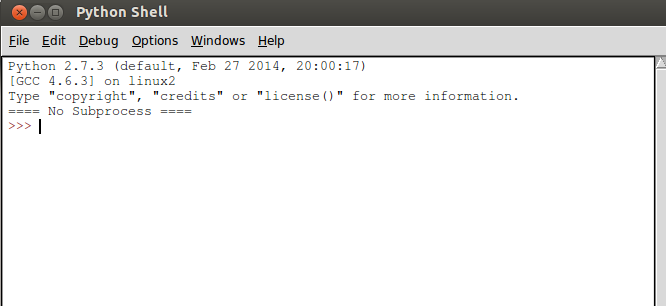 | 87 | 87 |
| 88 | 88 | 注意:看官所看到的界面中显示版本跟这个图不同,因为安装的版本区别。大致模样差不多。 | 89 | 89 |
| |
Collapse file Copy file name to clipboardExpand all lines: 105.md +9-9Lines changed: 9 additions & 9 deletions - Display the source diff
- Display the rich diff
| Original file line number | Diff line number | Diff line change |
|---|
| 30 | 30 |
| 31 | 31 | 操作:File->New window | 32 | 32 |
| 33 | | - | | 33 | +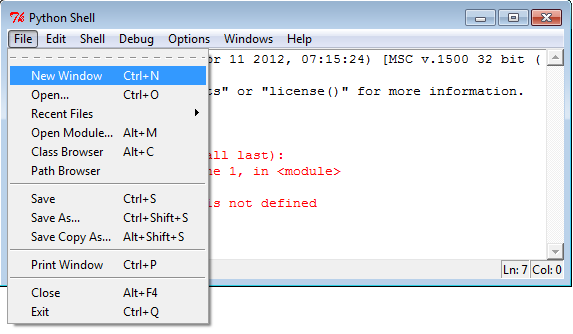 | 34 | 34 |
| 35 | 35 | 这样,就出现了一个新的操作界面,在这个界面里面,看不到用于输入指令的提示符:>>>,这个界面有点像记事本。说对了,本质上就是一个记事本,只能输入文本,不能直接在里面贴图片。 | 36 | 36 |
| 37 | | - | | 37 | +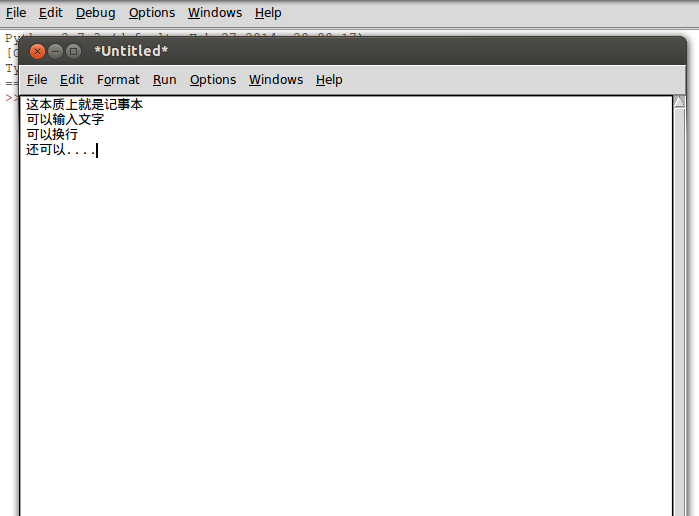 | 38 | 38 |
| 39 | 39 | ##写两个大字:Hello,World | 40 | 40 |
| @@ -46,13 +46,13 @@ Hello,World.是面向世界的标志,所以,写任何程序,第一句一 | 46 | 46 |
| 47 | 47 | 如下图的样式 | 48 | 48 |
| 49 | | - | | 49 | +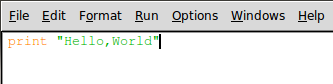 | 50 | 50 |
| 51 | 51 | 前面说过了,程序就是指令的集合,现在,这个程序里面,就一条指令。一条指令也可以成为集合。 | 52 | 52 |
| 53 | 53 | 注意观察,菜单上有一个RUN,点击这个菜单,在下拉的里面选择Run Moudle | 54 | 54 |
| 55 | | - | | 55 | +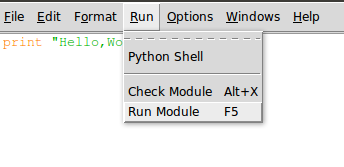 | 56 | 56 |
| 57 | 57 | 会弹出对话框,要求把这个文件保存,这就比较简单了,保存到一个位置,看官一定要记住这个位置,并且取个文件名,文件名是以.py为扩展名的。 | 58 | 58 |
| @@ -66,15 +66,15 @@ Hello,World.是面向世界的标志,所以,写任何程序,第一句一 | 66 | 66 |
| 67 | 67 | 下图是我保存那个文件的地址,我把那个文件命名为105.py,并保存在一个文件夹中。 | 68 | 68 |
| 69 | | - | | 69 | + | 70 | 70 |
| 71 | 71 | 然后在这个shell里面,输入:python 105.py | 72 | 72 |
| 73 | 73 | 上面这句话的含义就是告诉计算机,给我运行一个python语言编写的程序,那个程序文件的名称是105.py | 74 | 74 |
| 75 | 75 | 我的计算机我做主。于是它给我乖乖地执行了这条命令。如下图: | 76 | 76 |
| 77 | | - | | 77 | + | 78 | 78 |
| 79 | 79 | 还在沉默?可以欢呼了,德国队7:1胜巴西对,列看官中,不管是德国队还是巴西队的粉丝,都可以欢呼,因为你在程序员道路上迈出了伟大的第二步。顺便预测一下,本届世界杯最终冠军应该是:中国队。(还有这么扯的吗?) | 80 | 80 |
| @@ -85,11 +85,11 @@ Hello,World.是面向世界的标志,所以,写任何程序,第一句一 | 85 | 85 | 代码如下: | 86 | 86 |
| 87 | 87 | #coding:utf-8 | 88 | | - | | 88 | + | 89 | 89 | """ | 90 | 90 | 请计算:19+2*4-8/2 | 91 | 91 | """ | 92 | | - | | 92 | + | 93 | 93 | a = 19+2*4-8/2 | 94 | 94 | print a | 95 | 95 |
| @@ -99,7 +99,7 @@ Hello,World.是面向世界的标志,所以,写任何程序,第一句一 | 99 | 99 |
| 100 | 100 | 执行结果如下图: | 101 | 101 |
| 102 | | - | | 102 | + | 103 | 103 |
| 104 | 104 | 上面代码中,第一行,不能少,本文件是能够输入汉字的,否则汉字无法输入。 | 105 | 105 |
| |
Collapse file Copy file name to clipboardExpand all lines: 106.md +5-5Lines changed: 5 additions & 5 deletions - Display the source diff
- Display the rich diff
| Original file line number | Diff line number | Diff line change |
|---|
| 9 | 9 |
| 10 | 10 | 函数,从简单到复杂,各式各样。前面提供的维基百科中的函数词条,里面可以做一个概览。但不管什么样子的函数,都可以用下图概括: | 11 | 11 |
| 12 | | - | | 12 | +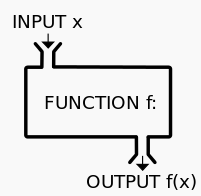 | 13 | 13 |
| 14 | 14 | 有初中数学水平都能理解一个大概了。这里不赘述。 | 15 | 15 |
| | 58 | 58 | 3 | 59 | 59 | >>> c | 60 | 60 | 3 | 61 | | - >>> | | 61 | + >>> | 62 | 62 |
| 63 | 63 | 说明: | 64 | 64 |
| | 112 | 112 | 在IDLE中,File->New window | 113 | 113 |
| 114 | 114 | 然后输入如下代码: | 115 | | - | | 115 | + | 116 | 116 | #coding:utf-8 | 117 | 117 |
| 118 | 118 | def add_function(a,b): | | 126 | 126 |
| 127 | 127 | 然后我就进入到那个文件夹,运行这个文件,出现下面的结果,如图: | 128 | 128 |
| 129 | | - | | 129 | + | 130 | 130 |
| 131 | 131 | 你运行的结果是什么?如果没有得到上面的结果,你就非常认真地检查代码,是否跟我写的完全一样,注意,包括冒号和空格,都得一样。**冒号和空格很重要。** | 132 | 132 |
| 133 | 133 | 下面开始庖丁解牛: | 134 | 134 |
| 135 | | -- #coding:utf-8 声明本文件中代码的字符集类型是utf-8格式。初学者如果还不理解,一方面可以去google,另外还可放一放,就先这么抄写下来,以后会讲解。 | | 135 | +- \#coding:utf-8声明本 文件中代码的字符集类型是utf-8格式。初学者如果还不理解,一方面可以去google,另外还可放一放,就先这么抄写下来,以后会讲解。 | 136 | 136 | - def add_function(a,b): 这里是函数的开始。在声明要建立一个函数的时候,一定要使用def(def 就是英文define的前三个字母),意思就是告知计算机,这里要声明一个函数;add_function是这个函数名称,取名字是有讲究的,就好比你的名字一样。在python中取名字的讲究就是要有一定意义,能够从名字中看出这个函数是用来干什么的。从add_function这个名字中,是不是看出她是用来计算加法的呢?(a,b)这个括号里面的是这个函数的参数,也就是函数变量。冒号,这个冒号非常非常重要,如果少了,就报错了。冒号的意思就是下面好开始真正的函数内容了。 | 137 | 137 | - c=a+b 特别注意,这一行比上一行要缩进四个空格。这是python的规定,要牢记,不可丢掉,丢了就报错。然后这句话就是将两个参数(变量)相加,结果赋值与另外一个变量c。 | 138 | 138 | - print c 还是提醒看官注意,缩进四个空格。将得到的结果c的值打印出来。 | |
Collapse file Copy file name to clipboardExpand all lines: 107.md +4-4Lines changed: 4 additions & 4 deletions - Display the source diff
- Display the rich diff
| Original file line number | Diff line number | Diff line change |
|---|
| 6 | 6 |
| 7 | 7 | 把我的这种分法抽象一下: | 8 | 8 |
| 9 | | -- 一种是:△ +□ = ○ | 10 | | -- 另外一种是:△ +□ = △ □ | | 9 | +- 一种是:△ + □ = ○ | | 10 | +- 另外一种是:△ + □ = △ □ | 11 | 11 |
| 12 | 12 | 我们的语言中,离不开以上两类,不是第一类就是第二类。 | 13 | 13 |
| | 44 | 44 |
| 45 | 45 | >>> print "小明说:\"我没有少圆明园\"" | 46 | 46 | 小明说"我没有少圆明园" | 47 | | - | | 47 | + | 48 | 48 | 这个例子中,为了打印出那句含有双引号的字符串,也就是双引号是字符串的一部分了,使用了一个符号:\,在python中,将这个符号叫做转义符。本来双引号表示包括字符串,它不是字符串一部分,但是如果前面有转义符,那么它就失去了原来的含义,转化为字符串的一部分,相当于一个特殊字符了。 | 49 | 49 |
| 50 | 50 | 下面用转义符在打印第二句话: | | 114 | 114 | 老齐教python | 115 | 115 | >>> c | 116 | 116 | '\xe8\x80\x81\xe9\xbd\x90\xe6\x95\x99python' | 117 | | - | | 117 | + | 118 | 118 | 这是一种最简单连接两个字符串的方法。注意上面例子的最后一行,怎么出现乱码了?那不是乱码,是字符编码的问题。这个你权当没看见好了。不过的确是看见了。请看官google字符编码就知道了。这里推荐一篇非常好的文章:[字符集和字符编码](http://www.cnblogs.com/skynet/archive/2011/05/03/2035105.html) | 119 | 119 |
| 120 | 120 | >>老齐提示:看官做为学习者,一定要对所学的对象有一种好奇心,比如上面例子中,如果你满足于print c,发现结果跟自己所预料一样,这还远远不够。如果你向下走了一行,就发现一个怪怪的结果了,这就让你在编程路上又前进一大步。所以,要有对世界好奇的心,不断探索、思考和尝试。反正在计算机上尝试,也没有多大成本。最坏的结果是关掉IDLE罢了。 | |
Collapse file Copy file name to clipboardExpand all lines: 108.md +4-4Lines changed: 4 additions & 4 deletions - Display the source diff
- Display the rich diff
| Original file line number | Diff line number | Diff line change |
|---|
| 78 | 78 | >>> a="hello" | 79 | 79 | >>> len(a) | 80 | 80 | 5 | 81 | | - | | 81 | + | 82 | 82 | 使用的是一个函数len(object)。得到的结果就是该字符串长度。 | 83 | | - | | 83 | + | 84 | 84 | >>> m = len(a) #把结果返回后赋值给一个变量 | 85 | 85 | >>> m | 86 | 86 | 5 | | 98 | 98 | - S.capitalize() #首字母大写 | 99 | 99 | - S.istitle() #单词首字母是否大写的,且其它为小写,**注**网友白羽毛指出,这里表述不准确。非常感谢他。为了让看官对这些大小写问题有更深刻理解,我从新写下面的例子,请看官审查。再次感谢白羽毛。 | 100 | 100 | - S.isupper() #S中的字母是否全是大写 | 101 | | -- S.islower() #S中的字母是否全是小写 | | 101 | +- S.islower() #S中的字母是否全是小写 | 102 | 102 |
| 103 | 103 | 看例子: | 104 | 104 |
| 105 | | - >>> a = "qiwsir,python" | | 105 | + >>> a = "qiwsir,python" | 106 | 106 | >>> a.upper() #将小写字母完全变成大写字母 | 107 | 107 | 'QIWSIR,PYTHON' | 108 | 108 | >>> a #原数据对象并没有改变 | |
Collapse file Copy file name to clipboardExpand all lines: 109.md +1-1Lines changed: 1 addition & 1 deletion - Display the source diff
- Display the rich diff
| Original file line number | Diff line number | Diff line change |
|---|
@@ -106,7 +106,7 @@ Hello,wor ld | 106 | 106 | 下面共同做一个练习:输入用户名,计算机自动向这个用户打招呼。代码如下: | 107 | 107 |
| 108 | 108 | #coding:utf-8 | 109 | | - | | 109 | + | 110 | 110 | print "please write your name:" | 111 | 111 | name=raw_input() | 112 | 112 | print "Hello,%s"%name | |
Collapse file Copy file name to clipboardExpand all lines: 110.md +1-1Lines changed: 1 addition & 1 deletion - Display the source diff
- Display the rich diff
| Original file line number | Diff line number | Diff line change |
|---|
@@ -154,7 +154,7 @@ or,翻译为“或”运算。在A and B中,它是这么运算的: | 154 | 154 | 上面这段算是伪代码啦。所谓伪代码,就是不是真正的代码,无法运行。但是,伪代码也有用途,就是能够以类似代码的方式表达一种计算过程。 | 155 | 155 |
| 156 | 156 | 看官是不是能够看懂上面的伪代码呢?下面再增加上每行的注释。这个伪代码跟自然的英语差不多呀。 | 157 | | - | | 157 | + | 158 | 158 | if A==True: #如果A的值是True | 159 | 159 | return True #返回True,表达式最终结果是True | 160 | 160 | else: #否则,也就是A的值不是True | |
Collapse file Copy file name to clipboardExpand all lines: 111.md +8-8Lines changed: 8 additions & 8 deletions - Display the source diff
- Display the rich diff
| Original file line number | Diff line number | Diff line change |
|---|
| 57 | 57 |
| 58 | 58 | 从这里开始,我们的代码就要越来越接近于一个复杂的判断过程了。为了让我们的思维能够更明确上述问题的解决流程,在程序开发过程中,常常要画流程图。什么是流程图,我从另外一个角度讲,就是要让思维过程可视化,简称“思维可视化”。顺便自吹自擂一下,我从2004年就开始在我朝推广思维导图,这就是一种思维可视化工具。自吹到此结束。看这个问题的流程图: | 59 | 59 |
| 60 | | - | | 60 | +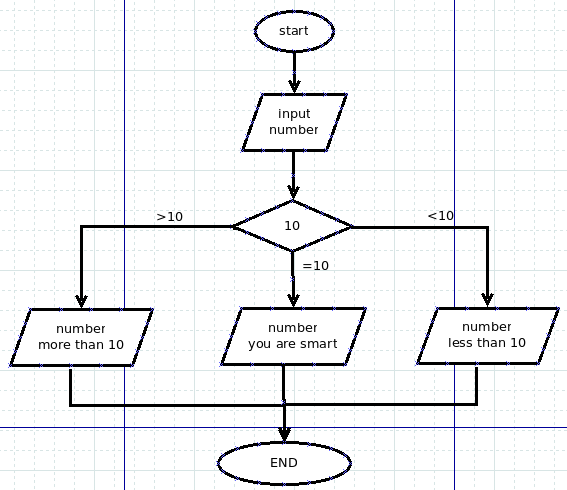 | 61 | 61 |
| 62 | 62 | 理解了流程图中的含义,就开始写代码,代码实例如下: | 63 | | - | | 63 | + | 64 | 64 | #! /usr/bin/env python | 65 | 65 | #coding:utf-8 | 66 | | - | | 66 | + | 67 | 67 | print "请输入任意一个整数数字:" | 68 | | - | | 68 | + | 69 | 69 | number = int(raw_input()) #通过raw_input()输入的数字是字符串 | 70 | 70 | #用int()将该字符串转化为整数 | 71 | | - | | 71 | + | 72 | 72 | if number == 10: | 73 | 73 | print "您输入的数字是:%d"%number | 74 | 74 | print "You are SMART." | | 79 | 79 | print "您输入的数字是:%d"%number | 80 | 80 | print "This number is less than 10." | 81 | 81 | else: | 82 | | - print "Are you a human?" | 83 | | - | | 82 | + print "Are you a human?" | | 83 | + | 84 | 84 | 特别提醒看官注意,前面我们已经用过raw_input()函数了,这个是获得用户在界面上输入的信息,而通过它得到的是字符串类型的数据。可以在IDLE中这样检验一下: | 85 | 85 |
| 86 | 86 | >>> a=raw_input() | 87 | 87 | 10 | 88 | | - >>> a | | 88 | + >>> a | 89 | 89 | '10' | 90 | 90 | >>> type(a) | 91 | 91 | <type 'str'> | |
Collapse file Copy file name to clipboardExpand all lines: 112.md +4-4Lines changed: 4 additions & 4 deletions - Display the source diff
- Display the rich diff
| Original file line number | Diff line number | Diff line change |
|---|
| 14 | 14 |
| 15 | 15 | 另外一个实验室就是UNIX操作系统(包含各种Linux和Mac OSx)的shell,在打开shell之后,输入python,出现如下图所示: | 16 | 16 |
| 17 | | - | | 17 | + | 18 | 18 |
| 19 | 19 | 如果看官是用windows的,也能够通过cmd来获得上图类似的界面,依然是输入python,之后得到界面。 | 20 | 20 |
| | 42 | 42 |
| 43 | 43 | >>> if bool(a): | 44 | 44 | ... print "I like python" | 45 | | - ... | | 45 | + ... | 46 | 46 | I like python | 47 | 47 |
| 48 | 48 | 对于if语句,在上一讲[《从if开始语句的征程》](./111.md)中,已经注意到,if下面的执行语句要缩进四个空格。在有的python教材中,说在交互模式下不需要缩进,可能是针对python3或者其它版本,我使用的是python2.7,的确需要缩进。上面的例子就看出来了。 | | 63 | 63 | print "I like python" | 64 | 64 | ^ | 65 | 65 | IndentationError: expected an indented block | 66 | | - | | 66 | + | 67 | 67 | 从错误信息中,我们可以知道,第二行错了。错在什么地方呢?python非常人性化就在这里,告诉你错误在什么地方: | 68 | 68 |
| 69 | 69 | IndentationError: expected an indented block | @@ -94,7 +94,7 @@ IndentationError: expected an indented block | 94 | 94 | False | 95 | 95 | >>> type(m) | 96 | 96 | <type 'bool'> | 97 | | - >>> | | 97 | + >>> | 98 | 98 |
| 99 | 99 | 从上面的实验可以看出,如果对象是空,返回False,如果不是,则返回True;如果对象是False,返回False。上面探索,还可以扩展到其它情况。看官能不能通过探索,总结出bool()的特点呢? | 100 | 100 |
| |
|