GV

GeezerVison

The World Wide Web, restored to 800 pixels of glory.

Home|About|Gaming cabinet|Archives|How it works|Starter sites

On this site

  • Sign in
  • ActionsCI/CD and automation
  • CodespacesCloud development environments
  • All Features
  • Documentation
  • Training
  • Certifications
  • Build with Copilot
  • Customize Copilot
  • Integrations
  • Trending repos
  • GitHub Sponsors
  • Developer articles
  • Enterprises

This view

  • Original page
  • New address

GeezerVison is showing github.com — Manual Setup for iOS

Manual Setup for iOS

Jump to bottom
Süleyman Yasir KULA edited this page Jul 5, 2021 · 4 revisions
  • set the values of Auto Setup Frameworks and Auto Setup iCloud to false at Project Settings/yasirkula/Native File Picker
  • after building the Unity project, open the Xcode project
  • add MobileCoreServices.framework to Link Binary With Libraries list in Build Phases (on Unity 2019.3 or newer, you must add the framework to UnityFramework in TARGETS list)
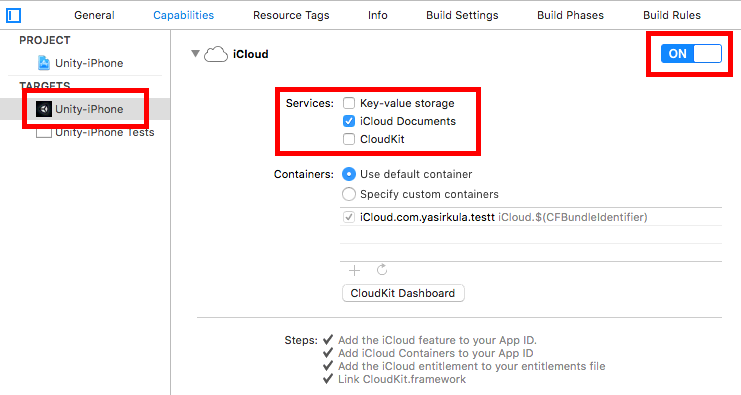
  • enable iCloud in Capabilities and make sure that at least one of its Services is active

iCloudCapability

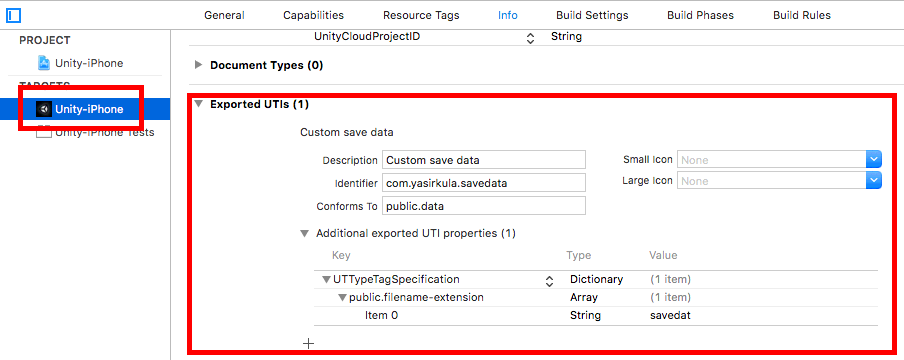
  • if your app uses custom file extensions that are unique to your app (e.g. .mydata), add them to the Exported UTIs or Imported UTIs lists in Info (about custom UTIs) (this step is not needed for extensions available in this list)

CustomUTIs

Clone this wiki locally

You are visitor 01402792 — GeezerVison does not store the pages you look up.
Best viewed with Netscape Navigator 4.7 or Internet Explorer 6 at 800×600. No cookies required.