GeezerVison is showing github.com — Manual Setup for iOS
Süleyman Yasir KULA edited this page
Jul 5, 2021
·
6 revisions
- set the value of Automated Setup to false at Project Settings/yasirkula/Native Gallery
- build your project
- enter a Photo Library Usage Description in Xcode
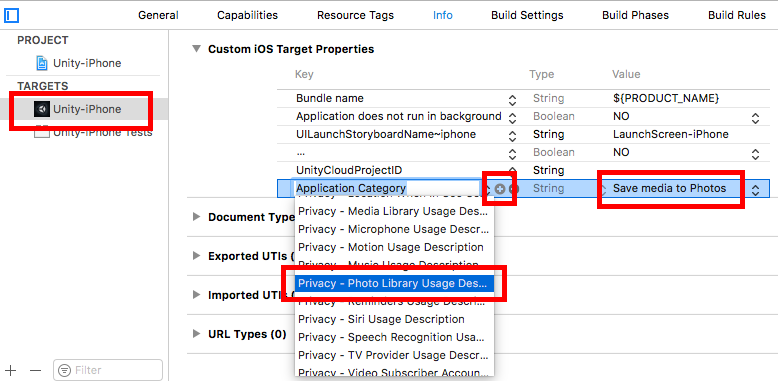
- also enter a Photo Library Additions Usage Description, if exists (see: https://github.com/yasirkula/UnityNativeGallery/issues/3)
- set Prevent limited photos access alert property's value to 1, if exists
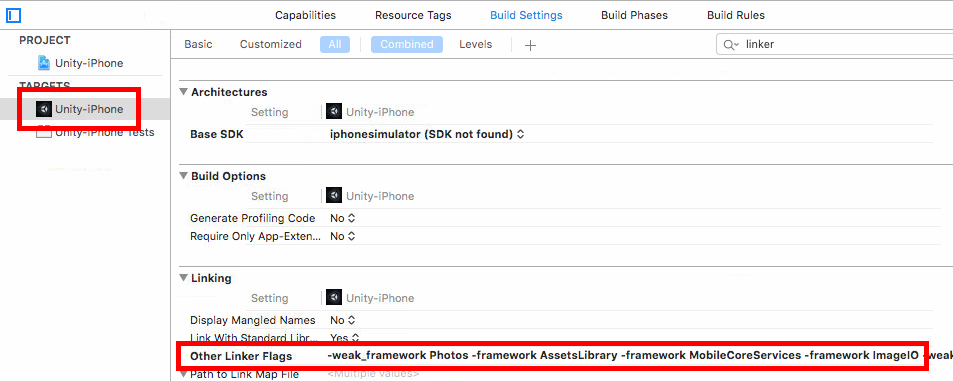
- insert
weak_framework PhotosUI -weak_framework Photos -framework AssetsLibrary -framework MobileCoreServices -framework ImageIO to the Other Linker Flags of Unity-iPhone Target (and UnityFramework Target on Unity 2019.3 or newer) (if your Deployment Target is at least 8.0, it is sufficient to insert weak_framework PhotosUI -framework Photos -framework MobileCoreServices -framework ImageIO):
- lastly, remove Photos.framework and PhotosUI.framework from Link Binary With Libraries of Unity-iPhone Target (and UnityFramework Target on Unity 2019.3 or newer) in Build Phases, if exists