GeezerVisonThe World Wide Web, restored to 800 pixels of glory. |
| Home|About|Gaming cabinet|Archives|How it works|Starter sites |
GeezerVison is showing hackpack.cc — Hackpack v4 | SIGNAL by Twilio So you’ve decided to leave the SIGNAL '18 kiosk on your Hackpack v4…Awesome! That’s why we built this Raspberry Pi-based handheld for you.Under the skin of the Hackpack v4, there’s a full computer with monitor and keyboard support. Once you break out of the SIGNAL kiosk you’ll initially be underwhelmed by how similar to your desktop it is (it even has a spreadsheet program!). That’ll pass quickly. The true power of the Hackpack is in the platform. Let’s talk about how you break out, and what to do when you do. Break Out of the Hackpack v4There are three main paths to break out of the Hackpack v4 (and a somewhat hidden one you can hit through the webview). Break Out with our New FirmwareNow that SIGNAL 2018 is over, we've created a firmware which boots to desktop.
pi and password is twiliox2018.
Break Out with a KeyboardThe simplest way to break out of the kiosk is to use a keyboard and (probably) a Micro USB to USB dongle (such as this). Simply attach a keyboard and mouse… and when inside the SIGNAL 18 kiosk hold Break Out with a Serial CableThe white header on top of the board is a Seeed Grove connector with 3.3v UART signals aboard. Looking at the screen, from left to right the signals are Rx, Tx, 3.3V, Gnd. 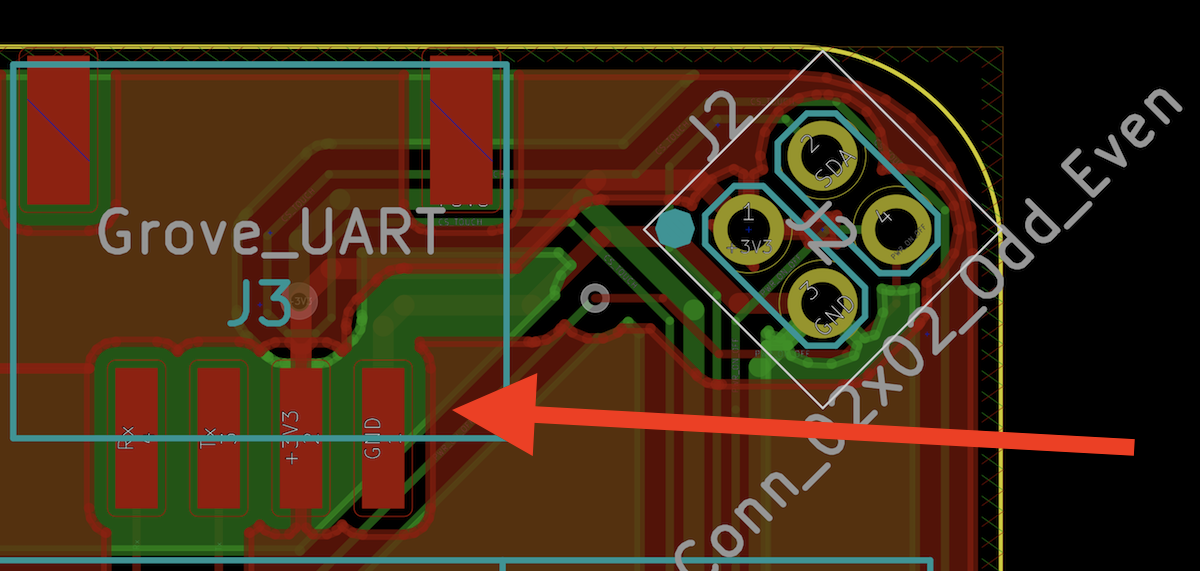
Use a 3.3V UART to USB adapter such as this with Grove breakout cables such as these to connect to the Pi. The username to use is Once logged in, you have a full shell. Run Staying On the LamIf you use one of the latter two methods to break out you probably don’t want to go back. We can help you with that too! In the directory Connecting to Wi-FiHackpack v4s come by default with Wi-Fi credentials for SIGNAL 2018. There are two ways to connect to a new network.
Wi-Fi is persistent; any changes you make will automatically remain between boots. Playing with the DriversOnce you exit the kiosk, all of the functionality of your board is intact. There are three drivers running on top of a base Raspbian installation. LED DriverThe LED driver onboard spins in a while loop waiting for input on a UNIX socket, Here are the commands accepted by the LED driver:
Seriously, though—you don’t need any integer over 120 or so. We mean it - the LEDs are extremely bright! The easiest way to use the lightserver might be to use our Python light client. There we’ve defined 39 LED patterns which we use(d) during SIGNAL. Call the light client on the command line with: Input DriverThe input driver controls three major components on the Hackpack:
While it’s a complex piece of code, it should operate mostly as a black box. Other than some sensitivity thresholds (which we encourage you to customize), the most interesting thing we built is an input mode switch. The input driver listens to a socket at In MOUSE mode, the joystick operates with a mouse. The START button is a left click and the SELECT button is a right click. In ARROW mode, the joystick acts like the arrow keys on the keyboard. The START button is an enter key and the SELECT button is a space. Also onboard are 5 additional buttons:
If you hold down ESCAPE for 3 seconds, the Hackpack will power down safely. Display DriverThe Hackpack v4 runs the fbcp_ili9341 display driver by If you do recompile, we suggest dropping it in the place of the current binary and restarting. Have Fun!The driving goal of the Hackpack—and the drivers—is to provide you with a base for your next project well after the tents at SIGNAL have been taken down. We hope that you continue to use it long after the show and turn it into your own unique creation. With the SIGNAL kiosk app, we’re showing you our take on one way to use the Hackpack. We know you’re going to take it further—and we can’t wait to see what you do with it. |
| You are visitor 01402503 — GeezerVison does not store the pages you look up. Best viewed with Netscape Navigator 4.7 or Internet Explorer 6 at 800×600. No cookies required. |