GeezerVison is showing home.bitengine.tech — bitEngine Hub
Zigbee and Thread, both on, in one PoE box.
bitEngine Hub puts a Zigbee coordinator and a Thread border router on two separate radios, running at the same time. One Ethernet cable for power and data. Runs locally, no cloud required.
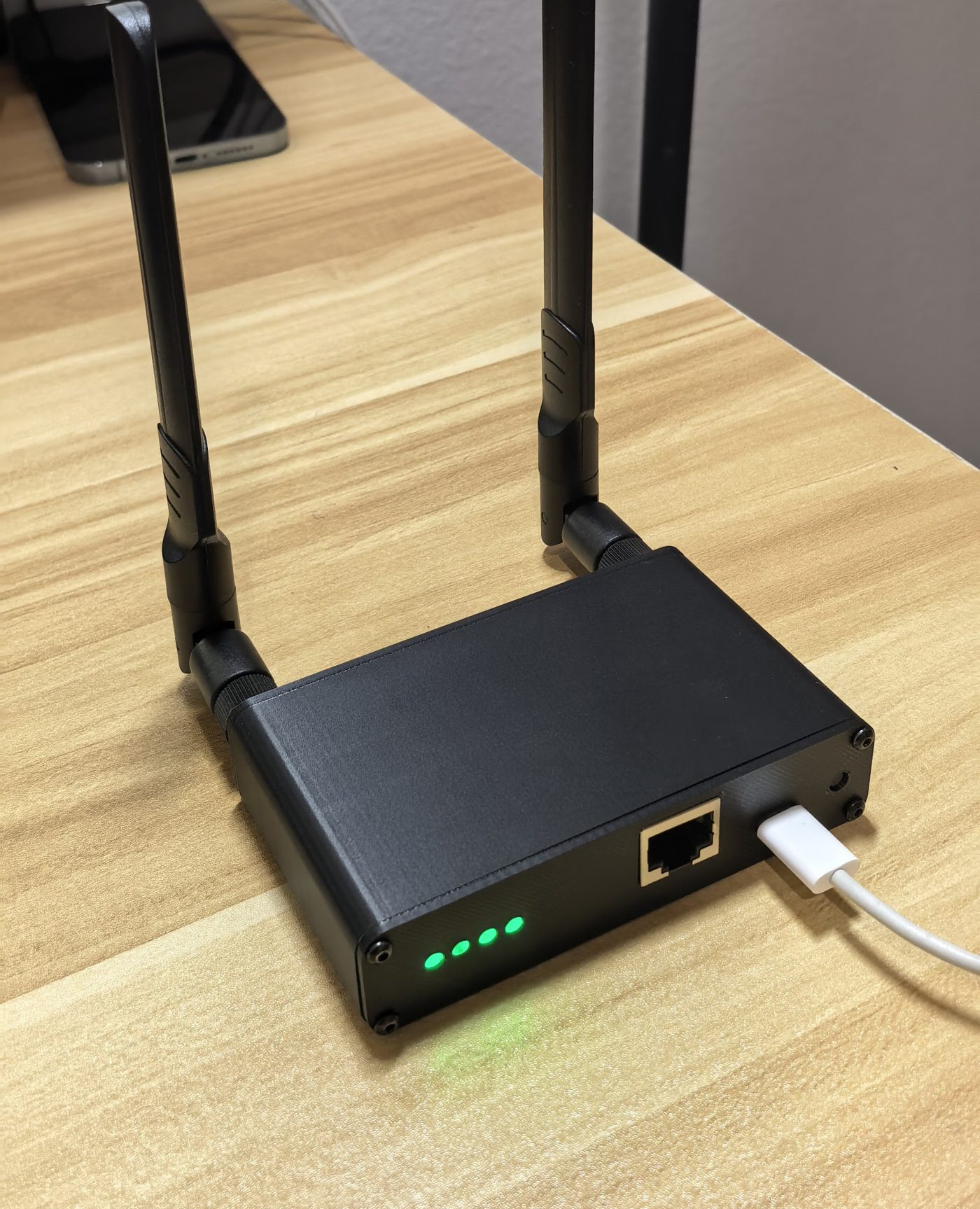
Prototype with 3D-printed enclosure. Production units will use an aluminium extrusion case.
Two networks transmitting at once, on their own channels
A single-radio coordinator makes you pick Zigbee or Thread, or time-share one radio with multiprotocol firmware. The Hub has two radios and two antennas, so each network keeps its own channel all the time.
EFR32MG24 Zigbee coordinator, antenna 1ESP32-C5 Thread border router, antenna 2Channels shown are an example; each network picks its own.
How it shows up in Home Assistant
It behaves like two standard devices in one enclosure. Nothing proprietary to install.
Zigbee: a network coordinator
Add it to ZHA as an EZSP network adapter. Zigbee2MQTT with the ember driver uses the same port, tested with Zigbee2MQTT 2.14.2.
socket://<hub-address>:6638
Thread: a border router on the device
OpenThread Border Router runs on the Hub itself. Add it with Home Assistant's Open Thread Border Router integration; the OTBR add-on isn't needed.
http://<hub-address>:8081
47-second cut, real time: Home Assistant first, then the same Hub with Zigbee2MQTT.
See it working
Home Assistant: a Zigbee bulb and motion sensor, plus an Aqara P2 door sensor and an Eve Energy plug over Matter and Thread, all on one box
Zigbee2MQTT: the same Hub as a network coordinator with the ember driver
What crosses your network is EZSP over TCP for Zigbee, and plain IPv6 plus the OTBR REST API for Thread. The Thread mesh keeps running if your Home Assistant host reboots. Select the diagram to view it full size.
Experimental
Or skip Home Assistant and talk to it through Muse
Home Assistant is the main way to use the Hub. On a separate, experimental firmware build, the Hub connects straight to Muse, Meta's AI agent, using the Muse Gadget SDK. You ask Muse in plain language to control your devices, and motion and door events show up in your Muse chat as they happen. There's no Home Assistant and no bitEngine cloud in between.
One-minute demo: "turn on the light" switches a Zigbee bulb, then opening a door sensor and walking past a motion sensor each show up in Muse. Full 2:38 take on YouTube.
What Muse can do
List devices, read their state, switch them on and off, and dim lights
Rename devices and assign rooms
Open the Zigbee join window and commission a Matter device
Receive motion and door events from the devices you opt in, as they happen
Measured on one prototype board
Sensor report at the Hub → accepted by Muse's server
median 0.24 s, worst 1.1 s (25 events overnight, none lost)
Matter plug command → plug confirms
about 90 ms
Continuous run
21.5 h, no reboot, no heap growth
Server-side connection drops
about once an hour; reconnected in 3–21 s each time
Devices on it now
Zigbee: Sengled bulb, Third Reality motion sensor, Aqara temperature and humidity sensor
Matter over Thread: Aqara P2 door sensor, Eve Energy plug
Know before you try it
Muse is a cloud service, so in this mode device events go to Muse's servers. The Home Assistant mode stays local.
This build is Ethernet only. Wi-Fi is left out to free memory for TLS, Thread, Matter and Zigbee.
It's an unofficial integration, not affiliated with or endorsed by Meta.
The Muse build: events go up to Muse, tool calls come back down. Select the diagram to view it full size.
How it compares
Dual-radio network coordinators already exist, such as SMLIGHT's MR series. The Hub makes a few different choices:
Thread is native on the second chip. The ESP32-C5 has its own 802.15.4 radio, so Thread doesn't need a separate radio co-processor.
OTBR is the only Thread mode. The border router always runs on the device and Home Assistant talks to it over the REST API. There's no mode to switch and no add-on to install.
Wi-Fi uplink is 5 GHz only. 2.4 GHz Wi-Fi stays off, leaving that band to Zigbee and Thread.
A coordinator sits at the centre of your home network, so you should be able to see exactly what it runs and how it's wired. Everything below will be published before any units reach testers.
Part
What's published
License
Hub firmware (ESP32-C5)
Full source: TCP bridge, OpenThread border router integration, web UI
Apache-2.0
Zigbee firmware (EFR32MG24)
Project configuration, our extensions and build scripts. The build pulls the EmberZNet SDK from Silicon Labs, which can't be redistributed.
Official firmware images will be signed so the radios stay within their certified limits.
Hardware
Zigbee
EFR32MG24, EmberZNet 8.2 NCP
Thread and Wi-Fi
ESP32-C5: 802.15.4 and dual-band Wi-Fi 6
Uplink
10/100 Ethernet, or 5 GHz Wi-Fi
Power
802.3af PoE or USB-C 5 V
Antennas
Two external SMA, one per radio
Status lights
Four RGB LEDs: system, Zigbee, Thread, network
Enclosure
Aluminium extrusion (production)
Trade-offs to know
Ethernet is the recommended uplink. 2.4 GHz Wi-Fi is turned off to keep that band clear for Zigbee and Thread. The 5 GHz Wi-Fi uplink shares the C5's radio with Thread, so a wire is the more reliable choice.
Both networks start from the same spot. If your home needs the Zigbee coordinator and the Thread border router in different rooms, two separate devices are the better fit.
Not certified yet. FCC and CE testing is being planned for the production hardware.
Where it stands
DoneIn progressPlanned
Hardware and firmware working on a home network
Running ZHA and Matter-over-Thread devices continuously.
Zigbee2MQTT (ember) tested
Pairing, reporting and control on Zigbee2MQTT 2.14.2, picking up the existing ZHA network without forming a new one.
Long-term stability testing
Current Home Assistant releases, migration from other coordinators, larger device counts and longer uptime. The bar is a coordinator you can forget about.
Direct link to Muse (experimental)
Working on one prototype board with Zigbee and Matter-over-Thread devices. See the Muse section.
Open-source release
Hub firmware under Apache-2.0 with build configuration for the MG24 image, and schematics (PDF) under CERN-OHL-P v2. Published before any units reach testers.
FCC and CE certification
On the production board revision.
Small tester run
A limited number of units for homes with larger Zigbee or mixed Thread networks.
Follow the build
Test results, the open-source release and news about tester units. A few emails at most; unsubscribe any time.
Used only for bitEngine Hub updates.
You are visitor 01402792 — GeezerVison does not store the pages you look up. Best viewed with Netscape Navigator 4.7 or Internet Explorer 6 at 800×600. No cookies required.