A Java array is an object that holds a fixed number of values of one type, stored in numbered slots from index 0 to length – 1, and it gives constant-time access to any slot by its index. Arrays hold primitives such as int or references to objects, and their size is set once, when the array is created.
We use arrays for fixed-size data such as the seven days of a week, pixel buffers, lookup tables and method arguments like String[] args, and as the storage behind collections such as ArrayList.
The following example creates, reads, prints and sorts an array with the java.util.Arrays class.
int[] scores = {72, 95, 61, 88};
int first = scores[0];                  // 72
int count = scores.length;              // 4
String text = Arrays.toString(scores);  // "[72, 95, 61, 88]"
Arrays.sort(scores);
String sorted = Arrays.toString(scores);   // "[61, 72, 88, 95]"
Notice that length is a field, not a method, and that printing needs Arrays.toString(). The sections cover how an array sits in memory, its rules, the Arrays class, and the linked tutorials, grouped by task.
1. How a Java Array Is Laid Out in Memory
An array is created on the heap with new or with an initializer, and every slot starts with the default value of its type, which is 0, false or null. A primitive array stores the values themselves next to each other, whereas an object array stores references that point to objects elsewhere on the heap.
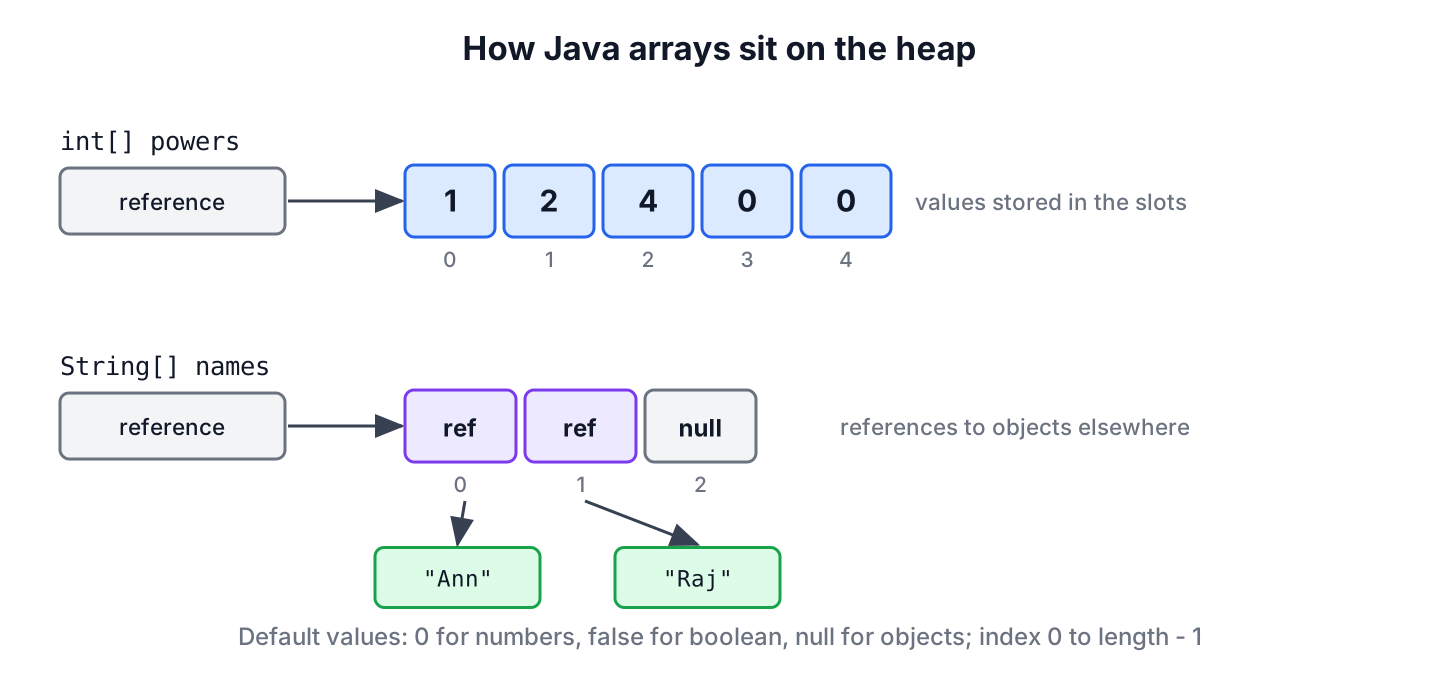
int[] powers = new int[5];
powers[0] = 1;
powers[1] = 2;
powers[2] = 4;
String unset = Arrays.toString(powers);   // "[1, 2, 4, 0, 0]"
String[] names = new String[2];
String empty = Arrays.toString(names);    // "[null, null]"
Reading or writing outside the valid range throws ArrayIndexOutOfBoundsException, because Java checks every index at runtime.
int[] small = new int[3];
int outside = small[3];                 // ArrayIndexOutOfBoundsException
2. Rules Every Java Array Follows
Arrays are simple, but a few rules surprise developers who come from languages with dynamic lists.
- The size is fixed after creation. Growing an array means copying it into a bigger one, as the resize tutorial shows, or switching to an ArrayList.
- An array is an object. It extends Object, implements Cloneable and Serializable, and can be null.
- The equals() and toString() methods of an array are inherited from Object, so they compare references and print codes such as [I@1b6d3586. The Arrays class has the content-based versions.
- Arrays are covariant, so a String[] can be assigned to an Object[] variable, and storing the wrong type throws ArrayStoreException.
- A multidimensional array is an array of arrays, so its rows can have different lengths.
int[][] triangle = new int[3][];
triangle[0] = new int[1];
triangle[1] = new int[2];
triangle[2] = new int[3];
int lastRowLength = triangle[2].length;   // 3
String grid = Arrays.deepToString(triangle);   // "[[0], [0, 0], [0, 0, 0]]"
3. The java.util.Arrays Class
Most everyday array work is one call on the Arrays class, so we check its methods before writing a loop by hand. All of them are static and have overloads for every primitive type and for objects.
| Task | Method | Tutorial |
|---|---|---|
| toString(), deepToString() | Print an array | |
| Fill and create | fill(), setAll() | Declare and initialize an array |
| Copy | copyOf(), copyOfRange() | Copy an array, Create a subarray |
| Compare | equals(), deepEquals(), mismatch(), compare() | Check if two arrays are equal |
| Sort and search | sort(), parallelSort(), binarySearch() | Sort an array |
| Convert | asList(), stream() | List and array, Stream and array |
int[] ids = {40, 10, 30, 20};
int[] bigger = Arrays.copyOf(ids, 6);    // [40, 10, 30, 20, 0, 0]
Arrays.sort(ids);
int position = Arrays.binarySearch(ids, 30);   // 2
boolean same = Arrays.equals(ids, new int[]{10, 20, 30, 40});   // true
4. Creating, Printing and Copying Arrays
The first steps with an array range from declaring it to making an independent copy, and each one has its own tutorial.
- Declare and initialize an array with new, initializers, fill(), setAll() and streams.
- Print an array with toString(), deepToString() and loops.
- Copy an array and the difference between a shallow and a deep copy.
- Resize an array with Arrays.copyOf() or an ArrayList.
- Reverse an array in place or into a new array.
- ArrayStoreException, its causes and the fix.
5. Combining, Splitting and Removing Elements
Because an array cannot change its size, every one of these operations creates a new array, and the tutorials show the fastest JDK way and the readable stream way.
- Concatenate two arrays
- Split an array at an index, in halves or in chunks.
- Create a subarray with copyOfRange().
- Remove an element from an array by index, value or condition.
- Find, count and remove duplicates
- Union of two arrays and intersection of two arrays.
6. Searching and Aggregating Arrays
Search and aggregation tasks are where the choice between a loop, a stream and a sorted array changes the result for large inputs or edge cases such as empty arrays and overflow.
- Check if an array contains a value
- Find the max and min in an array
- Sum and average of an array
- Find the top N elements
- Check if an array is sorted
- Check if two arrays are equal
7. Converting Arrays to Other Types
Conversions cause many array questions, mostly because int[] and Integer[] are different types that the generic APIs treat differently.
- Array vs ArrayList, and when to use each.
- Convert a List to an array and back
- Convert a stream to an array and back
- Convert int[] to Integer[] and back
- Convert a primitive array to a List
- Convert a String array to an int array
- Convert a String to a String array
- Convert a byte array to a String
- Join a String array with a separator
8. Java Array FAQs
Developers who start with Java arrays often ask these questions.
8.1. What is the default value of an array element?
The default depends on the type. Numeric elements start at 0, boolean elements at false, char elements at the character with code 0, and object elements at null.
8.2. Can we change the size of an array in Java?
No. The length is fixed when the array is created. We create a new array with Arrays.copyOf() and copy the values, or use an ArrayList, which does the same copying internally.
8.3. Is an array a primitive or an object in Java?
An object, even when it holds primitives. An int[] lives on the heap, can be null, and has a class whose name is [I.
8.4. What is the maximum size of a Java array?
An index is an int, so the limit is close to Integer.MAX_VALUE elements. HotSpot reserves a few header slots, so requests close to that limit can fail with OutOfMemoryError even with enough heap.
9. Conclusion
A Java array is a fixed-size object with indexed slots, default values and runtime bounds checks. Primitive arrays hold values, object arrays hold references, and multidimensional arrays are arrays of arrays.
The Arrays class covers printing, copying, comparing, sorting and converting, and the linked tutorials show each task in detail with Java 25 examples.
10. References
Happy Learning !!