XPath is a query language that selects nodes, attributes and values from an XML document with path expressions such as /inventory/book[1]/title, and the Java XPath API in javax.xml.xpath evaluates these expressions on a parsed document. No extra library is needed, because the JDK has included the API since Java 5.
In this Java XPath tutorial, we use XPath to read values from XML configuration files, SOAP and REST responses, and XML feeds, without walking the DOM tree node by node. Tests also use XPath to check XML responses.
The following example loads a small book inventory and runs the most common kinds of XPath queries on it with Java 25.
Document doc = DocumentBuilderFactory.newInstance().newDocumentBuilder().parse(new File("inventory.xml"));
XPath xpath = XPathFactory.newInstance().newXPath();

String first = xpath.evaluate("/inventory/book[1]/title", doc);                        // "Snow Crash"
String year = xpath.evaluate("//book[title='Zodiac']/@year", doc);                     // "1995"
Integer books = xpath.evaluateExpression("count(//book)", doc, Integer.class);         // 3
Boolean hasNiven = xpath.evaluateExpression("boolean(//book[author='Larry Niven'])", doc, Boolean.class);   // true
NodeList cheap = (NodeList) xpath.evaluate("//book[price < 8]/title", doc, XPathConstants.NODESET);
int cheapCount = cheap.getLength();                                                    // 2
Notice that one XPath object returns a string, a number, a boolean or a node list, depending on the result type we ask for. We look at the XPath data model and syntax, evaluate expressions step by step, and cover namespaces, variables, secure parsing and thread safety.
The examples use the following inventory.xml file.
<?xml version="1.0" encoding="UTF-8"?>
<inventory>
  <!--Prices in USD-->
  <book year="2000">
    <title>Snow Crash</title>
    <author>Neal Stephenson</author>
    <publisher>Spectra</publisher>
    <isbn>0553380958</isbn>
    <price>14.95</price>
  </book>
  <book year="2005">
    <title>Burning Tower</title>
    <author>Larry Niven</author>
    <author>Jerry Pournelle</author>
    <publisher>Pocket</publisher>
    <isbn>0743416910</isbn>
    <price>5.99</price>
  </book>
  <book year="1995">
    <title>Zodiac</title>
    <author>Neal Stephenson</author>
    <publisher>Spectra</publisher>
    <isbn>0553573862</isbn>
    <price>7.50</price>
  </book>
</inventory>
The table lists ready-to-use expressions for this file, with the result each one returns.
| Description | XPath expression | Result |
|---|---|---|
| Titles of books published after 2001 | //book[@year>2001]/title/text() | Burning Tower |
| Titles of books cheaper than 8 dollars | //book[price<8]/title/text() | Burning Tower, Zodiac |
| Title of the first book | //book[1]/title/text() | Snow Crash |
| Title of the last book | //book[last()]/title/text() | Zodiac |
| All authors | //book/author/text() | 4 author names |
| Number of books | count(//book/title) | 3 |
| Books whose first author starts with Neal | //book[starts-with(author,’Neal’)]/title | Snow Crash, Zodiac |
| Books with any author containing Pournelle | //book[author[contains(.,’Pournelle’)]]/title | Burning Tower |
| Number of books by Neal Stephenson | count(//book[author=’Neal Stephenson’]) | 2 |
| The comment text | /inventory/comment() | Prices in USD |
1. What Is XPath?
XPath describes the location of parts of an XML document, the way a file path describes the location of a file. With XPath, we can refer to an element, any attribute of an element, all elements that contain some text, and many other combinations.
XPath expressions combine Unix-like path steps (such as /inventory/book) with conditions in square brackets and a set of functions such as count() and contains(). XSLT stylesheets, XML Schema and many testing tools use XPath, so the same expressions work outside Java too.
The JDK implements XPath 1.0. Functions from XPath 2.0 and later, such as exists(), matches() or lower-case(), are not available and throw an XPathExpressionException. For XPath 3.1, we add a library such as Saxon-HE.
2. XPath Data Model
XPath views an XML document as a tree of nodes, similar to the DOM tree that the DOM parser builds. Every expression starts at a context node and walks this tree.
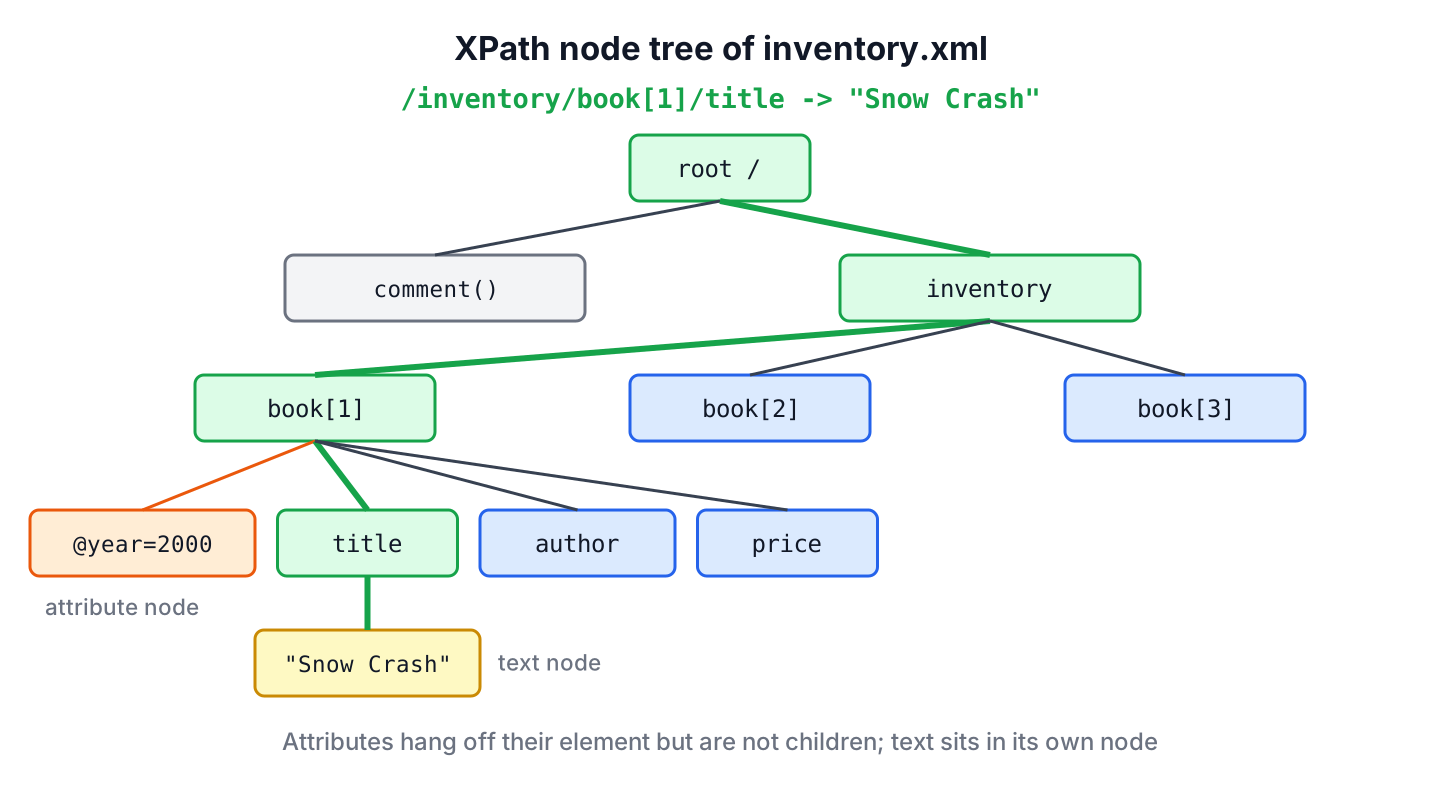
The XPath data model has seven kinds of nodes.
- The root node, one per document, written as a single slash /. It contains the inventory element and the comment.
- Element nodes, one for every element, such as book, title and price.
- Attribute nodes, such as year. The element is the parent of its attributes, but attributes are not children of the element.
- Text nodes with the character data of an element, such as Snow Crash. Entity references are resolved before the text node is created.
- Comment nodes, one for every comment, without the <!– and –> markers.
- Processing instruction nodes, such as <?xml-stylesheet href=”style.xsl”?>. The XML declaration <?xml version=”1.0″?> at the top of a file looks similar but is not a processing instruction and is not part of the tree.
- Namespace nodes for namespace declarations. A declaration such as xmlns:auth=”…” becomes a namespace node, not an attribute node.
3. XPath Data Types in Java
An XPath 1.0 expression returns one of four types, namely a node-set, a boolean, a number or a string. Java adds a single node as a fifth option, and the result type we pass decides which Java type comes back.
| XPath type | XPathConstants | Java type | Type for evaluateExpression() |
|---|---|---|---|
| node-set | NODESET | NodeList | XPathNodes.class |
| node (first of a node-set) | NODE | Node | Node.class |
| boolean | BOOLEAN | Boolean | Boolean.class |
| number | NUMBER | Double | Double.class, Integer.class, Long.class |
| string | STRING | String | String.class |
All XPath numbers are IEEE 754 doubles, like a Java double, so count() returns 3.0 with XPathConstants.NUMBER. XPath converts between types by fixed rules, which explains some surprising results.
Document doc = DocumentBuilderFactory.newInstance().newDocumentBuilder().parse(new File("inventory.xml"));
XPath xpath = XPathFactory.newInstance().newXPath();
Double asNumber = (Double) xpath.evaluate("count(//book)", doc, XPathConstants.NUMBER);   // 3.0
String missing = xpath.evaluate("//book/edition", doc);                                  // ""
String firstAuthor = xpath.evaluate("//book[2]/author", doc);                            // "Larry Niven"
Boolean anyBook = (Boolean) xpath.evaluate("//book", doc, XPathConstants.BOOLEAN);         // true
A node-set converted to a string gives the text of its first node only, so //book[2]/author returns Larry Niven and drops the second author. A missing node converts to an empty string, and a non-empty node-set converts to true. The article on how to check if a node or attribute exists builds on the boolean rule.
4. XPath Syntax
XPath syntax looks like a file path with filters. A path is a list of steps separated by slashes, each step can have conditions in brackets, and wildcards match unknown names.
4.1. Selecting Nodes
Path expressions select nodes relative to the root or to the current node, and the double slash searches at any depth.
| Expression | Description | Example on inventory.xml |
|---|---|---|
| nodename | Selects all child elements with that name | inventory/book |
| / | Selects from the root node | /inventory |
| // | Selects matching nodes at any depth below the current node | //title |
| . | Selects the current node | ./price |
| .. | Selects the parent of the current node | //title[.=’Zodiac’]/.. |
| @ | Selects attributes | //book/@year |
4.2. Using Predicates
Predicates filter nodes, and they are always written in square brackets after a step. A number selects by position, starting at 1, and any other expression keeps the nodes for which it is true.
| Predicate | Selects |
|---|---|
| //book[1] | The first book |
| //book[last()] | The last book |
| //book[position() < 3] | The first two books |
| //book[@year] | Books that have a year attribute |
| //book[price > 10] | Books with a price above 10 |
| //book[author=’Neal Stephenson’ and price < 10] | Cheap books by Neal Stephenson |
4.3. Wildcards for Unknown Nodes
Wildcards select elements or attributes whose names we do not know or do not care about.
| Wildcard | Matches | Example |
|---|---|---|
| * | Any element node | /inventory/book[1]/* selects all five children |
| @* | Any attribute node | //book[@*] selects books with any attribute |
| node() | Any node of any kind | /inventory/node() includes text and comment nodes |
4.4. XPath Axes
An axis selects nodes in a direction from the current node, written as axis::test. The short forms we used so far are axes too, because title means child::title and @year means attribute::year.
| Axis | Result |
|---|---|
| ancestor | All ancestors (parent, grandparent, and so on) |
| ancestor-or-self | All ancestors and the current node |
| attribute | All attributes of the current node |
| child | All children of the current node |
| descendant | All descendants (children, grandchildren, and so on) |
| descendant-or-self | All descendants and the current node |
| following | Everything after the closing tag of the current node |
| following-sibling | All siblings after the current node |
| namespace | All namespace nodes of the current node |
| parent | The parent of the current node |
| preceding | All nodes before the current node, except ancestors, attributes and namespace nodes |
| preceding-sibling | All siblings before the current node |
| self | The current node |
4.5. XPath Operators
XPath operators compare values, do arithmetic and combine node-sets. Division uses the word div, because the slash already separates steps.
| Operator | Description | Example | Result |
|---|---|---|---|
| | | Union of two node-sets | //title | //isbn | All titles and ISBNs |
| + | Addition | 6 + 4 | 10 |
| – | Subtraction | 6 – 4 | 2 |
| * | Multiplication | 6 * 4 | 24 |
| div | Division | 8 div 4 | 2 |
| mod | Remainder | 5 mod 2 | 1 |
| = | Equal | price = 7.50 | true for Zodiac |
| != | Not equal | price != 7.50 | true for the other books |
| <, <= | Less than, less than or equal | price <= 7.50 | true for Burning Tower and Zodiac |
| >, >= | Greater than, greater than or equal | price >= 14.95 | true for Snow Crash |
| and, or | Logical and, or | price > 5 and price < 8 | true for Burning Tower and Zodiac |
5. How to Evaluate XPath Expressions in Java
Evaluating XPath in Java takes three steps. We parse the XML into a DOM Document, create an XPath object from XPathFactory, and evaluate an expression against the document or any node in it.
5.1. Parsing the XML Safely
Disable DOCTYPE declarations whenever the XML comes from outside our own code. By default, the JDK 25 parser still processes DTDs and external entities, and a crafted DTD can make the parser read local files or call internal URLs, which is called an XML external entity (XXE) attack. The disallow-doctype-decl feature in the next snippet is the setting that the OWASP XXE cheat sheet recommends.
static Document load(Path file) throws Exception {
    DocumentBuilderFactory factory = DocumentBuilderFactory.newInstance();
    factory.setNamespaceAware(true);
    factory.setFeature("http://apache.org/xml/features/disallow-doctype-decl", true);   // blocks XXE
    try (InputStream in = Files.newInputStream(file)) {
        return factory.newDocumentBuilder().parse(in);
    }
}
5.2. Compiling and Evaluating
The XPath.evaluate() method parses the expression on every call. When we run the same expression many times, for example once per incoming message, we compile it once into an XPathExpression.
Document doc = load(Path.of("inventory.xml"));
XPath xpath = XPathFactory.newInstance().newXPath();
XPathExpression titlesAfter2001 = xpath.compile("//book[@year > 2001]/title/text()");
NodeList nodes = (NodeList) titlesAfter2001.evaluate(doc, XPathConstants.NODESET);
int matches = nodes.getLength();                         // 1
String title = nodes.item(0).getNodeValue();             // "Burning Tower"
Since Java 9, evaluateExpression() takes a class instead of a QName constant and returns the right type without a cast. For node-sets it returns XPathNodes, which is Iterable<Node>, so a for-each loop replaces the index loop over NodeList.
static List<String> texts(XPath xpath, String expression, Object context) throws XPathExpressionException {
    List<String> result = new ArrayList<>();
    for (Node node : xpath.evaluateExpression(expression, context, XPathNodes.class)) {
        result.add(node.getTextContent());
    }
    return result;
}
We can also evaluate a relative expression against a node instead of the whole document. Here we select each book element, and the expressions title and price run inside that book.
Document doc = load(Path.of("inventory.xml"));
XPath xpath = XPathFactory.newInstance().newXPath();
Map<String, Double> prices = new LinkedHashMap<>();
for (Node book : xpath.evaluateExpression("//book", doc, XPathNodes.class)) {
    prices.put(xpath.evaluate("title", book), xpath.evaluateExpression("price", book, Double.class));
}
Map<String, Double> result = prices;                     // {Snow Crash=14.95, Burning Tower=5.99, Zodiac=7.5}
6. Complete Java XPath Example
The following example runs the expressions from the quick reference table at the start with the load() and texts() methods of section 5. Each line shows the real result.
Document doc = load(Path.of("inventory.xml"));
XPath xpath = XPathFactory.newInstance().newXPath();

List<String> after2001 = texts(xpath, "//book[@year > 2001]/title", doc);          // [Burning Tower]
List<String> before2001 = texts(xpath, "//book[@year < 2001]/title", doc);         // [Snow Crash, Zodiac]
List<String> cheap = texts(xpath, "//book[price < 8]/title", doc);                 // [Burning Tower, Zodiac]
List<String> costly = texts(xpath, "//book[price > 8]/title", doc);                // [Snow Crash]
List<String> firstBook = texts(xpath, "//book[1]/title", doc);                     // [Snow Crash]
List<String> lastBook = texts(xpath, "//book[last()]/title", doc);                 // [Zodiac]
List<String> authors = texts(xpath, "//book/author", doc);                         // [Neal Stephenson, Larry Niven, Jerry Pournelle, Neal Stephenson]
Integer titleCount = xpath.evaluateExpression("count(//book/title)", doc, Integer.class);   // 3
List<String> byNeal = texts(xpath, "//book[starts-with(author, 'Neal')]/title", doc);     // [Snow Crash, Zodiac]
List<String> byNiven = texts(xpath, "//book[contains(author, 'Niven')]/title", doc);      // [Burning Tower]
List<String> byStephenson = texts(xpath, "//book[author = 'Neal Stephenson']/title", doc);   // [Snow Crash, Zodiac]
Integer stephensonCount = xpath.evaluateExpression("count(//book[author = 'Neal Stephenson'])", doc, Integer.class);   // 2
String comment = xpath.evaluate("/inventory/comment()", doc);                      // "Prices in USD"
Functions such as contains() and starts-with() take a string, so XPath converts the author node-set to the text of its first node. The condition never sees the second author of Burning Tower, and a nested predicate checks every author.
Document doc = load(Path.of("inventory.xml"));
XPath xpath = XPathFactory.newInstance().newXPath();
List<String> firstOnly = texts(xpath, "//book[contains(author, 'Pournelle')]/title", doc);       // []
List<String> anyAuthor = texts(xpath, "//book[author[contains(., 'Pournelle')]]/title", doc);   // [Burning Tower]
7. Querying Namespaced XML
XML from SOAP services, Maven POM files and many feeds declares a default namespace, for example xmlns=”http://example.com/inventory”. In a namespace-aware document, each element is named by the namespace plus the local name, so //book finds nothing.
The fix is a NamespaceContext that maps a prefix of our choice to the namespace URI, and expressions that use that prefix. The XPath namespace resolution article covers mapping several prefixes.
String nsXml = """
        <inventory xmlns="http://example.com/inventory">
          <book><title>Snow Crash</title></book>
        </inventory>""";
DocumentBuilderFactory factory = DocumentBuilderFactory.newInstance();
factory.setNamespaceAware(true);
Document nsDoc = factory.newDocumentBuilder().parse(new InputSource(new StringReader(nsXml)));
XPath xpath = XPathFactory.newInstance().newXPath();

String withoutPrefix = xpath.evaluate("//book/title", nsDoc);                      // ""
xpath.setNamespaceContext(new NamespaceContext() {
    public String getNamespaceURI(String prefix) {
        return "inv".equals(prefix) ? "http://example.com/inventory" : XMLConstants.NULL_NS_URI;
    }
    public String getPrefix(String uri) { return null; }
    public Iterator<String> getPrefixes(String uri) { return Collections.emptyIterator(); }
});
String withPrefix = xpath.evaluate("//inv:book/inv:title", nsDoc);                 // "Snow Crash"
String byLocalName = xpath.evaluate("//*[local-name()='title']", nsDoc);           // "Snow Crash"
The local-name() function ignores namespaces and is handy for a quick test, but it also matches elements with the same name from other namespaces. Production code that reads a known format uses prefixes.
8. Passing Values With XPath Variables
Building an expression with string concatenation, such as “//book[author='” + name + “‘]”, breaks on names with quotes, such as O’Brien, and lets a user change the query, which is called XPath injection. An XPathVariableResolver supplies values for variables written as $name in the expression.
Say a bookshop search page lets customers type an author name. The page passes the input as a variable, so a customer who types ‘ or ‘1’=’1 searches for that literal text instead of listing every book.
Document doc = load(Path.of("inventory.xml"));
XPath xpath = XPathFactory.newInstance().newXPath();
Map<String, Object> params = new HashMap<>();
xpath.setXPathVariableResolver(name -> params.get(name.getLocalPart()));
XPathExpression byAuthor = xpath.compile("//book[author = $author]/title");

params.put("author", "Neal Stephenson");
int found = byAuthor.evaluateExpression(doc, XPathNodes.class).size();            // 2
params.put("author", "' or '1'='1");
int injected = byAuthor.evaluateExpression(doc, XPathNodes.class).size();         // 0
The resolver is read when the expression is compiled, and the value is read on each evaluation, so one compiled expression serves many searches.
9. Performance and Thread Safety
Neither XPath nor XPathExpression is thread-safe. In a web app that handles requests on many threads, each thread needs its own instance, and a ThreadLocal, kept in a static final field, holds one compiled expression per thread.
ThreadLocal<XPathExpression> firstPrice = ThreadLocal.withInitial(() -> {
    try {
        return XPathFactory.newInstance().newXPath().compile("number(//book[1]/price)");
    } catch (XPathExpressionException e) {
        throw new IllegalStateException(e);
    }
});
Document doc = load(Path.of("inventory.xml"));
Double price = (Double) firstPrice.get().evaluate(doc, XPathConstants.NUMBER);   // 14.95
Two more habits keep XPath fast. Avoid starting expressions with // on large documents when the full path is known, because // searches the whole tree. For files of hundreds of megabytes, a DOM does not fit in memory, and a streaming parser such as StAX is the better choice.
10. Java XPath FAQs
Questions about XPath in Java mostly start with an expression that returns nothing.
10.1. Which XPath version does Java support?
XPath 1.0. The javax.xml.xpath API in the JDK has no XPath 2.0 or 3.1 functions, so exists(), matches() and date functions throw an XPathExpressionException. Saxon-HE adds XPath 3.1 through its own API.
10.2. Why does my XPath expression return an empty result?
The three usual causes are a default namespace (see section 7), a wrong case in an element name, because XPath is case-sensitive, or an absolute path that misses a level. Testing the expression with //*[local-name()=’title’] shows whether namespaces are the problem.
10.3. How do I get an attribute value with XPath?
Select the attribute with @ and evaluate it as a string, for example xpath.evaluate(“//book[1]/@year”, doc) returns 2000. The XPath attribute value article shows more variants.
10.4. Is XPath better than walking the DOM?
For reading a few values, yes, because one expression replaces nested loops over getElementsByTagName() and getChildNodes(). DOM traversal is still useful when we modify the document or visit every node anyway.
11. Conclusion
Java evaluates XPath 1.0 expressions through XPathFactory, XPath and XPathExpression, and the result type we request decides whether we get a String, a number, a Boolean or nodes. Since Java 9, evaluateExpression() with XPathNodes removes most casts and index loops.
In real code, we parse untrusted XML with DOCTYPE declarations disabled, map namespaces before querying, pass user input as variables instead of concatenating it, and keep one XPath object per thread.
12. References
- javax.xml.xpath package
- XPath interface Javadoc
- XML Path Language (XPath) Version 1.0
- OWASP XML External Entity Prevention Cheat Sheet
Happy Learning !!