GV

GeezerVison

The World Wide Web, restored to 800 pixels of glory.

Home|About|Gaming cabinet|Archives|How it works|Starter sites

On this site

  • This page describes the ImageJ2 platform.
  • Download
  • ImageJ Basics
  • Tutorials
  • User Guides
  • Keyboard Shortcuts
  • Tips and Tricks
  • Troubleshooting
  • Frequently Asked Questions
  • Supported Platforms
  • Windows
  • MacOS
  • Linux
  • Raspberry Pi

This view

  • Original page
  • New address

GeezerVison is showing imagej.net — ImageJ2

ImageJ Wiki

How do I edit this website?

ImageJ Docs

  • Download
  • Learn
    • ImageJ Basics
      • Tutorials
      • User Guides
      • Keyboard Shortcuts
      • Tips and Tricks
      • Troubleshooting
      • Frequently Asked Questions
      • Supported Platforms
        • Windows
        • MacOS
        • Linux
        • Raspberry Pi
        • Android
      • File Formats
        • Bio-Formats
        • Video formats
        • QuickTime
        • TIFF
        • PDF
        • DICOM
        • Zeiss LSM
        • Olympus VSI
        • Opera Flex
        • FIB-SEM
    • Scientific Imaging
      • Principles of Scientific Imaging
      • Annotating Images
      • Colocalization
      • Color Image Processing
      • Deconvolution
      • Image Intensity Processing
      • Particle Analysis
      • Registration
      • Segmentation
      • Stack-slice Manipulations
      • T-functions
      • Tracking
      • Visualization
      • Z-functions
  • Extend
    • List of Extensions
    • Update Sites
      • List of Update Sites
      • Following an Update Site
      • Creating an Update Site
      • Terms of Service
      • Automatic Upload
      • Uploading to Core Sites
      • Update Sites FAQ
      • Statistics
    • Scripting
      • Scripting Basics
      • Script Editor
      • Parameters
      • User Input
      • Auto Import
      • Templates
      • Batch Processing
      • Running Headlessly
      • Scripting Comparisons
      • Toolbox
      • Languages
        • BeanShell Scripting
        • Groovy Scripting
        • ImageJ Macro
        • JavaScript
        • Lisp (Clojure)
        • MATLAB
        • Python (Jython)
        • Python (native)
        • R (Renjin)
        • Ruby (JRuby)
        • Scala Scripting
    • Development
      • Philosophy
      • Architecture
      • Source code
      • Project management
      • Coding style
      • Using Javadoc
      • Debugging
      • Wish list
      • Tools
        • GitHub
        • Maven
        • CI/CD
        • Dotfiles
        • IDEs
          • Eclipse
          • NetBeans
          • IntelliJ IDEA
          • Command Line
      • Guides
        • Writing plugins
        • Contributing to a plugin
        • Development lifecycle
        • Building a POM
        • Hands-on debugging
        • Adding new ops
        • Adding new formats
        • Using native libraries
        • Tips for developers
        • Tips for C++ developers
        • ImageJ 1.x plugins
        • Versioning
        • Logging
        • Uber-JARs
      • Git
        • Git in Eclipse (EGit)
        • Git mini howto
        • Git workshop
        • Git conflicts
        • Git topic branches
        • Git notes
        • Git reflogs
        • Git submodules
        • How to pinpoint regressions
        • How to publish a git repository
        • How to extract a subproject
  • Contribute
    • Citing
    • Contributors
    • Organizations
    • Governance
    • Funding
    • Contributing to Fiji
    • Licensing
      • Open Source
        • Apache
        • BSD
        • EPL
        • GPL
        • LGPL
        • MIT
        • Public domain
        • BIG
      • Proprietary
    • Editing the Wiki
      • Advanced Editing
      • Buttons
      • Citations
      • Source Code
      • Debugging
      • Headers
      • Icons
      • Images
      • Keyboard Shortcuts
      • Linking
      • Math Expressions
      • Menu Paths
      • Navigation
      • Notices
      • People
      • Pitfalls
      • Quizzes
      • Statbox
      • Symbols
      • Tables
      • Tooltips
      • Videos
      • Whitespace
  • Discuss
    • Reporting Issues
    • Mailing Lists
    • Chat
  • Explore
    • News
    • Events
      • Presentations
      • Conferences
      • Hackathons
      • More...
    • Libraries
      • ImageJ Ops
      • ImageJ Common
      • ImageJ Legacy
      • ImgLib2
      • SciJava
      • SCIFIO
      • More...
    • Software
      • NIH Image
      • ImageJ
      • ImageJ2
      • Fiji
      • More...

Vital statistics

Loading...

Source none
License
Release
Date
Development status
Support status
Discussion Image.sc forum
TeamThe group of people who take responsibility for the project.
FoundersPeople who created the project. Does not imply any current participation or responsibility.
LeadsPeople responsible for making decisions about the project: timing of releases, inclusion of features, etc.
DevelopersPeople responsible for adding new features or enhancements.
DebuggersPeople responsible for fixing bugs.
ReviewersPeople responsible for reviewing patch submissions.
SupportPeople responsible for responding to community questions and issue reports.
MaintainersPeople responsible for maintaining the project: e.g., merging patch submissions and cutting releases.
ContributorsPeople who contributed code to the project. Does not imply any current participation or responsibility.

Page contents

    Mission

    • Design the next generation of ImageJ, driven by the needs of the community.
    • Collaborate across organizations, fostering open development through sharing and reuse.
    • Broaden ImageJ’s usefulness and relevance across many disciplines of the scientific community.
    • Maintain backwards compatibility with existing ImageJ functionality.
    • Unify online resources to a central location for the ImageJ community.

    See also these presentation slides about ImageJ2.

    ImageJ2 is a rewrite of ImageJ for multidimensional image data, with a focus on scientific imaging. Its central goal is to broaden the paradigm of ImageJ beyond the limitations of the original ImageJ application, to support the next generation of multidimensional scientific imaging.

    To ensure backwards compatibility, ImageJ2 has been designed to fully integrate into the existing ImageJ user interface. This allows users to keep using ImageJ in familiar ways, while providing the ability to migrate toward more powerful new features as needed.

    The Fiji project has been built on top of ImageJ2 for quite some time, so you may already be familiar with some of ImageJ2’s features—some of which, such as the Updater and Launcher, were originally developed as part of Fiji.

    Features of ImageJ2

    ImageJ2 provides many new features and capabilities:

    • The ImageJ Updater makes it simple to stay up to date, and to add new plugins by enabling additional Update Sites.
    • New and enhanced file format support via the SCIFIO library (see below).
    • More powerful Script Editor with support for several scripting languages.
    • New commands:
      • Plugins › Debug › Dump Stack for debugging when things hang.
      • Plugins › Debug › System Information for reporting on versions of installed plugins and libraries.
    • Use ImageJ2’s N-dimensional ImgLib2-based data structures (still in beta).
    • Write parameterized commands and scripts:
      • Typed inputs and outputs with no dependence on AWT user interface.
      • Mix and match ImageJ and ImageJ2 data structures.
      • Plugins appear in the menu automatically without plugins.config files.
      • Reusable in many contexts: KNIME, CellProfiler, OMERO, headless…

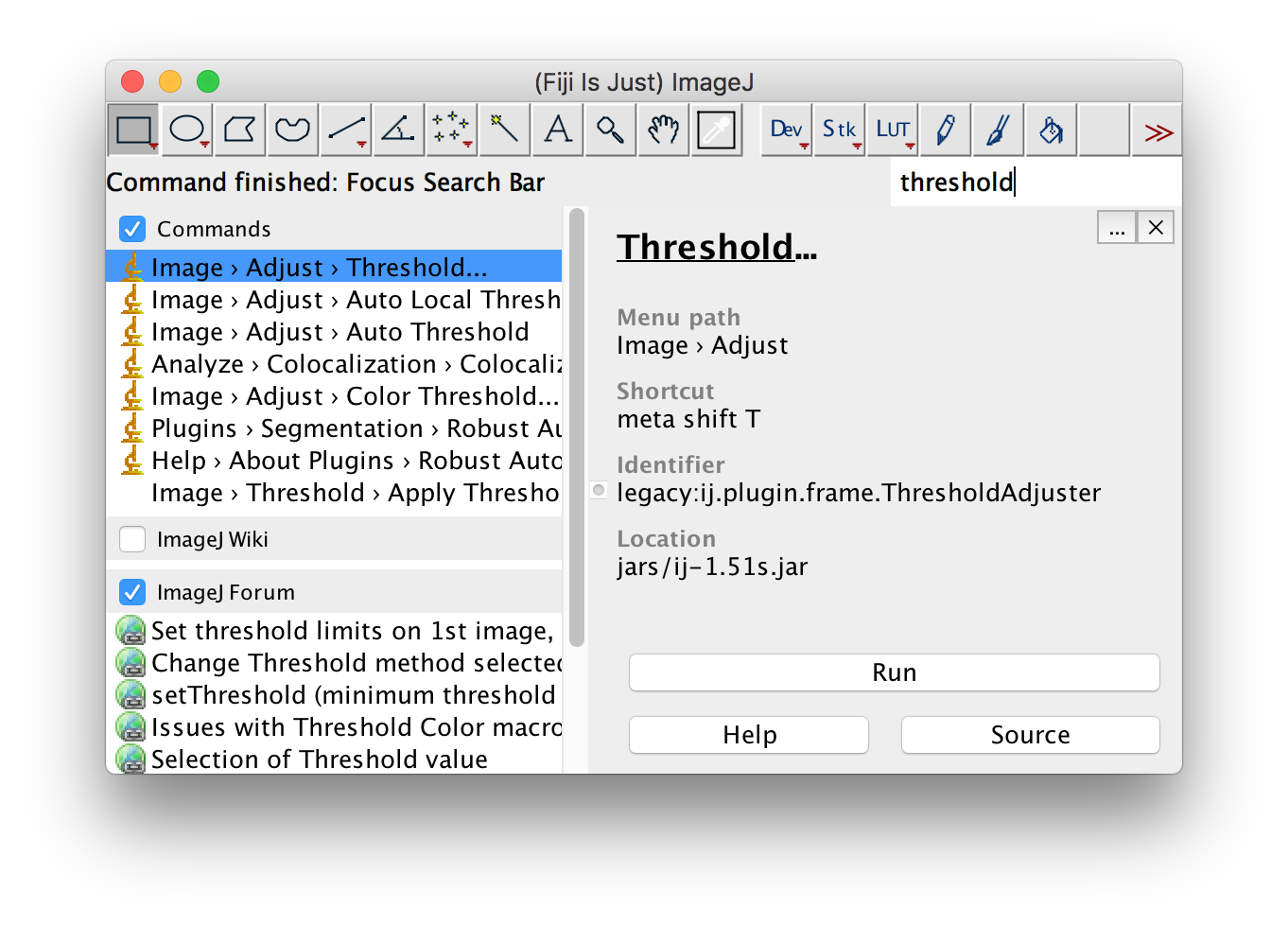
    Integrated search bar

    ImageJ2 integrated search bar

    The search bar finds commands, and can search the ImageJ wiki as well as the Image.sc Forum if you check those respective checkboxes.

    For power users and developers, the search bar supports execution of “code snippets”—single lines of code for performing tasks—by starting the query with !. Any code that works in the Script Interpreter should be usable as a code snippet.

    Developers can extend the capabilities of the search bar by writing Searcher plugins.

    Improved image I/O with the SCIFIO library

    ImageJ2 uses the SCIFIO library (SCientific Image Format Input and Output) by default for most image input tasks. You can change this behavior at any time by running Edit › Options › ImageJ2 and modifying the Use SCIFIO when opening files option.

    For further details, see the SCIFIO page.

    ImageJ2 is more than just an application

    ImageJ2 is also a collection of reusable software libraries built on SciJava, using a powerful plugin framework to facilitate rapid development and painless user customization.

    The following software component libraries form the core of ImageJ2:

    • ImageJ Common - The core image data model, using ImgLib2.
    • ImageJ Ops - An extensible framework for reusable image processing algorithms.
    • ImageJ Updater - A mechanism to update individual plugins and libraries within ImageJ2.
    • ImageJ Legacy - Provides complete backwards compatibility with the original ImageJ.
    • SciJava Common - The core frameworks for plugins, modules and the application itself.

    See the Architecture page for further details.

    Rationale

    In recent years a segment of the ImageJ developer community has repeatedly inquired as to ImageJ’s future. The program has been successful enough that it would greatly benefit from current open-source software best practices: a publicly accessible source code repository, a suite of unit tests with a continuous build integration system, a central repository of extensions, clear guidelines on how external developers can contribute to both those extensions and to the core program when warranted, and a development roadmap addressing feature requests and tasks from the community.

    Listening to the ImageJ community, it is clear that:

    1. There is substantial demand from developers for a next-generation version of ImageJ with a cleaner, more modular API, so that ImageJ can be leveraged not just as a standalone analysis program, but as a robust, extensible library in a variety of contexts.
    2. The ImageJ user community has invested a lot of time and energy to develop complex workflows within ImageJ, and they oppose any change that would break them. Thus, any effort to improve the software must maintain compatibility with existing code.
    3. Further, any next-generation version of ImageJ must maintain community unity, and not fork the project. All components of this project will be developed as upgrades to core ImageJ.
    4. The ImageJ community as a whole would substantially benefit from a central effort to organize and serve program code (both the core application and its plugins), keep track of bugs and feature requests, and better leverage external developer contributions.

    For more details, see the presentation from the 2010 ImageJ Conference.

    Funding

    ImageJ2 is funded from a variety of sources. See the Funding page for details.

    Publications

    • doi:10.1186/s12859-017-1934-z

    • doi:10.1002/mrd.22489

    Presentations

    • 2017-Feb-16 “What’s New in ImageJ2?” [ slides ]
    • 2015-Sep-03 “The ImageJ2 platform, and the Fiji distribution of ImageJ” [ video, slides ]
    • 2012-Oct-24 “ImageJ2: Current Status and Future Directions” [ slides ]
    • 2010-Oct-27 “ImageJDev: Next Generation ImageJ” [ slides ]

    See also

    • ImageJ1-ImageJ2 cheat sheet
    You are visitor 01402503 — GeezerVison does not store the pages you look up.
    Best viewed with Netscape Navigator 4.7 or Internet Explorer 6 at 800×600. No cookies required.