GeezerVisonThe World Wide Web, restored to 800 pixels of glory. | |||||||
| Home|About|Gaming cabinet|Archives|How it works|Starter sites | |||||||
GeezerVison is showing javaee.github.io — Introduction to Batch Processing
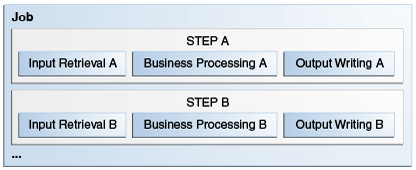
Introduction to Batch ProcessingSome enterprise applications contain tasks that can be executed without user interaction. These tasks are executed periodically or when resource usage is low, and they often process large amounts of information such as log files, database records, or images. Examples include billing, report generation, data format conversion, and image processing. These tasks are called batch jobs. Batch processing refers to running batch jobs on a computer system. Java EE includes a batch processing framework that provides the batch execution infrastructure common to all batch applications, enabling developers to concentrate on the business logic of their batch applications. The batch framework consists of a job specification language based on XML, a set of batch annotations and interfaces for application classes that implement the business logic, a batch container that manages the execution of batch jobs, and supporting classes and interfaces to interact with the batch container. A batch job can be completed without user intervention. For example, consider a telephone billing application that reads phone call records from the enterprise information systems and generates a monthly bill for each account. Since this application does not require any user interaction, it can run as a batch job. The phone billing application consists of two phases: The first phase associates each call from the registry with a monthly bill, and the second phase calculates the tax and total amount due for each bill. Each of these phases is a step of the batch job. Batch applications specify a set of steps and their execution order. Different batch frameworks may specify additional elements, like decision elements or groups of steps that run in parallel. The following sections describe steps in more detail and provide information about other common characteristics of batch frameworks. Steps in Batch JobsA step is an independent and sequential phase of a batch job. Batch jobs contain chunk-oriented steps and task-oriented steps.
For example, the phone billing application consists of two chunk steps.
This application could also contain a task step that cleaned up the files from the bills generated for the previous month. Parallel ProcessingBatch jobs often process large amounts of data or perform computationally expensive operations. Batch applications can benefit from parallel processing in two scenarios.
Batch frameworks provide mechanisms for developers to define groups of independent steps and to split chunk-oriented steps in parts that can run in parallel. Status and Decision ElementsBatch frameworks keep track of a status for every step in a job. The status indicates if a step is running or if it has completed. If the step has completed, the status indicates one of the following.
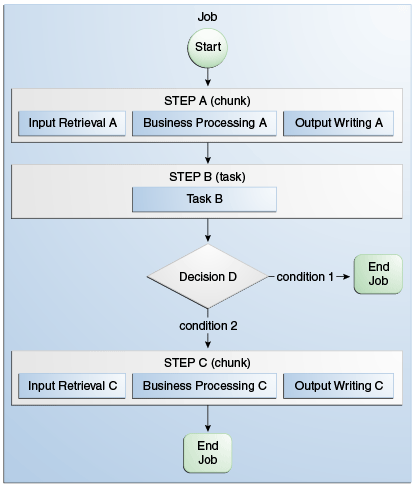
In addition to steps, batch jobs can also contain decision elements. Decision elements use the exit status of the previous step to determine the next step or to terminate the batch job. Decision elements set the status of the batch job when terminating it. Like a step, a batch job can terminate successfully, be interrupted, or fail. Figure 58-2 shows an example of a job that contains chunk steps, task steps and a decision element. Figure 58-2 Steps and Decision Elements in a Job
Batch Framework FunctionalityBatch applications have the following common requirements.
Batch frameworks provide the batch execution infrastructure that addresses the common requirements of all batch applications, enabling developers to concentrate on the business logic of their applications. Batch frameworks consist of a format to specify jobs and steps, an application programming interface (API), and a service available at runtime that manages the execution of batch jobs.
 Copyright © 2017, Oracle and/or its affiliates. All rights reserved. | |||||||
| You are visitor 01402503 — GeezerVison does not store the pages you look up. Best viewed with Netscape Navigator 4.7 or Internet Explorer 6 at 800×600. No cookies required. |