GeezerVisonThe World Wide Web, restored to 800 pixels of glory. | |||||||
| Home|About|Gaming cabinet|Archives|How it works|Starter sites | |||||||
GeezerVison is showing javaee.github.io — Overview of Java EE Security
Overview of Java EE SecurityEvery enterprise that has either sensitive resources that can be accessed by many users or resources that traverse unprotected, open networks, such as the Internet, needs to be protected. Enterprise tier and web tier applications are made up of components that are deployed into various containers. These components are combined to build a multitier enterprise application. Security for components is provided by their containers. A container provides two kinds of security: declarative and programmatic.
Java EE 8 includes a Security API specification that defines portable, plug-in interfaces for authentication and identity stores, and a new injectable-type SecurityContext interface that provides an access point for programmatic security. You can use the built-in implementations of these APIs, or define custom implementations. More information on these concepts and mechanismsMore information on these concepts and mechanisms can be found in the chapter on security in the Java EE 8 specification. Other chapters in this Part discuss security requirements in web tier and enterprise tier applications, and the Java EE Security API.
A Simple Application Security WalkthroughThe security behavior of a Java EE environment may be better understood by examining what happens in a simple application with a web client, a user interface, and enterprise bean business logic. In the following example, which is taken from the Java EE Specification, the web client relies on the web server to act as its authentication proxy by collecting user authentication data from the client and using it to establish an authenticated session. Step 1: Initial RequestIn the first step of this example, the web client requests the main application URL. This action is shown in Figure 50-1. Figure 50-1 Initial Request
Since the client has not yet authenticated itself to the application environment, the server responsible for delivering the web portion of the application, hereafter referred to as the web server, detects this and invokes the appropriate authentication mechanism for this resource. For more information on these mechanisms, see Security Mechanisms. Step 2: Initial AuthenticationThe web server returns a form that the web client uses to collect authentication data, such as user name and password, from the user. The web client forwards the authentication data to the web server, where it is validated by the web server, as shown in Figure 50-2. The validation mechanism may be local to a server or may leverage the underlying security services. On the basis of the validation, the web server sets a credential for the user. Figure 50-2 Initial Authentication
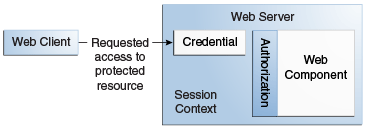
Step 3: URL AuthorizationThe credential is used for future determinations of whether the user is authorized to access restricted resources it may request. The web server consults the security policy associated with the web resource to determine the security roles that are permitted access to the resource. The security policy is derived from annotations or from the deployment descriptor. The web container then tests the user’s credential against each role to determine whether it can map the user to the role. Figure 50-3 shows this process. Figure 50-3 URL Authorization
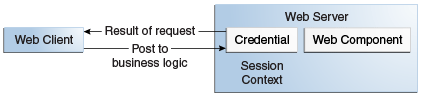
The web server’s evaluation stops with an "is authorized" outcome when the web server is able to map the user to a role. A "not authorized" outcome is reached if the web server is unable to map the user to any of the permitted roles. Step 4: Fulfilling the Original RequestIf the user is authorized, the web server returns the result of the original URL request, as shown in Figure 50-4. Figure 50-4 Fulfilling the Original Request
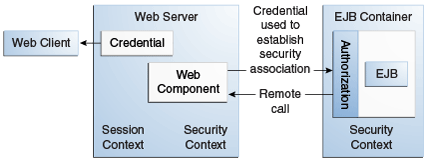
In our example, the response URL of a web page is returned, enabling the user to post form data that needs to be handled by the business-logic component of the application. See Chapter 51, "Getting Started Securing Web Applications" for more information on protecting web applications. Step 5: Invoking Enterprise Bean Business MethodsThe web page performs the remote method call to the enterprise bean, using the user’s credential to establish a secure association between the web page and the enterprise bean, as shown in Figure 50-5. The association is implemented as two related security contexts: one in the web server and one in the EJB container. Figure 50-5 Invoking an Enterprise Bean Business Method
The EJB container is responsible for enforcing access control on the enterprise bean method. The container consults the security policy associated with the enterprise bean to determine the security roles that are permitted access to the method. The security policy is derived from annotations or from the deployment descriptor. For each role, the EJB container determines whether it can map the caller to the role by using the security context associated with the call. The container’s evaluation stops with an "is authorized" outcome when the container is able to map the caller’s credential to a role. A "not authorized" outcome is reached if the container is unable to map the caller to any of the permitted roles. A "not authorized" result causes an exception to be thrown by the container and propagated back to the calling web page. If the call is authorized, the container dispatches control to the enterprise bean method. The result of the bean’s execution of the call is returned to the web page and ultimately to the user by the web server and the web client. Features of a Security MechanismA properly implemented security mechanism will provide the following functionality:
Ideally, properly implemented security mechanisms will also be
Characteristics of Application SecurityJava EE applications consist of components that can contain both protected and unprotected resources. Often, you need to protect resources to ensure that only authorized users have access. Authorization provides controlled access to protected resources. Authorization is based on identification and authentication. Identification is a process that enables recognition of an entity by a system, and authentication is a process that verifies the identity of a user, device, or other entity in a computer system, usually as a prerequisite to allowing access to resources in a system. Authorization and authentication are not required for an entity to access unprotected resources. Accessing a resource without authentication is referred to as unauthenticated, or anonymous, access. The characteristics of application security that, when properly addressed, help to minimize the security threats faced by an enterprise include the following.
 Copyright © 2017, Oracle and/or its affiliates. All rights reserved. | |||||||
| You are visitor 01402503 — GeezerVison does not store the pages you look up. Best viewed with Netscape Navigator 4.7 or Internet Explorer 6 at 800×600. No cookies required. |