GeezerVisonThe World Wide Web, restored to 800 pixels of glory. | ||||||||||||||||
| Home|About|Gaming cabinet|Archives|How it works|Starter sites | ||||||||||||||||
GeezerVison is showing learn.microsoft.com — What is MSIX? - MSIX Note Access to this page requires authorization. You can try signing in or changing directories. Access to this page requires authorization. You can try changing directories. What is MSIX?MSIX is the modern Windows app packaging format. It gives any Windows app a reliable, clean install and uninstall, automatic updates, and access to Windows platform features that require a package identity. Package identity is the key concept. When your app is packaged as MSIX, Windows assigns it an identity based on manifest information such as its name, publisher, version, architecture, and resource identifier. That identity is required for:
If you're not sure whether to package your app or which packaging model to use, start with the Packaging decision guide. Key features
Get started
Highlights
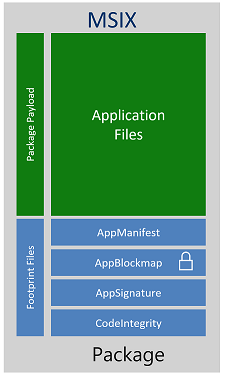
Inside an MSIX package
Payload filesPayload files are files stored in and delivered by the package, including executable code, libraries, assets, configuration files, and resources. Footprint filesFootprint files are package metadata and infrastructure files that describe, validate, or support the payload. Core footprint files include:
Other footprint files are present only when a package uses the corresponding feature. For example, The Windows packaging APIs distinguish payload files from footprint files. For package architecture and deployment behavior, see MSIX package types, Package storage volumes, and Package registration and lifetime. Supported platformsFor a full list of supported platforms, see MSIX features and supported platforms. Validation, testing, and troubleshootingFor testing and common errors, see the MSIX troubleshooting guide and MSIX validation and testing overview. Benefits of app containersApps packaged with MSIX can be configured to run in a lightweight app container that isolates the process using file system and registry virtualization. For a full explanation of what the container changes and how to work with it, see MSIX containerization overview. FeedbackWas this page helpful? NoAdditional resources
| ||||||||||||||||
| You are visitor 01402503 — GeezerVison does not store the pages you look up. Best viewed with Netscape Navigator 4.7 or Internet Explorer 6 at 800×600. No cookies required. |