GeezerVisonThe World Wide Web, restored to 800 pixels of glory. |
| Home|About|Gaming cabinet|Archives|How it works|Starter sites |
GeezerVison is showing liascript.github.io — Menu Open Turn simple Markdown into interactive open coursesCreate, share, and remix Open Educational Resources with LiaScript — an open Markdown dialect and interpreter that transforms plain text into fully interactive courses in any modern browser. For — Educators · Institutions · Developers Already have a LiaScript (Markdown) file?or start right in your browser  See LiaScript in ActionA short demo showcasing how plain Markdown becomes an interactive course. LiaScript Hello WorldLiaScript ShortsQuick, focused video snippets showing specific LiaScript capabilities in just a few seconds. Short #1 – One Document, Many Representations (Part 1)A single Markdown file can become a narrative presentation, lecture, or interactive course. This demo also shows how LiaScript handles text-to-speech with automatic fallbacks. Short #2 – One Document, Many Representations (Part 2)More examples of how one Markdown source can be transformed into multiple localized or adapted versions of the same course. Short #3 – Intelligent Image HandlingLiaScript treats images context-aware: floating layouts, automatic galleries, captioning, and optimal sizing — depending on how you structure your Markdown paragraph. Short #4 – Embedding Media Made EasyLiaScript supports four lightweight ways to embed media: classic images, audio tags, inline videos, and flexible URL-based embeds for any custom content. Short #5 – Quizzes in 100 SecondsCreate rich quizzes directly in Markdown: multiple choice, single choice, matrix questions, text input, dropdowns, or gap texts — all without an LMS. Short #6 – Executable Code BlocksMake code snippets editable and runnable inside your course by attaching a simple script definition. Perfect for tutorials and programming lessons. Short #7 – Tables & Data VisualizationLiaScript can turn Markdown tables into charts automatically. Ten plot types are available, and you can still pick your preferred visualization. Short #8 – Custom MacrosDefine your own macros or reusable LiaScript components with just an @name. Add parameters, shortcuts, and even block macros to simplify authoring. Short #9 – Serverless & Decentralized HostingHost LiaScript courses anywhere: classic HTTPS, GitHub, GitLab, Nextcloud, Dropbox, IPFS, data URIs, Nostr, WebTorrent, OnionShare, and more. 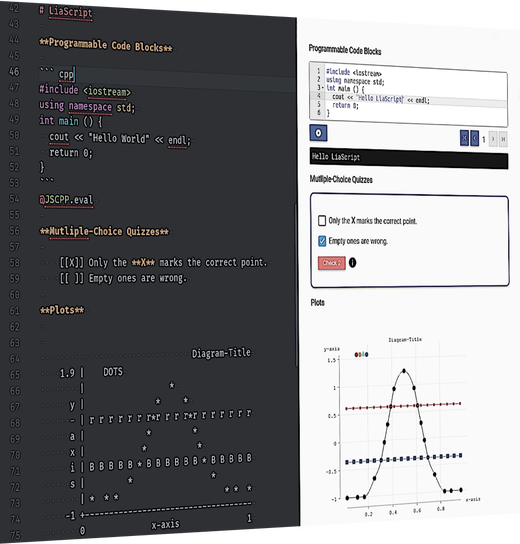 No build steps. No configuration.LiaScript parses and renders your course directly in the browser, on the client side, in real time. All you need is the URL to your course file. A course is just a plain Markdown document enhanced with LiaScript for:
 Open-courSe: like open source, but for coursesYou stay in full control of your content — but by hosting your courses on GitHub, you make it easy for others to contribute, translate, and adapt them. There is no single source of truth, and there does not have to be only one course. With branches and forks you can evolve multiple variants for different languages, contexts, and target groups.  JavaScript-ready by designUnlike most Markdown parsers, LiaScript lets you use any JavaScript library you like. Integrate visualizations, simulations, computer algebra systems, or custom widgets — whatever helps your learners. 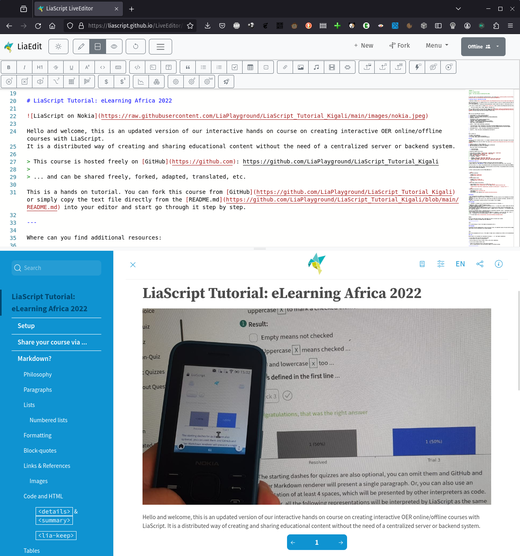 LiveEditor: collaborative authoring in your browserThe LiveEditor is a browser-based collaborative editor built specifically for LiaScript. Your content is stored locally in your browser; collaboration happens peer-to-peer via WebRTC and Yjs. Snippets for common LiaScript patterns are built-in — just type “lia” to discover them. And if you have a GitHub account, you can export your courses directly as gists with a few clicks. How it works1 Write in MarkdownAdd LiaScript syntax where you want a quiz, a TTS voice, a runnable code block, or a chart. No template project, no dependencies to install. 2 Host the file anywhereA GitHub repo, GitLab, Dropbox, IPFS, or a plain link. LiaScript doesn’t care where the text lives, since it renders in the visitor’s browser. 3 Share the linkAnyone opens it in a modern browser and gets the interactive course, no login and no server needed. Works offline once loaded, too. More ToolsA collection of free and open tools that make it easier to write, preview, export, and share your LiaScript courses. VSCode PreviewEditing A lightweight preview extension for Visual Studio Code that updates automatically whenever you save your LiaScript Markdown file.visit VSCode Web PreviewEditing Use LiaScript directly in your browser with the VSCode Web experience — no installation required. Instant live preview included.visit Development ServerEditing Run a local development server to preview multiple courses at once — ideal if you prefer your own editor or manage larger projects.visit LiaScript ExporterExport Export your course as a SCORM-compliant package for seamless integration into LMS platforms like Moodle, ILIAS, OpenOlat, and more.visit Live EditorEditing A browser-based collaborative editor for LiaScript. Write together in real time and export your courses directly to GitHub Gists.visit Atom PreviewEditing If you prefer using Atom, you can install a preview plugin and snippet support to work efficiently with larger projects.visit VSCode SnippetsEditing Type “lia” to activate a fuzzy search with ready-to-use snippets, examples, and common LiaScript patterns — faster authoring guaranteed.visit Atom SnippetsEditing Type “lia” in Atom to explore a collection of LiaScript shortcuts, examples, and snippet templates for rapid course creation.visit YouTubeInspiration Explore new features, updates, tutorials, and showcases on our YouTube channel — ideal for inspiration and learning.visit Preview-LiaOrganization Embed dynamic previews of LiaScript courses or GitHub projects on your personal website or blog using this web component.visit CodiLIAEditing A collaborative editor based on CodiMD — extended to support creating interactive LiaScript courses instead of static documents.visit Frequently asked questionsDo I need to install anything to write a course?No. A LiaScript course is a plain Markdown file. You can write it in any text editor; the browser based Live Editor adds live preview and autocompletion if you want it. Do I need to install anything to read a course?No. Any modern browser renders the course directly from the Markdown file, no server or app required. Is LiaScript free?Yes, and it stays that way. LiaScript is developed in the open on GitHub; there’s no paid tier and no account requirement to create or run a course. Where do I host my courses?Wherever you already store text: GitHub, GitLab, Dropbox, a plain web server, or IPFS. There’s no LiaScript hosting service you’re locked into. Can I use LiaScript without internet access?Yes, once a course is loaded it keeps working offline, since everything runs client side in the browser. Can I add quizzes, simulations, or my own JavaScript?Yes. LiaScript supports quizzes, surveys, executable code blocks, and a macro system for wrapping any JavaScript library into reusable, author friendly blocks. Can I use LiaScript courses in Moodle, ILIAS, or another LMS?Yes, via the LiaScript Exporter, which packages a course as SCORM for import into common LMS platforms. Can multiple people write a course together?Yes, the Live Editor supports real time, peer to peer collaborative editing (WebRTC + Yjs), with no account or central server involved. What if I already have a LiaScript file?Paste its URL into the box on the homepage and it opens directly as a live course, no upload step needed. 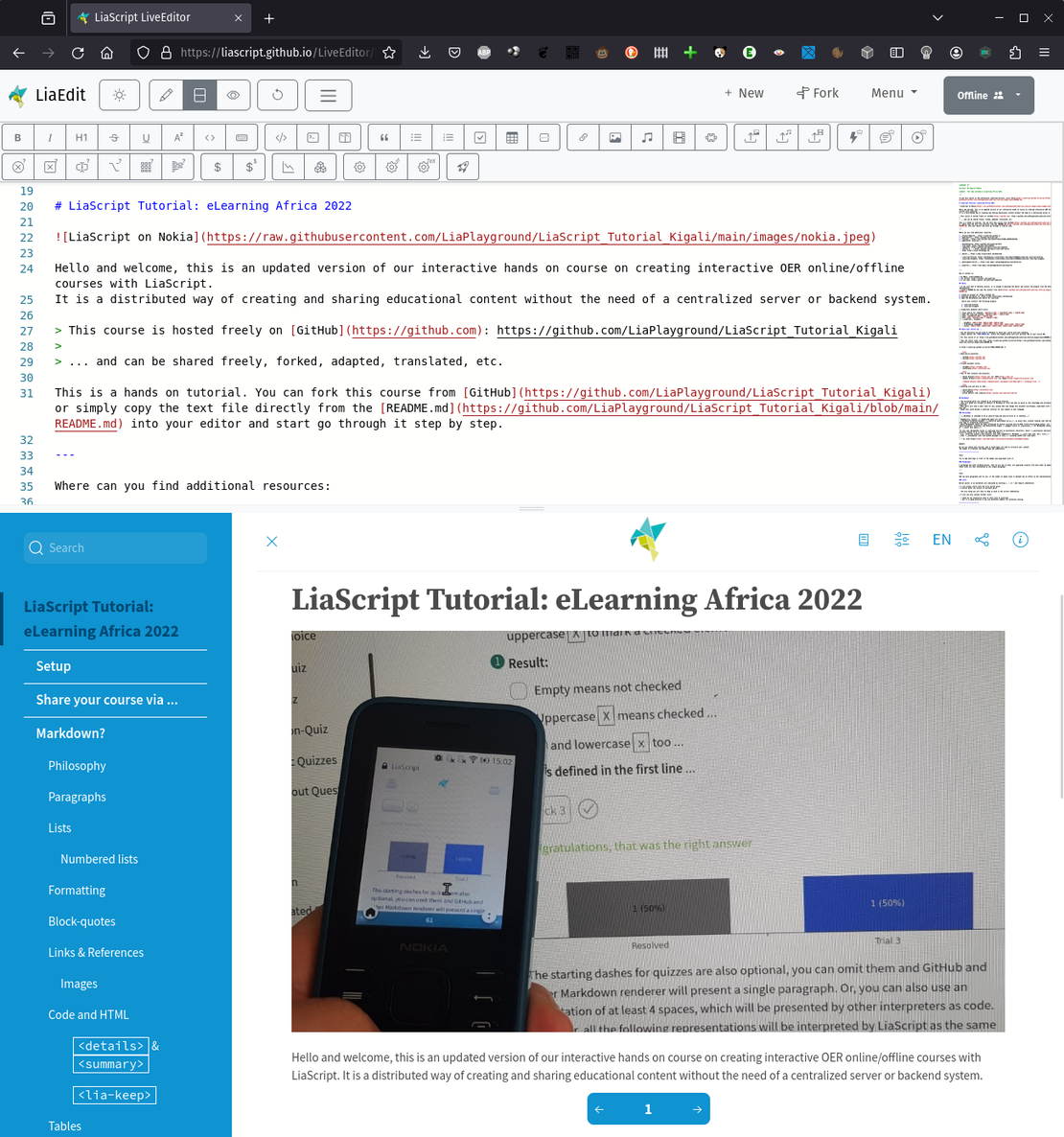 Your next course starts as a text fileNo installation, no build step, no account required. Write it in Markdown, drop in a quiz or a bit of JavaScript where you need it, and open the link in a browser. Open the Live Editor |
| You are visitor 01402503 — GeezerVison does not store the pages you look up. Best viewed with Netscape Navigator 4.7 or Internet Explorer 6 at 800×600. No cookies required. |