GeezerVison is showing masarray.github.io — ARStack61850 — IEC 61850 Process Bus Simulator
Dual Firmware Stable · IEC 61850 engineering
A process bus lab. Without the test rack.
ARStack Studio puts real IEC 61850 Sampled Values and PTP Ethernet traffic on your test network using an affordable ESP32-P4. Simulate a Merging Unit, configure 4I+4V waveforms and experiment with SCL-defined stream profiles—right from your desktop.
Actual Qt Studio capture, committed in this repository (not a mockup)Capture provenance ↗
4,705,090SV Ethernet frames captured
3,999.886Observed frames per second
19m 36sContinuous on-wire capture
0Missing / duplicate / malformed frames
Historical M3.H.3 single-stream lab benchmark — not a three-stream or v3.x qualification claim. View capture evidence ↗
What you can build
Real packets. Repeatable engineering scenarios.
From live electrical waveforms to protocol identifiers, ARStack gives you direct control of the process-bus traffic your lab subscribers see.
01 / SAMPLED VALUES
Simulated Merging Unit output
Configure four current and four voltage channels with amplitude, phase and quality. Publish real IEC 61850 SV multicast Ethernet traffic using the ESP32-P4.
02 / TIME SYNCHRONIZATION
GPS-style PTP Grandmaster emulation
Generate PTP Announce, Sync and Follow_Up on the wire with the simulation timebase and inspect sample synchronization in the lab. No external GPS receiver needed.
03 / ENGINEERING WORKFLOW
SCL identities and Studio control
Import supported SCD, SCL, CID or IID files, deploy supported SV profiles, tune waveforms, START/STOP, capture and reconnect without resetting the powered board.
A real hardware bench
See the ESP32-P4 lab setup.
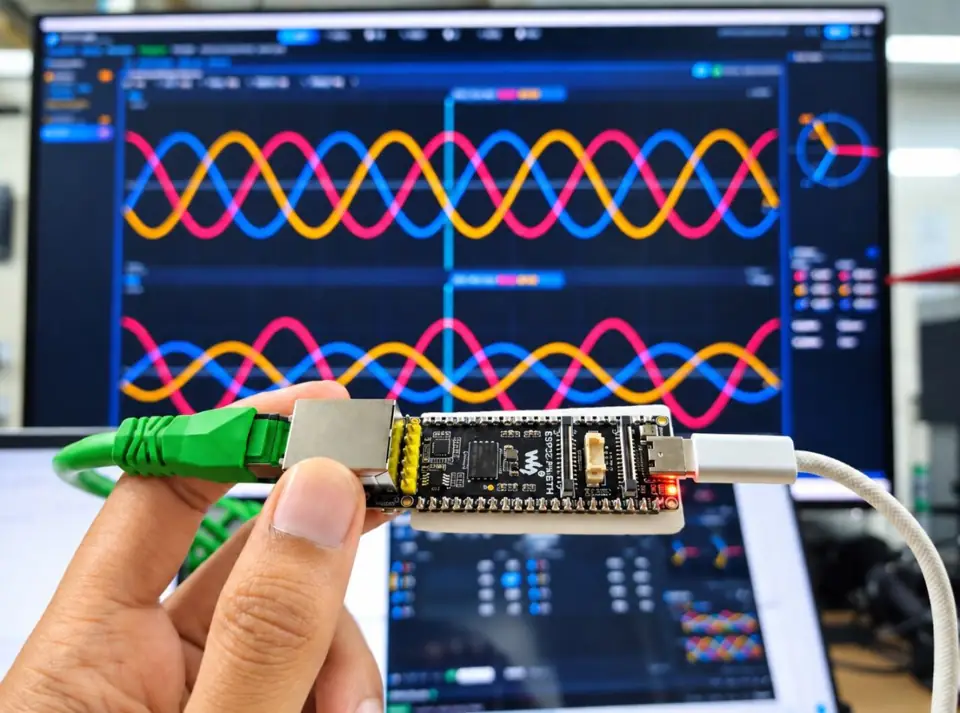
A real photo of a compact ESP32-P4 development board connected to USB-C and Ethernet, with the engineering waveform workspace in the background.
Project hardware demo photo · real board and cables. On-wire SV/PTP benchmark evidence is documented separately.
AFFORDABLE PROCESS BUS EXPERIMENTS
Explore with Waveshare ESP32-P4-ETH.
The ESP32-P4-ETH family includes the ESP32-P4-ETH-M with pre-soldered headers. For the ARStack lab, use a compatible Ethernet board and release-matched firmware; use a dedicated, isolated test network.
Board revisions matter. ARStack Studio distributes distinct pre-v3 and v3.x firmware images. The newer v3.x firmware is still in engineering-preview hardware qualification.
M4 software includes SCL-driven three-virtual-MU configuration and group START/STOP with shared sample/PTP timing. The publicly shipped dual-firmware stable package carries these integrated controls, while sustained 3 × 4,000 fps on-wire load acceptance and v3.x hardware qualification are still being collected.
The stable Studio release offers separate firmware images for ESP32-P4 pre-v3 and v3.x silicon and a matching firmware catalog. v3.x board support remains an engineering preview pending broader physical acceptance.
Install StudioExtract the Windows Setup ZIP or run the Linux x86_64 AppImage.
Connect your boardUse USB data and an isolated Ethernet test network.
Load matching firmwareInstall the release-paired pre-v3 or v3.x image from Studio.
Start SV + PTPUse 4I+4V Quick Start and a simulated PTP source, then capture the packets.
Lab-only network boundary: do not connect this publisher or simulated PTP Grandmaster to an energized or production substation process bus. Firmware must match the Studio release.
Latest public stable
Choose your ARStack Studio package.
Windows Setup ZIP is recommended for easier browser downloads. Linux AppImage is available directly. Both are sourced from the public stable release; firmware artifacts are published alongside them.
Also published: direct Windows Setup EXE, SHA256SUMS.txt, firmware-catalog.json, firmware-manifest.json and release-provenance.json. Windows Setup ZIP avoids direct-EXE download friction but does not bypass Windows security checks for unsigned installers. Installation help ↗
You are visitor 01402503 — GeezerVison does not store the pages you look up. Best viewed with Netscape Navigator 4.7 or Internet Explorer 6 at 800×600. No cookies required.