GV

GeezerVison

The World Wide Web, restored to 800 pixels of glory.

Home|About|Gaming cabinet|Archives|How it works|Starter sites

On this site

  • Check if a File Exists in Node.js
  • Working with UUID in Node
  • Using bcrypt-js to Hash Passwords in JavaScript
  • Working with the Node.js assert Library
  • Modify Authorized redirect_uris For Google OAuth
  • Fundamentals
  • Node
  • Vue
  • Webpack
  • Axios
  • Mongoose
  • Express
  • Lodash
  • npm

This view

  • Original page
  • New address

GeezerVison is showing masteringjs.io — Upload Files to Google Cloud Storage in Node.js

Mastering JS Logo
Mastering JS
Tutorials Newsletter eBooks Jobs
☰
Tutorials Newsletter eBooks Jobs
Tutorials / Node /

Upload Files to Google Cloud Storage in Node.js

Mar 6, 2020

Google Cloud is Google's alternative to AWS. For the most part, you can do anything you do on AWS in Google Cloud, and vice versa. For example, this article will show how to upload a file to Google Cloud Storage, which is similar to AWS S3.

Setup

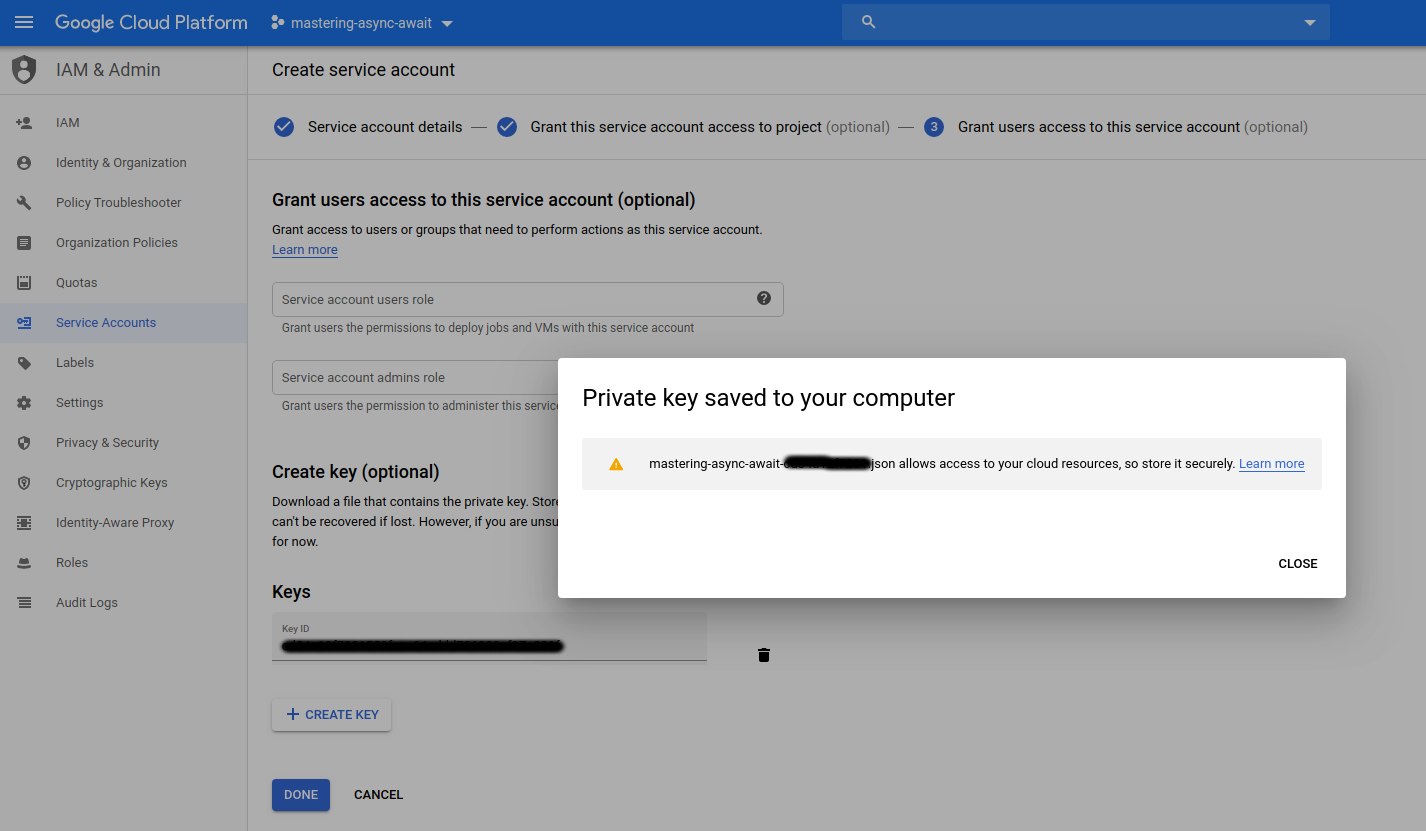
The @google-cloud/storage npm module is Google's officially supported npm module for uploading files to Google Cloud. The first thing you need to do is get a Google service account key, which contains the credentials you need to authenticate with Google Cloud.

To get this file, you should create a Google Cloud service account and give it the "storage admin" permission. Then create a key for the service account and download it.
Uploading a File with Node.js

Next, let's use the @google-cloud/storage npm module to upload a file. The npm module is pretty easy to work with - the hard part is getting the credentials.

To upload a file, you just use the .upload() function. You also need to make sure the file is public using the makePublic() function:

const { Storage } = require('@google-cloud/storage');

const storage = new Storage({ keyFilename: './google-cloud-key.json' });
// Replace with your bucket name and filename.
const bucketname = 'vkarpov15-test1';
const filename = 'package.json';

const res = await storage.bucket(bucketname).upload('./' + filename);
// `mediaLink` is the URL for the raw contents of the file.
const url = res[0].metadata.mediaLink;

// Need to make the file public before you can access it.
await storage.bucket(bucketname).file(filename).makePublic();

// Make a request to the uploaded URL.
const axios = require('axios');
const pkg = await axios.get(url).then(res => res.data);
pkg.name; // 'masteringjs.io'

Did you find this tutorial useful? Say thanks by starring our repo on GitHub!

More Node Tutorials

  • Getting Started with Oso Authorization in Node.js
  • Check if a File Exists in Node.js
  • How To Fix "__dirname is not defined" Error in Node.js
  • Working with UUID in Node
  • Using bcrypt-js to Hash Passwords in JavaScript
  • Working with the Node.js assert Library
  • Modify Authorized redirect_uris For Google OAuth
You are visitor 01402503 — GeezerVison does not store the pages you look up.
Best viewed with Netscape Navigator 4.7 or Internet Explorer 6 at 800×600. No cookies required.