GV

GeezerVison

The World Wide Web, restored to 800 pixels of glory.

Home|About|Gaming cabinet|Archives|How it works|Starter sites

On this site

  • Plot types
  • User guide
  • Tutorials
  • Examples
  • Reference
  • Contribute
  • Releases
  • Gitter
  • Discourse
  • GitHub
  • Lines, bars and markers
  • Line plot
  • Linestyles
  • Dashed line style configuration

This view

  • Original page
  • New address

GeezerVison is showing matplotlib.org — Generate 3D polygons — Matplotlib 3.11.2 documentation

Note

Go to the end to download the full example code.

Generate 3D polygons#

Demonstrate how to create polygons in 3D. Here we stack 3 hexagons.

import matplotlib.pyplot as plt
import numpy as np

from mpl_toolkits.mplot3d.art3d import Poly3DCollection

# Coordinates of a hexagon
angles = np.linspace(0, 2 * np.pi, 6, endpoint=False)
x = np.cos(angles)
y = np.sin(angles)
zs = [-3, -2, -1]

# Close the hexagon by repeating the first vertex
x = np.append(x, x[0])
y = np.append(y, y[0])

verts = []
for z in zs:
    verts.append(list(zip(x*z, y*z, np.full_like(x, z))))
verts = np.array(verts)

ax = plt.figure().add_subplot(projection='3d')

poly = Poly3DCollection(verts, alpha=.7)
ax.add_collection3d(poly)
ax.set_aspect('equalxy')

plt.show()
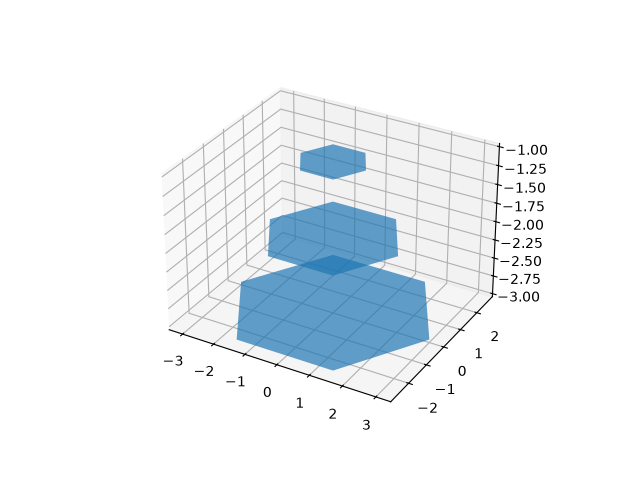
polys3d

Tags: plot-type: 3D styling: colormap level: intermediate

Download Jupyter notebook: polys3d.ipynb

Download Python source code: polys3d.py

Download zipped: polys3d.zip

Gallery generated by Sphinx-Gallery

You are visitor 01402503 — GeezerVison does not store the pages you look up.
Best viewed with Netscape Navigator 4.7 or Internet Explorer 6 at 800×600. No cookies required.