GeezerVisonThe World Wide Web, restored to 800 pixels of glory. |
| Home|About|Gaming cabinet|Archives|How it works|Starter sites |
GeezerVison is showing microsoft.github.io — Getting started Getting startedThis section contains the detailed installation instructions, and a first overview on how functions work in the wpa package. InstallationThe stable version of wpa can be installed directly from CRAN: There may occasionally be some experimental features that are only available in the development version. To install the development version from GitHub, you can also run: The above code will tell R not to update dependency packages, which speeds up the installation process. If you’d like to update all dependency packages, you can remove As best practice, you should restart your R Session both before and after running the above code. If you prefer to proceed with a local installation, you can download a installation file here. Troubleshooting installationIf you encounter any issues with package installations, you can find the recommended troubleshooting flow below. Note that this process can take 10-15 minutes for a full package library update.
Loading the wpa packageOnce the installation is complete, you can load the package with: You only need to install the package once; however, you will need to load it every time you start a new R session. wpa is designed to work side by side with other Data Science R packages from tidyverse. We generally recommend to load that package too: Importing Workplace Analytics dataTo read data into R, you can use the Assuming you have a file called myquery.csv on your desktop, you can import it into R using: In the code above, As an alternative to The contents will be saved to the object person_data (using Demo dataThe wpa package includes a set of demo Workplace Analytics datasets that you can use to explore the functionality of this package. We will also use them extensively in this guide. The included datasets are:
See here for a full documentation of the queries in Workplace Analytics. Exploring a person queryWe can explore the For example, if we want to know the number of individuals in This function requires you to provide a person query ( The same R code can be written using a Forward-Pipe Operator ( Let’s now use this function to explore of other groups. For example: We can expand this analysis by using the Most functions in wpa create plot by default, but can change their behaviour by adding a If at any point you would like to understand more about the functions, you can:
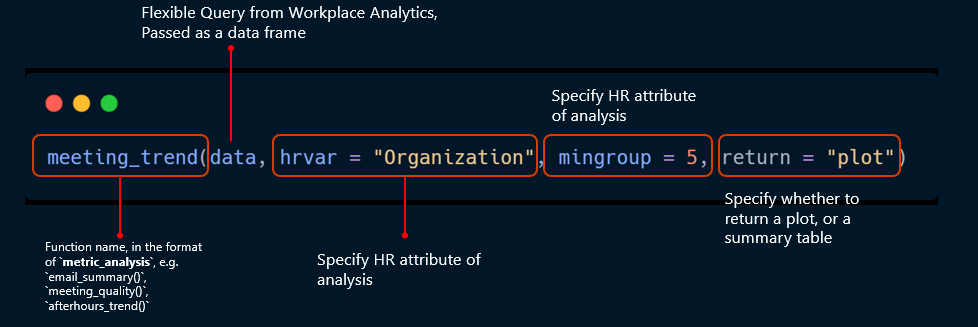
Function structureAll functions in wpa follow a similar behaviour, including many common arguments. The following illustrates the basic API of standard analysis functions:
So far we have explored the Exporting plots and tablesTables and plots can be saved with the One again, adding an additional forward-Pipe operator we can write: Four steps from data to outputThe examples above illustrate how the use of wpa can be summarized in 4 simple steps: Load the package, read-in query data, run functions and export results. The script below illustrates this functionality: Ready to learn more?Let’s go to the Data Validation section to explore options for validating data. To skip straight to analysis, see the Summary Functions section. |
| You are visitor 01402775 — GeezerVison does not store the pages you look up. Best viewed with Netscape Navigator 4.7 or Internet Explorer 6 at 800×600. No cookies required. |