GeezerVisonThe World Wide Web, restored to 800 pixels of glory. |
| Home|About|Gaming cabinet|Archives|How it works|Starter sites |
GeezerVison is showing mpcsimple.com — MPC Simple — custom operating system for the Akai MPC Sample Status: public betaMPC Simple 1.0 Beta 12 is out now as a free public beta. It runs from the SD card and changes nothing on the unit. Being a beta, it may still have bugs, so keep backups of the projects that matter to you. Get it below, or see what’s new. What it isMPC Simple is a new operating system for the Akai MPC Sample, written from scratch on the latest version of JUCE. It brings back the workflow of the classic MPCs — the MPC60, 3000, 2000XL, 1000 and 2500 — and adds the modern features worth having. Some other projects for the MPC Sample try to add the DAW-like features of the bigger MPCs. MPC Simple goes the other way. It gives the MPC Sample the functions of the classic MPCs, with a few modern touches, and makes it what it always should have been: an MPC that works like the old ones, on modern hardware. Nothing to install, nothing to undoMPC Simple runs from the SD card. Nothing is installed on the unit, and nothing on its internal storage is changed. To return to the stock operating system, remove the card and restart. 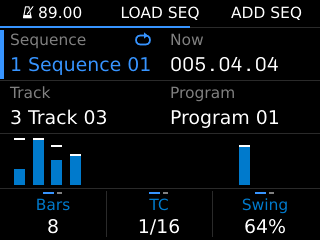
Main screen How it differs from the stock OSHere is what MPC Simple does differently from the stock MPC Sample and MPC OS 3. Programs are backMPC OS 3 dropped programs. MPC Simple brings them back: a program is a kit of pads that any number of tracks and sequences can share, so changing a sound on the kit changes it everywhere it plays. Samples are separate from padsThe stock MPC Sample ties each sample to a pad. In MPC Simple, samples live in the project’s sample pool, the way they did on the classic MPCs. A sample can play on any number of pads and programs, and editing it in Sample Edit changes it everywhere it’s used. More kinds of programBesides drum programs, MPC Simple has keygroup programs, which spread samples across the keyboard; MIDI programs, which play external gear over the MIDI jack or USB; and instrument programs, which play a software instrument from the pads and the sequencer. Instrument programs use CLAP plugins, the same open plugin format as MPC Simple’s effects. A few instruments come built in, and you can add your own by copying them to the SD card. In the beta
Still to come
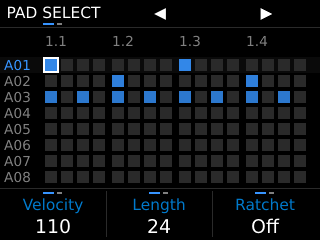
Grid Edit DemonstrationSupport the projectMPC Simple is free. If it’s useful to you, a donation of any amount is appreciated — you choose how much on the next page. Get the operating systemMPC Simple 1.0 Beta 12 is a free download from SourceForge. The zip holds the SD card files, a Quick Start guide, the full Operator’s Manual and the release notes. Copy what’s in its SD Card folder to the top level of an exFAT SD card, put the card in the MPC Sample and turn it on. To go back to the stock operating system, remove the card and restart. What’s changed in each release is in the release notes. Found a bug, or something that doesn’t work the way the old MPCs did? Please report it on the SourceForge project page. |
| You are visitor 01402792 — GeezerVison does not store the pages you look up. Best viewed with Netscape Navigator 4.7 or Internet Explorer 6 at 800×600. No cookies required. |