GeezerVisonThe World Wide Web, restored to 800 pixels of glory. |
| Home|About|Gaming cabinet|Archives|How it works|Starter sites |
GeezerVison is showing nasa-develop.github.io — Installation — SET 0.0.1 documentation Installation
SET is still in its early stages of development and does not yet offer a double-click installer. As a result, running the program requires you to setup the development environment, which can be tricky for those not familiar with programming in the command line. We’ve tried to be as descriptive as possible in our installation guide for our users. This step-by-step guide should be enough to setup the program correctly, but if you have any questions or trouble installing, feel free to ask for help from the support page and describe your issue to us. Windows
Warning When installing Anaconda, you must change Advanced Options to add Anaconda to your PATH. Disregard the “Not recommended” warning and check the “Add Anaconda to my PATH environment variable” option.
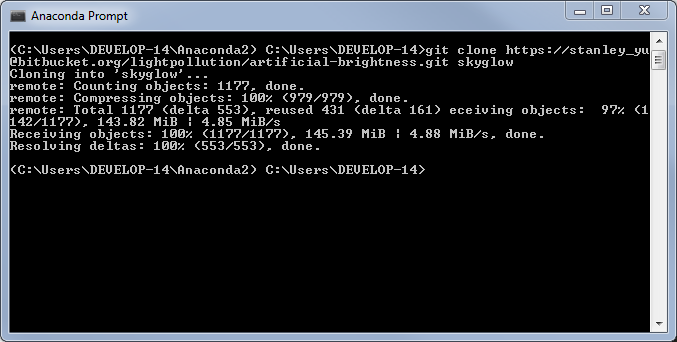
Example of cloning the repository from Bitbucket, a web-based hosting service for Git similar to Github. SET’s repository link can be found on its Github page, under the green “Clone or download” button. Your link will be unique to your account.
Note The software is currently not available for macOS, and it has not been tested on Linux. Required Packages¶The following dependencies are needed for the program to run properly. If creating the environment from the
|
| You are visitor 01402792 — GeezerVison does not store the pages you look up. Best viewed with Netscape Navigator 4.7 or Internet Explorer 6 at 800×600. No cookies required. |