GeezerVisonThe World Wide Web, restored to 800 pixels of glory. |
| Home|About|Gaming cabinet|Archives|How it works|Starter sites |
GeezerVison is showing netty.io — Netty.docs: User guide for 4.x
Skip navigation
User guide for 4.x
Did you know this page is automatically generated from
a Github Wiki page?
You can improve it by yourself
here!
Nowadays we use general purpose applications or libraries to communicate with each other. For example, we often use an HTTP client library to retrieve information from a web server and to invoke a remote procedure call via web services. However, a general purpose protocol or its implementation sometimes does not scale very well. It is like how we don't use a general purpose HTTP server to exchange huge files, e-mail messages, and near-realtime messages such as financial information and multiplayer game data. What's required is a highly optimized protocol implementation that is dedicated to a special purpose. For example, you might want to implement an HTTP server that is optimized for AJAX-based chat application, media streaming, or large file transfer. You could even want to design and implement a whole new protocol that is precisely tailored to your need. Another inevitable case is when you have to deal with a legacy proprietary protocol to ensure the interoperability with an old system. What matters in this case is how quickly we can implement that protocol while not sacrificing the stability and performance of the resulting application. The Netty project is an effort to provide an asynchronous event-driven network application framework and tooling for the rapid development of maintainable high-performance and high-scalability protocol servers and clients. In other words, Netty is an NIO client server framework that enables quick and easy development of network applications such as protocol servers and clients. It greatly simplifies and streamlines network programming such as TCP and UDP socket server development. 'Quick and easy' does not mean that a resulting application will suffer from a maintainability or a performance issue. Netty has been designed carefully with the experiences learned from the implementation of a lot of protocols such as FTP, SMTP, HTTP, and various binary and text-based legacy protocols. As a result, Netty has succeeded to find a way to achieve ease of development, performance, stability, and flexibility without a compromise. Some users might already have found other network application frameworks that claim to have the same advantage, and you might want to ask what makes Netty so different from them. The answer is the philosophy it is built on. Netty is designed to give you the most comfortable experience both in terms of the API and the implementation from day one. It is not something tangible but you will realize that this philosophy will make your life much easier as you read this guide and play with Netty. This chapter tours around the core constructs of Netty with simple examples to let you get started quickly. You will be able to write a client and a server on top of Netty right away when you are at the end of this chapter. If you prefer a top-down approach in learning something, you might want to start from Chapter 2, Architectural Overview and get back here. The minimum requirements to run the examples in this chapter are only two; the latest version of Netty and JDK 1.6 or above. The latest version of Netty is available in the project download page. To download the right version of JDK, please refer to your preferred JDK vendor's web site. As you read, you might have more questions about the classes introduced in this chapter. Please refer to the API reference whenever you want to know more about them. All class names in this document are linked to the online API reference for your convenience. Also, please don't hesitate to contact the Netty project community and let us know if there's any incorrect information, errors in grammar or typos, and if you have any good ideas to help improve the documentation. The most simplistic protocol in the world is not 'Hello, World!' but To implement the package io.netty.example.discard; import io.netty.buffer.ByteBuf; import io.netty.channel.ChannelHandlerContext; import io.netty.channel.ChannelInboundHandlerAdapter; /** * Handles a server-side channel. */ public class DiscardServerHandler extends ChannelInboundHandlerAdapter { // (1) @Override public void channelRead(ChannelHandlerContext ctx, Object msg) { // (2) // Discard the received data silently. ((ByteBuf) msg).release(); // (3) } @Override public void exceptionCaught(ChannelHandlerContext ctx, Throwable cause) { // (4) // Close the connection when an exception is raised. cause.printStackTrace(); ctx.close(); } }
@Override
public void channelRead(ChannelHandlerContext ctx, Object msg) {
    try {
        // Do something with msg
    } finally {
        ReferenceCountUtil.release(msg);
    }
}
So far so good. We have implemented the first half of the package io.netty.example.discard; import io.netty.bootstrap.ServerBootstrap; import io.netty.channel.ChannelFuture; import io.netty.channel.ChannelInitializer; import io.netty.channel.ChannelOption; import io.netty.channel.EventLoopGroup; import io.netty.channel.nio.NioEventLoopGroup; import io.netty.channel.socket.SocketChannel; import io.netty.channel.socket.nio.NioServerSocketChannel; /** * Discards any incoming data. */ public class DiscardServer { private int port; public DiscardServer(int port) { this.port = port; } public void run() throws Exception { EventLoopGroup bossGroup = new NioEventLoopGroup(); // (1) EventLoopGroup workerGroup = new NioEventLoopGroup(); try { ServerBootstrap b = new ServerBootstrap(); // (2) b.group(bossGroup, workerGroup) .channel(NioServerSocketChannel.class) // (3) .childHandler(new ChannelInitializer<SocketChannel>() { // (4) @Override public void initChannel(SocketChannel ch) throws Exception { ch.pipeline().addLast(new DiscardServerHandler()); } }) .option(ChannelOption.SO_BACKLOG, 128) // (5) .childOption(ChannelOption.SO_KEEPALIVE, true); // (6) // Bind and start to accept incoming connections. ChannelFuture f = b.bind(port).sync(); // (7) // Wait until the server socket is closed. // In this example, this does not happen, but you can do that to gracefully // shut down your server. f.channel().closeFuture().sync(); } finally { workerGroup.shutdownGracefully(); bossGroup.shutdownGracefully(); } } public static void main(String[] args) throws Exception { int port = 8080; if (args.length > 0) { port = Integer.parseInt(args[0]); } new DiscardServer(port).run(); } }
Congratulations! You've just finished your first server on top of Netty. Now that we have written our first server, we need to test if it really works. The easiest way to test it is to use the telnet command. For example, you could enter However, can we say that the server is working fine? We cannot really know that because it is a discard server. You will not get any response at all. To prove it is really working, let us modify the server to print what it has received. We already know that @Override public void channelRead(ChannelHandlerContext ctx, Object msg) { ByteBuf in = (ByteBuf) msg; try { while (in.isReadable()) { // (1) System.out.print((char) in.readByte()); System.out.flush(); } } finally { ReferenceCountUtil.release(msg); // (2) } }
If you run the telnet command again, you will see the server prints what it has received. The full source code of the discard server is located in the So far, we have been consuming data without responding at all. A server, however, is usually supposed to respond to a request. Let us learn how to write a response message to a client by implementing the The only difference from the discard server we have implemented in the previous sections is that it sends the received data back instead of printing the received data out to the console. Therefore, it is enough again to modify the @Override public void channelRead(ChannelHandlerContext ctx, Object msg) { ctx.write(msg); // (1) ctx.flush(); // (2) }
If you run the telnet command again, you will see the server sends back whatever you have sent to it. The full source code of the echo server is located in the The protocol to implement in this section is the Because we are going to ignore any received data but to send a message as soon as a connection is established, we cannot use the package io.netty.example.time; public class TimeServerHandler extends ChannelInboundHandlerAdapter { @Override public void channelActive(final ChannelHandlerContext ctx) { // (1) final ByteBuf time = ctx.alloc().buffer(4); // (2) time.writeInt((int) (System.currentTimeMillis() / 1000L + 2208988800L)); final ChannelFuture f = ctx.writeAndFlush(time); // (3) f.addListener(new ChannelFutureListener() { @Override public void operationComplete(ChannelFuture future) { assert f == future; ctx.close(); } }); // (4) } @Override public void exceptionCaught(ChannelHandlerContext ctx, Throwable cause) { cause.printStackTrace(); ctx.close(); } }
To test if our time server works as expected, you can use the UNIX where Unlike The biggest and only difference between a server and a client in Netty is that different package io.netty.example.time; public class TimeClient { public static void main(String[] args) throws Exception { String host = args[0]; int port = Integer.parseInt(args[1]); EventLoopGroup workerGroup = new NioEventLoopGroup(); try { Bootstrap b = new Bootstrap(); // (1) b.group(workerGroup); // (2) b.channel(NioSocketChannel.class); // (3) b.option(ChannelOption.SO_KEEPALIVE, true); // (4) b.handler(new ChannelInitializer<SocketChannel>() { @Override public void initChannel(SocketChannel ch) throws Exception { ch.pipeline().addLast(new TimeClientHandler()); } }); // Start the client. ChannelFuture f = b.connect(host, port).sync(); // (5) // Wait until the connection is closed. f.channel().closeFuture().sync(); } finally { workerGroup.shutdownGracefully(); } } }
As you can see, it is not really different from the server-side code. What about the package io.netty.example.time; import java.util.Date; import io.netty.buffer.ByteBuf; import io.netty.channel.ChannelHandlerContext; import io.netty.channel.ChannelInboundHandlerAdapter; public class TimeClientHandler extends ChannelInboundHandlerAdapter { @Override public void channelRead(ChannelHandlerContext ctx, Object msg) { ByteBuf m = (ByteBuf) msg; // (1) try { long currentTimeMillis = (m.readUnsignedInt() - 2208988800L) * 1000L; System.out.println(new Date(currentTimeMillis)); ctx.close(); } finally { m.release(); } } @Override public void exceptionCaught(ChannelHandlerContext ctx, Throwable cause) { cause.printStackTrace(); ctx.close(); } }
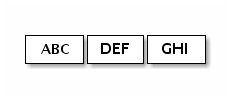
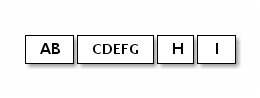
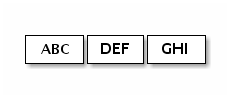
It looks very simple and does not look any different from the server side example. However, this handler sometimes will refuse to work raising an In a stream-based transport such as TCP/IP, received data is stored into a socket receive buffer. Unfortunately, the buffer of a stream-based transport is not a queue of packets but a queue of bytes. It means, even if you sent two messages as two independent packets, an operating system will not treat them as two messages but as just a bunch of bytes. Therefore, there is no guarantee that what you read is exactly what your remote peer wrote. For example, let us assume that the TCP/IP stack of an operating system has received three packets:
Because of this general property of a stream-based protocol, there's a high chance of reading them in the following fragmented form in your application:
Therefore, a receiving part, regardless it is server-side or client-side, should defrag the received data into one or more meaningful frames that could be easily understood by the application logic. In the case of the example above, the received data should be framed like the following:
Now let us get back to the The simplistic solution is to create an internal cumulative buffer and wait until all 4 bytes are received into the internal buffer. The following is the modified package io.netty.example.time; public class TimeClientHandler extends ChannelInboundHandlerAdapter { private ByteBuf buf; @Override public void handlerAdded(ChannelHandlerContext ctx) { buf = ctx.alloc().buffer(4); // (1) } @Override public void handlerRemoved(ChannelHandlerContext ctx) { buf.release(); // (1) buf = null; } @Override public void channelRead(ChannelHandlerContext ctx, Object msg) { ByteBuf m = (ByteBuf) msg; buf.writeBytes(m); // (2) m.release(); if (buf.readableBytes() >= 4) { // (3) long currentTimeMillis = (buf.readUnsignedInt() - 2208988800L) * 1000L; System.out.println(new Date(currentTimeMillis)); ctx.close(); } } @Override public void exceptionCaught(ChannelHandlerContext ctx, Throwable cause) { cause.printStackTrace(); ctx.close(); } }
Although the first solution has resolved the problem with the As you may have noticed, you can add more than one
Fortunately, Netty provides an extensible class which helps you write the first one out of the box: package io.netty.example.time; public class TimeDecoder extends ByteToMessageDecoder { // (1) @Override protected void decode(ChannelHandlerContext ctx, ByteBuf in, List<Object> out) { // (2) if (in.readableBytes() < 4) { return; // (3) } out.add(in.readBytes(4)); // (4) } }
Now that we have another handler to insert into the b.handler(new ChannelInitializer<SocketChannel>() { @Override public void initChannel(SocketChannel ch) throws Exception { ch.pipeline().addLast(new TimeDecoder(), new TimeClientHandler()); } }); If you are an adventurous person, you might want to try the public class TimeDecoder extends ReplayingDecoder<Void> { @Override protected void decode( ChannelHandlerContext ctx, ByteBuf in, List<Object> out) { out.add(in.readBytes(4)); } } Additionally, Netty provides out-of-the-box decoders which enables you to implement most protocols very easily and helps you avoid from ending up with a monolithic unmaintainable handler implementation. Please refer to the following packages for more detailed examples:
All the examples we have reviewed so far used a The advantage of using a POJO in your First, let us define a new type called package io.netty.example.time; import java.util.Date; public class UnixTime { private final long value; public UnixTime() { this(System.currentTimeMillis() / 1000L + 2208988800L); } public UnixTime(long value) { this.value = value; } public long value() { return value; } @Override public String toString() { return new Date((value() - 2208988800L) * 1000L).toString(); } } We can now revise the @Override protected void decode(ChannelHandlerContext ctx, ByteBuf in, List<Object> out) { if (in.readableBytes() < 4) { return; } out.add(new UnixTime(in.readUnsignedInt())); } With the updated decoder, the @Override public void channelRead(ChannelHandlerContext ctx, Object msg) { UnixTime m = (UnixTime) msg; System.out.println(m); ctx.close(); } Much simpler and elegant, right? The same technique can be applied on the server side. Let us update the @Override public void channelActive(ChannelHandlerContext ctx) { ChannelFuture f = ctx.writeAndFlush(new UnixTime()); f.addListener(ChannelFutureListener.CLOSE); } Now, the only missing piece is an encoder, which is an implementation of package io.netty.example.time; public class TimeEncoder extends ChannelOutboundHandlerAdapter { @Override public void write(ChannelHandlerContext ctx, Object msg, ChannelPromise promise) { UnixTime m = (UnixTime) msg; ByteBuf encoded = ctx.alloc().buffer(4); encoded.writeInt((int)m.value()); ctx.write(encoded, promise); // (1) } }
To simplify even further, you can make use of public class TimeEncoder extends MessageToByteEncoder<UnixTime> { @Override protected void encode(ChannelHandlerContext ctx, UnixTime msg, ByteBuf out) { out.writeInt((int)msg.value()); } } The last task left is to insert a Shutting down a Netty application is usually as simple as shutting down all In this chapter, we had a quick tour of Netty with a demonstration on how to write a fully working network application on top of Netty. There is more detailed information about Netty in the upcoming chapters. We also encourage you to review the Netty examples in the Please also note that the community is always waiting for your questions and ideas to help you and keep improving Netty and its documentation based on your feedback.
Last retrieved on 16-Nov-2026
|
| You are visitor 01402775 — GeezerVison does not store the pages you look up. Best viewed with Netscape Navigator 4.7 or Internet Explorer 6 at 800×600. No cookies required. |