# Python的LEGB作用域是什么?
面试官问:"Python如何查找变量?什么是LEGB规则?"
很多人只知道"局部变量和全局变量",但说不清楚嵌套函数的作用域、为什么有时会报UnboundLocalError,以及Built-in作用域包含什么。
# 简要回答
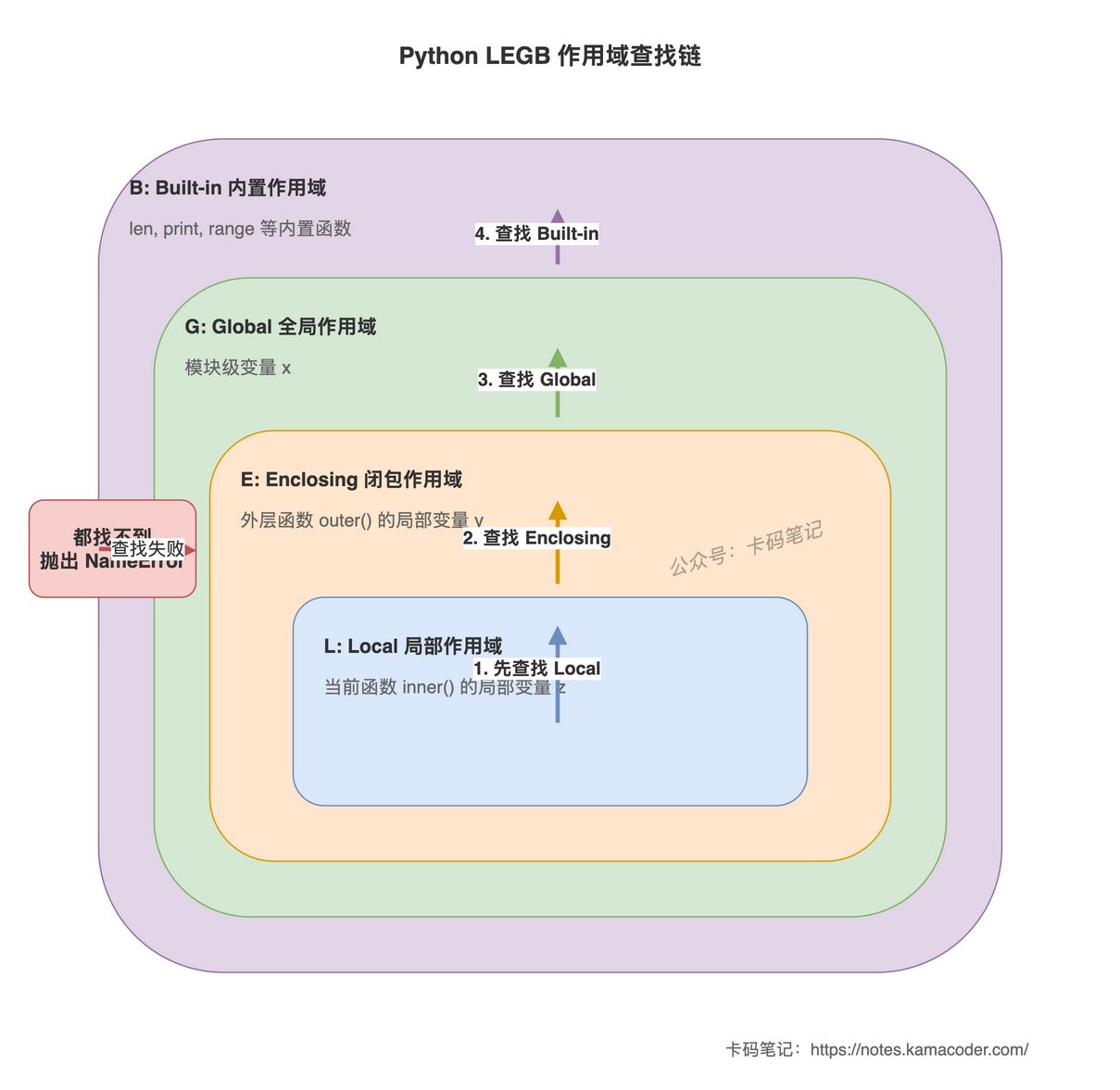
Python使用LEGB规则查找变量,按以下顺序依次搜索:
- L(Local):当前函数的局部作用域。
- E(Enclosing):外层函数的局部作用域(闭包)。
- G(Global):模块的全局作用域。
- B(Built-in):内置作用域,包含
len、print等内置函数和异常。
查找时从内向外,找到第一个匹配的名字就停止。如果四层都找不到,抛出NameError。
赋值默认创建局部变量。如果函数内对一个名字赋值,Python认为它是局部变量,查找时只在局部作用域找;如果赋值前尝试读取,会抛出UnboundLocalError。
# 详细回答
# 四层作用域
x = "global"  # Global作用域

def outer():
    y = "enclosing"  # Enclosing作用域

    def inner():
        z = "local"  # Local作用域
        print(z)  # local,找到L
        print(y)  # enclosing,L找不到,找E
        print(x)  # global,L和E找不到,找G
        print(len)  # <built-in function len>,L、E、G找不到,找B

    inner()

outer()
1
2
3
4
5
6
7
8
9
10
11
12
13
14
15
inner函数查找变量时:
- 先在自己的局部作用域(L)找。
- 找不到,到外层函数
outer的作用域(E)找。 - 还找不到,到模块全局作用域(G)找。
- 最后到内置作用域(B)找。
# Built-in作用域
内置作用域包含Python自动导入的所有内置函数、异常和常量:
print(__builtins__.__dict__.keys())
# dict_keys(['__name__', '__doc__', 'abs', 'all', 'any', ..., 'len', 'print', 'range', ...])
1
2
可以在任何地方使用len、print、range等,不需要导入,因为它们在Built-in作用域中。
# Enclosing作用域与闭包
嵌套函数可以访问外层函数的局部变量:
def outer():
    count = 0

    def inner():
        print(count)  # 访问外层函数的局部变量

    inner()  # 0

outer()
1
2
3
4
5
6
7
8
9
inner的Enclosing作用域是outer的局部作用域。这是闭包的基础。
# 赋值创建局部变量
函数内对名字赋值,Python认为它是局部变量:
x = 10

def func():
    x = 20  # 创建局部变量x,覆盖全局x
    print(x)  # 20

func()
print(x)  # 10,全局x未被修改
1
2
3
4
5
6
7
8
# UnboundLocalError陷阱
x = 10

def func():
    print(x)  # UnboundLocalError: local variable 'x' referenced before assignment
    x = 20

func()
1
2
3
4
5
6
7
为什么会报错?因为函数内对x赋值,Python在编译时认为x是局部变量。执行print(x)时,局部作用域中x还没有绑定值,所以抛出UnboundLocalError。
解决方法:用global声明(见下一篇文章《global和nonlocal有什么区别?》)。
# 全局变量只读不写
函数内可以读取全局变量,但不能修改:
count = 0

def increment():
    count = count + 1  # UnboundLocalError

increment()
1
2
3
4
5
6
右侧的count需要先读取值,但左侧的count是赋值操作,Python认为count是局部变量。在赋值前读取局部变量,抛出UnboundLocalError。
# 类定义不引入作用域
类定义内的名字不在函数的查找链中:
class MyClass:
    x = 10

    def method(self):
        print(x)  # NameError: name 'x' is not defined

obj = MyClass()
obj.method()
1
2
3
4
5
6
7
8
method查找x时,按LEGB顺序查找,不会查找类命名空间。必须写成self.x或MyClass.x。
# 列表推导式的作用域
Python 3中,列表推导式有自己的局部作用域:
x = "global"
result = [x for x in range(3)]
print(x)  # global,推导式内的x不影响外部
1
2
3
推导式的循环变量是局部的,不会泄漏到外层作用域。
# 知识拓展
Q1:可以在程序中动态修改作用域吗?
不能直接修改作用域链,但可以用locals()和globals()访问作用域字典:
def func():
    x = 10
    print(locals())  # {'x': 10}

x = 20
print(globals()['x'])  # 20
1
2
3
4
5
6
不推荐动态修改globals()返回的字典,可读性差且容易出错。
Q2:del删除变量后,外层同名变量会暴露出来吗?
不会。del删除当前作用域的名字,但不会让外层同名变量在当前作用域可见:
x = 10

def func():
    x = 20
    del x
    print(x)  # NameError: name 'x' is not defined

func()
1
2
3
4
5
6
7
8
删除x后,局部作用域中不再有x,查找时会向外层查找,但如果函数内某处对x赋值,Python在编译时就认为x是局部变量,删除后再访问会报错。
Q3:内置函数能被覆盖吗?
可以,但不推荐:
len = 100  # 覆盖内置函数len
print(len([1, 2, 3]))  # TypeError: 'int' object is not callable
1
2
全局作用域的len覆盖了Built-in作用域的len。删除后恢复:
del len
print(len([1, 2, 3]))  # 3
1
2
Q4:嵌套多层时,查找会跨越多个Enclosing作用域吗?
会:
def outer():
    x = "outer"

    def middle():
        def inner():
            print(x)  # outer,逐层向外查找
        inner()

    middle()

outer()
1
2
3
4
5
6
7
8
9
10
11
inner查找x时,先查Local,再查middle的Enclosing,再查outer的Enclosing,最后在outer的局部作用域找到。
Q5:LEGB规则在模块导入时适用吗?
适用。导入模块后,模块名是全局作用域的名字;模块内的名字在模块自己的全局作用域中。