GeezerVisonThe World Wide Web, restored to 800 pixels of glory. | |||||
| Home|About|Gaming cabinet|Archives|How it works|Starter sites | |||||
GeezerVison is showing octave.sourceforge.io — Function Reference: waitbar
Demonstration 1The following code h = waitbar (0, '0.00%');
for i = 0:0.01:1
waitbar (i, h, sprintf ('%.2f%%', 100*i));
endfor
close (h);
gives an example of how 'waitbar' is used. Demonstration 2The following code h = waitbar (0, 'please wait...'); for i = 0:0.01:0.6 waitbar (i); endfor i = 0.3; waitbar (i, h, 'don''t you hate taking a step backward?'); pause (0.5); for i = i:0.005:0.7 waitbar (i, h); endfor waitbar (i, h, 'or stalling?'); pause (1); for i = i:0.003:0.8 waitbar (i, h, 'just a little longer now'); endfor for i = i:0.001:1 waitbar (i, h, 'please don''t be impatient'); endfor close (h); gives an example of how 'waitbar' is used. Demonstration 3The following code h1 = waitbar (0, 'Waitbar #1'); h2 = waitbar (0, 'Waitbar #2'); h2pos = get (h2, 'position'); h2pos(1) = h2pos(1) + (h2pos(3) + 50); set (h2, 'position', h2pos); pause (0.5); for i = 1:4 waitbar (i/4, h1); pause (0.5); waitbar (i/4, h2); pause (0.5); endfor pause (0.5); close (h1); close (h2); gives an example of how 'waitbar' is used. Demonstration 4The following code clf ();
niter = 9;
l = 1;
xx = [0 l];
yy = [0 0];
hli = plot (xx, yy);
disp ("Push the cancel to stop the process.");
hf = waitbar(0,"0","Name","Building Koch curve ...",...
"createcancelbtn", "setappdata (gcbf,'interrupt', true)");
for ii = 1:niter
## Check cancel request
if (! ishandle (hf))
break;
elseif (getappdata (hf, "interrupt"))
delete (hf);
break;
else
waitbar (ii/niter, hf, sprintf ("Step %d/%d", ii, niter));
endif
## Increasingly lengthy computation
l /= 3;
theta = angle (complex (diff (xx), diff (yy)));
xy = @(th, x0, y0) [cos(th) -sin(th) x0
sin(th) cos(th) y0] * [0 l l*3/2 2*l;
0 0 l*(3)^.5/2 0;
1 1 1 1];
tmp = arrayfun (xy, theta, xx(1:end-1), yy(1:end-1),
"uniformoutput", false);
tmp = cell2mat (tmp);
xx = [tmp(1,:) xx(end)];
yy = [tmp(2,:) yy(end)];
set (hli, "xdata", xx, "ydata", yy);
drawnow ();
pause (0.5);
endfor
if (ishandle (hf))
delete (hf);
endif
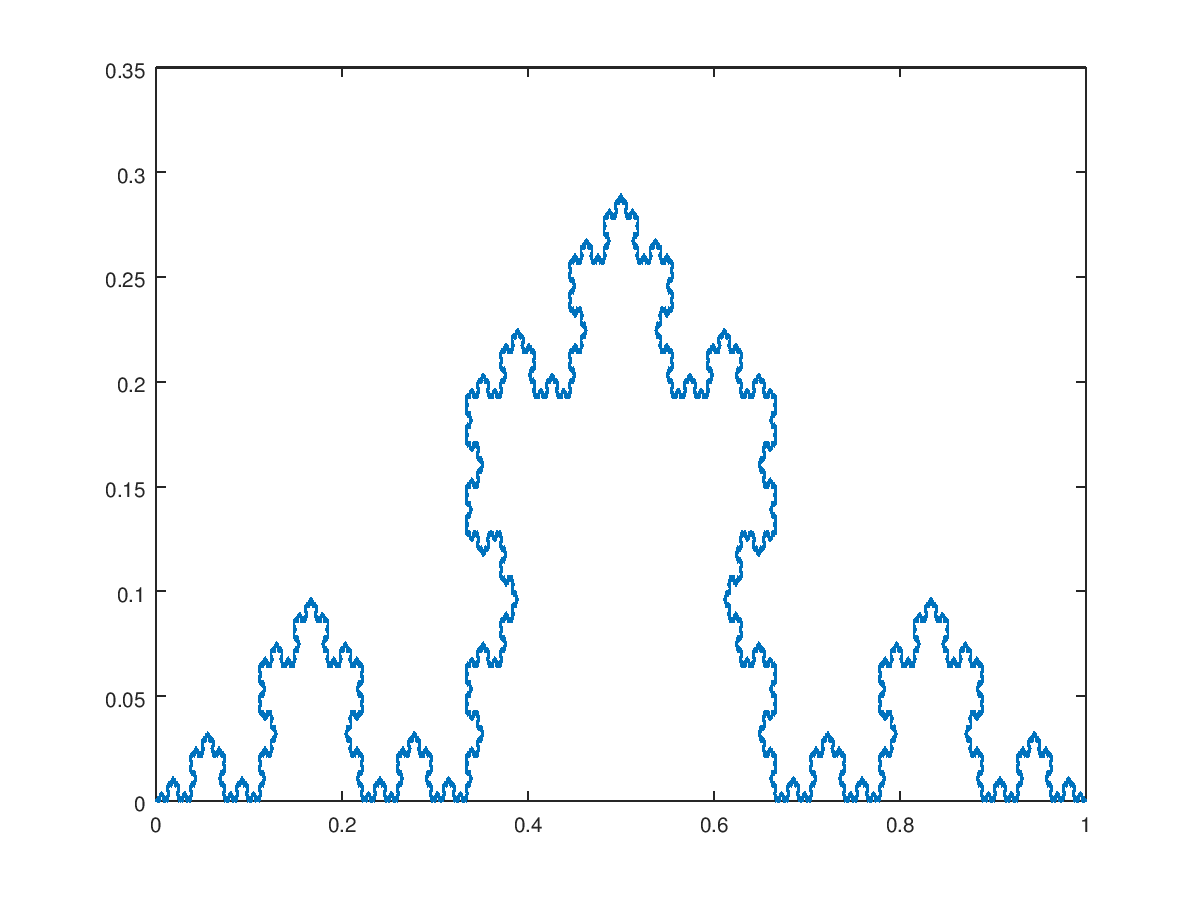
Produces the following output Push the cancel to stop the process. and the following figure
Package: octave | |||||
| You are visitor 01402503 — GeezerVison does not store the pages you look up. Best viewed with Netscape Navigator 4.7 or Internet Explorer 6 at 800×600. No cookies required. |