GeezerVisonThe World Wide Web, restored to 800 pixels of glory. |
| Home|About|Gaming cabinet|Archives|How it works|Starter sites |
GeezerVison is showing opencsv.sourceforge.net — opencsv – opencsv
Opencsv Users GuideTable of Contents
GeneralOpencsv is an easy-to-use CSV (comma-separated values) parser library for Java. It was developed because all the CSV parsers at the time didn’t have commercial-friendly licenses. Java 8 is currently the minimum supported version. BuildingOpencsv can be built using Maven 3 (Recommended: Maven 3.3) and JDK 8 / OpenJDK 8. Later versions of Java can be used but we only support version 8. Maven 3 GoalsTypical build command
To build site documentation (Please run this command when making changes to the pom file).
Maven ProfilesjpmsThis profile is run when java version 9 or greater is detected. This profile enables java 9 modules! noJavaUpperLimitWhen running jpms you will still run afoul of the maven-enforcer-plugin as we require the final build to be done with Java 8. We do not want to change that default so for those who want to build a version of opencsv with a higher version of java can use this profile which will remove the upper bounds check. Thus removing the need to modify the enforcer plugin for custom builds. FeaturesOpencsv supports all the basic CSV-type things you’re likely to want to do:
All of these things can be done reading and writing, using a manifest of malleable methodologies:
Developer DocumentationHere is an overview of how to use opencsv in your project. Once you have absorbed the overview of how opencsv works, please consult the well-maintained Javadocs for further details. Quick startThis is limited to the easiest, most powerful way of using opencsv to allow you to hit the ground running. For reading, create a bean to harbor the information you want to read, annotate the bean fields with the opencsv annotations, then do this: For writing, create a bean to harbor the information you want to write, annotate the bean fields with the opencsv annotations, then do this: Even quicker startStarting with version 4.2, there’s another handy way of reading CSV files that doesn’t even require creating special classes. If your CSV file has headers, you can just initialize a CSVReaderHeaderAware and start reading the values out as a map: Upgrading from 4.x to 5.x5.0 is a major release because it breaks backward compatibility. What do you get for that? Here is a list of the improvements in opencsv 5.0.
Here are the things you can expect to encounter during an upgrade and what to do about them.
And we have a new list of things that we have deprecated and plan to remove in 6.0, as well as what you can do about it.
Upgrading from 3.x to 4.x4.0 is a major release because it breaks backward compatibility. What do you get for that? Here is a list of the improvements in opencsv 4.0.
Here are the things you can expect to encounter during an upgrade and what to do about them.
And we have a new list of things that we have deprecated and plan to remove in 5.0, as well as what you can do about it.
Core conceptsThere are a couple of concepts that most users of opencsv need to understand, and that apply equally to reading and writing. Configuration"CSV" stands for "comma-separated values", but life would be too simple if that were always true. Often the separator is a semicolon. Sometimes the separator character is included in the data for a field itself, so quotation characters are necessary. Those quotation characters could be included in the data also, so an escape character is necessary. All of these configuration options and more are given to the parser or the CSVWriter as necessary. Naturally, it’s easier for you to give them to a builder and the builder passes them on to the right class. Say you’re using a tab for your separator, you can do something like this: or for reading with annotations: And if you single-quoted your escaped characters rather than double-quoting them, you can use the three-argument constructor: or for reading with annotations: Error handlingOpencsv uses structured exception handling, including checked and unchecked exceptions. The checked exceptions are typically errors in input data and do not have to impede further parsing. They could occur at any time during normal operation in a production environment. They occur during reading or writing. The unchecked errors are typically the result of incorrect programming and should not be thrown in a production environment with well-tested code. Opencsv gives you flexible options for handling exceptions. At the core of exception handling in opencsv is the interface com.opencsv.bean.exceptionhandler.CsvExceptionHandler. This interface allows you to
A series of exception handlers is provided in the same package as the interface mentioned above. Please see the documentation for these classes for what opencsv can do without extension and for inspiration for your own exception handlers. To change exception handling, simply use CsvToBeanBuilder.withExceptionHandler() for reading and StatefulBeanToCsvBuilder.withExceptionsHandler() for writing, then collect the results after data processing with CsvToBean.getCapturedExceptions() for reading and StatefulBeanToCsv.getCapturedExceptions() for writing. Warnings about multithreadingBecause opencsv is multithreaded by default, the getCapturedExceptions() method in CsvToBean and StatefulBeanToCsv can potentially return more exceptions than expected if a handler is used that collects a certain number of exceptions before throwing one; any threads still active when another thread throws an exception are allowed to finish. If those threads throw additional exceptions, they are handled as well. Another interesting side effect noted when testing under heavy load, I was running Folding@Home, was that while the number of exceptions counted was correct, the number of exceptions queued using the ExceptionHandlerQueueThenThrowAfter was different from the count! So if the actual contents of the exceptions are important, you are better off using CSVIterator, which runs single-threaded, and queueing the exceptions yourself. Just beware that more threads and heavier system load can increase the above-mentioned issues. AnnotationsThe most powerful mechanism opencsv has for reading and writing CSV files involves defining beans that the fields of the CSV file can be mapped to and from, and annotating the fields of these beans so opencsv can do the rest. In brief, these annotations are:
As you can infer, there are two strategies for annotating beans, depending on your input:
It is possible to annotate bean fields both with header-based and position-based annotations. If you do, position-based annotations take precedence if the mapping strategy is automatically determined. To use the header-based annotations, you would need to instantiate and pass in a HeaderColumnNameMappingStrategy. When might this be useful? Possibly reading two different sources that provide the same data, but one includes headers and the other doesn’t. Possibly to convert between headerless input and output with headers. Further use cases are left as an exercise for the reader. opencsv always produces (on reading from a CSV file) and consumes (on writing to a CSV file) one bean type. You may wish to split the input/output across multiple bean types. If this is the case for you, the annotation CsvRecurse is available. Most of the more detailed documentation on using annotations is in the section on reading data. The use of annotations applies equally well to writing data, though; the annotations define a two-way mapping between bean fields and fields in a CSV file. Writing is then simply reading in reverse. ReadingMost users of opencsv find themselves needing to read CSV files, and opencsv excels at this. But then, opencsv excels at everything. :) ParsingIt’s unlikely that you will need to concern yourself with exactly how parsing works in opencsv, but documentation wouldn’t be documentation if it didn’t cover all the obscure nooks and crannies. So here we go. Parsers in opencsv implement the interface ICSVParser. You are free to write your own, if you feel the need to. opencsv itself provides two parsers, detailed in the following sections. Although opencsv attempts to be simple to use for most use cases, and thus tries not to make the choice of a parser obvious, you are still always free to instantiate whichever parser suits your needs and pass it to the builder or reader you are using. CSVParserThe original, tried and true parser that does fairly well everything you need to do, and does it well. If you don’t tell opencsv otherwise, it uses this parser. The advantage of the CSVParser is that it’s highly configurable and has the best chance of parsing "non-standard" CSV data. The disadvantage is that while highly configurable it was found that there were RFC4180 data that it could not parse. Thus, the RFC4180Parser was created. RFC4180ParserRFC4180 defines a standard for all the nitty-gritty questions of just precisely how CSV files are to be formatted, delimited, and escaped. Since opencsv predates RFC4180 by a few days and every effort was made to preserve backwards compatibility, it was necessary to write a new parser for full compliance with RFC4180. The main difference between the CSVParser and the RFC4180Parser is that the CSVParser uses an escape character to denote "unprintable" characters while the RFC4180 spec takes all characters between the first and last quote as gospel (except for the double quote which is escaped by a double quote). Reading into an array of stringsAt the most basic, you can use opencsv to parse an input and return a String[], thus: One step up is reading all lines of the input file at once into a List<String[]>, thus: The last option for getting at an array of strings is to use an iterator: or: Reading into beansArrays of strings are all good and well, but there are simpler, more modern ways of data processing. Specifically, opencsv can read a CSV file directly into a list of beans. Quite often, that’s what we want anyway, to be able to pass the data around and process it as a connected dataset instead of individual fields whose position in an array must be intuited. We shall start with the easiest and most powerful method of reading data into beans, and work our way down to the cogs that offer finer control, for those who have a need for such a thing. Performance always being one of our top concerns, reading is multi-threaded. There are two performance choices left in your hands:
Let it be mentioned here that although the authors of opencsv aren’t thrilled about the idea of using Java 8’s Optional for accessor methods (that is, returning an Optional of your real data type from a getter or requiring an Optional of your real data type for a setter), we do support it as long as the actual field in your bean is not an Optional, but rather whatever data type the Optional wraps. If your getter returns an empty Optional, opencsv uses null. The bean work was begun by Kyle Miller and extended by Tom Squires and Andrew Jones. AnnotationsBy simply defining a bean and annotating the fields, opencsv can do all of the rest. When we write "bean", that’s a loose approximation of the requirements. Actually, if you use annotations, opencsv uses reflection (not introspection) on reading, so all you need is a POJO (plain old Java object) that does not have to conform to the Java Bean Specification, but is required to be public and have a public nullary constructor. If getters and setters are present and accessible, they are used. Otherwise, opencsv bypasses access control restrictions to get to member variables. Besides the basic mapping strategy, there are various mechanisms for processing certain kinds of data. Annotating by header nameCSV files should have header names for all fields in the file, and these can be used to great advantage. By annotating a bean field with the name of the header whose data should be written in the field, opencsv can do all of the matching and copying for you. This also makes you independent of the order in which the headers occur in the file. For data like this: firstName,lastName,visitsToWebsite
     John,Doe,12
     Jane,Doe,23
you could create the following bean: Here we simply name the fields identically to the header names. After that, reading is a simple job: This will give you a list of the two beans as defined in the example input file. Note how type conversions to basic data types (wrapped and unwrapped primitives, enumerations, Strings, and java.util.Currency) occur automatically. Input can get more complicated, though, and opencsv gives you the tools to deal with that. Let’s start with the possibility that the header names can’t be mapped to Java field names: First name,Last name,1 visit only
John,Doe,true
Jane,Doe,false
In this case, we have spaces in the names and one header with a number as the initial character. Other problems can be encountered, such as international characters in header names. Additionally, we would like to require that at least the name be mandatory. For this case, our bean doesn’t look much different: The code for reading remains unchanged. Now let’s say that your data for whatever reason look like this: First name,Last name,1 visit only
John middle:Bubba,Doe,true
Jane middle:Rachel,Doe,false
Someone has included the person’s middle name in the field for the first name. But we really only want the first name. Do we have to write a custom converter? No, friends, there is an easier way: The capture option to all of the binding annotations (except the custom binding annotations, of course) allows you to tell opencsv just what part of the input field should actually be considered significant. opencsv takes the contents of the first capture group. In this example, we take everything up to but not including the first space and discard the rest. Please read the Javadoc for more details and handling of edge cases. Annotating by column positionNot every scribe of CSV files is kind enough to provide header names. This is a no-no, but we’re not here to condemn the authors of poor data exports. Our goal is to provide our users with everything they could possibly need to parse CSV files, no matter how bad, as long as they’re still logically coherent in some way. To that end, we have also accounted for the possibility that there are no headers, and data must be divined from column position. We will return to our previous input file sans header names: John,Doe,12
Jane,Doe,23
The bean for these data would be: Besides that, the annotations behave the same as their header name counterparts. EnumerationsEnumerations work exactly like regular primitive fields. There is only one more thing to say about them: input is checked against the declared values of the enumeration type without regard to case. On writing, the enumeration value will always be written exactly as declared. CurrencyConverting to and from ISO 4217 currency codes via java.util.Currency works exactly like regular primitive fields. Locales, dates, numbersWe’ve considered simple data types, but we haven’t considered more complex yet common data types. We have also not considered locales other than the default locale or formatting options beyond those provided by a locale. Here we shall do all of this at the same time. Consider this input file: username,valid since,annual salary
user1,01.01.2010,100.000€
user2,31.07.2014,50.000€
The dates are dd.MM.yyyy, the salaries use a dot as the thousands delimiter, and a currency symbol is in use. For this input we create the following bean: The date is handled with the annotation @CsvDate in addition to the mapping annotation. @CsvDate can take a format string, and incidentally handles all common date-type classes. See the Javadocs for more details. The format of the salary, including thousands separator and currency symbol, are dealt with using a combination of the German locale, one of many countries where the thousands separator is a dot, and @CsvNumber. Collection-based bean fields (one-to-many mappings)CSV files are lists, right? Well, some people like lists within lists. For them, we have the ability to annotate bean fields that are declared to be some type implementing java.util.Collection. When using CsvBindAndSplitByName or CsvBindAndSplitByPosition, one field in the CSV file is taken to be a list of data that are separated by a delimiter of some kind. The input is split along this delimiter and the results are put in a Collection and assigned to the bean field. What kind of Collection? Any kind you want. If opencsv knows it, it instantiates an implementing class for you. If opencsv doesn’t know it, you can educate opencsv. Every reasonable Collection-based interface from the JDK is known, and well as Bag and SortedBag from Apache Commons Collections. Some examples would doubtless illuminate my meaning. This shows us much of the power of these annotations in a few lines. Let’s take the first field. It is defined to be a Collection of Floats. Note, please, the annotation @CsvBindAndSplitByName (or the equivalent for position) always requires the type of an element of the collection being created. Nothing else is mandatory. In particular, Collection itself has no directly implementing classes, but please note, we didn’t indicate to opencsv which kind of collection we want. opencsv chooses one for us. The next field is a List of something derived from Number. This is where it becomes apparent why the element type is mandatory — it cannot always be determined. Besides that, in this line we are not satisfied with the List implementation opencsv chooses, so we specify LinkedList with the collectionType parameter to the annotation. The third field is a SortedSet of dates (when a student was tardy to class). Sorted for convenience, and a set to avoid clerical errors of double entry. For this field we have specified that the string separating elements of this list in the input is one or more semicolons. This string is always interpreted as a regular expression. Interestingly, in case we write these data out to a CSV file later, the elements of the list should be separated with a single semicolon. Perhaps someone is trying to convert the data from a older format or remove redundancies. The forth field is a list of teachers the student has. This field demonstrates the combination of collection-based fields and custom converters. The converter, which must be derived from AbstractCsvConverter, could look like this: The corresponding data structure would be: The final field is simply for student identification. The input to be mapped to this bean could look like this: studentID,testScores,quizScores,tardies,teachers
1,100.0 97.2 18.9,77 90.3 88.8,,Mr.Stone|Mrs.Mason
2,56.6 97.2 90.0,82.0 79.6 66.9,2017-01-02;2017-03-04;;;2017-03-04;;2017-05-31,Ms.Currie|Mr.Feynman
The first student has never been tardy, so that list will be empty (but never null). The school secretary accidentally entered a tardy for the second student twice, but this will be eliminated by the SortedSet. Let’s say you want to tell opencsv which Collection implementation to use, perhaps because you want to make certain it’s one that will perform better for your usage pattern, or perhaps because you want to use one opencsv knows nothing about, like your own implementation. There are two ways of doing this. We already saw one: specify the implementation you want to use in the annotation with the parameter "collectionType". The only stipulations on the implementing class are that it be public and have a nullary constructor. The other way is to declare the type of the bean field using the implementing class rather than the interface implemented, thus: Here, instead of declaring List<Integer> myList, we used the implementing class. opencsv will respect this and instantiate the class specified. That class can be parameterized, naturally (e.g. MySuperDuperList<Integer>). All of the other features you know, love, and depend on, such as a field being required, or support for locales, is equally well supported for Collection-based members. For details on which subinterfaces of Collection opencsv knows and exactly what implementation opencsv uses for those interfaces if you don’t specify one, see the Javadoc for the annotations CsvBindAndSplitByName or CsvBindAndSplitByPosition. MultiValuedMap-based bean fields (many-to-one mappings)If Collection-based bean fields were there to split one element into many, MultiValuedMap-based bean fields are there to consolidate many elements into one. What if you have the following input? Album,Artist,Artist,Artist,Track1,Track2,Track3,Track4
We are the World,Michael Jackson,Lionel Richie,Stevie Wonder,We are the World,We are the World (instrumental),Did this album,Have any other tracks?
The first difficulty you will encounter is that three columns have the same name. The second difficulty is that the number of tracks in the header might increase over time, but you want them all. Both problems are easily solved, as are all problems in the opencsv-world: The first field is unimportant for this illustration. The second field is a MultiValuedMap that collects all of the values under all of the columns with the name "Album". If you are not familiar with MultiValuedMap, it is a part of Apache Commons Collections. The first parameter is the index, and the second parameter is the value. In the case of CsvBindAndJoinByName, the index should always be a string. The value should be of a type to which the elementType from the annotation is assignable. Why would we choose to use such a cumbersome data type as a MultiValuedMap to implement this feature? Why not a simple List and everyone is happy? Two reasons: First, someone will want to know what the header was actually named on reading, and second, opencsv needs to know what the header is named when it writes beans to a CSV file. And really, at least for reading, a MultiValuedMap isn’t that cumbersome: Mostly you will want a list of all values, not caring about which header they were under, and that can simply be had by calling values() on the field. Back to our topic, the second field will be a MultiValuedMap with exactly one key: "Artist". Under this key, there will be a list with up to three entries, in this case "Michael Jackson", "Lionel Richie" and "Stevie Wonder". It only remains to note that the type of the elements being read must always be specified for the same reason it is necessary for Collection-based bean fields. The third field sums up most of the rest of the features this annotation provides. As you can see, the definition of the column names is a regular expression. Naturally, the "column" attribute of CsvBindAndJoinByName is always interpreted as a regular expression. In this annotation we have also requested a specific implementation of MultiValuedMap, which opencsv will honor. We have decided that this field is mandatory, which in this case means that at least one matching header must be in the input, and every record must have a non-empty value for at least one of the matching columns. Given the input from above, this MultiValuedMap will have four entries, one for each column, and each of these entries will have a list of one element as its value. The elements will be the track titles. All of the usual features apply: conversion locale, combination with CsvDate, custom converters as with collection-based fields, and specifying your own implementation of MultiValuedMap either through the annotation or by defining the field with the specific implementation (default implementations for the applicable interface are documented in the Javadoc for CsvBindAndJoinByName). The latter being said, if the MultiValuedMap is already present (and possibly contains values), say through the use of a constructor, it will not be overwritten, but rather added to. What about precedence? To stay with our running example, what if after extending the number of track titles in the input significantly (which would require no changes to the bean), we hire some junior programmer who doesn’t get it, and he adds the following field to the bean: What does opencsv do with this? It follows the general computing principle of "specific trumps general": It puts any information found under the header "Track21" into the new field, not the MultiValuedMap. Obviously this doesn’t exist for the sole purpose of creating mistakes; you can use it to your advantage if you want one otherwise matching column to be treated individually. Since we’re on the topic of precedence, what happens if two regular expressions from CsvBindAndJoinByName match one and the same input header name? Don’t do this. The results are undefined. While minding the last caveat, it is possible to use this feature to collect everything not otherwise mapped: There is another way one could possibly use this feature: Let’s say you get input of the same information from two different sources, and for reasons that are beyond your control, they have different header names. Perhaps they are in different languages. In one file, the header is: studentID,given name,surname And in another file, it’s: Schueler-ID,Vorname,Nachname You really don’t want two beans for the same thing. You can simply do this: The only down side is, you will have to unpack the values with code like: But wait! That’s not all! Using CsvBindAndJoinByPosition we can do the same thing with input that does not include headers. Let’s just say for the sake of argument that our album example from earlier now no longer includes headers, and that the structure grew over time. Perhaps the first version of the CSV file only included one artist, and the other two fields for artist were added at two different points in time after that. The tracks grew over time as well. So now our input looks like this: We are the World,Michael Jackson,We are the World,We are the World (instrumental),Lionel Richie,Did this album,Stevie Wonder,Have any other tracks? In other words, first the album name, then the first artist, followed by two tracks, then the second artist followed by one more track, then the third artist again followed by one track. The bean for these data would look like this: The first thing to notice in this example is that we have used CsvBindAndJoinByPosition, which takes a list of zero-based column numbers and ranges as its most important argument. The list is comma-separated, and can include any number of column indices as well as closed (e.g. "3-5") and half-open (e.g. "-5" or "10-") ranges. The next thing to notice in this example is that for CsvBindAndJoinByPosition, the index type to MultiValuedMap must be Integer. Values are saved under the index of the column position they were found in. The last thing to notice is that as long as new column positions are added to the end of the file, and these are all new tracks, they will all be placed in the variable "tracks" because the column position definition from the CsvBindAndJoinByPosition annotation defines an open range starting at index 7. As with a header-based mapping, it is possible to create a mop-up field, if no other fields are mapped with CsvBindAndJoinByPosition, by mapping to a MultiValuedMap using the fully open range expression "-". Writing with CsvBindAndJoinByName and CsvBindAndJoinByPosition are slightly more complicated. Both include ambiguous information about the source of the data, one in the form of regular expressions, and the other in the form of ranges. Once the data have been read in, there is no way from this information alone to determine which column each header came from. That, as we have already said, is why we use a MultiValuedMap: the index gives us this vital information. That said, it should be obvious that when writing, the MultiValuedMap must be completely filled out for every bean before sending it off to be written. That is, every index that is expected in the output must be present in the map and have at least a null value. Custom convertersNow, we know that input data can get very messy, so we have provided our users with the ability to deal with the messiest of data by allowing you to define your own custom converters. The custom converters here are used at the level of the entire field, not like the custom converters previously covered in collection-based and MultiValuedMap-based bean fields. Every converter must be derived from AbstractBeanField, must be public, and must have a public nullary constructor. For reading, the convert() method must be overridden. opencsv provides two custom converters in the package com.opencsv.bean.customconverter. These can be useful converters themselves, but they also exist for instructive purposes: If you want to write your own custom converter, look at these for examples of how it’s done. Let’s use two as illustrations. Let’s say we have the following input file: cluster,nodes,production
cluster1,node1 node2,wahr
cluster2,node3 node4 node5,falsch
In this file we have a list of server clusters. The cluster name comes first, followed by a space-delimited list of names of servers in the cluster. The final field indicates whether the cluster is in production use or not, but the truth value uses German. Here is the appropriate bean, using the custom converters opencsv provides: More than that is not necessary. If you need boolean values in other languages, take a gander at the code in ConvertGermanToBoolean; Apache BeanUtils provides a slick way of converting booleans. The corresponding annotations for custom converters based on column position are also provided. Recursion into subordinate beansSometimes we want to split the input into a hierarchy of beans instead of having it all in one flat bean. We can do this with the annotation @CsvRecurse. Let’s say we have the following input: title,author given name,author surname,publisher,date Space Opera 2.0,Andrew,Jones,NoWay Publishers,3019 We could put all of this in one bean, of course, but we could also create the following beans: This way, your data can be hierarchical. If you want to split the data among completely unrelated beans, create a containing bean for the beans you actually need, thus: Then simply extract the subordinate beans you need after parsing. opencsv will instantiate the entire hierarchy of subordinate beans while reading data in, even if it does not need a subordinate bean for a particular dataset because all associated input fields are empty. opencsv will, however, always check first to see if the subordinate bean has already been created (by the constructor of the enclosing bean), and will not replace it if it exists. As a result, any subordinate beans must either have an accessible nullary constructor, or they must be created by the enclosing bean. Access to subordinate beans is accomplished the same way it is in the rest of opencsv: accessor methods where available, and Reflection otherwise. ProfilesThere may be times when you receive differently formatted input files that nonetheless have the same data, and you will want to map them to the same bean. Here are two example inputs: This from customer 1: last name,first name,middle initial,salary,height Jones,Andrew,R,50000.00,188 Compared to this from customer 2: surname,given name,annual salary,height Jones,Andrew,5.0E5,188cm As you can see, the inputs have mostly the same information, but the formats are incompatible for the purposes of using exactly one bean. Profiles allow you to resolve these superficial differences and use the same data bean for both inputs. All annotations save CsvRecurse include a "profiles" parameter for this purpose. CsvRecurse does not include the parameter because all annotations in recursively included beans are likewise subject to profile selection. The bean for our two inputs (and possibly more) could look like this: public class Person {
@CsvBindByNames({
@CsvBindByName(column = "last name"),
@CsvBindByName(profiles = {"customer 2", "customer 5"})
})
private String surname;
@CsvBindByNames({
@CsvBindByName,
@CsvBindByName(column = "first name", profiles = "customer 1"),
@CsvBindByName(column = "given name", profiles = "customer 2")
})
private String name;
@CsvIgnore(profiles = "customer 2")
@CsvBindByName(column = "middle initial")
private char initial;
@CsvBindByName(column = "salary", profiles = "customer 1")
@CsvBindByName(column = "annual salary", profiles = "customer 2")
@CsvNumber(value = "#0.00", profiles = "customer 1")
@CsvNumber(value = "0.0#E0", profiles = "customer 2")
private float salaryInUSD;
@CsvBindByName(column = "height")
@CsvNumbers({
@CsvNumber("000"),
@CsvNumber(value = "000cm", profiles = "customer 2")
})
private int heightInCentimeters
// Accessor methods go here.
}
To use this, your code might look like this: List<Person> beans = new CsvToBeanBuilder<Person>(inputfile)
.withProfile("customer 1")
.withType(Person.class)
.build()
.parse();
The field "surname" is annotated with two CsvBindByName annotations, enclosed in a CsvBindByNames annotation, though the enclosure is optional. The first annotation does not specify any profiles, so it is used when no annotation for a specific profile is found, or when no profile is specified on parsing. It says that the default setting is to find a column named "last name" to bind to the field. The second annotation stipulates it is to be used with the profiles "customer 2" and "customer 5" (whose data we have not seen in this example). It does not name a column, so the typical fallback for header naming is used: the name of the field. In this case, that’s "surname". The field "name" is annotated with three CsvBindByName annotations. The first does just what one would expect: it binds the field "name" to the column "name" from the input. We don’t have an input like this in our example files, but perhaps such data come from other customers, like customer 5. This annotation does not specify a profile, so it is the default profile. The second annotation is only for the profile "customer 1", and it binds the field to the input column named "first name". The third annotation is similar in function. The field "initial" is annotated with only one CsvBindByName, which binds the input column "middle initial" to the field. It uses the default profile. This field is also annotated with a CsvIgnore which says the field will be ignored for the profile "customer 2". The field "salaryInUSD" is annotated with two CsvBindByName annotations that should be self-explanatory by now. It is worth noting, though, that both are connected to one named profile each. If a different profile is specified for parsing, e.g. "customer 5", this field will simply not be bound at all — in other words, it will be ignored. The field is also annotated with two CsvNumber annotations: one each for the profiles specified in the CsvBindByName annotations, as it would happen. The two annotations simply provide different format strings for the input numbers. The field "heightInCentimeters" has only one CsvBindByName annotation to bind the field to the input column "height" independent of profile (since it is the default profile, and no other binding annotations exist for the field). After that come two CsvNumber annotations that demonstrate the same principle as the binding annotations: the first is for the default profile, the second is only for the profile "customer 2". Reading into beans without annotationsIf annotations are anathema to you, you can bypass them with carefully structured data and beans. Reading without annotations, column positionsHere’s how you can map to a bean based on the field positions in your CSV file: Reading without annotations, exact header namesWith a header name mapping strategy, things are even easier. As long as you do not annotate anything in the bean, the header name mapping strategy will assume that all columns may be matched to a member variable of the bean with precisely the same name (save capitalization). Every field is considered optional. If no annotations of any kind are present, the header name mapping strategy is automatically chosen for you. Reading without annotations, fuzzy header namesIf you explicitly specify the mapping strategy FuzzyMappingStrategy, all annotated member variables are respected, if any are present, and if any input fields are left unmapped, they will be mapped to the best non-annotated member variable. "Best" means the closest fuzzy string match between available header names and available member variable names, case insensitive. If we have the following input header names: joined header 1,joined header 2,split header,first header,second header,mispeling We could write the following bean: And use this code for reading: Everything will work like you want it to with a minimum of annotating. Both @CsvBindAndJoinByName() as well as @CsvBindAndSplitByName() will be honored exactly, consuming the headers from the input they are meant to consume. After that, the fuzzy mapping strategy will compute that the header name "first header" is closest to the member variable name "firstHeader", "second header" is closest to "secondHeader", and "mispeling" is closest to "misspelling". The mappings will be initialized appropriately. The dangers of this mapping strategy should be obvious. Even though the algorithm for computing the closest match is stable, the results might not be obvious to you. If you have headers named "header 1" (with two spaces) and "header 11", and only one member variable named "header1" (perhaps you wish to ignore "header 11" in the input), it is non-deterministic which of the two input columns will be mapped to the member variable "header1". You might accidentally get stuck with the wrong mapping. A similar problem can arise if the structure of your input data is not stable. If someone else is in control of the input and may add or delete columns at any time, fuzzy mappings that have worked fine for a long time may stop working because the new input file has a better match between header name and member variable. Finally, if you have headers that should remain unmatched and member variables without annotations that should also remain unmatched, you will have a problem. This mapping strategy will map any unused field to the best unused member variable, no matter how poor the match. If you need to get around this, the best way is to annotate the member variable to be skipped and map it to a fictitious but optional header. Nonetheless, if you know your data, and a mismapping will not cause catastrophic failure of a critical system, this mapping strategy can save you some burdensome annotating for obvious mappings. Since this matching strategy only makes sense for reading, it is not supported for writing, but it should behave exactly as HeaderColumnNameMappingStrategy. Skipping, filtering, verifying, and ignoringWith some input it can be helpful to skip the first few lines. opencsv provides for this need with CsvToBeanBuilder.withSkipLines(), which ultimately is used on the appropriate constructor for CSVReader, if you would prefer to do everything without the use of the builders. This will skip the first few lines of the raw input, not the CSV data, in case some input provides heaven knows what before the first line of CSV data, such as a legal disclaimer or copyright information. So, for example, you can skip the first two lines by doing: or for reading with annotations: Verifying is slightly different. With verifying, a complete finished bean is checked for desirability and consistency. By implementing BeanVerifier and passing it to CsvToBeanBuilder.withVerifier(), each bean will be vetted before being returned to the calling code. Beans can be silently filtered if they are simply undesirable data sets, or if the data are inconsistent and this is considered an error for the surrounding logic, CsvConstraintViolationException may be thrown. Incidentally, though it is a well-kept secret, the bean passed to a BeanVerifier is not a copy, so any changes made to the bean will be kept. This is a way to get a postprocessor for beans into opencsv. Ignoring applies to fields in beans, and can be achieved via annotation or method call. If a bean you are manipulating (for reading or writing) includes fields that you want opencsv to ignore (even if they already bear binding annotations from opencsv), you can add @CsvIgnore to them and opencsv will skip them in all reading and writing operations. If you have no source control over the beans you use, you can use the withIgnoreField() method of the appropriate builder or the ignoreFields() method of the mapping strategy to achieve the same effect. WritingLess often used, but just as comfortable as reading CSV files is writing them. And believe me, a lot of work went into making writing CSV files as comfortable as possible for you, our users. There are three methods of writing CSV data:
Writing from an array of stringsCSVWriter follows the same semantics as the CSVReader. For example, to write a tab-separated file: If you’d prefer to use your own quote characters, you may use the three argument version of the constructor, which takes a quote character (or feel free to pass in CSVWriter.NO_QUOTE_CHARACTER). You can also customize the line terminators used in the generated file (which is handy when you’re exporting from your Linux web application to Windows clients). There is a constructor argument for this purpose. Writing from a list of beansThe easiest way to write CSV files will in most cases be StatefulBeanToCsv, which is simplest to create with StatefulBeanToCsvBuilder, and which is thus named because there used to be a BeanToCsv.Thankfully, no more. Notice, please, we did not tell opencsv what kind of bean we are writing or what mapping strategy is to be used. opencsv determines these things automatically. Annotations are not even strictly necessary: if there are no annotations, opencsv assumes you want to write the whole bean using the header name mapping strategy and uses the field names as the column headers.Naturally, the mapping strategy can be dictated, if necessary, through StatefulBeanToCsvBuilder.withMappingStrategy(), or the constructor for StatefulBeanToCsv. Just as we can use the "capture" option to the binding annotations, if you use annotations on writing, you can use the "format" option to dictate how the field should be formatted if simply writing the bean field value is not enough. Please see the Javadoc for the annotations for details. Just as in reading into beans, there is a performance trade-off while writing that is left in your hands: ordered vs. unordered data.If the order of the data written to the output and the order of any exceptions captured during processing do not matter to you, use StatefulBeanToCsv.withOrderedResults(false) to obtain slightly better performance. Again, just as in reading into beans, Java 8’s Optional is supported. Changing the write orderIf you do nothing, the order of the columns on writing will be ascending according to position for column index-based mappings, and ascending according to name for header name-based mappings.You can change this order, if you must. The same method exists for ColumnPositionMappingStrategy.If you wish to use your own ordering, you must instantiate your own mapping strategy (through the appropriate builder) and pass it in to StatefulBeanToCsvBuilder. We expect there will be plenty of people who find using a Comparator uncomfortable, because they have an exact order that they need that has nothing to do with any kind of rule-based ordering.For these people we have included com.opencsv.bean.comparator.LiteralComparator.It is instantiated with an array of strings for header name mapping or integers for column position mapping that define the order desired.Please note, though, that LiteralComparator is deprecated as of opencsv 5.0 because it is easily replaced by a few Comparators from Apache Commons Collections when strung together.Commons Collections is a dependency of opencsv, so it is already in your classpath.You are strongly encouraged to examine the Comparators Commons Collections makes available to you.They are quite flexible and very useful. From a database tableHere’s a nifty little trick for those of you out there who often work directly with databases and want to write the results of a query directly to a CSV file. Sean Sullivan added a neat feature to CSVWriter so you can pass writeAll() a ResultSet from an SQL query. The defaults for date and dateTime are in the ResultSetHelperService For those not wanting to use the default formats you can define your own ResultSetHelperService and modify the formats for date and/or dateTime. Processors and ValidatorsIt has always been, and always will be, our position that opencsv should be configurable enough to process almost all csv files but be extensible so that users can write their own parsers and mappers for the situations where it cannot. However, over the last couple of years a number of feature requests, support requests or feature/support requests disguised as bug reports have made us realize that extensibility is not enough and we should allow hooks to allow for the integration of user defined code to allow users another route for customization. So we have added hooks for validators and processors. Validators allow for the injection of code to provide additional checks of data over and above what opencsv provides. Processors allow for the injection of code to modify the data. By allowing integration, developers can inject code for their specific requirements without adding performance overhead and an unnecessary burden to the users who do not need them. NOTE - Because a badly coded or malformed validator/processor can cause failure to process the csv file, any bug reports written about validators will be closed with the suggestion that they be reopened as support requests. We are glad to help you with opencsv and the integration of your validators with opencsv but the bugs in the validators you write are NOT bugs with opencsv. That and we have unit tests with all types of validators so we know the validator integration works as designed. Feel free to look at our unit tests if you are having issues with the validators or processors. Here is a crude diagram of csv data showing where the different types of validators and processors are called. 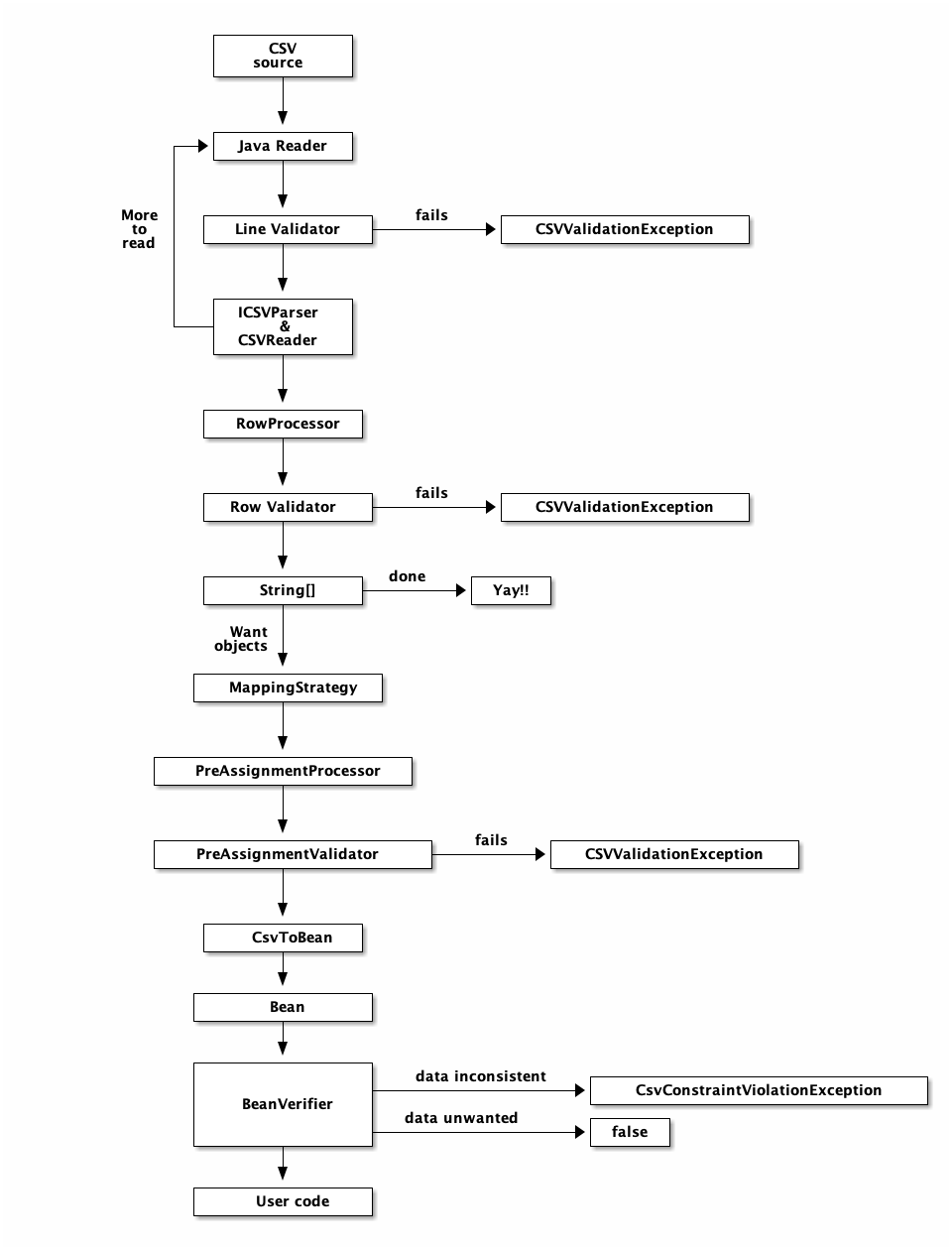
ValidatorsValidators allow users to create their own rules for validating data. LineValidatorThe LineValidator interface is for the creation of validators upon a single line from the Reader before it is processed. A LineValidator should only be used when your csv records take one and only one line (no carriage returns or new line characters in any of the fields) and any of the existing validations do not work for you - like the multiLineLimit that is set in the CSVReaderBuilder. Here is a sample Validator we created as a unit test: And here is how it is integrated with opencsv: RowValidatorThe RowValidator interface is for the creation of validators for an array of Strings that are supplied by the CSVReader after they have been processed. RowValidators should only be used if you have a very good understanding and control of the data being being processed, like the positions of the columns in the csv file. If you do not know the order, then RowValidator needs to be generic enough such that it can be applied to every element in the row. Here is an example of the integration of RowValidator with opencsv: StringValidator and PreAssignmentValidatorThe StringValidator allows for the validation of a String prior to the conversion and assignment to a field in a bean. Of all the validators this is the most precise as the user knows the precise string that is going to be assigned to a given field and thus the only reason to make a validator generic is for reusability across multiple types of fields. A StringValidator is assigned to a field using the PreAssignmentValidator annotation. Example ProcessorsProcessors allow for the modification of data, typically for the removal of undesired data or changing the defaults (empty string to null for example). Great care must be taken to ensure that the Processors written are fully tested as a malformed processor can make the data unusable. Because of the dangers posed by the processor there is no LineProcessor, only RowProcessor and PreAssignmentProcessor. RowProcessorRowProcessors take the array of String that is the entire row and will process it. It is up to the user to decide if only specific elements or the entire row is processed. The processColumnItem is currently not used directly in opencsv but was put in the interface directly in hopes that the implementors will use it when creating unit tests to verify their processors work correctly. Below is an example RowProcessor used in the opencsv unit tests. And here is a test that shows the usage of the RowProcessor. StringProcessor and PreAssignmentProcessorThe StringProcessor allows for the processing of a String prior to the conversion and assignment to a field in a bean. Because the user knows the precise string that is going to be processed for a given field and thus the only reason to make a StringProcessor generic is for reusability across multiple types of fields. A StringProcessor is assigned to a field using the PreAssignmentProcessor annotation. Example And an example of its use: Nuts and boltsNow we start to poke around under the hood of opencsv. Flow of data through opencsvWe have tried to hide all of the classes and how they work together in opencsv by providing you with builders, since you will rarely need to know all the details of opencsv’s internal workings. But for those blessed few, here is how all of the pieces fit together for reading:
For writing, it’s a little simpler:
Mapping strategiesOpencsv has the concept of a mapping strategy. This is what translates a column from an input file into a field in a bean or vice versa. As we have already implied in the documentation of the annotations, there are two basic mapping strategies: Mapping by header name and mapping by column position. These are incarnated in HeaderColumnNameMappingStrategy and ColumnPositionMappingStrategy respectively. If you need to translate names from the input file to field names, and you are not using annotations, you will need to use HeaderColumnNameTranslateMappingStrategy. FuzzyMappingStrategy maps from input column names to bean fields as intelligently as possible based on name. If you use annotations and CsvToBeanBuilder (for reading) or StatefulBeanToCsv(Builder) (for writing), an appropriate mapping strategy is automatically determined, and you need worry about nothing else. Naturally, you can implement your own mapping strategies as you see fit. Your mapping strategy must implement the interface MappingStrategy, but has no other requirement. Feel free to derive a class from the existing implementations for simplicity. If you have implemented your own mapping strategy, or if you need to override the automatic selection of a mapping strategy, for example if you are reading the same bean with one mapping strategy, but writing it with a different one for conversion purposes, you need to let opencsv know which mapping strategy it must use. For reading, this is accomplished by passing an instance of your mapping strategy to CsvToBeanBuilder.withMappingStrategy(). For writing, pass your strategy to StatefulBeanToCsvBuilder.withMappingStrategy(). Frequently Asked QuestionsWhere can I get it?Source and binaries are available from SourceForge Can I use opencsv in my commercial applications?Yes. opencsv is available under a commercial-friendly Apache 2.0 license. You are free to include it in your commericial applications without any fee or charge, and you are free to modify it to suit your circumstances. To find out more details of the license, read the Apache 2.0 license agreement Can I get the source? More example code?You can view the source from the opencsv source section. The source section also gives you the URL to the git repository so you can download source code. There is also a sample addressbook CSV reader in the /examples directory. And for extra marks, there’s a JUnit test suite in the /test directory. How can I use it in my Maven projects?Add a dependency element to your pom: Who maintains opencsv?
How do I report issues?You can report issues on the support page at Sourceforge. Please post a sample file that demonstrates your issue. For bonus marks, post a patch too. :-) What are the "gotchas"?We maintain a separate page of issues/questions/resolutions on our sourceforge wiki to enable us to make changes without a release. |
| You are visitor 01402503 — GeezerVison does not store the pages you look up. Best viewed with Netscape Navigator 4.7 or Internet Explorer 6 at 800×600. No cookies required. |
