GeezerVisonThe World Wide Web, restored to 800 pixels of glory. |
| Home|About|Gaming cabinet|Archives|How it works|Starter sites |
GeezerVison is showing orca.dev — Hosted reviews, issues & Actions — Orca Docs Hosted code review is a first-class part of the worktree. Orca links worktrees to their pull requests or merge requests, surfaces review state inline, and lets you triage issues without leaving the app. 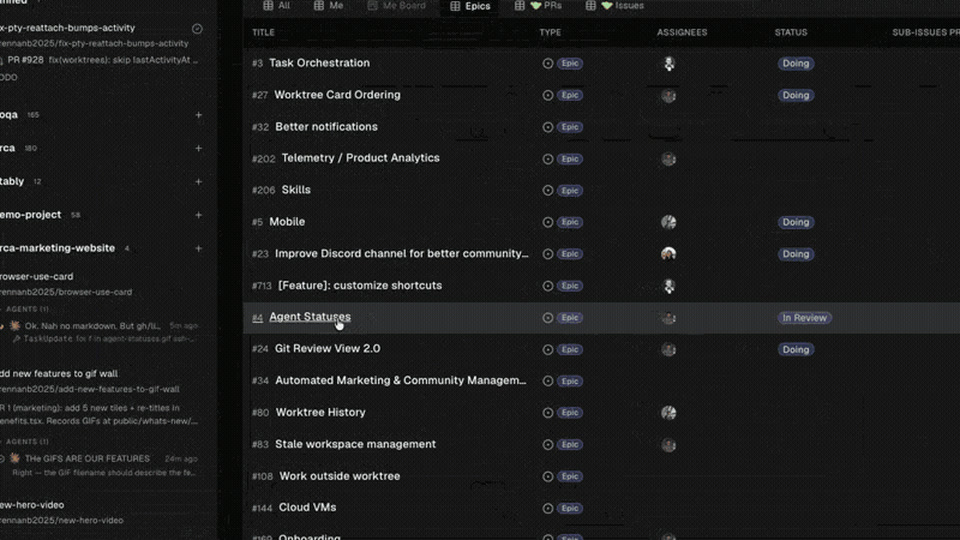 Connecting a providerConnect the provider your repository uses from Settings → Integrations. GitHub has the deepest Actions and issue support; GitLab merge requests and issues use the same worktree review flow. Bitbucket Cloud connects in-app from the same pane — Connect with Email & API token or an Access token. Orca verifies the credential before saving and can create pull requests from Source Control. Bitbucket Cloud has no draft PRs, so the composer hides the Draft toggle. Reviews
Auto-mergeFor open GitHub PRs, the PR view's merge button offers Enable auto-merge so GitHub merges the branch automatically once its requirements (checks, required reviews) pass. The merge method follows the repository's default and is one of Squash and merge, Create merge commit, or Rebase and merge — methods the repo disallows aren't shown. Use Disable auto-merge from the same control to cancel a pending auto-merge. When the base branch uses GitHub's merge queue, the same control reads Merge when ready and adds the PR to the queue instead. The auto-merge control is hidden for PRs GitHub reports as draft, closed, conflicting, or unstable, and for repos that don't allow auto-merge — in those cases you'll only see the manual merge action. Stacked pull requestsWhen you create a GitHub pull request whose selected base already has an open PR, the composer offers Stack this PR above #N. Checking it creates a GitHub Stack (or extends the parent's existing stack) and changes the submit label to Create PR in stack (or Create draft PR in stack / Push & Create PR in stack). A small preview shows the parent PR and the new branch. The option is GitHub-only and appears only when the executing host supports stacked creation. GitLab merge requests and Bitbucket pull requests stay single-PR create. When GitHub registers a pull request as part of a stack, the PR sidebar shows a collapsible Stack #N map: your position in the stack, stack size, and the stack base branch. Expand it to see the ordered layers with status (open, draft, checks pending/failed, review needed, conflicts, merged, closed). Click a layer to open that PR in Orca. Stack-aware merge replaces the single-PR merge label with Merge through #N · M PRs (or Queue through #N · M PRs when the repo uses a merge queue). That action covers the current PR and every PR below it in the stack. Confirmation lists the included numbers when stack metadata is complete. Atomic stack merge fails closed — if any layer cannot merge, none merge. Ordinary dependent PR chains without GitHub-registered stack metadata keep the normal single-PR merge flow. GitLab merge requests are unchanged. IssuesThe issue drawer lets you browse, filter, and edit GitHub and GitLab issues from within Orca. Creating a worktree from a GitHub issue or PR opens the interactive workspace composer (not a silent background create) so issue-command automation, SSH targets, and folder workspaces work the same as other create paths. The composer pre-fills the task name and links the issue so the review stays attached to the task. For GitHub issues, the details dialog has an Activity section that interleaves comments with timeline events — assignments, mentions, cross-references, state changes, and project column moves — so you can see the full history without leaving Orca. Use the linked issue menu in the workspace sidebar to copy an issue link without opening the drawer. For GitLab repositories, the drawer lists open issues from the selected project and can narrow the list to issues assigned to you. ActionsFailed GitHub Actions checks show up as a red chip on the worktree. Click through to see the failing job logs inline. TasksOrca surfaces a full GitHub Projects view under the Tasks sidebar entry — browse project cards across repos, filter by source repo, see draft pull request status, and create a worktree from any card. Board project views render as a kanban you can drag cards across, and the drop writes the card's status field back to the project; table and other project views keep their list layout. TroubleshootingIf PR status, checks, or Tasks fail to refresh — rate limits, Next steps
|
| You are visitor 01402775 — GeezerVison does not store the pages you look up. Best viewed with Netscape Navigator 4.7 or Internet Explorer 6 at 800×600. No cookies required. |