GeezerVisonThe World Wide Web, restored to 800 pixels of glory. |
| Home|About|Gaming cabinet|Archives|How it works|Starter sites |
GeezerVison is showing plotdevice.io — PlotDevice: A Python-based graphics environment for the Mac 
PlotDevice A Python-based graphics language for A Scriptable Graphics FactoryPlotDevice is a Macintosh application that lets you write Python scripts to generate
2D graphics using simple drawing commands.
Your code can combine basic geometric shapes, typography,
freeform Bézier curves, and a panoply of
image formats. This omnivorousness makes PlotDevice ideal for
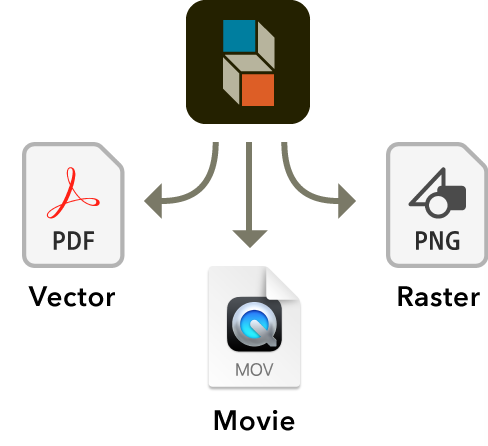
both workaday tasks like image-processing as well as more exotic  Write once, export everywherePlotDevice is more than just an updated version of Logo. The graphics you create in the
app can be exported to a variety of popular file-types.
In addition to static images, your scripts can easily generate multi-frame animations. Movies can be exported as H.265-encoded QuickTimes, animated GIFs, and even PDF ‘flipbooks’.
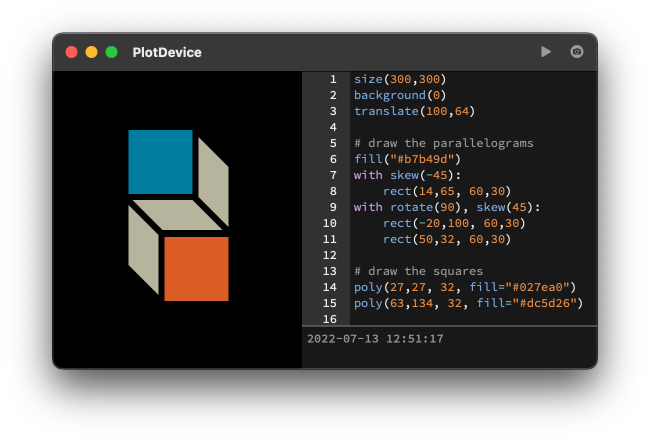
 Draw with codeThe application gives you everything you need to start writing programs that draw to a virtual canvas. It features a text editor with syntax highlighting and tab completion plus
a zoomable graphics viewer and a variety of export options.
 Iterate and AutomateThe scripts you write in PlotDevice are useful even outside of the app. You can use the included command line tool to run scripts and export images from the Terminal. The graphics routines can be imported from your own external Python scripts using the PlotDevice module, leaving your code in the driver's seat. PlotDevice also provides a form of graphics sneakernet using the clipboard. Within the app you can copy the graphical output as a PDF and paste it into the illustration program of your choice. This allows for semi-automated designs combining code-driven structure and handmade detailing. 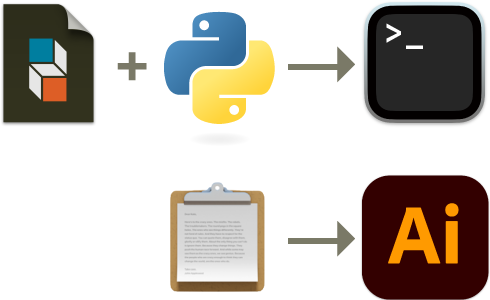 Fully DocumentedThe PlotDevice Reference describes the ins and outs of the drawing commands and datatypes available to your scripts. The entries discuss each command's syntax and demonstrate their use. Those looking for a more narrative walk through the API will want to dive into Perhaps the best way to learn a new language is to look at sample code. The app comes with a slew of terrific scripts written by Tom De Smedt which are accessible from the “Examples” menu. Examples
ScriptName ><Intro text from docstring Description line from docstring ×DownloadsPlotDevice v1.0.047.8mb / 15 Jul 2022The application requires a Macintosh running macOS 11 or newer. After downloading the archive, place the app in your “Applications” folder. Documentation11.1mbIf you're on-the-go and would like a copy of the User Manual that doesn't require net connectivity, download this archive for a static version of the full docs. Sample Code41kbThe examples included with the app can also be downloaded separately and run using the module’s Source CodeGitHub Repocontributions welcomePlotDevice is an ongoing work-in-progress and your help is appreciated. If you'd like to get involved, report a bug or (better still) send a pull request. Python Modulepip install plotdeviceYou don't need to work within the app to use its graphics capabilities. Install the module and import it from your scripts for the best of both worlds. MIT Licensefree as in beerPlotDevice is open source and we hope you'll make the most of it. Feel free to use it however you like, but please consider sharing your modifications. Family TreeThis project is a fork of the NodeBox 1 application which was developed in the early oughts at the Experimental Media Research Group in Antwerp and derived from an early version of DrawBot. Its original goals were twofold: offering a powerful graphics tool for Pythonistas and providing a learning environment for budding programmers. PlotDevice is an “existential refactor” of the NodeBox code, updating it to work with modern versions
of Python and macOS and adding syntactic sugar as judiciously as possible. Its main code-level innovation
is the use of the Python AcknowledgementsPlotDevice is primarily the work of Christian Swinehart, with significant API-design contributions from Marcos Ojeda. Special thanks to Alexander Bohn, Anselm Levskaya, and Adam Suharja for beta testing and essential feedback. Authors of the earlier projects in the app's lineage include:
AlternativesPlotDevice is hardly the only app of its kind. It differs from similar projects in its focus on automation, expressiveness, and export quality over rendering speed or interactivity. If these trade-offs don’t match your project's use case, you still have a number of terrific packages to choose from: NodeBoxThe original inspiration for this project, NodeBox has gone in an interesting, Max/MSP-like direction in recent years and is now growing toward a web based future incarnation. NodeBox for OpenGLA cross-platform implementation of the NodeBox API. Rendering is offloaded to the GPU for high-performance interactive graphics. DrawBotNodeBox was originally a fork of this app which ProcessingBen Fry & Casey Reas kicked off the current wave of programmatic-drawing environments with their release of Processing in 2001. In addition to being “the original”, it’s the most time-tested and has by far the largest community. |
| You are visitor 01402503 — GeezerVison does not store the pages you look up. Best viewed with Netscape Navigator 4.7 or Internet Explorer 6 at 800×600. No cookies required. |